
.NET Core 跨平台物联网开发:上报属性(三)
系列教程目录
(一) 连接阿里云IOT
(二) 设置委托事件
(三) 上报属性
(四) SDK文档 属性、方法、委托、类
http://pan.whuanle.cn/index.php?dir=uploads/阿里云IOT/AliIOTXFclient-dll类库&response
下载三个库,头部引入 即可使用
using AliIOTXFClient;
示例下载地址
http://pan.whuanle.cn/index.php?dir=uploads/阿里云IOT/demo示例
本章示例 AliIOTXF.Three
定义产品模型-属性
打开阿里云IOT控制台 https://iot.console.aliyun.com/product
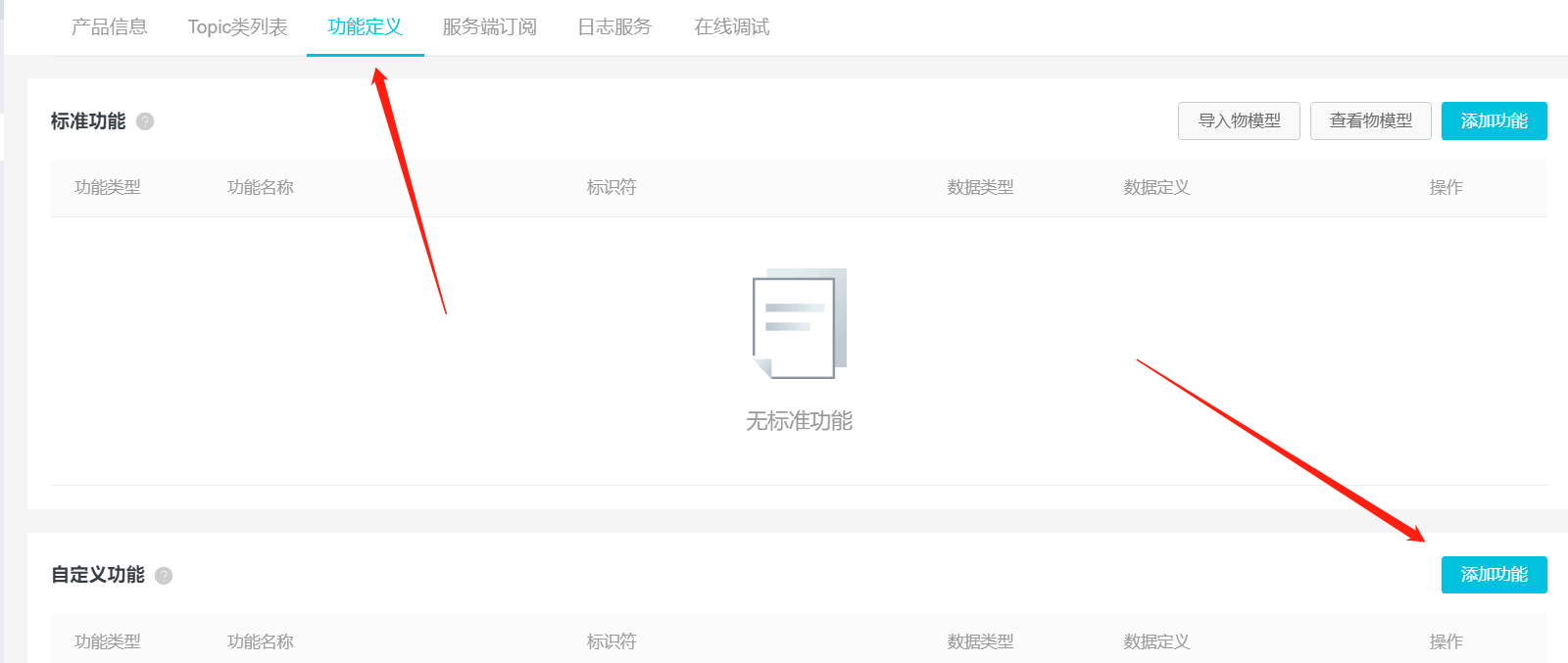
点击产品,打开 --功能定义,然后新建自定义功能
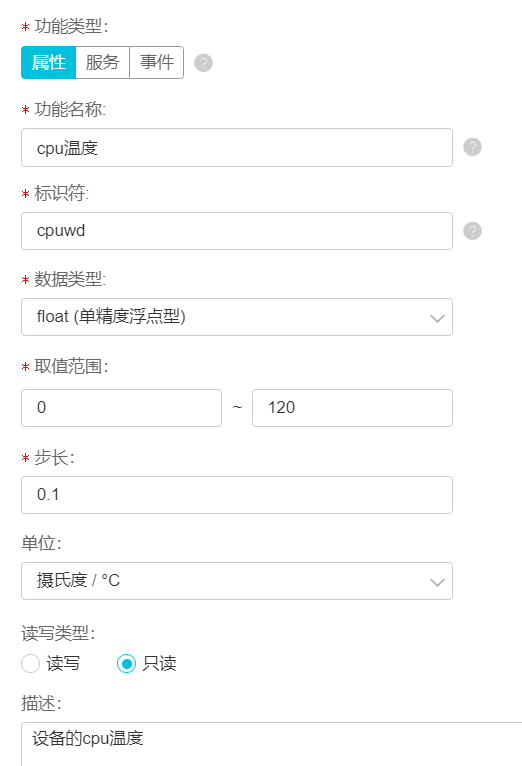
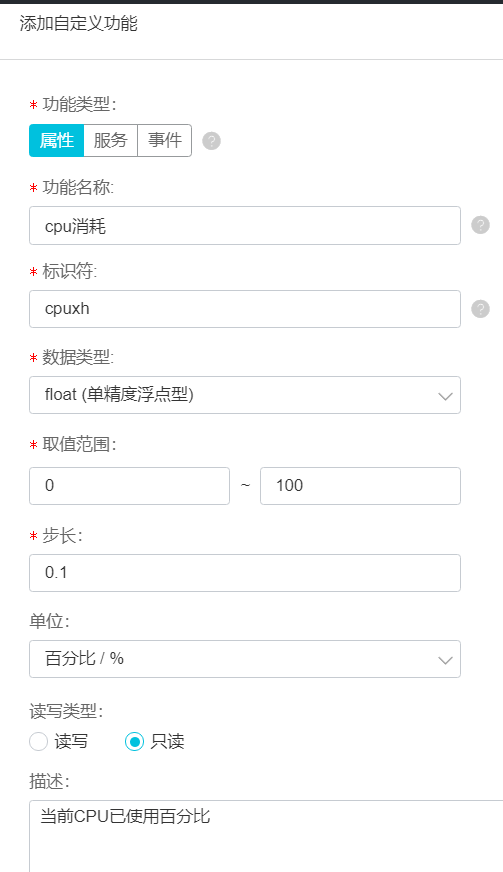
定义两个属性
注意都用小写,注意都用小写!透传数据和Json上传,都是区分大小写的。应当统一小写,避免命名冲突。尤其使用模型存储数据,有些字段会与关键字冲突,可以把字段部分大写,上传时转化为 json,字符全部转小写即可。
读写权限,只读,表示只能从客户端发送属性数据到服务器,可读可写表示服务器可以向客户端设置此属性的值。
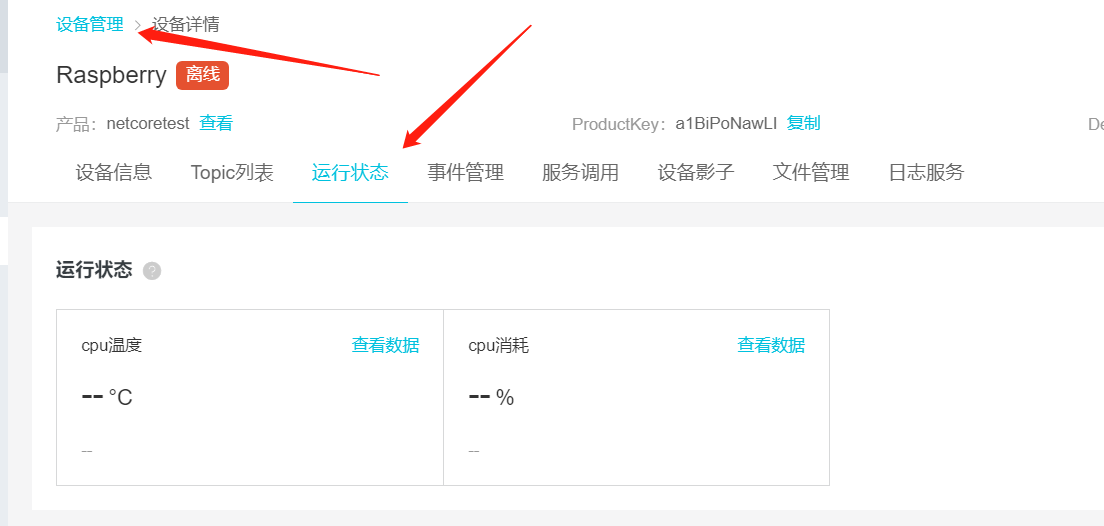
查看属性
添加好的属性,打开设备-运行状态可以看到
编写客户端设备模型
阿里云官方文档 属性、事件、服务 https://help.aliyun.com/document_detail/89301.html?spm=5176.11065259.1996646101.searchclickresult.5d587dafQbHe20
这里主要说Json上传,透传比较麻烦,但是 XF SDK 是支持的,后面补充透传方法。
设备属性上传JSON格式
{

  "id": "",

  "version": "1.0",

  "params": {

    "属性1": {

      "value": "on",

      "time":

    },

    "属性2": {

      "value": 23.6,

      "time":

    }

  },

  "method": "thing.event.property.post"

}
params 里面,放置属性,属性有两个参数,value:值,time:时间
在下面里添加一个新文件 TestModel.cs
文件内容:
 public class TestModel

    {

        public string id { get; set; }

        public string version { get; set; }

        public Params paramS { get; set; }

        public TestModel()

        {

            paramS = new Params();

        }

        public class Params

        {

            public Cpuwd cpuwd { get; set; }

            public Cpuxh cpuxh { get; set; }

            public Params()

            {

                cpuwd = new Cpuwd();

                cpuxh = new Cpuxh();

            }

            public class Cpuwd

            {

                public float value { get; set; }

                public long time { get; set; }

            }

            public class Cpuxh

            {

                public float value { get; set; }

                public long time { get; set; }

            }

        }

        public string methoD { get; set; }

    }
上面就是定义的模型,后面转为Json即可上传数据。模型根据实际情况自定义。
上一章使用的最后完整代码,我们继续使用此项目代码:
    class Program

    {

        static void Main(string[] args)

        {

            // 创建连接对象

            XFMQTT client = new XFMQTT("a1BiPoNawLI", "Raspberry");

            // 初始化客户端配置

            client.Init("2NOaBeqXcIzLQEhlJFEfKbWeug0o3m0c", "cn-shanghai");

            // 要订阅的Topic

            string[] topic = { client.CombineHeadTopic("PubData") };

            // 使用自定义的委托事件

            事件类 事件 = new 事件类();

            client.PubEventHandler += 事件.收到消息;

            client.PubedEventHandler += 事件.重复收到消息;

            client.SubedEventHandler += 事件.发布消息时;

            client.UnSubedEventHandler += 事件.发送失败;

            client.ConnectionClosedEventHandler += 事件.断开连接;

            //client.add

            // 连接服务器

            client.ConnectMqtt(topic);

            while (true)

            {

                string str = Console.ReadLine();

                // 推送内容到特定的 Topic

                client.Subscribe(client.CombineHeadTopic("SubData"), str);

            }

            Console.ReadKey();

        }

    }

    public class 事件类

    {

        public  void 收到消息(object sender, MqttMsgPublishEventArgs e)

        {

            Console.WriteLine("topic名称:" + e.Topic);

            Console.WriteLine("接收时间:" + DateTime.Now.ToLongDateString());

            Console.WriteLine("消息内容:\n" + Encoding.ASCII.GetString(e.Message));

        }

        public  void 重复收到消息(object sender, MqttMsgPublishedEventArgs e)

        {

            Console.WriteLine("接收时间: " + DateTime.Now.ToLongTimeString());

            Console.WriteLine("消息id: " + e.MessageId + "    Is Published: " + e.IsPublished);

        }

        public void 发布消息时(object sender, MqttMsgSubscribedEventArgs e)

        {

            Console.WriteLine("向服务器发送了消息");

            Console.WriteLine("发送时间: " + DateTime.Now.ToLongTimeString());

            Console.WriteLine("消息id: " + e.MessageId);

            Console.WriteLine("QOS 为 :    " + Encoding.UTF8.GetString(e.GrantedQoSLevels));

        }

        public void 发送失败(object sender, MqttMsgUnsubscribedEventArgs e)

        {

            Console.WriteLine("消息发送失败 ");

            Console.WriteLine("时间: " + DateTime.Now.ToLongTimeString());

            Console.WriteLine("失败的消息 MessageId:    " + e.MessageId);

        }

        public  void 断开连接(object sender, EventArgs e)

        {

            Console.WriteLine("日。。。连接断开了: " + DateTime.Now.ToLongTimeString());

        }

    }
删除这一行
            // 使用默认事件方法

            client.UseDefaultEventHandler();
上报属性
删除 while(true) 语句内的代码
改成
   Thread.Sleep();

                //模拟数据

                // cpu温度

                float cpuwd = (float)(new Random()).Next(, ) + (float)(new Random()).NextDouble();

                // cpu消耗

                float cpuxh = (float)(new Random()).Next(, ) + (float)(new Random()).NextDouble();

                // 模型对象

                TestModel model = new TestModel

                {

                    id = "",      //自定义

                    version = "1.0",    //固定!

                    methoD = "thing.event.property.post",    //固定!

                };

                // 数据和时间戳

                model.paramS.cpuwd.value = cpuwd;

                model.paramS.cpuwd.time = 1524448722000;

                model.paramS.cpuxh.value = cpuxh;

                model.paramS.cpuxh.time = 1524448722000;

                // 推送内容到特定的 Topic

                client.Thing_Property_Post<TestModel>(model, true);
然后运行程序,查看阿里云IOT--设备--运行状态--数据变化
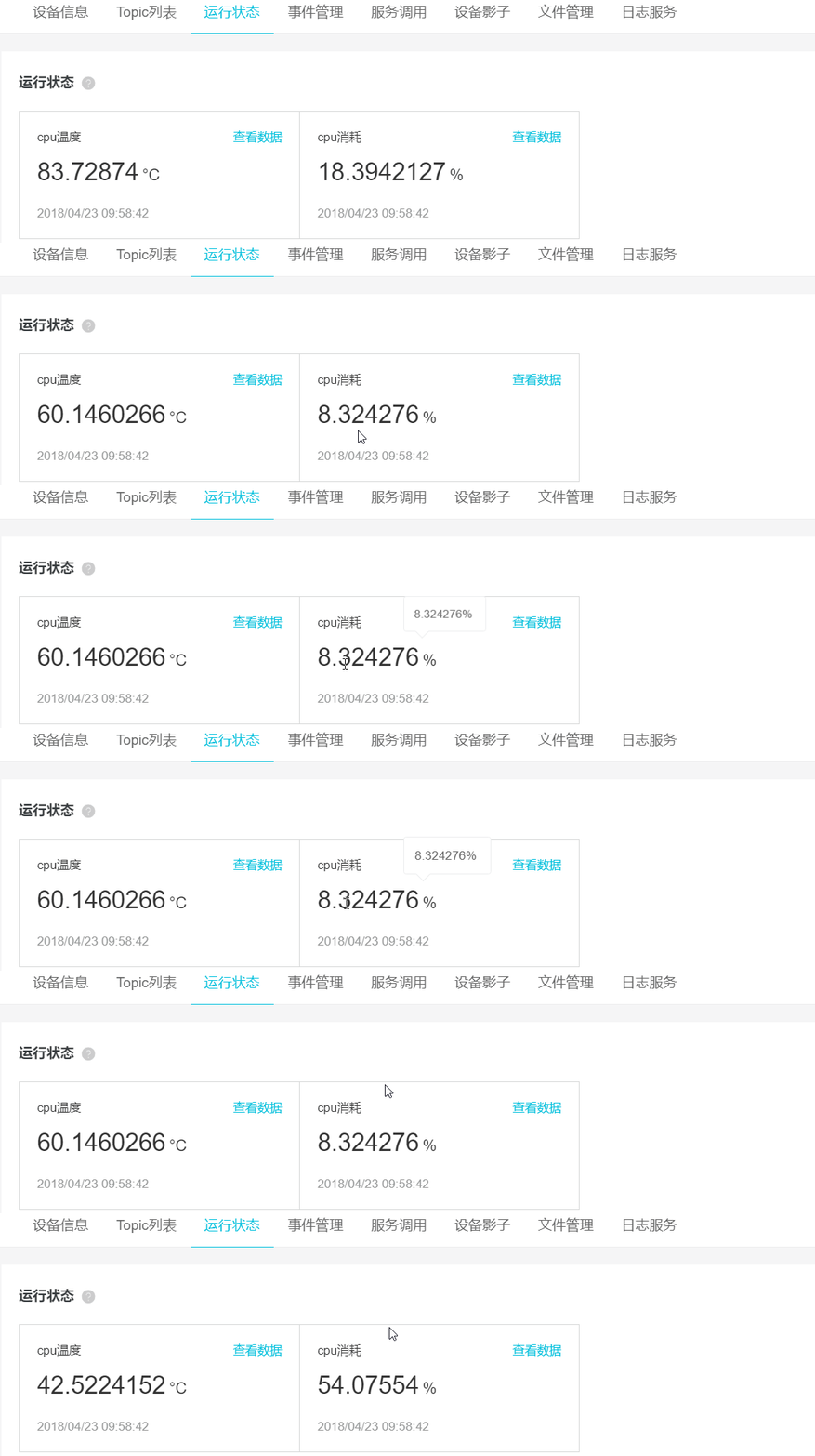
如果你有留意,会发现时间不是实时的。
增加一个方法获取时间戳的方法(偷别人的)
        /// <summary>

        /// 将c# DateTime时间格式转换为Unix时间戳格式

        /// </summary>

        /// <param name="time">时间</param>

        /// <returns>long</returns>

        public static long ConvertDateTimeToInt()

        {

            System.DateTime time = DateTime.Now;

            System.DateTime startTime = TimeZone.CurrentTimeZone.ToLocalTime(new System.DateTime(, , , , , , ));

            long t = (time.Ticks - startTime.Ticks) / ;   //除10000调整为13位

            return t;

        }
把 while(true)的代码修改
 while (true)

            {

                Thread.Sleep();

                //模拟数据

                // cpu温度

                float cpuwd = (float)(new Random()).Next(, ) + (float)(new Random()).NextDouble();

                // cpu消耗

                float cpuxh = (float)(new Random()).Next(, ) + (float)(new Random()).NextDouble();

                // 模型对象

                TestModel model = new TestModel

                {

                    id = "",      //自定义

                    version = "1.0",    //固定!

                    methoD = "thing.event.property.post",    //固定!

                };

                // 数据和时间戳

                model.paramS.cpuwd.value = cpuwd;

                model.paramS.cpuwd.time = ConvertDateTimeToInt();

                model.paramS.cpuxh.value = cpuxh;

                model.paramS.cpuxh.time = ConvertDateTimeToInt();

                // 推送内容到特定的 Topic

                client.Thing_Property_Post<TestModel>(model, true);

            }
再次查看数据

由于使用随机数的范围比较大,波动太大了,不太符合常规,所以数据报表不好看。这个要根据实际情况自己调整一下范围。
笔者把cpu消耗调到 40-50

完整代码如下
    class Program

    {

        static void Main(string[] args)

        {

            // 创建连接对象

            XFMQTT client = new XFMQTT("a1BiPoNawLI", "Raspberry");

            // 初始化客户端配置

            client.Init("2NOaBeqXcIzLQEhlJFEfKbWeug0o3m0c", "cn-shanghai");

            // 要订阅的Topic

            string[] topic = { client.CombineHeadTopic("PubData")};

            // 使用自定义的委托事件

            事件类 事件 = new 事件类();

            client.PubEventHandler += 事件.收到消息;

            client.PubedEventHandler += 事件.重复收到消息;

            client.SubedEventHandler += 事件.发布消息时;

            client.UnSubedEventHandler += 事件.发送失败;

            client.ConnectionClosedEventHandler += 事件.断开连接;

            //client.add

            // 连接服务器

            client.ConnectMqtt(topic);

            while (true)

            {

                Thread.Sleep();

                //模拟数据

                // cpu温度

                float cpuwd = (float)(new Random()).Next(, ) + (float)(new Random()).NextDouble();

                // cpu消耗

                float cpuxh = (float)(new Random()).Next(, ) + (float)(new Random()).NextDouble();

                // 模型对象

                TestModel model = new TestModel

                {

                    id = "",      //自定义

                    version = "1.0",    //固定!

                    methoD = "thing.event.property.post",    //固定!

                };

                // 数据和时间戳

                model.paramS.cpuwd.value = cpuwd;

                model.paramS.cpuwd.time = ConvertDateTimeToInt();

                model.paramS.cpuxh.value = cpuxh;

                model.paramS.cpuxh.time = ConvertDateTimeToInt();

                // 推送内容到特定的 Topic

                client.Thing_Property_Post<TestModel>(model, true);

            }

            Console.ReadKey();

        }

        /// <summary>

        /// 将c# DateTime时间格式转换为Unix时间戳格式

        /// </summary>

        /// <param name="time">时间</param>

        /// <returns>long</returns>

        public static long ConvertDateTimeToInt()

        {

            System.DateTime time = DateTime.Now;

            System.DateTime startTime = TimeZone.CurrentTimeZone.ToLocalTime(new System.DateTime(, , , , , , ));

            long t = (time.Ticks - startTime.Ticks) / ;   //除10000调整为13位

            return t;

        }

    }

    public class 事件类

    {

        public void 收到消息(object sender, MqttMsgPublishEventArgs e)

        {

            Console.WriteLine("topic名称:" + e.Topic);

            Console.WriteLine("接收时间:" + DateTime.Now.ToLongDateString());

            Console.WriteLine("消息内容:\n" + Encoding.ASCII.GetString(e.Message));

        }

        public void 重复收到消息(object sender, MqttMsgPublishedEventArgs e)

        {

            Console.WriteLine("接收时间: " + DateTime.Now.ToLongTimeString());

            Console.WriteLine("消息id: " + e.MessageId + "    Is Published: " + e.IsPublished);

        }

        public void 发布消息时(object sender, MqttMsgSubscribedEventArgs e)

        {

            Console.WriteLine("向服务器发送了消息");

            Console.WriteLine("发送时间: " + DateTime.Now.ToLongTimeString());

            Console.WriteLine("消息id: " + e.MessageId);

            Console.WriteLine("QOS 为 :    " + Encoding.UTF8.GetString(e.GrantedQoSLevels));

        }

        public void 发送失败(object sender, MqttMsgUnsubscribedEventArgs e)

        {

            Console.WriteLine("消息发送失败 ");

            Console.WriteLine("时间: " + DateTime.Now.ToLongTimeString());

            Console.WriteLine("失败的消息 MessageId:    " + e.MessageId);

        }

        public void 断开连接(object sender, EventArgs e)

        {

            Console.WriteLine("日。。。连接断开了: " + DateTime.Now.ToLongTimeString());

        }

    }
考虑到有些师弟在看~贴一下部分代码的解释
Random random = new Random();

int wd = random.Next(,);

简化写成

(new Random()).Next(, )
.Next(,) 生成范围内的 int 类型数值, .NextDouble() 生成 0<=n<1 的数,double类型。
time是 long int 类型,要填写 13 位时间戳。不懂请点击 https://www.jb51.net/article/149152.htm
public int Thing_Property_Post<AlinkModel>(AlinkModel model, bool isToLower = true);
Thing_Property_Post() 方法可以把属性上传到服务器,isToLwer 表示是否转为小写再上传。
注意:阿里云IOT json 区分大小写,所以建议控制台定义属性是,标识符使用小写,客户端上传json时,全部转为小写,避免出错。
三个重载方法
上传属性有三个重载方法
        public int Thing_Property_Post<AlinkModel>(AlinkModel model, bool isToLower = true);

        public int Thing_Property_Post(byte[] json);

        public int Thing_Property_Post(string json, bool isToLwer = true);
自定义属性模型,通过第一个方法可以直接转换上传,省略不必要操作。
把 json string 转byte[] ,可以通过第二个方法上传到服务器。必须注意byte[]进制问题!
如果只有json,不需要自定义模型,则使用第三种方法上传。
接收响应
根据协议,属性、事件、服务,上传或下发,另一方要进行响应。
上面的例子运行后,控制台并没有反应。
因为我们没有设置要接收响应。
修改一下订阅Topic
            // 要订阅的Topic

            string[] topic = { client.CombineHeadTopic("PubData"),client.thingModel.upTopic.post_reply };
client.thingModel.upTopic.post_reply ,一个Topic地址,由于接收发布属性后,接收服务器的响应消息。
thingModel 定义的设备属性服务事件,发送接收以及响应的Topic。这些下一章说。
服务器响应内容格式
{

  "id": "",

  "code": ,

  "data": {}

}
修改后的完整代码
    class Program

    {

        static void Main(string[] args)

        {

            // 创建连接对象

            XFMQTT client = new XFMQTT("a1BiPoNawLI", "Raspberry");

            // 初始化客户端配置

            client.Init("2NOaBeqXcIzLQEhlJFEfKbWeug0o3m0c", "cn-shanghai");

            // 要订阅的Topic

            string[] topic = { client.CombineHeadTopic("PubData"),client.thingModel.upTopic.post_reply };

            // 使用自定义的委托事件

            事件类 事件 = new 事件类();

            client.PubEventHandler += 事件.收到消息;

            client.PubedEventHandler += 事件.重复收到消息;

            client.SubedEventHandler += 事件.发布消息时;

            client.UnSubedEventHandler += 事件.发送失败;

            client.ConnectionClosedEventHandler += 事件.断开连接;

            //client.add

            // 连接服务器

            client.ConnectMqtt(topic);

            while (true)

            {

                Thread.Sleep();

                //模拟数据

                // cpu温度

                float cpuwd = (float)(new Random()).Next(, ) + (float)(new Random()).NextDouble();

                // cpu消耗

                float cpuxh = (float)(new Random()).Next(, ) + (float)(new Random()).NextDouble();

                // 模型对象

                TestModel model = new TestModel

                {

                    id = "",      //自定义

                    version = "1.0",    //固定!

                    methoD = "thing.event.property.post",    //固定!

                };

                // 数据和时间戳

                model.paramS.cpuwd.value = cpuwd;

                model.paramS.cpuwd.time = ConvertDateTimeToInt();

                model.paramS.cpuxh.value = cpuxh;

                model.paramS.cpuxh.time = ConvertDateTimeToInt();

                // 推送内容到特定的 Topic

                client.Thing_Property_Post<TestModel>(model, true);

            }

            Console.ReadKey();

        }

        /// <summary>

        /// 将c# DateTime时间格式转换为Unix时间戳格式

        /// </summary>

        /// <param name="time">时间</param>

        /// <returns>long</returns>

        public static long ConvertDateTimeToInt()

        {

            System.DateTime time = DateTime.Now;

            System.DateTime startTime = TimeZone.CurrentTimeZone.ToLocalTime(new System.DateTime(, , , , , , ));

            long t = (time.Ticks - startTime.Ticks) / ;   //除10000调整为13位

            return t;

        }

    }

    public class 事件类

    {

        public void 收到消息(object sender, MqttMsgPublishEventArgs e)

        {

            Console.WriteLine("topic名称:" + e.Topic);

            Console.WriteLine("接收时间:" + DateTime.Now.ToLongDateString());

            Console.WriteLine("消息内容:\n" + Encoding.ASCII.GetString(e.Message));

        }

        public void 重复收到消息(object sender, MqttMsgPublishedEventArgs e)

        {

            Console.WriteLine("接收时间: " + DateTime.Now.ToLongTimeString());

            Console.WriteLine("消息id: " + e.MessageId + "    Is Published: " + e.IsPublished);

        }

        public void 发布消息时(object sender, MqttMsgSubscribedEventArgs e)

        {

            Console.WriteLine("向服务器发送了消息");

            Console.WriteLine("发送时间: " + DateTime.Now.ToLongTimeString());

            Console.WriteLine("消息id: " + e.MessageId);

            Console.WriteLine("QOS 为 :    " + Encoding.UTF8.GetString(e.GrantedQoSLevels));

        }

        public void 发送失败(object sender, MqttMsgUnsubscribedEventArgs e)

        {

            Console.WriteLine("消息发送失败 ");

            Console.WriteLine("时间: " + DateTime.Now.ToLongTimeString());

            Console.WriteLine("失败的消息 MessageId:    " + e.MessageId);

        }

        public void 断开连接(object sender, EventArgs e)

        {

            Console.WriteLine("日。。。连接断开了: " + DateTime.Now.ToLongTimeString());

        }

    }
运行程序可以发现控制台会接收到服务器响应提示

.NET Core 跨平台物联网开发:上报属性(三)的更多相关文章
- .NET Core 跨平台物联网开发:SDK 属性、方法、委托、类(四)
系列教程目录 (一) 连接阿里云IOT (二) 设置委托事件 (三) 上报属性 (四) SDK文档 属性.方法.委托.类 http://pan.whuanle.cn/index.php?dir=up ...
- .NET Core 跨平台物联网开发:连接阿里云IOT(一)
系列教程目录 (一) 连接阿里云IOT (二) 设置委托事件 (三) 上报属性 (四) SDK文档 属性.方法.委托.类 http://pan.whuanle.cn/index.php?dir=up ...
- .NET Core 跨平台物联网开发:设置委托事件(二)
系列教程目录 (一) 连接阿里云IOT (二) 设置委托事件 (三) 上报属性 (四) SDK文档 属性.方法.委托.类 http://pan.whuanle.cn/index.php?dir=up ...
- .NET Core容器化开发系列(零)——计划
.NET Core相当完善的跨平台特性以及其轻量化的底层接口为我们能顺畅进行微服务开发提供了非常棒的基础. 作为支撑微服务最常见的基础技术--容器化将是本系列的核心内容. 接下来我计划用一个月左右的时 ...
- ASP.NET Core Windows服务开发技术实战演练
一.课程介绍 人生苦短,我用.NET Core!大家都知道如果想要程序一直运行在Windows服务器上,最好是把程序写成Windows服务程序:这样程序会随着系统的自动启动而启动,自动关闭而关闭,不需 ...
- 阿里云物联网 .NET Core 客户端 | CZGL.AliIoTClient:4. 设备上报属性
文档目录: 说明 1. 连接阿里云物联网 2. IoT 客户端 3. 订阅Topic与响应Topic 4. 设备上报属性 4.1 上报位置信息 5. 设置设备属性 6. 设备事件上报 7. 服务调用 ...
- [.net 面向对象程序设计深入](9).NET Core 跨平台开发环境搭建
[.net 面向对象程序设计深入](9).NET Core 跨平台开发环境搭建 1.概述 读前必备:认识.NET Core 上篇介绍了.NET 新的生态环境:包括.NET Framework..NET ...
- .NET Core跨平台:使用.NET Core开发一个初心源商城总括
1..NET Core基本介绍 a 作为一个.NET的开发者,在以前的开发中,我们开发的项目基本都是部署在windows服务器上,但是在windows服务器上的话某些比较流行的解决访问量的方案基本都是 ...
- 《ASP.NET Core跨平台开发从入门到实战》Web API自定义格式化protobuf
<ASP.NET Core跨平台开发从入门到实战>样章节 Web API自定义格式化protobuf. 样章 Protocol Buffers 是一种轻便高效的结构化数据存储格式,可以用于 ...
随机推荐
- 最少拦截系统-----hdu1257(dp+最长上升子序列)
Problem Description 某国为了防御敌国的导弹袭击,发展出一种导弹拦截系统.但是这种导弹拦截系统有一个缺陷:虽然它的第一发炮弹能够到达任意的高度,但是以后每一发炮弹都不能超过前一发的高 ...
- Spring基础入门(二)
一.AOP 1.AOP概念 aop:面向切面编程,扩展功能不修改源代码实现. AOP采取横向抽取机制,取代了传统纵向继承体系重复性代码. 2.AOP原理 (1)第一种情况,有接口情况,使用动态代理创建 ...
- 火狐firefox、谷歌chrome等浏览器扩展、插件介绍
火狐旧的插件扩展已经不可用,需要更新,这是本人安装的最新的插件 chrome插件 https://www.zhihu.com/question/68338297
- Design Pattern Visitor 訪问者设计模式
訪问者设计模式是已经有了一组Person对象了,然后不同的訪问者訪问这组对象.会有不同效果. 这些訪问者实际上就是一个能够让Person对象组运行的动作行为等. 至于这些Person对象是怎样运行这些 ...
- linux 下的特殊文件 /dev/null 和 /de/zero
生成一个100Mb的文件 : time dd of=2Gb.file if=/dev/zero bs=1024 count=100000 ubuntu 下测试磁盘的读写性能: 测试写: time d ...
- [Bash] Search for Text with `grep`
In this lesson, we’ll use grep to find text patterns. We’ll also go over some of the flags that grep ...
- vi下对齐代码的操作
时不时会用到,但easy忘,在这里记录一下 1. ctrl + v (选中块) 2. ctrl + f (向前) 或 ctrl +v (向后) 3. 按"=", 把选中的代码对齐
- Scrum 常见错误实践 之 形式化的站会
站会作为一个团队最容易实施的敏捷实践,为广大team leader和老板们所喜欢,但大部分程序员却很抵触.其主要原因就是很多时候站会都流于形式,没能帮助团队成员解决问题.改进效率. 一种常见的情况就是 ...
- 连接虚拟机的SQLServer
1.IP可以互相PING通 2.Telnet发现端口没有放开,防火墙新建入账规则开放端口 成功..
- UPDATE command denied DELETE
可用磁盘空间不足 支持SELECT information_schema. TABLES