
countUp.js-数字滚动效果(简单基础使用)
最近写了个移动端宣传页,里面有数字的效果,所以有使用到countUp.js。
以下内容有包括:h5页面countUp.js的引入和实例、参数说明、事件简单使用和描述、countUp.js源代码。
附上countUp.js的gitHub地址:http://inorganik.github.io/countUp.js/
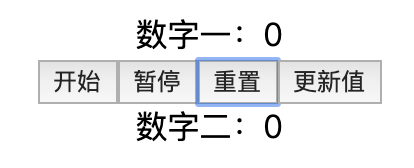
- 效果
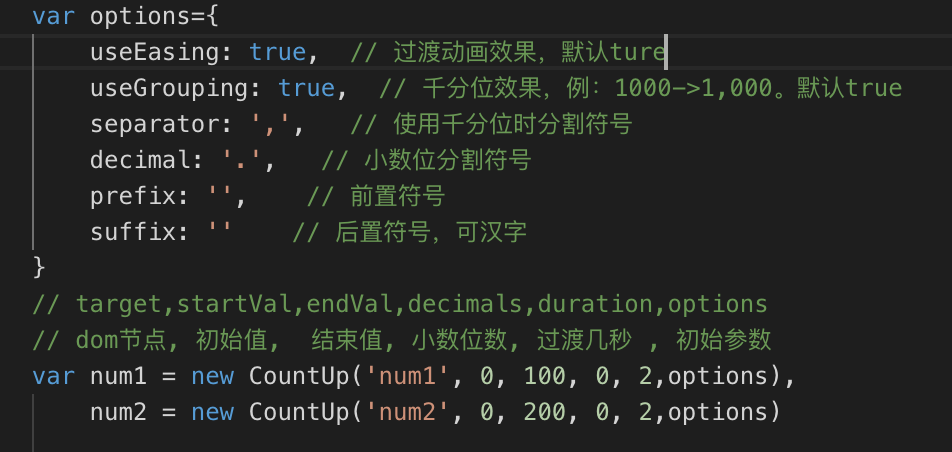
- 重点部分-参数
- h5页面代码
<!DOCTYPE html>

<html lang="en">

<head>

    <meta charset="UTF-8">

    <meta name="viewport" content="width=device-width, initial-scale=1.0">

    <meta http-equiv="X-UA-Compatible" content="ie=edge">

    <title>Document</title>

    <style>

        .content{

            text-align: center

        }

    </style>

    <script src="./js/countUp.js"></script>

</head>

<body>

    <div class="content">数字一:<span id="num1"></span></div>

    <div class="content"><button onclick="start()">开始</button><button onclick="pause()">暂停</button><button onclick="reset()">重置</button><button onclick="updata()">更新值</button></div>

    <div class="content">数字二:<span id="num2"></span></div>

</body>

<script>

    var options={

        useEasing: true,  // 过渡动画效果,默认ture

        useGrouping: true,  // 千分位效果,例:1000->1,000。默认true

        separator: ',',   // 使用千分位时分割符号

        decimal: '.',   // 小数位分割符号

        prefix: '',    // 前置符号

        suffix: ''    // 后置符号,可汉字

    }

    // target,startVal,endVal,decimals,duration,options

    // dom节点, 初始值,  结束值, 小数位数, 过渡几秒 , 初始参数

    var num1 = new CountUp('num1', 0, 100, 0, 2,options),

        num2 = new CountUp('num2', 0, 200, 0, 2,options)

    function start(){

        // 开始

        num1.start()

    }

    function pause(){

        // 暂停或继续

        num1.pauseResume()

    }

    function reset(){

        // 重置初始值

        num1.reset()

    }

    function updata(){

        // 重新赋值

        num1.update(888)

    }

</script>

</html>
- countUp.js
var CountUp=function(target,startVal,endVal,decimals,duration,options){var self=this;self.version=function(){return"1.9.2"};self.options={useEasing:true,useGrouping:true,separator:",",decimal:".",easingFn:easeOutExpo,formattingFn:formatNumber,prefix:"",suffix:"",numerals:[]};if(options&&typeof options==="object"){for(var key in self.options){if(options.hasOwnProperty(key)&&options[key]!==null){self.options[key]=options[key]}}}if(self.options.separator===""){self.options.useGrouping=false}else{self.options.separator=""+self.options.separator}var lastTime=0;var vendors=["webkit","moz","ms","o"];for(var x=0;x<vendors.length&&!window.requestAnimationFrame;++x){window.requestAnimationFrame=window[vendors[x]+"RequestAnimationFrame"];window.cancelAnimationFrame=window[vendors[x]+"CancelAnimationFrame"]||window[vendors[x]+"CancelRequestAnimationFrame"]}if(!window.requestAnimationFrame){window.requestAnimationFrame=function(callback,element){var currTime=new Date().getTime();var timeToCall=Math.max(0,16-(currTime-lastTime));var id=window.setTimeout(function(){callback(currTime+timeToCall)},timeToCall);lastTime=currTime+timeToCall;return id}}if(!window.cancelAnimationFrame){window.cancelAnimationFrame=function(id){clearTimeout(id)}}function formatNumber(num){num=num.toFixed(self.decimals);num+="";var x,x1,x2,x3,i,l;x=num.split(".");x1=x[0];x2=x.length>1?self.options.decimal+x[1]:"";if(self.options.useGrouping){x3="";for(i=0,l=x1.length;i<l;++i){if(i!==0&&((i%3)===0)){x3=self.options.separator+x3}x3=x1[l-i-1]+x3}x1=x3}if(self.options.numerals.length){x1=x1.replace(/[0-9]/g,function(w){return self.options.numerals[+w]});x2=x2.replace(/[0-9]/g,function(w){return self.options.numerals[+w]})}return self.options.prefix+x1+x2+self.options.suffix}function easeOutExpo(t,b,c,d){return c*(-Math.pow(2,-10*t/d)+1)*1024/1023+b}function ensureNumber(n){return(typeof n==="number"&&!isNaN(n))}self.initialize=function(){if(self.initialized){return true}self.error="";self.d=(typeof target==="string")?document.getElementById(target):target;if(!self.d){self.error="[CountUp] target is null or undefined";return false}self.startVal=Number(startVal);self.endVal=Number(endVal);if(ensureNumber(self.startVal)&&ensureNumber(self.endVal)){self.decimals=Math.max(0,decimals||0);self.dec=Math.pow(10,self.decimals);self.duration=Number(duration)*1000||2000;self.countDown=(self.startVal>self.endVal);self.frameVal=self.startVal;self.initialized=true;return true}else{self.error="[CountUp] startVal ("+startVal+") or endVal ("+endVal+") is not a number";return false}};self.printValue=function(value){var result=self.options.formattingFn(value);if(self.d.tagName==="INPUT"){this.d.value=result}else{if(self.d.tagName==="text"||self.d.tagName==="tspan"){this.d.textContent=result}else{this.d.innerHTML=result}}};self.count=function(timestamp){if(!self.startTime){self.startTime=timestamp}self.timestamp=timestamp;var progress=timestamp-self.startTime;self.remaining=self.duration-progress;if(self.options.useEasing){if(self.countDown){self.frameVal=self.startVal-self.options.easingFn(progress,0,self.startVal-self.endVal,self.duration)}else{self.frameVal=self.options.easingFn(progress,self.startVal,self.endVal-self.startVal,self.duration)}}else{if(self.countDown){self.frameVal=self.startVal-((self.startVal-self.endVal)*(progress/self.duration))}else{self.frameVal=self.startVal+(self.endVal-self.startVal)*(progress/self.duration)}}if(self.countDown){self.frameVal=(self.frameVal<self.endVal)?self.endVal:self.frameVal}else{self.frameVal=(self.frameVal>self.endVal)?self.endVal:self.frameVal}self.frameVal=Math.round(self.frameVal*self.dec)/self.dec;self.printValue(self.frameVal);if(progress<self.duration){self.rAF=requestAnimationFrame(self.count)}else{if(self.callback){self.callback()}}};self.start=function(callback){if(!self.initialize()){return}self.callback=callback;self.rAF=requestAnimationFrame(self.count)};self.pauseResume=function(){if(!self.paused){self.paused=true;cancelAnimationFrame(self.rAF)}else{self.paused=false;delete self.startTime;self.duration=self.remaining;self.startVal=self.frameVal;requestAnimationFrame(self.count)}};self.reset=function(){self.paused=false;delete self.startTime;self.initialized=false;if(self.initialize()){cancelAnimationFrame(self.rAF);self.printValue(self.startVal)}};self.update=function(newEndVal){if(!self.initialize()){return}newEndVal=Number(newEndVal);if(!ensureNumber(newEndVal)){self.error="[CountUp] update() - new endVal is not a number: "+newEndVal;return}self.error="";if(newEndVal===self.frameVal){return}cancelAnimationFrame(self.rAF);self.paused=false;delete self.startTime;self.startVal=self.frameVal;self.endVal=newEndVal;self.countDown=(self.startVal>self.endVal);self.rAF=requestAnimationFrame(self.count)};if(self.initialize()){self.printValue(self.startVal)}};
countUp.js-数字滚动效果(简单基础使用)的更多相关文章
- CountUp.js 数字跳转效果小插件
CountUp.js 实现数字跳转效果的小插件 //调用方法 const easingFn = function (t, b, c, d) { var ts = (t /= d) * t; var ...
- WPF数字滚动效果
和WPF数字滚动抽奖有区别,WPF数字滚动抽奖是随机的,而这里是确定的. 为了系统演示,这个效果通宵加班写了整整6个小时,中间就上了次厕所. 代码: RollingNumberItemCtrl.xam ...
- js文字滚动效果实现
纯js实现,完整代码如下: <!doctype html> <html lang="en"> <head> <meta http-equi ...
- js 无缝滚动效果学习
<!DOCTYPE html> <html> <head> <title>无缝滚动测试</title> <meta http-equi ...
- 采用cocos2d-x lua 制作数字滚动效果样例
require "Cocos2d"require "Cocos2dConstants"local testscene = class("testsce ...
- 用jQuery实现数字滚动效果
html 部分 <div class="js-box box"></div> css 部分 .statistic .box{ display: inline ...
- js文字滚动效果
function (global) { var logo = document.getElementById('logo'); var text = document.createTextNode(' ...
- animatescroll.min.js ~~~~ jq滚动效果 优化target自定义方法
$(".meun>div[name='meun_nav']>a").eq(1).on("click",function(){ $("bod ...
- Vue.js大屏数字滚动翻转效果
================================ 大屏数字滚动翻转效果来源于最近工作中element后台管理页面一张大屏的UI图,该UI图上有一个模块需要有数字往上翻动的效果,以下是最 ...
随机推荐
- 发布Rest风格的WebService的SpringBoot极简例子
JDK:1.8.0_212 IDE:STS4(Spring Tool Suit4 Version: 4.3.2.RELEASE) 工程下载:https://files.cnblogs.com/file ...
- java基础点<一>
1. 九种基本数据类型的大小,以及他们的封装类.byte,short,int,long,boolue,float,double,char,特殊voidByte,Short,Integer,Long,B ...
- koa express 优缺点
关于 Express 优点.Express 的优点是线性逻辑:路由和中间件完美融合,通过中间件形式把业务逻辑细分,简化,一个请求进来经过一系列中间件处理后再响应给用户,再复杂的业务也是线性了,清晰明了 ...
- mingw32-gcc-9.2.1-i686-posix-sjlj-20190904-8ba5c53
gcc -v Using built-in specs. COLLECT_GCC=gcc COLLECT_LTO_WRAPPER=d:/msys/mingw32/bin/../libexec/gcc/ ...
- 利用Bag中的getCount()方法统计list集合中重复元素
实际应用场景:从Excel导入数据时,存在某个标识符相同的多条数据,需要进行合并,因此需要统计重复元素,可以利用Bag包下的getCount()进行统计,代码如下: package test.com. ...
- [LeetCode] 697. Degree of an Array 数组的度
Given a non-empty array of non-negative integers nums, the degree of this array is defined as the ma ...
- 微信路由navigateTo
// pages/index/index.js Page({ /** * 页面的初始数据 */ data: { res:2 }, search: function(e) { var that = th ...
- 【Linux开发】【DSP开发】Linux设备驱动之——PCI 总线
PCI总线概述 随着通用处理器和嵌入式技术的迅猛发展,越来越多的电子设备需要由处理器控制.目前大多数CPU和外部设备都会提供PCI总线的接口,PCI总线已成为计算机系统中一种应用广泛.通用的总线标准 ...
- 使用PowerShell 自动安装.NET4.6.1离线包
自动安装脚本在文章末尾 自动安装脚本在文章末尾 自动安装脚本在文章末尾 运行环境:Windows Server 2012 R2 开发环境:Win10 Microsoft .NET Framework ...
- Linux基础命令训练题型(上)
1.创建目录/data/dongdaxia,并且在该目录下创建文件dongdaxia.txt,然后在文件dongdaxia.txt里写入内容“inet 192.168.221.132 netmask ...