
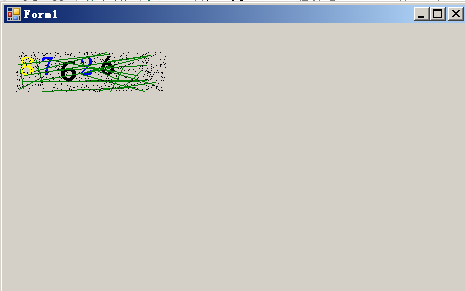
GDI+ 绘图教程 验证码
使用的 C# winform
using System;
using System.Collections.Generic;
using System.ComponentModel;
using System.Data;
using System.Drawing;
using System.Linq;
using System.Text;
using System.Threading.Tasks;
using System.Windows.Forms;

namespace GDI_
{
    public partial class Form1 : Form
    {
        public Form1()
        {
            InitializeComponent();
        }

        private void Form1_Load(object sender, EventArgs e)
        {
            // 一根笔 绘制直线的对象 pen 颜色 Brush Brushes SolidBrush color  一张纸(图面) Graphics  两点 Point

        }

        private void button1_Click(object sender, EventArgs e)
        {
            //创建GDI图面对象
            //Graphics g = new Graphics(); 没有定义构造函数
            //创对象
            // 1 在堆中开空间 2 在开辟的空间创对象 3 调用构造函数

            Graphics g = this.CreateGraphics();
            //创建画笔对象  画笔
            //1
            //Pen pen = new Pen(Brushes.Yellow);//Brush 点不出来 看复数
            //2 直接给笔上色
            Pen pen = new Pen(Color.Yellow);//
            //Pen pen = new Pen(new Brush(Color.Yellow));Brush 抽象类报错
            //创建两个点
            Point p1 = , );
            Point p2 = , );

            g.DrawLine(pen, p1, p2);
        }
        ;
        private void Form1_Paint(object sender, PaintEventArgs e)
        {
            i++;
            label1.Text = i.ToString();
            //创建GDI对象
            //Graphics g = new Graphics();
            //创对象
            // 1 在堆中开空间 2 在开辟的空间创对象 3 调用构造函数

            Graphics g = this.CreateGraphics();
            //创建画笔对象  画笔
            Pen pen = new Pen(Brushes.Yellow);// 复数形式 返回对象
            //创建两个点
            Point p1 = , );
            Point p2 = , );

            g.DrawLine(pen, p1, p2);

        }

        private void button2_Click(object sender, EventArgs e)
        {
            Graphics g = this.CreateGraphics();
            Pen pen = new Pen(Brushes.Yellow);
            Size si = , );
            Rectangle rec = , ), si); // 矩形对象
            g.DrawRectangle(pen, rec);
        }

        private void button3_Click(object sender, EventArgs e)
        {
            Graphics g = this.CreateGraphics();
            Pen pen = new Pen(Brushes.Blue);
            Size si = , );
            Rectangle rec = , ), si);
            g.DrawPie(pen, rec, , );//他要什么 我们就给什么
            //Draw 画  在图上绘制 Graphics

        }

        private void button4_Click(object sender, EventArgs e)
        {
            Graphics g = this.CreateGraphics();
            Font f = , FontStyle.Underline);
            g.DrawString(, ));
        }
    }
}

using System;
using System.Collections.Generic;
using System.ComponentModel;
using System.Data;
using System.Drawing;
using System.Linq;
using System.Text;
using System.Threading.Tasks;
using System.Windows.Forms;

namespace GDI_验证码
{
    public partial class Form1 : Form
    {
        public Form1()
        {
            InitializeComponent();
        }

        //点击更换验证码
        private void pictureBox1_Click(object sender, EventArgs e)
        {
            //1 产生随机数
            Random r = new Random();
            string str = null;
            ; i < ; i++)
            {
                , );
                str += rNumber;
            }
            //MessageBox.Show(str);
            // 画一个图片 把文本放到图片里面去
            //创建GDI对象
            Bitmap bmp = , );//创建位图
            //位图 操作系统中 默认的图片类型 其实就是位图(.bmp)
            Graphics g = Graphics.FromImage(bmp); //对象从图片来 就是在图片上绘制

            // 画数字
            ; i < ; i++)
            {
                Point p = , );
                string[] fonts = { "宋体", "微软雅黑", "黑体", "隶书", "仿宋" };
                Color[] colors = { Color.Yellow, Color.Blue, Color.Red, Color.Black, Color.Green };
                g.DrawString(str[i].ToString(), , )], , FontStyle.Bold), , )]), p);
            }

            //画线
            ; i < ; i++)
            {//线必须在验证码图片里面
                Point p1 = , bmp.Width), r.Next(, bmp.Height));
                Point p2 = , bmp.Width), r.Next(, bmp.Height));
                g.DrawLine(new Pen(Brushes.Green), p1, p2);
            }
            //画点
            ; i < ; i++)
            {
                //创建点
                Point p = , bmp.Width), r.Next(, bmp.Height));
                bmp.SetPixel(p.X, p.Y, Color.Black);//再在图上画点
            }

            //将图片镶嵌到picturebox中
            pictureBox1.Image = bmp;
        }
    }
}
GDI+ 绘图教程 验证码的更多相关文章
- VB6 GDI+ 入门教程[5] 基础绘图小结
http://vistaswx.com/blog/article/category/tutorial/page/2 VB6 GDI+ 入门教程[5] 基础绘图小结 2009 年 6 月 18 日 4条 ...
- VB6 GDI+ 入门教程[1] GDI+介绍
http://vistaswx.com/blog/article/category/tutorial/page/2 VB6 GDI+ 入门教程[1] GDI+介绍 2009 年 6 月 18 日 17 ...
- VB6 GDI+ 入门教程[2] GDI+初始化
http://vistaswx.com/blog/article/category/tutorial/page/2 VB6 GDI+ 入门教程[2] GDI+初始化 2009 年 6 月 18 日 7 ...
- VB6 GDI+ 入门教程[4] 文字绘制
http://vistaswx.com/blog/article/category/tutorial/page/2 VB6 GDI+ 入门教程[4] 文字绘制 2009 年 6 月 18 日 7条评论 ...
- VB6 GDI+ 入门教程[6] 图片
http://vistaswx.com/blog/article/category/tutorial/page/2 VB6 GDI+ 入门教程[6] 图片 2009 年 6 月 19 日 15条评论 ...
- 如何用GDI+画个验证码
如何使用GDI+来制作一个随机的验证码 绘制验证码之前先要引用 using System.Drawing; using System.Drawing.Drawing2D; 首先,先写一个方法来取得验证 ...
- MFC GDI绘图基础
一.关于GDI的基本概念 什么是GDI? Windows绘图的实质就是利用Windows提供的图形设备接口GDI(Graphics Device Interface)将图形绘制在显示器上. 在Wind ...
- VB6 GDI+ 入门教程[3] 笔、刷子、矩形、椭圆绘制
http://vistaswx.com/blog/article/category/tutorial/page/2 VB6 GDI+ 入门教程[3] 笔.刷子.矩形.椭圆绘制 2009 年 6 月 1 ...
- VB6 GDI+ 入门教程[7] Graphics 其他内容
http://vistaswx.com/blog/article/category/tutorial/page/2 VB6 GDI+ 入门教程[7] Graphics 其他内容 2009 年 9 月 ...
随机推荐
- 大数据HIve
1. 题目说明 设计题:MySQL数据库A有1000w条数据,完成统计再输入到另外的B表中 A表 test1 0.2,3.5,1,1test1 1.2,2.3,4.56test2 2.1,0.3,9. ...
- ceph报错
[ceph_deploy.mon][ERROR ] RuntimeError: config file /etc/ceph/ceph.conf exists with different conten ...
- Linux系统管理_主题01 :初识Linux_1.7 关闭和重启Linux_shutdown
shutdown [选项] 时间 [警告消息] 系统关机 -c 取消前一个 shutdown 命令.值得注意的是,当执行一个如 “shutdown -h 11:10”的命令时,只要按“Ctrl+C ...
- 权限控制(delphi actionlist)
权限控制(delphi TActionList方案)在软件开发中,为软件加入权限控制功能,使不同的用户有不同的使用权限,是非常重要的一项功能,由其在开发数据库方面的应用,这项功能更为重要.但是,要为一 ...
- curl指令的坑
今天使用curl指令构造一个docker api访问,一直得不到预期的结果.调试了半天,发现是网址没加引号. token=$(curl -v -XGET -H >& 由于网址跟了一串参数 ...
- (长期更新)【python数据建模实战】零零散散问题及解决方案梳理
注1:本文旨在梳理汇总出我们在建模过程中遇到的零碎小问题及解决方案(即当作一份答疑文档),会不定期更新,不断完善, 也欢迎大家提问,我会填写进来. 注2:感谢阅读.为方便您查找想要问题的答案,可以就本 ...
- [机器学习理论] 降维算法PCA、SVD(部分内容,有待更新)
几个概念 正交矩阵 在矩阵论中,正交矩阵(orthogonal matrix)是一个方块矩阵,其元素为实数,而且行向量与列向量皆为正交的单位向量,使得该矩阵的转置矩阵为其逆矩阵: 其中,为单位矩阵. ...
- pig-csm 7.9修改记录
PigCms\Lib\Action\System\UsersAction.class.php 存在页面广告跳转 bbs.go _pe.cn的问题 tpl\Home\weimob\public_head ...
- spring-boot和jboss应用添加pinpiont方式
一.jboss应用 添加方式,添加方式,在run.conf文件配置pinpoint相关信息,如下: if [ "x$JAVA_OPTS" = "x" ]; th ...
- jQuery之克隆事件--clone()与clone(true)区别
clone()与clone(true)同为克隆 clone()表示复制标签本身, clone(true)会将标签绑定的事件一起复制 来看案例: <!DOCTYPE html> <ht ...