
HTML属性操作
属性名 属性值
相关操作:读与取
一、属性读操作:元素.属性,其实在就是找到等号右边的值

代码为:
<!DOCTYPE html>

<html lang="en">

<head>

    <meta charset="UTF-8">

    <title>Document</title>

</head>

<body>

    <input type="text" id="text">

    <select name="" id="select">

        <option value="sh">上海</option>

        <option value="bj">北京</option>

        <option value="hz">杭州</option>

    </select>

    <input type="button" value="按钮" id="button">

</body>

<script>

    function $(id) {

        return document.getElementById(id);

    }

    $('button').onclick=function(){

        var a=$('text').value+'在'+$('select').value;

        alert(a)

    }

</script>

</html>
二、属性写操作:("添加")替换、修改
元素.属性名=新的值

<!DOCTYPE html>

<html lang="en">

<head>

    <meta charset="UTF-8">

    <title>Document</title>

</head>

<body>

    <input type="text" id="text">

    <select name="" id="select">

        <option value="sh">上海</option>

        <option value="bj">北京</option>

        <option value="hz">杭州</option>

    </select>

    <input type="button" value="按钮" id="button">

</body>

<script>

    function $(id) {

        return document.getElementById(id);

    }

    $('button').onclick=function(){

        $('button').value='button';//button的值原为按钮,将其修改为button

        $('text').value="老朋友";//原先text的值为空,其实是把空值修改为有值

    }

</script>

</html>
三、innerHTML 读取元素内的所有HTML元素

<!DOCTYPE html>

<html lang="en">

<head>

    <meta charset="UTF-8">

    <title>Document</title>

</head>

<body>

    <input type="button" value="按钮" id="button">

    <p id="content">这是一段文字</p>

</body>

<script>

    function $(id) {

        return document.getElementById(id);

    }

    $('button').onclick=function(){

        var a=$('content').innerHTML;

        alert(a)

    }

</script>

</html>
动态添加内容
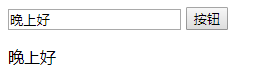
<!DOCTYPE html>

<html lang="en">

<head>

    <meta charset="UTF-8">

    <title>Document</title>

</head>

<body>

    <input type="text" id="text">

    <input type="button" value="按钮" id="button">

    <p id="content"></p>

</body>

<script>

    function $(id) {

        return document.getElementById(id);

    }

    $('button').onclick=function(){

        $('content').innerHTML=$('text').value;//将写入文本框的内容,动态添加到P标签中

    }

</script>

</html>
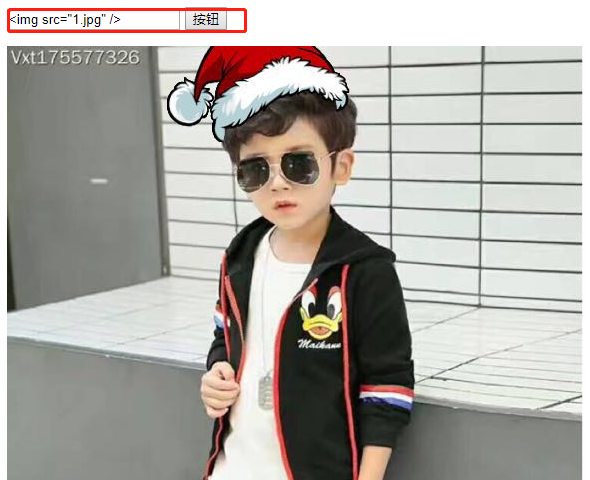
同样,写可以插入图片
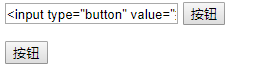
插入按钮
练习:input中输入文字内容,可以在文本框中显示

代码:
<!DOCTYPE html>

<html lang="en">

<head>

    <meta charset="UTF-8">

    <title>Document</title>

    <style>

        #box{

            width: 300px;

            margin: 200px auto;

            height: 200px;

        }

        #content{

            border: 1px solid #000;

            height: 200px;

        }

        #submit{

            margin-left: 30px;

        }

    </style>

</head>

<body>

<div id="box">

    <div id="content"></div>

    <span id="name">主人:</span><input type="text" id="text"><input type="button" id="submit" value="提交">

</div>

</body>

<script>

    function $(id){

        return document.getElementById(id);

    }

    window.onload=function () {

        $('submit').onclick=function(){

            $('content').innerHTML+=$('name').innerHTML+$('text').value+'<br />';//这边有一个值得注意的:span是没有value属性的,只有表单元素具有value属性

            $('text').value='';

        }

    }

</script>

</html>
四、属性操作注意事项
1.
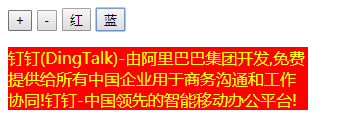
<!DOCTYPE html>

<html lang="en">

<head>

    <meta charset="UTF-8">

    <title>Document</title>

    <style>

        input{

            cursor: pointer;

        }

        .red{

            color: red;

            width: 300px;

            background-color: yellow;

        }

        .blue{

            color: yellow;

            width: 300px;

            background-color: red;

        }

    </style>

</head>

<body>

<div class="box">

    <input type="button" value="+" id="add">

    <input type="button" value="-" id="duce">

    <input type="button" value="红" id="red" >

    <input type="button" value="蓝" id="blue">

    <p id="introduce" >钉钉(DingTalk)-由阿里巴巴集团开发,免费提供给所有中国企业用于商务沟通和工作协同!钉钉-中国领先的智能移动办公平台!</p>

</div>

</body>

<script>

    function $(id) {

        return document.getElementById(id);

    }

    var num=15;

    $('add').onclick=function(){

        num++;

        $('introduce').style.fontSize=num+'px';//JS中不允许出现'-',所以font-size应该写成fontSize

    }

    $('duce').onclick=function(){

        num--;

        $('introduce').style.fontSize=num+'px';

    }

    $('red').onclick=function(){

        $('introduce').className='red';//注意:给一个元素动态添加类,不是class,而是className

    }

    $('blue').onclick=function(){

        $('introduce').className='blue';

    }

</script>

</html>
2.控制元素浮动
如果想要修改float属性,得注意IE(styleFloat)、非IE(cssFloat)(浏览器的兼容问题)
即写成

更好的方法是:写一个类,在类里写上浮动样式,修改类即可。
3.想要实现一个效果:
有一个div框,在第一个text输入框中输入修改的属性,第二个输入值,则div框就会相应的被修改
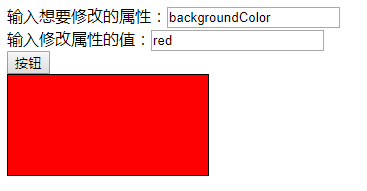
代码如下:
<!DOCTYPE html>

<html lang="en">

<head>

    <meta charset="UTF-8">

    <title>Document</title>

    <style>

        #box{

            width: 100px;

            height: 100px;

            border:1px solid black;

            background-color: ;

        }

    </style>

</head>

<body>

    输入想要修改的属性:<input type="text" id="attr"></br>

    输入修改属性的值:<input type="text" id="val"></br>

    <input type="button" value="按钮" id="btn">

    <div id="box"></div>

</body>

<script>

    function $(id) {

        return document.getElementById(id);

    }

    $('btn').onclick=function(){

        $('box').style[$('attr').value]=$('val').value;//此处注意:要修改box的style,属性值可以通过value直接拿到,并且是个定值。但是,一个div的属性有很多种,可以是宽 高 背景色等等,是变化的,所以不能直接写定值。也不可以写成$('box').style.$('attr').value,因为'.'后面接的不应该是变量

    }

</script>

</html>
在JS中,允许将'.'替换成'[]',即将点替换成中括号,并且不存在浏览器的兼容性问题。'.'后面的值无法修改,'[]'里面的值可以随便写。
HTML属性操作的更多相关文章
- 了解JavaScript 对象的属性操作
提起操作, 很多人都会想到我们学习过程中最经常做的操作, 就是对数据库进行增, 删, 改, 查, 既然提到这个, 那么对于对象的属性操作也不例外, 基本上可以说也是这几个操作. JS中对象的属性标签 ...
- 深入理解javascript对象系列第二篇——属性操作
× 目录 [1]查询 [2]设置 [3]删除[4]继承 前面的话 对于对象来说,属性操作是绕不开的话题.类似于“增删改查”的基本操作,属性操作分为属性查询.属性设置.属性删除,还包括属性继承.本文是对 ...
- jQuery-1.9.1源码分析系列(八) 属性操作
jQuery的属性操作主要包括 jQuery.fn.val jQuery.fn.attr jQuery.fn.removeAttr jQuery.fn.prop jQuery.fn.removePro ...
- jQuery属性操作
jQuery 的属性操作的核心部分其实就是对底层 getAttribute().setAttributes()等方法的一系列兼容性处理 ...if ( notxml ) { name = name.t ...
- 利用@property实现可控的属性操作
利用@property实现可控的属性操作 Python中没有访问控制符, 不像java之类的 public class Person{ private int x public int getAge( ...
- js学习笔记2---HTML属性操作
1.HTML属性操作:读.写 属性名 属性值 2.属性读操作:获取.找到 a) 语法:元素.属性名 如:document.getElementById(“btn”).value; b) 字符串的连 ...
- jQuery源代码学习之八——jQuery属性操作模块
一.jQuery属性模块整体介绍 jQuery的属性操作模块分四个部分:html属性操作,dom属性操作,类样式操作,和值操作. html属性操作(setAttribute/getAttribute) ...
- jquery学习--属性操作
学习jquery很长一段时间了,知道对属性操作的方式为: $("#xx1").attr("xx2"); //获取属性值 $("#xx1"). ...
- 第二十一课:js属性操作的兼容性问题
上一课主要讲了属性的概念,用法,固有属性和自定义属性的区别,class属性操作的方法等,这一课主要讲一些有关属性操作的兼容性问题. IE6-IE8在一些表示URL的属性会返回补全的改过编码的路径,比如 ...
- C# 反射之属性操作
一.反射-类操作 //1.获取对象所有的属性名 Student stu = new Student(); //获取当前类名称 Console.WriteLine(stu.GetType().Name) ...
随机推荐
- vue关于路由容易忽略的点
1.去掉导航里的# 在router.js中 export default new Router{ mode:'history' } 2.指定激活项的class 在router.js中 export d ...
- IDEA GIT 忽略文件
1.装插件 .igore 2.新建忽略文件格式 3.编辑忽略后缀文件 可以是文件夹 也可以是 具体文件类型
- linux 中free命令
1.free 命令的选项使用 free 命令查看服务器内存使用情况.free [-b|-k|-m|-g|-h] [-l] [-o] [-t] [-s delay] [-c count] [-V](1) ...
- Scala高阶函数与泛型
1. Scala中的函数 在Scala中,函数是“头等公民”,就和数字一样.可以在变量中存放函数,即:将函数作为变量的值(值函数). 2. scala中的匿名函数,即没有函数名称的函数,匿名函数常作为 ...
- 轻量化模型之MobileNet系列
自 2012 年 AlexNet 以来,卷积神经网络在图像分类.目标检测.语义分割等领域获得广泛应用.随着性能要求越来越高,AlexNet 已经无法满足大家的需求,于是乎各路大牛纷纷提出性能更优越的 ...
- 2019 ICPC 南昌网络赛I:Yukino With Subinterval(CDQ分治)
Yukino With Subinterval Yukino has an array a_1, a_2 \cdots a_na1,a2⋯*a**n*. As a tsundere girl, Yuk ...
- 内网监控zabbix
告警 告警方式:linkedsee 类型:使用脚本linkedsee.sh [root@zabbix-server ~]# cat linkedsee.sh #! /bin/bash SERVICE_ ...
- 我对line-height及vertical-align的一点理解
张鑫旭老师在文章<我对CSS vertical-align的一些理解与认识(一)>中提到: vertical-align:middle属性的表现与否,仅仅与其父标签有关,至于我们通常看到的 ...
- IDEA中配置Jetty Server
首先去 Eclipse官网下载Jetty jar包 鼠标移到Jetty上时 点击 Git it (得到它) 点击 .zip等待下载完成 然后 解压出来 接下就让我们 开始 使用IDEA了(创建一个We ...
- BZOJ1101——莫比乌斯函数&&入门
题目 链接 有$50000$次查询,对于给定的整数$a,b$和$d$,有多少正整数对$x$和$y$,满足$x \leq a$,$y \leq b$,并且$gcd(x, y)=d$.$1 \leq k ...