
Mybatis整合(Redis、Ehcache)实现二级缓存
目的:
Mybatis整合ehcache实现二级缓存
- ssm中整合ehcache
在POM中导入相关依赖
<dependency>

    <groupId>org.springframework</groupId>

    <artifactId>spring-context-support</artifactId>

    <version>${spring.version}</version>

</dependency>

<!--mybatis与ehcache整合-->

<dependency>

    <groupId>org.mybatis.caches</groupId>

    <artifactId>mybatis-ehcache</artifactId>

    <version>1.1.0</version>

</dependency>

<!--ehcache依赖-->

<dependency>

    <groupId>net.sf.ehcache</groupId>

    <artifactId>ehcache</artifactId>

    <version>2.10.0</version>

</dependency>
- 修改日志配置,因为ehcache使用了Slf4j作为日志输出
日志我们使用slf4j,并用log4j来实现。SLF4J不同于其他日志类库,与其它有很大的不同。
SLF4J(Simple logging Facade for Java)不是一个真正的日志实现,而是一个抽象层( abstraction layer),
它允许你在后台使用任意一个日志类库。
Pom.xml
<!-- log4j2日志配置相关依赖 -->

    <log4j2.version>2.9.1</log4j2.version>

    <log4j2.disruptor.version>3.2.0</log4j2.disruptor.version>

    <slf4j.version>1.7.13</slf4j.version>

<!-- log4j2日志相关依赖 -->

    <!-- log配置:Log4j2 + Slf4j -->

    <!-- slf4j核心包-->

    <dependency>

      <groupId>org.slf4j</groupId>

      <artifactId>slf4j-api</artifactId>

      <version>${slf4j.version}</version>

    </dependency>

    <dependency>

      <groupId>org.slf4j</groupId>

      <artifactId>jcl-over-slf4j</artifactId>

      <version>${slf4j.version}</version>

      <scope>runtime</scope>

    </dependency>

    <!--核心log4j2jar包-->

    <dependency>

      <groupId>org.apache.logging.log4j</groupId>

      <artifactId>log4j-api</artifactId>

      <version>${log4j2.version}</version>

    </dependency>

    <dependency>

      <groupId>org.apache.logging.log4j</groupId>

      <artifactId>log4j-core</artifactId>

      <version>${log4j2.version}</version>

    </dependency>

    <!--用于与slf4j保持桥接-->

    <dependency>

      <groupId>org.apache.logging.log4j</groupId>

      <artifactId>log4j-slf4j-impl</artifactId>

      <version>${log4j2.version}</version>

    </dependency>

    <!--web工程需要包含log4j-web,非web工程不需要-->

    <dependency>

      <groupId>org.apache.logging.log4j</groupId>

      <artifactId>log4j-web</artifactId>

      <version>${log4j2.version}</version>

      <scope>runtime</scope>

    </dependency>

    <!--需要使用log4j2的AsyncLogger需要包含disruptor-->

    <dependency>

      <groupId>com.lmax</groupId>

      <artifactId>disruptor</artifactId>

      <version>${log4j2.disruptor.version}</version>

    </dependency>
在Resource中添加一个ehcache.xml的配置文件
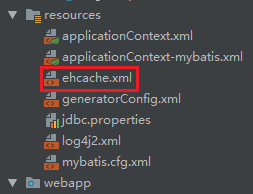
ehcache.xml
<?xml version="1.0" encoding="UTF-8"?>

<ehcache xmlns:xsi="http://www.w3.org/2001/XMLSchema-instance"

         xsi:noNamespaceSchemaLocation="http://ehcache.org/ehcache.xsd"

         updateCheck="false">

    <!--磁盘存储:将缓存中暂时不使用的对象,转移到硬盘,类似于Windows系统的虚拟内存-->

    <!--path:指定在硬盘上存储对象的路径-->

    <!--java.io.tmpdir 是默认的临时文件路径。 可以通过如下方式打印出具体的文件路径 System.out.println(System.getProperty("java.io.tmpdir"));-->

    <diskStore path="java.io.tmpdir"/>

    <!--defaultCache:默认的管理策略-->

    <!--eternal:设定缓存的elements是否永远不过期。如果为true,则缓存的数据始终有效,如果为false那么还要根据timeToIdleSeconds,timeToLiveSeconds判断-->

    <!--maxElementsInMemory:在内存中缓存的element的最大数目-->

    <!--overflowToDisk:如果内存中数据超过内存限制,是否要缓存到磁盘上-->

    <!--diskPersistent:是否在磁盘上持久化。指重启jvm后,数据是否有效。默认为false-->

    <!--timeToIdleSeconds:对象空闲时间(单位:秒),指对象在多长时间没有被访问就会失效。只对eternal为false的有效。默认值0,表示一直可以访问-->

    <!--timeToLiveSeconds:对象存活时间(单位:秒),指对象从创建到失效所需要的时间。只对eternal为false的有效。默认值0,表示一直可以访问-->

    <!--memoryStoreEvictionPolicy:缓存的3 种清空策略-->

    <!--FIFO:first in first out (先进先出)-->

    <!--LFU:Less Frequently Used (最少使用).意思是一直以来最少被使用的。缓存的元素有一个hit 属性,hit 值最小的将会被清出缓存-->

    <!--LRU:Least Recently Used(最近最少使用). (ehcache 默认值).缓存的元素有一个时间戳,当缓存容量满了,而又需要腾出地方来缓存新的元素的时候,那么现有缓存元素中时间戳离当前时间最远的元素将被清出缓存-->

    <defaultCache eternal="false" maxElementsInMemory="1000" overflowToDisk="false" diskPersistent="false"

                  timeToIdleSeconds="0" timeToLiveSeconds="600" memoryStoreEvictionPolicy="LRU"/>

    <!--name: Cache的名称,必须是唯一的(ehcache会把这个cache放到HashMap里)-->

    <cache name="stuCache" eternal="false" maxElementsInMemory="100"

           overflowToDisk="false" diskPersistent="false" timeToIdleSeconds="0"

           timeToLiveSeconds="300" memoryStoreEvictionPolicy="LRU"/>

</ehcache>
在applicationContext-mybatis.xml中给mybatis设置支持
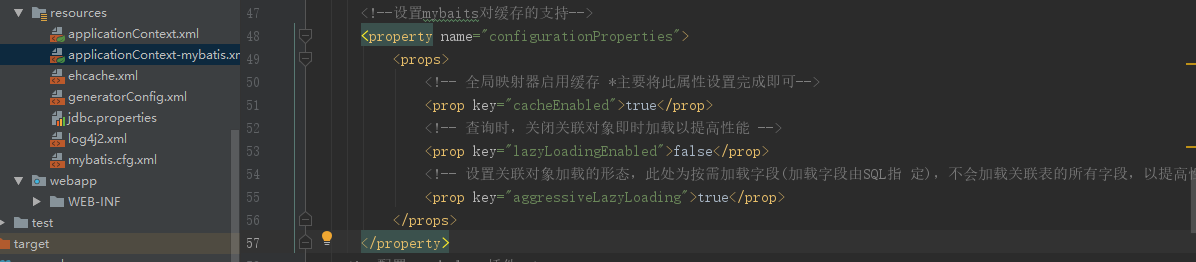
<!--设置mybaits对缓存的支持-->

      <property name="configurationProperties">

          <props>

              <!-- 全局映射器启用缓存 *主要将此属性设置完成即可-->

              <prop key="cacheEnabled">true</prop>

              <!-- 查询时,关闭关联对象即时加载以提高性能 -->

              <prop key="lazyLoadingEnabled">false</prop>

              <!-- 设置关联对象加载的形态,此处为按需加载字段(加载字段由SQL指 定),不会加载关联表的所有字段,以提高性能 -->

              <prop key="aggressiveLazyLoading">true</prop>

          </props>

      </property>
现在我们来测试一下它访问是否使用了二级缓存
@Test

    public void cacheSingle() {

        Book book= this.bookService.selectByPrimaryKey(5);

        System.out.println(book);

        Book book2= this.bookService.selectByPrimaryKey(5);

        System.out.println(book2);

    }
效果:
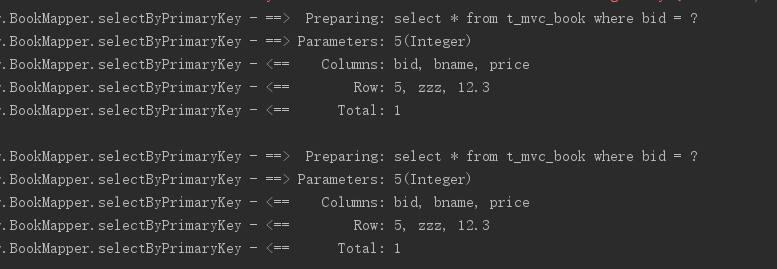
很明显查询了两次数据库,没有成功,继续往下看如何解决这个问题
我们需要在BookMapper.xml中加入chache配置

<cache type="org.mybatis.caches.ehcache.EhcacheCache"></cache>
我们在运行之前的测试方法测试一下
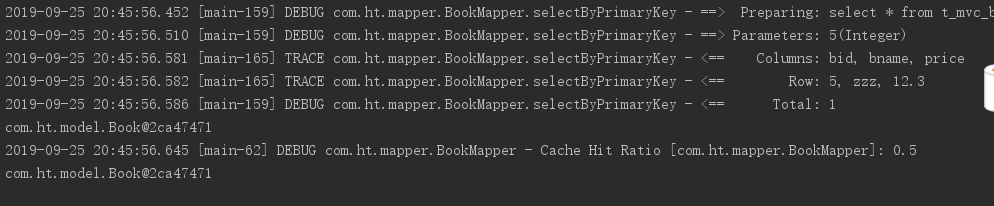
很明显,第一次从数据库中查询数据第二次就从缓存中拿数据了
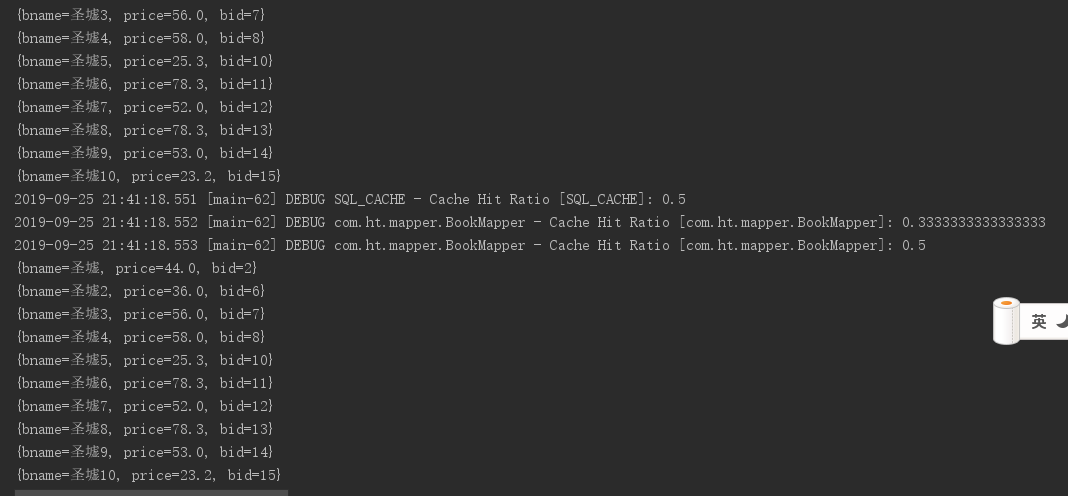
现在我们来测试查询多条数据的效果
@Test

    public void cacheMany() {

        Map map = new HashMap();

        map.put("bname", StringUtils.toLikeStr("圣墟"));

        List<Map> hhhh = this.bookService.listPager(map,pageBean);

        for (Map m : hhhh) {

            System.out.println(m);

        }

        List<Map> hhhh2 = this.bookService.listPager(map,pageBean);

        for (Map m : hhhh2) {

            System.out.println(m);

        }

    }
效果:
关闭缓存
既然开启了那就会有关闭缓存的时候,对吧
我们可以通过select标签的useCache属性打开或关闭二级缓存即可
<select id="selectByPrimaryKey" resultType="com.ht.model.Book" useCache="false"><select/>
注意:
1、mybatis默认使用的二级缓存框架就是ehcache(org.mybatis.caches.ehcache.EhcacheCache),无缝结合
2、Mybatis缓存开关一旦开启,可缓存单条记录,也可缓存多条,hibernate不能缓存多条。
3、Mapper接口上的所有方法上另外提供关闭缓存的属性
Mybatis整合redis实现二级缓存
1. redis常用类
1.1 Jedis
jedis就是集成了redis的一些命令操作,封装了redis的java客户端
1.2 JedisPoolConfig
Redis连接池
1.3 ShardedJedis
基于一致性哈希算法实现的分布式Redis集群客户端
实现 mybatis 的二级缓存,一般来说有如下两种方式:
1) 采用 mybatis 内置的 cache 机制。
2) 采用三方 cache 框架, 比如ehcache, oscache 等等.
2. 添加jar依赖
添加redis相关依赖
<!-- redis与spring的整合依赖 -->

    <redis.version>2.9.0</redis.version>

    <redis.spring.version>1.7.1.RELEASE</redis.spring.version>

    <dependency>

      <groupId>redis.clients</groupId>

      <artifactId>jedis</artifactId>

      <version>${redis.version}</version>

    </dependency>

    <dependency>

      <groupId>org.springframework.data</groupId>

      <artifactId>spring-data-redis</artifactId>

      <version>${redis.spring.version}</version>

    </dependency>
log4j2配置
jackson依赖
<!-- jackson -->

    <jackson.version>2.9.3</jackson.version>

<!-- jackson -->

    <dependency>

      <groupId>com.fasterxml.jackson.core</groupId>

      <artifactId>jackson-databind</artifactId>

      <version>${jackson.version}</version>

    </dependency>

    <dependency>

      <groupId>com.fasterxml.jackson.core</groupId>

      <artifactId>jackson-core</artifactId>

      <version>${jackson.version}</version>

    </dependency>

    <dependency>

      <groupId>com.fasterxml.jackson.core</groupId>

      <artifactId>jackson-annotations</artifactId>

      <version>${jackson.version}</version>

    </dependency>
spring + redis 集成实现缓存功能(与mybatis无关)
添加两个redis的配置文件,并将redis.properties和applicationContext-redis.xml配置到applicationContext.xml文件中
redis.properties
redis.hostName=192.168.80.128

redis.password=613613

redis.timeout=10000

redis.maxIdle=300

redis.maxTotal=1000

redis.maxWaitMillis=1000

redis.minEvictableIdleTimeMillis=300000

redis.numTestsPerEvictionRun=1024

redis.timeBetweenEvictionRunsMillis=30000

redis.testOnBorrow=true

redis.testWhileIdle=true
applicationContext-redis.xml
<?xml version="1.0" encoding="UTF-8"?>

<beans xmlns="http://www.springframework.org/schema/beans"

       xmlns:xsi="http://www.w3.org/2001/XMLSchema-instance"

       xmlns:context="http://www.springframework.org/schema/context"

       xsi:schemaLocation="http://www.springframework.org/schema/beans http://www.springframework.org/schema/beans/spring-beans.xsd http://www.springframework.org/schema/context http://www.springframework.org/schema/context/spring-context.xsd">

    <!-- 1. 引入properties配置文件 -->

    <!--<context:property-placeholder location="classpath:redis.properties" />-->

    <!-- 2. redis连接池配置-->

    <bean id="poolConfig" class="redis.clients.jedis.JedisPoolConfig">

        <!--最大空闲数-->

        <property name="maxIdle" value="${redis.maxIdle}"/>

        <!--连接池的最大数据库连接数  -->

        <property name="maxTotal" value="${redis.maxTotal}"/>

        <!--最大建立连接等待时间-->

        <property name="maxWaitMillis" value="${redis.maxWaitMillis}"/>

        <!--逐出连接的最小空闲时间 默认1800000毫秒(30分钟)-->

        <property name="minEvictableIdleTimeMillis" value="${redis.minEvictableIdleTimeMillis}"/>

        <!--每次逐出检查时 逐出的最大数目 如果为负数就是 : 1/abs(n), 默认3-->

        <property name="numTestsPerEvictionRun" value="${redis.numTestsPerEvictionRun}"/>

        <!--逐出扫描的时间间隔(毫秒) 如果为负数,则不运行逐出线程, 默认-1-->

        <property name="timeBetweenEvictionRunsMillis" value="${redis.timeBetweenEvictionRunsMillis}"/>

        <!--是否在从池中取出连接前进行检验,如果检验失败,则从池中去除连接并尝试取出另一个-->

        <property name="testOnBorrow" value="${redis.testOnBorrow}"/>

        <!--在空闲时检查有效性, 默认false  -->

        <property name="testWhileIdle" value="${redis.testWhileIdle}"/>

    </bean>

    <!-- 3. redis连接工厂 -->

    <bean id="connectionFactory" class="org.springframework.data.redis.connection.jedis.JedisConnectionFactory"

          destroy-method="destroy">

        <property name="poolConfig" ref="poolConfig"/>

        <!--IP地址 -->

        <property name="hostName" value="${redis.hostName}"/>

        <!--端口号  -->

        <property name="port" value="${redis.port}"/>

        <!--如果Redis设置有密码  -->

        <property name="password" value="${redis.password}"/>

        <!--客户端超时时间单位是毫秒  -->

        <property name="timeout" value="${redis.timeout}"/>

    </bean>

    <!-- 4. redis操作模板,使用该对象可以操作redis  -->

    <bean id="redisTemplate" class="org.springframework.data.redis.core.RedisTemplate">

        <property name="connectionFactory" ref="connectionFactory"/>

        <!--如果不配置Serializer,那么存储的时候缺省使用String,如果用User类型存储,那么会提示错误User can't cast to String!!  -->

        <property name="keySerializer">

            <bean class="org.springframework.data.redis.serializer.StringRedisSerializer"/>

        </property>

        <property name="valueSerializer">

            <bean class="org.springframework.data.redis.serializer.GenericJackson2JsonRedisSerializer"/>

        </property>

        <property name="hashKeySerializer">

            <bean class="org.springframework.data.redis.serializer.StringRedisSerializer"/>

        </property>

        <property name="hashValueSerializer">

            <bean class="org.springframework.data.redis.serializer.GenericJackson2JsonRedisSerializer"/>

        </property>

        <!--开启事务  -->

        <property name="enableTransactionSupport" value="true"/>

    </bean>

    <!-- 5.使用中间类解决RedisCache.RedisTemplate的静态注入,从而使MyBatis实现第三方缓存 -->

    <bean id="redisCacheTransfer" class="com.ht.Util.RedisCacheTransfer">

        <property name="redisTemplate" ref="redisTemplate"/>

    </bean>

</beans>
将redis.properties导入到applicationContext.xml文件中
applicationContext.xml
<?xml version="1.0" encoding="UTF-8"?><beans xmlns="http://www.springframework.org/schema/beans"
       xmlns:xsi="http://www.w3.org/2001/XMLSchema-instance"

       xmlns:context="http://www.springframework.org/schema/context" xmlns:tx="http://www.springframework.org/schema/tx"

       xmlns:aop="http://www.springframework.org/schema/aop"

       xsi:schemaLocation="http://www.springframework.org/schema/beans http://www.springframework.org/schema/beans/spring-beans.xsd

       http://www.springframework.org/schema/context http://www.springframework.org/schema/context/spring-context.xsd

       http://www.springframework.org/schema/tx http://www.springframework.org/schema/tx/spring-tx.xsd

       http://www.springframework.org/schema/aop http://www.springframework.org/schema/aop/spring-aop.xsd">

  <!--引入两个或多个属性文件的写法-->
 <!--pring中引入第二个属性文件会出现“找不到某个配置项”错误,这是因为spring只允许有一个<context:property-placeholder/>-->
  <context:property-placeholder ignore-unresolvable="true" location="classpath:jdbc.properties,classpath:redis.properties" />

  <!--整合mybatis框架-->

  <import resource="applicationContext-mybatis.xml"></import>

  <!--整合redis框架-->

  <import resource="applicationContext-redis.xml"></import>

</beans>
将redis缓存引入到mybatis中
package com.ht.Util;

import org.apache.ibatis.cache.Cache;

import org.slf4j.Logger;

import org.slf4j.LoggerFactory;

import org.springframework.dao.DataAccessException;

import org.springframework.data.redis.connection.RedisConnection;

import org.springframework.data.redis.core.RedisCallback;

import org.springframework.data.redis.core.RedisTemplate;

import java.util.concurrent.TimeUnit;

import java.util.concurrent.locks.ReadWriteLock;

import java.util.concurrent.locks.ReentrantReadWriteLock;

public class RedisCache implements Cache //实现类

{

    private static final Logger logger = LoggerFactory.getLogger(RedisCache.class);

    private static RedisTemplate<String,Object> redisTemplate;

    private final String id;

    /**

     * The {@code ReadWriteLock}.

     */

    private final ReadWriteLock readWriteLock = new ReentrantReadWriteLock();

    @Override

    public ReadWriteLock getReadWriteLock()

    {

        return this.readWriteLock;

    }

    public static void setRedisTemplate(RedisTemplate redisTemplate) {

        RedisCache.redisTemplate = redisTemplate;

    }

    public RedisCache(final String id) {

        if (id == null) {

            throw new IllegalArgumentException("Cache instances require an ID");

        }

        logger.debug("MybatisRedisCache:id=" + id);

        this.id = id;

    }

    @Override

    public String getId() {

        return this.id;

    }

    @Override

    public void putObject(Object key, Object value) {

        try{

            logger.info(">>>>>>>>>>>>>>>>>>>>>>>>putObject: key="+key+",value="+value);

            if(null!=value)

                redisTemplate.opsForValue().set(key.toString(),value,60, TimeUnit.SECONDS);

        }catch (Exception e){

            e.printStackTrace();

            logger.error("redis保存数据异常!");

        }

    }

    @Override

    public Object getObject(Object key) {

        try{

            logger.info(">>>>>>>>>>>>>>>>>>>>>>>>getObject: key="+key);

            if(null!=key)

                return redisTemplate.opsForValue().get(key.toString());

        }catch (Exception e){

            e.printStackTrace();

            logger.error("redis获取数据异常!");

        }

        return null;

    }

    @Override

    public Object removeObject(Object key) {

        try{

            if(null!=key)

                return redisTemplate.expire(key.toString(),1,TimeUnit.DAYS);

        }catch (Exception e){

            e.printStackTrace();

            logger.error("redis获取数据异常!");

        }

        return null;

    }

    @Override

    public void clear() {

        Long size=redisTemplate.execute(new RedisCallback<Long>() {

            @Override

            public Long doInRedis(RedisConnection redisConnection) throws DataAccessException {

                Long size = redisConnection.dbSize();

                //连接清除数据

                redisConnection.flushDb();

                redisConnection.flushAll();

                return size;

            }

        });

        logger.info(">>>>>>>>>>>>>>>>>>>>>>>>clear: 清除了" + size + "个对象");

    }

    @Override

    public int getSize() {

        Long size = redisTemplate.execute(new RedisCallback<Long>() {

            @Override

            public Long doInRedis(RedisConnection connection)

                    throws DataAccessException {

                return connection.dbSize();

            }

        });

        return size.intValue();

    }

}
RedisCacheTransfer
package com.ht.Util;

import org.springframework.beans.factory.annotation.Autowired;

import org.springframework.data.redis.core.RedisTemplate;

public class RedisCacheTransfer {

    @Autowired

    public void setRedisTemplate(RedisTemplate redisTemplate) {

        RedisCache.setRedisTemplate(redisTemplate);

    }

}
接下来,我们在BookMapper.xml中配置RedisCache缓存

<cache type="com.ht.Util.RedisCache"></cache>
测试:
 @Test

    public void cacheSingle() {

        Book book= this.bookService.selectByPrimaryKey(5);

        System.out.println(book);

        Book book2= this.bookService.selectByPrimaryKey(5);

        System.out.println(book2);

    }


谢谢观看!
Mybatis整合(Redis、Ehcache)实现二级缓存的更多相关文章
- Spring Boot2.0+Redis+Ehcache实现二级缓存
EHCache 本地缓存 Redis 分布式缓存(可以共享) 一级 Redis 二级Ehcache 当redis挂了 有备胎 反之: 先走本地,本地没有再走网络 尽量少走Redis 效率会高 ...
- 【Redis】SpringBoot+Redis+Ehcache实现二级缓存
一.概述 1.1 一些疑惑? 1.2 场景 1.3 一级缓存.两级缓存的产生 1.4 流程分析 二.项目搭建 一.概述 1.1 一些疑惑? Ehcache本地内存 Redis 分布式缓存可以共享 一级 ...
- Mybatis整合Redis实现二级缓存
Mybatis集成ehcache . 为什么需要缓存 拉高程序的性能 . 什么样的数据需要缓存 很少被修改或根本不改的数据 业务场景比如:耗时较高的统计分析sql.电话账单查询sql等 . ehcac ...
- SpringBoot30 整合Mybatis-Plus、整合Redis、利用Ehcache实现二级缓存、利用SpringCache和Redis作为缓存
1 环境说明 JDK: 1.8 MAVEN: 3. SpringBoot: 2.0.4 2 SpringBoot集成Mybatis-Plus 2.1 创建SpringBoot 利用IDEA创建Spri ...
- SSM+redis整合(mybatis整合redis做二级缓存)
SSM:是Spring+Struts+Mybatis ,另外还使用了PageHelper 前言: 这里主要是利用redis去做mybatis的二级缓存,mybaits映射文件中所有的select都会刷 ...
- mybatis整合redis二级缓存
mybatis默认开启了二级缓存功能,在mybatis主配置文件中,将cacheEnabled设置成false,则会关闭二级缓存功能 <settings> <!--二级缓存默认开启, ...
- mybatis(4)_二级缓存深入_使用第三方ehcache配置二级缓存
增删改对二级缓存的影响 1.增删改也会清空二级缓存 2.对于二级缓存的清空实质上是对value清空为null,key依然存在,并非将Entry<k,v>删除 3.从DB中进行select查 ...
- Hibernate4+EhCache配置二级缓存
本文主要讲一讲Hibernate+EhCache配置二级缓存的基本使用方法 (有关EhCache的基础介绍可参见:http://sjsky.iteye.com/blog/1288257 ) Cache ...
- Mybatis基于注解开启使用二级缓存
关于Mybatis的一级缓存和二级缓存的概念以及理解可以参照前面文章的介绍.前文连接:https://www.cnblogs.com/hopeofthevillage/p/11427438.html, ...
- Hibernate 集成 Ehcache 开启二级缓存
一.将 Ehcache.xml 放到 classpath 下 <?xml version="1.0" encoding="UTF-8"?> < ...
随机推荐
- html5中section元素详解
html5中section元素详解 一.总结 一句话总结: section元素 用来定义文章中的章节(通常应该有标题和段落内容) section元素的作用就是给内容分段,给页面分区 1.section ...
- CESIUM内置shader变量和函数[转]
cesium中内置了一些常量.变量和函数,在vs和fs中可直接使用. 内置uniform 内置uniform主要置于AutomaticUniforms类里面,该类私有未开放文档. czm_backgr ...
- JVM 初始化阶段例子
创建如下Demo package com.example.jvm.classloader; class Parent{ static int a = 3; static { System.out.pr ...
- 微信小程序开发者工具详解
一.微信小程序web开发工具下载地址 1.1 在微信公众平台-小程序里边去下载开发工具下载地址. 1.2 下载后安装一下就可以使用了: 二.创建项目 2.1 微信小程序web开发工具需要扫码登陆,所以 ...
- SpringMVC 集成 jackson,日志格式报错:org.codehaus.jackson.map.JsonMappingException: Can not construct instance of java.util.Date from String value
org.codehaus.jackson.map.JsonMappingException: Can not construct instance of java.util.Date from Str ...
- ubuntu系统TCP连接参数优化-TIME_WAIT过多解决办法
状态:描述CLOSED:无连接是活动的或正在进行LISTEN:服务器在等待进入呼叫SYN_RECV:一个连接请求已经到达,等待确认SYN_SENT:应用已经开始,打开一个连接ESTABLISHED:正 ...
- Docs-.NET-C#-指南-语言参考-关键字-值类型:bool
ylbtech-Docs-.NET-C#-指南-语言参考-关键字-值类型:bool 1.返回顶部 1. bool(C# 参考) 2015/07/20 bool 关键字是 System.Boolean ...
- 让remix使用本地文件系统
让remix使用本地文件系统 转:https://blog.csdn.net/platocnet/article/details/83376792 1. 测试发现使用npm命令安装相关环境不成功, ...
- 解决IE浏览器没有网络的情况
计算机能够连接到网络,但是IE浏览器却显示没有网络. 解决方案: 设置 >> IE internet选项: 选择“高级”: 选择“重置”: 勾选“删除个人设置”,点击重置: 重新打开IE, ...
- Spring Cloud Ribbon 客户端负载均衡 4.3
在分布式架构中,服务器端负载均衡通常是由Nginx实现分发请求的,而客户端的同一个实例部署在多个应用上时,也需要实现负载均衡.那么Spring Cloud中是否提供了这种负载均衡的功能呢?答案是肯 ...