
利用HTML和CSS设计一个静态的“小米商城官网首页”
一、小项目说明
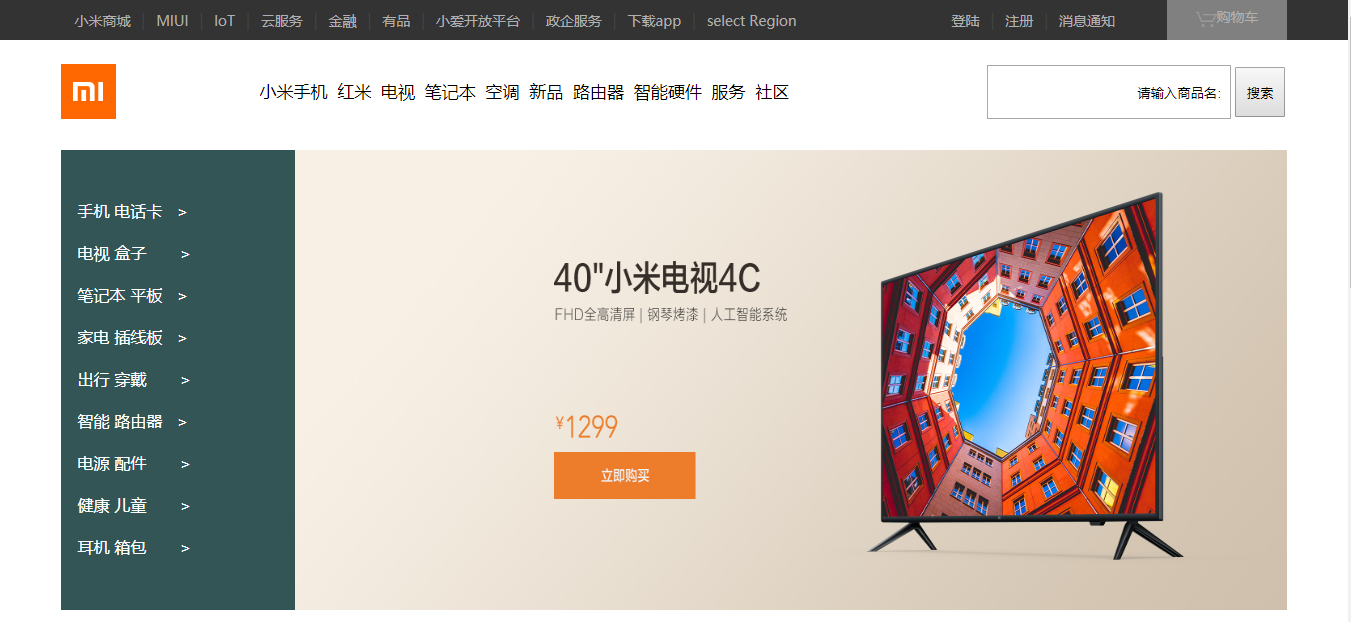
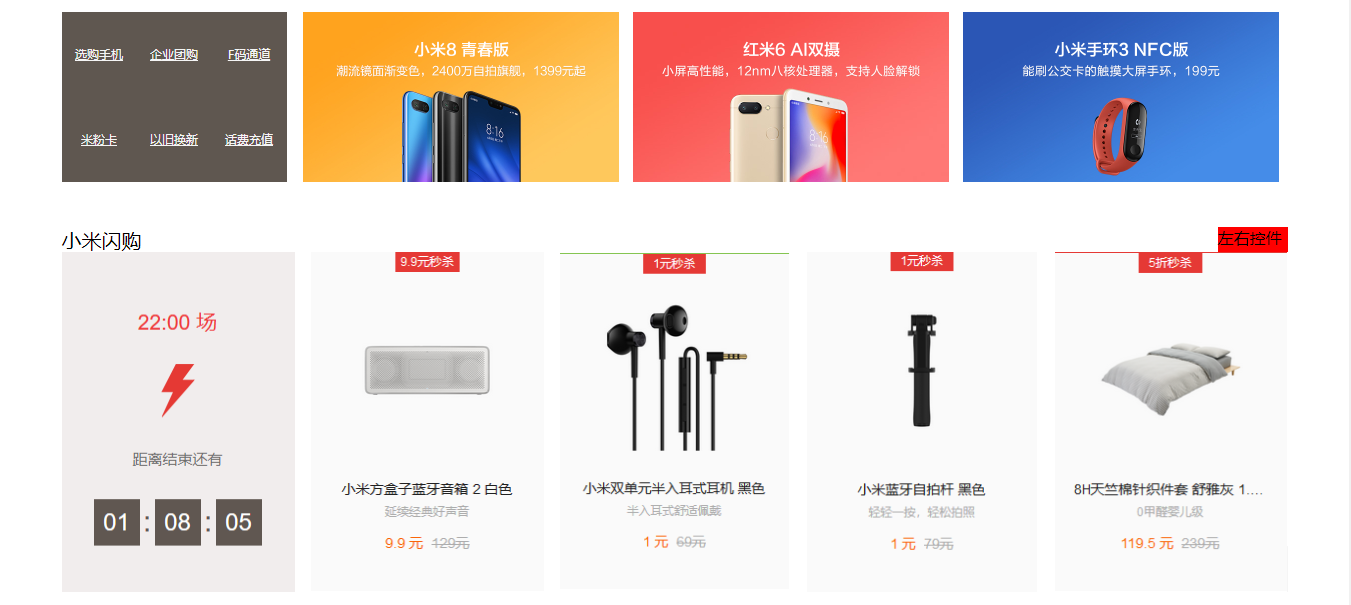
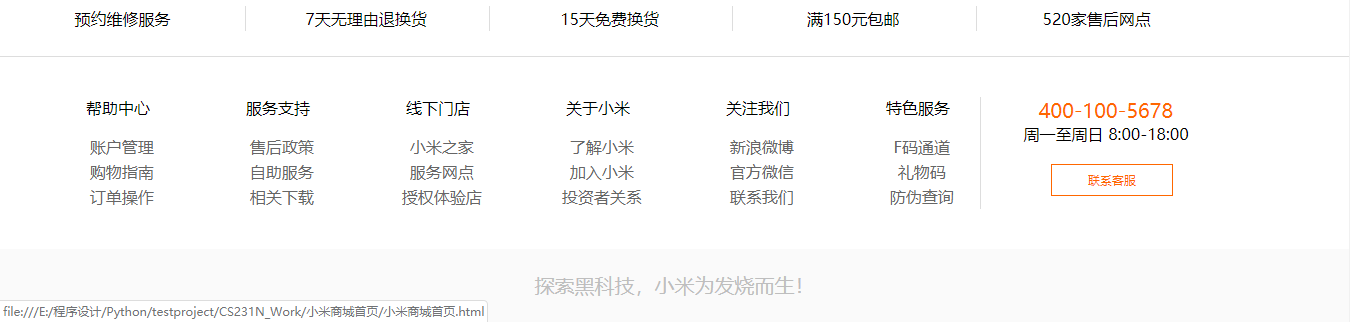
这是个例行的小项目练习,主要利用html和css的基础知识,复刻一个缩减版的小米商城网页。包括【导航栏】、【头部logo区,快捷键、搜索框】、【网页主体】、【网页尾部】几个部分。目前只实现静态的网页显示。最终效果图如下:
二、程序框架
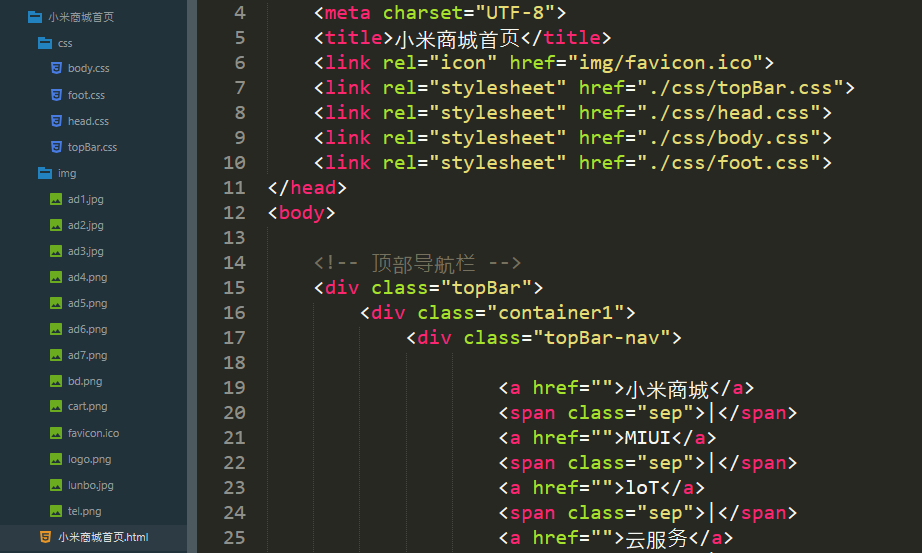
按照开发规范,先在sublime text3中创建【小米商城首页】文件夹,在此文件夹下创建【css】文件夹(放css文件)和【img】文件夹(放图片)和主要的html文件,如下图:
三、小米商城首页.html
<!DOCTYPE html>
<html lang="en">
<head>
<meta charset="UTF-8">
<title>小米商城首页</title>
<link rel="icon" href="img/favicon.ico">
<link rel="stylesheet" href="./css/topBar.css">
<link rel="stylesheet" href="./css/head.css">
<link rel="stylesheet" href="./css/body.css">
<link rel="stylesheet" href="./css/foot.css">
</head>
<body> <!-- 顶部导航栏 -->
<div class="topBar">
<div class="container1">
<div class="topBar-nav"> <a href="">小米商城</a>
<span class="sep">|</span>
<a href="">MIUI</a>
<span class="sep">|</span>
<a href="">loT</a>
<span class="sep">|</span>
<a href="">云服务</a>
<span class="sep">|</span>
<a href="">金融</a>
<span class="sep">|</span>
<a href="">有品</a>
<span class="sep">|</span>
<a href="">小爱开放平台</a>
<span class="sep">|</span>
<a href="">政企服务</a>
<span class="sep">|</span>
<a href="">下载app</a>
<span class="sep">|</span>
<a href="">select Region</a> </div>
<div class="topBar-cart">
<a href="" target="_self">
<img src="img/cart.png" alt="" id="t-cart">购物车
</a>
</div>
<div class="user-info">
<a href="">登陆</a>
<span class="sep">|</span>
<a href="">注册</a>
<span class="sep">|</span>
<a href="">消息通知</a>
</div>
</div>
</div> <!-- 头部logo 导航 和商品搜索部分 -->
<div class="header">
<div class="container2">
<!-- logo的盒子 -->
<div class="logo">
<img src="img/logo.png" alt="LOGO">
</div>
<!-- 下面的是导航的盒子 -->
<div class="nav">
<div class="sub-nav">
<a href="">小米手机 </a>
<a href="">红米 </a>
<a href="">电视 </a>
<a href="">笔记本 </a>
<a href="">空调 </a>
<a href="">新品 </a>
<a href="">路由器 </a>
<a href="">智能硬件 </a>
<a href="">服务 </a>
<a href="">社区 </a>
</div>
</div>
<div class="search">
<input type="text" name="goods" value="请输入商品名:  " id="s1">
<input type="submit" name="submit" value="搜索" id="s2">
</div>
</div>
</div> <!-- 内容主体部分 -->
<div class="content">
<!-- 内容选择样表 -->
<div class="content-list">
<div class="sub-content">
<ul>
<li>手机 电话卡   ></li><br>
<li>电视 盒子       ></li><br>
<li>笔记本 平板   ></li><br>
<li>家电 插线板   ></li><br>
<li>出行 穿戴       ></li><br>
<li>智能 路由器   ></li><br>
<li>电源 配件       ></li><br>
<li>健康 儿童       ></li><br>
<li>耳机 箱包       ></li><br>
</ul>
</div>
</div>
<!-- 轮播图 -->
<div class="viewpager">
<a href="">
<img src="img/lunbo.jpg" alt="轮播图" width="992px" height="460px">
</a>
</div>
</div> <div class="shop">
<!-- 选购引导 -->
<div class="channel">
<ul>
<li><a href="">选购手机</a></li>
<li><a href="">企业团购</a></li>
<li><a href="">F码通道</a></li>
<li><a href="">米粉卡</a></li>
<li><a href="">以旧换新</a></li>
<li><a href="">话费充值</a></li>
</ul>
</div>
<div class="advertise">
<ul>
<li>
<a href="">
<img src="img/ad1.jpg" alt="" width="316px" height="170px">
</a>
</li>
<li>
<a href="">
<img src="img/ad2.jpg" alt="" width="316px" height="170px">
</a>
</li>
<li>
<a href="">
<img src="img/ad3.jpg" alt="" width="316px" height="170px">
</a>
</li>
</ul>
</div>
</div> <!-- 内容主体 闪购部分 -->
<div class="tag">
<div class="letter">小米闪购</div>
<div class="form">左右控件</div>
</div> <div class="limit-shop">
<div class="shangou"> </div>
<div class="shangpin">
<ul>
<li>
<a href="">
<img src="img/ad4.png" alt="" width="233px" height="340px">
</a>
</li>
<li>
<a href="">
<img src="img/ad5.png" alt="" width="233px" height="340px">
</a>
</li>
<li>
<a href="">
<img src="img/ad6.png" alt="" width="233px" height="340px">
</a>
</li>
<li>
<a href="">
<img src="img/ad7.png" alt="" width="233px" height="340px">
</a>
</li>
</ul>
</div>
</div> <!-- 页末 售后部份 -->
<div class="foot">
<div class="f-cont">
<div class="f1">
<ul>
<li><div class="f11"><a href="">预约维修服务</a></div></li>
<li><div class="f11"><a href="">7天无理由退换货</a></div></li>
<li><div class="f11"><a href="">15天免费换货</a></div></li>
<li><div class="f11"><a href="">满150元包邮</a></div></li>
<li><div class="f12"><a href="">520家售后网点</a></div></li>
</ul>
</div>
<div class="f2">
<div class="f21"><div class="f22">帮助中心</div>
<ul>
<li><a href="">账户管理</a></li>
<li><a href="">购物指南</a></li>
<li><a href="">订单操作</a></li>
</ul>
</div>
<div class="f21"><div class="f22">服务支持</div>
<ul>
<li><a href="">售后政策</a></li>
<li><a href="">自助服务</a></li>
<li><a href="">相关下载</a></li>
</ul>
</div>
<div class="f21"><div class="f22">线下门店</div>
<ul>
<li><a href="">小米之家</a></li>
<li><a href="">服务网点</a></li>
<li><a href="">授权体验店</a></li>
</ul>
</div>
<div class="f21"><div class="f22">关于小米</div>
<ul>
<li><a href="">了解小米</a></li>
<li><a href="">加入小米</a></li>
<li><a href="">投资者关系</a></li>
</ul>
</div>
<div class="f21"><div class="f22">关注我们</div>
<ul>
<li><a href="">新浪微博</a></li>
<li><a href="">官方微信</a></li>
<li><a href="">联系我们</a></li>
</ul>
</div>
<div class="f21"><div class="f22">特色服务</div>
<ul>
<li><a href="">F码通道</a></li>
<li><a href="">礼物码</a></li>
<li><a href="">防伪查询</a></li>
</ul>
</div>
<div class="f21" id="f21">
<span class="spf21">400-100-5678</span><br>周一至周日 8:00-18:00
<div class="f212"><a href="">联系客服</a></div>
</div>
</div> </div>
<div class="f3">
探索黑科技,小米为发烧而生!
</div>
</div> </body>
</html>
小米商城.html
四、CSS文件夹
 /*清除默认样式*/

 *{

     padding:;

     margin:;

 }

 ul{

     list-style: none;

 }

 /*顶部广告栏*/

 .sep {

     width: 3.22px;

     font: 16px/40px "Microsoft YaHei";

     color: #424242;

     margin: auto 6px;

 }

 /*导航栏*/

 .topBar{

     height: 40px;

     background: #333;

 }

 .container1{

     width: 1226px;

     height: 40px;

     margin: 0 auto;

 }

 .topBar-nav{

     width: 750px;

     height: 40px;

     float:left;

     text-align: center;

 }

 .topBar-nav a{

     font-size: 14px;

     font-weight: border;

     color: #b0b0b0;

     text-decoration: none;

 }

 .topBar-nav a:hover{

     color: #fff;

 }

 .topBar-cart{

     width: 120px;

     height: 40px;

     background-color: gray;

     float:right;

     text-align: center;

 }

 .topBar-cart a{

     font-size: 14px;

     font-weight: border;

     color: #b0b0b0;

     text-decoration: none;

     margin: 5px auto;

 }

 .topBar-cart a:hover{

     color: #fff;

 }

 .topBar-cart #t-cart{

     width: 22px;

     height: 22px;

     position: relative;

     top: 8px;

 }

 .user-info{

     width: 200px;

     height: 40px;

     float:right;

     margin-right:15px;

 }

 .user-info a{

     font-size: 14px;

     font-weight: border;

     color: #b0b0b0;

     text-decoration: none;

 }

 .user-info a:hover{

     color: #fff;

 }
topBar.css
 .head{

     width:100%;

     height: 110px;

 }

 .container2{

     width: 1226px;

     height: 110px;

     margin: 0 auto;

 }

 .logo{

     margin-top: 24px;

     margin-right: 24px;

     width: 55px;

     height: 55px;

     float: left;

 }

 .nav{

     width: 820px;

     height: 110px;

     float: left;

 }

 .nav .sub-nav{

     width: 580px;

     height: 30px;

     margin: 40px auto 40px;

 }

 .nav .sub-nav a{

     font-size: 17px;

     font-weight: border;

     color: black;

     text-decoration: none;

     text-align: center;

 }

 .nav .sub-nav a:hover{

     color: #ff6700;

 }

 .search{

     margin-top: 25px;

     width: 300px;

     height: 50px;

     float: right;

 }

 .search #s1{

     width: 240px;

     height: 50px;

     text-align: right;

     font-weight: border;

 }

 .search #s2{

     width: 50px;

     height: 50px;

 }
head.css
 .content{

     width: 1226px;

     height: 460px;

     margin: 0 auto 20px;

 }

 .content-list{

     float: left;

     width: 234px;

     height: 460px;

     background-color: #355

 }

 .content-list .sub-content{

     width: 200px;

     height: 380px;

     margin:50px auto;

     color: white;

 }

 .viewpager{

     float: left;

     width: 992px;

     height: 460px;

 }

 .shop{

     width: 1226px;

     height: 170px;

     margin: 0 auto 30px;

 }

 .channel {

     width: 225px;

     height:170px;

     float: left;

 }

 .channel ul li{

     background-color: #5f5750;

     width: 75px;

     height: 85px;

     font: 12px/85px "Microsoft YaHei";

     text-align: center;

     float: left;

 }

 .channel ul li a {

     display: block;

     width: 75px;

     height: 85px;

     color: whitesmoke;

 }

 .channel ul li a:hover {

     display: block;

     width: 75px;

     height: 85px;

     color:white;

 }

 .shop .advertise{

     float: left;

     width: 992px;

     height: 170px;

 }

 .shop .advertise ul li{

     width:316px;

     height: 170px;

     float: right;

     margin-left: 14px;

 }

 .tag{

     width: 1226px;

     height: 40px;

     margin: 0 auto;

 }

 .tag .letter{

     width: 90px;

     height: 25px;

     float: left;

     font-size: 20px;

     margin-top: 15px;

 }

 .tag .form{

     width: 70px;

     height: 25px;

     background-color: red;

     float: right;

     margin-top: 15px;

 }

 .limit-shop{

     width: 1226px;

     height: 340px;

     margin: 0 auto;

 }

 .limit-shop .shangou{

     width: 234px;

     height: 340px;

     float: left;

     background-image: url(../img/bd.png);

     background-size: 234px 340px;

 }

 .limit-shop .shangpin{

     width: 992px;

     height: 340px;

     float: left;

 }

 .limit-shop .shangpin ul li{

     width: 233px;

     height: 340px;

     float: right;

     margin-left: 15px;

 }
body.css
 .foot {

     margin-top: 20px;

 }

 .foot a{

     text-decoration: none;

 }

 .foot .f1 {

     height: 50px;

     border-bottom: 1px solid #DDDDDD;

     margin:0 auto;

 }

 .foot .f1 .f11 {

     width: 245.2px;

     height: 25px;

     border-right: 1px solid #DDDDDD;

 }

 .foot .f1 .f12 {

     width: 245.2px;

     height: 25px;

 }

 .foot ul li {

     width: 243.5px;

     float: left;

     text-align: center;

 }

 .foot ul li a {

     font: 16px/25px "Microsoft YaHei";

     color: black;

 }

 .foot ul li a:hover{

     color:#FF6700;

 }

 .foot .f2 {

     height: 112px;

     padding: 40px 0;

 }

 .foot .f2 .f21 {

     width: 160px;

     height: 112px;

     float: left;

 }

 .foot .f2 .f22 {

     width: 150px;

     height: 17px;

     text-align: right;

     margin-bottom: 20px;

 }

 .f21 ul li a {

     color: #666666;

 }

 #f21 {

     width: 250px;

     height: 112px;

     margin-left: 20px;

     border-left: 1px solid #DDDDDD;

     text-align: center;

 }

 .spf21 {

     color: #FF6700;

     font-size: 20px;

 }

 .f212 {

     width: 120px;

     height: 30px;

     border: 1px solid  #FF6700;

     margin: 20px 70px;

 }

 .f212 a {

     display: block;

     width: 120px;

     height: 30px;

     font: 12px/30px "Microsoft YaHei";

     color: #FF6700;

 }

 .f212 a:hover{

     display: block;

     width: 120px;

     height: 30px;

     font: 16px/30px "Microsoft YaHei";

     color: #fff;

     background-color: #FF6700;

 }

 .f3 {

     height: 73px;

     color: #BEBEBE;

     text-align: center;

     background-color: #FAFAFA;

     font: 20px/73px "Microsoft YaHei";

 }
foot.css
五、img文件夹
小米官网的图片直接另存为在这个文件夹中,然后重命名成自己需要的就行。如有需要,也可以评论中告知。
利用HTML和CSS设计一个静态的“小米商城官网首页”的更多相关文章
- 利用git+hugo+markdown 搭建一个静态网站
利用git+hugo+markdown 搭建一个静态网站 一直想要有一个自己的文档管理系统: 可以很方便书写,而且相应的文档很容易被分享 很方便的存储.管理.历史记录 比较方面的浏览和查询 第一点用M ...
- CSS设计一个三列布局的页面
探讨这种布局是因为最近对话框组件以及信息系统B/S界面布局的需要.无论是什么,我们在写CSS之前首先引入reset.css,我使用的是淘宝的reset. 01 /* 02 KISSY CSS Rese ...
- 用html,CSS 写一个静态的博客网页
<!doctype html> <html> <br/><br/><br/> <head> <meta http-equi ...
- 【记录一个问题】opencv官网的opencv android sdk使用opencl并未用到GPU
UMat u_mat;mat.copyTo(u_mat);cv::cvtColor(u_mat, cv::BGR2GARY);这样的代码反复执行,并未发现GPU占用提升.执行时间与不使用UMat相当. ...
- Css打造一个简单的静态七巧板
偶然在微博上看到用css写一个七巧板,正好也有一些源代码,于是就试着敲了敲. 主要是利用了css3的transform,实现平移,旋转,变形,直接用看到的代码敲出来之后有些问题,因为宽度上下面绿色的三 ...
- 利用JAVA反射机制设计通用的DAO
利用JAVA反射机制设计一个通用的DAO 反射机制 反射机制指的是程序在运行时能够获取自身的信息.在java中,只要给定类的名字, 那么就可以通过反射机制来获得类的所有信息. 反射机制创建类对象 ...
- 开源项目 PM 浅谈如何设计官网
有用户反馈进入官网首页光秃秃的一片,大家忙着做产品,忽略了官网的建设,惭愧惭愧. 确实,极简风格和极其简单还是有很大区别的. 旧的 Web 端 除了极其简单之外,它还有一个小问题, ...
- 你真的了解字典(Dictionary)吗? C# Memory Cache 踩坑记录 .net 泛型 结构化CSS设计思维 WinForm POST上传与后台接收 高效实用的.NET开源项目 .net 笔试面试总结(3) .net 笔试面试总结(2) 依赖注入 C# RSA 加密 C#与Java AES 加密解密
你真的了解字典(Dictionary)吗? 从一道亲身经历的面试题说起 半年前,我参加我现在所在公司的面试,面试官给了一道题,说有一个Y形的链表,知道起始节点,找出交叉节点.为了便于描述,我把上面 ...
- 《CSS 设计指南》学习笔记 一
本篇文章是对这几天看完 Charles Wyke-Smit 的 <CSS 设计指南> 后的一些学习笔记与心得,笔者好像是大一的时候开始接触网页设计,由于并不是计算机专业的,所以所有都是自己 ...
随机推荐
- 关于梯度下降之前需要进行feature scale的记录
先上吴恩达老师的课件图 1.对于梯度下降而言,学习率很大程度上影响了模型收敛的速度.对于不同规模的特征,如果采用相同的学习率,那么如果学习率适应于scale大的数据,scale较小的数据由于学习率过大 ...
- Bean管理学习笔记
1.BeanFactory 介绍 1.1 首先什么是Bean? 1.Bean在Spring技术中是基于组件 2.他是Spring容器管理的最基本最常见的单元.在spring的应用场合中,bean可以是 ...
- 【洛谷 P3346】 [ZJOI2015]诸神眷顾的幻想乡(后缀自动机)
题目链接 广义sam+不同子串个数.. 找到所有入度为\(0\)的点开始\(dfs\),建出广义sam. 然后就是不同子串个数了 #include <cstdio> #include &l ...
- vue实现滑块滑动校验
为了防止机器操作自动提交,我们需要添加滑动校验. 实现代码如下: 1.子组件slider.vue <template> <div class="drag" r ...
- js javascirpt 数学库、 算法库 (转载)
提示:国外官网,谷歌浏览器右键可以翻译成中文. 1.math.js 官网:https://mathjs.org/index.html 其它简介:https://www.jianshu.com/p/4f ...
- 【kafka】安装部署kafka集群(kafka版本:kafka_2.12-2.3.0)
3.2.1 下载kafka并安装kafka_2.12-2.3.0.tgz tar -zxvf kafka_2.12-2.3.0.tgz 3.2.2 配置kafka集群 在config/server.p ...
- c# IComparable与IComparer接口
- [ike][ipsec] child sa rekey机制的细节分析
子标题:ipsec rekey是否会导致丢包 author: classic_tong 前言 什么叫rekey. rekey是指ipsec的通信两端定期更换加密信道秘钥的机制. 为了安全性考虑,随着秘 ...
- prometheus operator 部署
prometheus operator 部署自定义记录 环境: k8s 1.11集群版本,kubeadm部署 docker 17.3.2版本 Centos 7系统 阿里云服务器 operator 源码 ...
- 批处理引擎MapReduce编程模型
批处理引擎MapReduce编程模型 作者:尹正杰 版权声明:原创作品,谢绝转载!否则将追究法律责任. MapReduce是一个经典的分布式批处理计算引擎,被广泛应用于搜索引擎索引构建,大规模数据处理 ...