
Spark GraphX图计算简单案例【代码实现,源码分析】
一.简介
参考:https://www.cnblogs.com/yszd/p/10186556.html
二.代码实现
 package big.data.analyse.graphx

 import org.apache.log4j.{Level, Logger}

 import org.apache.spark.graphx._

 import org.apache.spark.rdd.RDD

 import org.apache.spark.sql.SparkSession

 class VertexProperty()

 case class UserProperty(val name: String) extends VertexProperty

 case class ProductProperty(val name: String, val price: Double) extends VertexProperty

 /*class Graph[VD, ED]{

   val vertices: VertexRDD[VD]

   val edges: EdgeRDD[ED]

 }*/

 /**

   * Created by zhen on 2019/10/4.

   */

 object GraphXTest {

   /**

     * 设置日志级别

     */

   Logger.getLogger("org").setLevel(Level.WARN)

   def main(args: Array[String]) {

     val spark = SparkSession.builder().appName("GraphXTest").master("local[2]").getOrCreate()

     val sc = spark.sparkContext

     /**

       * 创建vertices的RDD

       */

     val users : RDD[(VertexId, (String, String))] = sc.parallelize(

       Array((3L, ("Spark", "GraphX")), (7L, ("Hadoop", "Java")),

             (5L, ("HBase", "Mysql")), (2L, ("Hive", "Mysql"))))

     /**

       * 创建edges的RDD

       */

     val relationships: RDD[Edge[String]] = sc.parallelize(

       Array(Edge(3L, 7L, "Fast"), Edge(5L, 3L, "Relation"),

       Edge(2L, 5L, "colleague"), Edge(5L, 7L, "colleague")))

     /**

       * 定义默认用户

       */

     val defualtUser = ("Machical", "Missing")

     /**

       * 构建初始化图

       */

     val graph = Graph(users, relationships, defualtUser)

     /**

       * 使用三元组视图呈现顶点之间关系

       */

     val facts : RDD[String] = graph.triplets.map(triplet =>

       triplet.srcAttr._1 + " is the " + triplet.attr + " with " + triplet.dstAttr._1)

     facts.collect().foreach(println)

     graph.vertices.foreach(println) //顶点

     graph.edges.foreach(println) //边

     graph.ops.degrees.foreach(println) // 各顶点的度

     graph.triplets.foreach(println) // 顶点,边,关系

     println(graph.ops.numEdges) // 边的数量

     println(graph.ops.numVertices) // 顶点的数量

   }

 }
三.结果
1.三元组视图

2.顶点
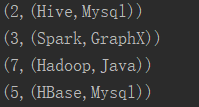
3.边
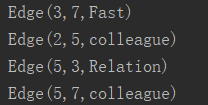
4.各顶点的度
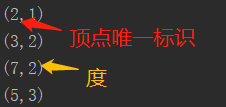
5.三元组视图
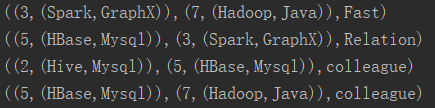
6.边/顶点数量

四.源码分析
 class Graph[VD, ED] {

    // Information about the Graph

   val numEdges: Long

   val numVertices:Long

   val inDegrees: VertexRDD[Int]

   val outDegrees: VertexRDD[Int]

   val degrees: VertexRDD[Int]


    // Views of the graph as collections

   val vertices: VertexRDD[VD]

   val edges: EdgeRDD[ED]

   val triplets: RDD[EdgeTriplet[VD,ED]]


   //Functions for caching graphs

   def persist(newLevel1:StorageLevel = StorageLevel.MEMORY_ONLY): Graph[VD, ED]//默认存储级别为MEMORY_ONLY

   def cache(): Graph[VD, ED]

   def unpersistVertices(blocking: Boolean = true): Graph[VD, ED]

   // Change the partitioning heuristic

   def partitionBy(partitionStrategy: PartitionStrategy)

   // Transform vertex and edge attributes

   def mapVertices[VD2](map: (VertexId, VD) => VD2): Graph[VD2, ED]

   def mapEdges[ED2](map: Edge[ED] => ED2): Graph[VD, ED2]

   def mapEdges[ED2](map: (PartitionID, Iterator[Edge[ED]]) => Iterator[ED2]): Graph[VD, ED2]

   def mapTriplets[ED2](map: EdgeTriplet[VD, ED] => ED2): Graph[VD, ED2]

   def mapTriplets[ED2](map: (PartitionID, Iterator[EdgeTriplet[VD, ED]]) => Iterator[ED2]): Graph[VD, ED2]

   // Modify the graph structure

   def reverse: Graph[VD, ED]

   def subgraph(epred: EdgeTriplet[VD,ED] => Boolean,vpred: (VertexId, VD) => Boolean): Graph[VD, ED]

   def mask[VD2, ED2](other: Graph[VD2, ED2]): Graph[VD, ED] // 返回当前图和其它图的公共子图

   def groupEdges(merge: (ED, ED) => ED): Graph[VD,ED]

   // Join RDDs with the graph

   def joinVertices[U](table: RDD[(VertexId, U)])(mapFunc: (VertexId, VD, U) => VD): Graph[VD, ED]

   def outerJoinVertices[U, VD2](other: RDD[(VertexId, U)])(mapFunc: (VertexId, VD, Option[U]))


   // Aggregate information about adjacent triplets

   def collectNeighborIds(edgeDirection: EdgeDirection): VertexRDD[Array[VertexId]]

   def collectNeighbors(edgeDirection: EdgeDirection): VertexRDD[Array[(VertexId, VD)]]

   def aggregateMessages[Msg: ClassTag](sendMsg: EdgeContext[VD, ED, Msg] => Unit, merageMsg: (Msg, Msg) => Msg, tripletFields: TripletFields: TripletFields = TripletFields.All): VertexRDD[A]


   //Iterative graph-parallel computation

   def pregel[A](initialMsg: A, maxIterations: Int, activeDirection: EdgeDiection)(vprog: (VertexId, VD, A) => VD, sendMsg: EdgeTriplet[VD, ED] => Iterator[(VertexId, A)], mergeMsg: (A, A) => A): Graph[VD, ED]


   // Basic graph algorithms

   def pageRank(tol: Double, resetProb: Double = 0.15): Graph[Double, Double]

   def connectedComponents(): Graph[VertexId, ED]

   def triangleCount(): Graph[Int, ED]

   def stronglyConnectedComponents(numIter: Int): Graph[VertexId, ED]

 }
Spark GraphX图计算简单案例【代码实现,源码分析】的更多相关文章
- Spark GraphX图计算核心源码分析【图构建器、顶点、边】
一.图构建器 GraphX提供了几种从RDD或磁盘上的顶点和边的集合构建图形的方法.默认情况下,没有图构建器会重新划分图的边:相反,边保留在默认分区中.Graph.groupEdges要求对图进行重新 ...
- Spark技术内幕:Stage划分及提交源码分析
http://blog.csdn.net/anzhsoft/article/details/39859463 当触发一个RDD的action后,以count为例,调用关系如下: org.apache. ...
- 5.Spark Streaming流计算框架的运行流程源码分析2
1 spark streaming 程序代码实例 代码如下: object OnlineTheTop3ItemForEachCategory2DB { def main(args: Array[Str ...
- 仿爱奇艺视频,腾讯视频,搜狐视频首页推荐位轮播图(二)之SuperIndicator源码分析
转载请把头部出处链接和尾部二维码一起转载,本文出自逆流的鱼:http://blog.csdn.net/hejjunlin/article/details/52510431 背景:仿爱奇艺视频,腾讯视频 ...
- Spark大师之路:广播变量(Broadcast)源码分析
概述 最近工作上忙死了……广播变量这一块其实早就看过了,一直没有贴出来. 本文基于Spark 1.0源码分析,主要探讨广播变量的初始化.创建.读取以及清除. 类关系 BroadcastManager类 ...
- 史上最简单的的HashTable源码分析
HashTable源码分析 1.前言 Hashtable 一个元老级的集合类,早在 JDK 1.0 就诞生了 1.1.摘要 在集合系列的第一章,咱们了解到,Map 的实现类有 HashMap.Link ...
- 65、Spark Streaming:数据接收原理剖析与源码分析
一.数据接收原理 二.源码分析 入口包org.apache.spark.streaming.receiver下ReceiverSupervisorImpl类的onStart()方法 ### overr ...
- struts2 paramsPrepareParamsStack拦截器简化代码(源码分析)
目录 一.在讲 paramsPrepareParamsStack 之前,先看一个增删改查的例子. 1. Dao.java准备数据和提供增删改查 2. Employee.java 为model 3. E ...
- Spark GraphX图计算核心算子实战【AggreagteMessage】
一.简介 参考博客:https://www.cnblogs.com/yszd/p/10186556.html 二.代码实现 package graphx import org.apache.log4j ...
随机推荐
- Location配置与ReWrite语法(五)
原文链接:https://www.cnblogs.com/crazylqy/p/6892010.html location表示uri方式定位,基础语法有三种: location = pattern { ...
- leetcode14最长公共前缀
class Solution { public: string longestCommonPrefix(vector<string>& strs) { ) return " ...
- ASP.NET开发实战——(五)ASP.NET MVC & 分层
上一篇文章简要说明了MVC所代表的含义并提供了详细的项目及其控制器.视图等内容的创建步骤,最终完成了一个简单ASP.NET MVC程序. 注:MVC与ASP.NET MVC不相等,MVC是一种开发模式 ...
- 【UVA1303】Wall(凸包)
点此看题面 大致题意: 给你一个多边形,要求建一面墙使得墙上的点至少离多边形每个顶点\(R\)的距离,求最短的墙长. 考虑\(R=0\) 考虑当\(R=0\)时,所求的答案显然就是求得的凸包的周长. ...
- beeline无密码连接hiveserver2
1.说明 #hiveserver2增加了权限控制,需要在hadoop的配置文件中配置 core-site.xml 增加以下内容: <property> <name>hadoop ...
- [LeetCode] 36. Valid Sudoku 验证数独
Determine if a 9x9 Sudoku board is valid. Only the filled cells need to be validated according to th ...
- LeetCode 1284. Minimum Number of Flips to Convert Binary Matrix to Zero Matrix (最少翻转次数将二进制矩阵全部置为0)
给一个矩阵mat,每个格子都是0或1,翻转一个格子会将该格子以及相邻的格子(有共同边)全部翻转(0变为1,1变为0) 求问最少需要翻转几次将所有格子全部置为0. 这题的重点是数据范围,比赛结束看了眼数 ...
- prometheus consul docker redis_exporter 自动注册配置
0.启动redis_exporter redis_exporter: version: '2'services: redis_exporter: image: oliver006/redis_expo ...
- Ansible16:Playbook高级用法
目录 本地执行 任务委托 任务暂停 滚动执行 只执行一次 设置环境变量 交互式提示 本地执行 如果希望在控制主机本地运行一个特定的任务,可以使用local_action语句. 假设我们需要配置的远程主 ...
- 解决 警告: [SetPropertiesRule]{Server/Service/Engine/Host/Context} Setting property 'source' to 'org.eclipse.jst.jee.server:reyo' did not find a matching property.
解决办法是:关闭tomcat,双击eclipse下tomcat服务器,在出来的Tomcat server at localhost页面中找到server options选项,选中其中的选项”Publi ...