
OSPF 高级配置

这是一个综合的实验,包含了静态路由、默认路由、RIP、OSPF四种路由。通过配置,最终实现全网互通。
实验拓扑
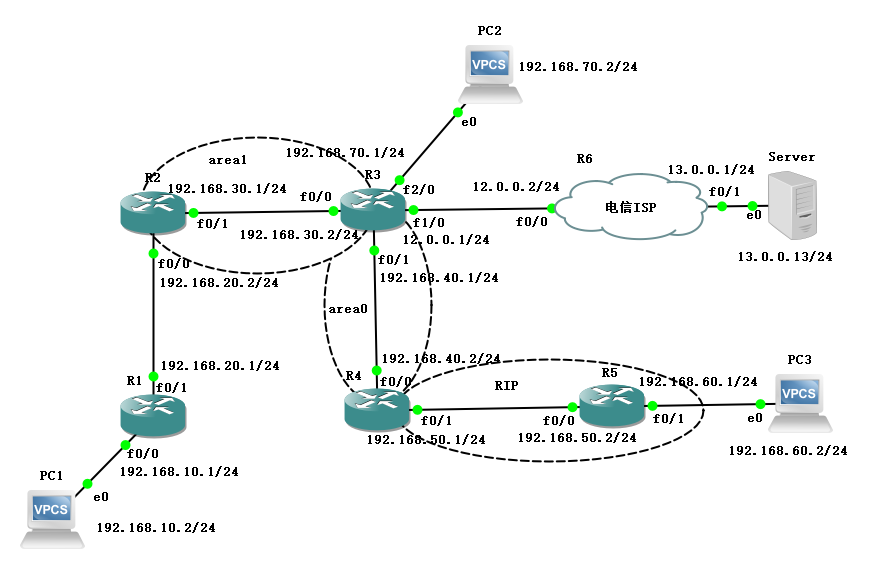
如图所示连接,地址规划如下:
| 名称 | 接口 | IP地址 |
|---|---|---|
| R1 | f0/0 | 192.168.10.1/24 |
| R1 | f0/1 | 192.168.20.1/24 |
| R2 | f0/0 | 192.168.20.2/24 |
| R2 | f0/1 | 192.168.30.1/24 |
| R3 | f0/0 | 192.168.30.2/24 |
| R3 | f0/1 | 192.168.40.1/24 |
| R3 | f1/0 | 12.0.0.1/24 |
| R3 | f2/0 | 192.168.70.1/24 |
| R4 | f0/0 | 192.168.40.2/24 |
| R4 | f0/1 | 192.168.50.1/24 |
| R5 | f0/0 | 192.168.50.2/24 |
| R5 | f0/1 | 192.168.60.1/24 |
| R6 | f0/0 | 12.0.0.2/24 |
| R6 | f0/1 | 13.0.0.1/24 |
| PC1 | e0 | 192.168.10.2/24 |
| PC2 | e0 | 192.168.70.2/24 |
| PC3 | e0 | 192.168.60.2/24 |
| Server | e0 | 13.0.0.13/24 |
实验过程
R1
R1#conf t

Enter configuration commands, one per line.  End with CNTL/Z.

R1(config)#int f0/0

R1(config-if)#ip add 192.168.10.1 255.255.255.0

R1(config-if)#no sh

R1(config-if)#ex

R1(config)#int f0/1

R1(config-if)#ip add 192.168.20.1 255.255.255.0

R1(config-if)#no sh

R1(config-if)#ex

R1(config)#ip route 0.0.0.0 0.0.0.0 192.168.20.2
R2
R2#conf t

Enter configuration commands, one per line.  End with CNTL/Z.

R2(config)#int f0/0

R2(config-if)#ip add 192.168.20.2 255.255.255.0

R2(config-if)#no sh

R2(config-if)#ex

R2(config)#int f0/1

R2(config-if)#ip add 192.168.30.1 255.255.255.0

R2(config-if)#no sh

R2(config-if)#ex

R2(config)#router ospf 1

R2(config-router)#router-id 2.2.2.2

R2(config-router)#network 192.168.30.0 0.0.0.255 area 1

R2(config-router)#ex

R2(config)#ip route 192.168.10.0 255.255.255.0 192.168.20.1

R2(config)#router ospf 1

R2(config-router)#redistribute connected subnets

R2(config-router)#redistribute static subnets

R2(config-router)#ex
R3
R3#conf t

Enter configuration commands, one per line.  End with CNTL/Z.

R3(config)#int f0/0

R3(config-if)#ip add 192.168.30.2 255.255.255.0

R3(config-if)#no sh

R3(config-if)#ex

R3(config)#int f0/1

R3(config-if)#ip add 192.168.40.1 255.255.255.0

R3(config-if)#no sh

R3(config-if)#ex

R3(config)#int f1/0

R3(config-if)#ip add 12.0.0.1 255.255.255.0

R3(config-if)#no sh

R3(config-if)#ex

R3(config)#int f2/0

R3(config-if)#ip add 192.168.70.1 255.255.255.0

R3(config-if)#no sh

R3(config-if)#ex

R3(config)#ip route 0.0.0.0 0.0.0.0 12.0.0.2

R3(config)#router ospf 1

R3(config-router)#router-id 3.3.3.3

R3(config-router)#network 192.168.30.0 0.0.0.255 area 1

R3(config-router)#network 192.168.40.0 0.0.0.255 area 0

R3(config-router)#network 192.168.70.0 0.0.0.255 area 0

R3(config-router)#default-information originate

R3(config-router)#ex
R4
R4#conf t

Enter configuration commands, one per line.  End with CNTL/Z.

R4(config)#int f0/0

R4(config-if)#ip add 192.168.40.2 255.255.255.0

R4(config-if)#no sh

R4(config-if)#ex

R4(config)#int f0/1

R4(config-if)#ip add 192.168.50.1 255.255.255.0

R4(config-if)#no sh

R4(config-if)#ex

R4(config)#router rip

R4(config-router)#version 2

R4(config-router)#no auto-summary

R4(config-router)#network 192.168.50.0

R4(config-router)#redistribute ospf 1 metric 5

R4(config-router)#ex

R4(config)#router ospf 1

R4(config-router)#router-id 4.4.4.4

R4(config-router)#network 192.168.40.0 0.0.0.255 area 0

R4(config-router)#redistribute rip subnets

R4(config-router)#ex
R5
R5#conf t

Enter configuration commands, one per line.  End with CNTL/Z.

R5(config)#int f0/0

R5(config-if)#ip add 192.168.50.2 255.255.255.0

R5(config-if)#no sh

R5(config-if)#ex

R5(config)#int f0/1

R5(config-if)#ip add 192.168.60.1 255.255.255.0

R5(config-if)#no sh

R5(config-if)#ex

R5(config)#router rip

R5(config-router)#version 2

R5(config-router)#no auto-summary

R5(config-router)#network 192.168.50.0

R5(config-router)#network 192.168.60.0

R5(config-router)#ex
R6
R6#conf t

Enter configuration commands, one per line.  End with CNTL/Z.

R6(config)#int f0/0

R6(config-if)#ip add 12.0.0.2 255.255.255.0

R6(config-if)#no sh

R6(config-if)#ex

R6(config)#int f0/1

R6(config-if)#ip add 13.0.0.1 255.255.255.0

R6(config-if)#no sh

R6(config-if)#ex

R6(config)#ip route 192.168.0.0 255.255.0.0 12.0.0.1
查看路由表
- R1
R1(config)#do show ip route

Codes: C - connected, S - static, R - RIP, M - mobile, B - BGP

       D - EIGRP, EX - EIGRP external, O - OSPF, IA - OSPF inter area

       N1 - OSPF NSSA external type 1, N2 - OSPF NSSA external type 2

       E1 - OSPF external type 1, E2 - OSPF external type 2

       i - IS-IS, su - IS-IS summary, L1 - IS-IS level-1, L2 - IS-IS level-2

       ia - IS-IS inter area, * - candidate default, U - per-user static route

       o - ODR, P - periodic downloaded static route

Gateway of last resort is 192.168.20.2 to network 0.0.0.0

C    192.168.10.0/24 is directly connected, FastEthernet0/0

C    192.168.20.0/24 is directly connected, FastEthernet0/1

S*   0.0.0.0/0 [1/0] via 192.168.20.2
- R2
R2(config)#do show ip route

Codes: C - connected, S - static, R - RIP, M - mobile, B - BGP

       D - EIGRP, EX - EIGRP external, O - OSPF, IA - OSPF inter area

       N1 - OSPF NSSA external type 1, N2 - OSPF NSSA external type 2

       E1 - OSPF external type 1, E2 - OSPF external type 2

       i - IS-IS, su - IS-IS summary, L1 - IS-IS level-1, L2 - IS-IS level-2

       ia - IS-IS inter area, * - candidate default, U - per-user static route

       o - ODR, P - periodic downloaded static route

Gateway of last resort is 192.168.30.2 to network 0.0.0.0

C    192.168.30.0/24 is directly connected, FastEthernet0/1

O E2 192.168.60.0/24 [110/20] via 192.168.30.2, 00:07:57, FastEthernet0/1

S    192.168.10.0/24 [1/0] via 192.168.20.1

O IA 192.168.40.0/24 [110/20] via 192.168.30.2, 00:22:05, FastEthernet0/1

C    192.168.20.0/24 is directly connected, FastEthernet0/0

O E2 192.168.50.0/24 [110/20] via 192.168.30.2, 00:12:35, FastEthernet0/1

O IA 192.168.70.0/24 [110/11] via 192.168.30.2, 00:21:37, FastEthernet0/1

O*E2 0.0.0.0/0 [110/1] via 192.168.30.2, 00:21:17, FastEthernet0/1
- R3
R3(config)#do show ip route

Codes: C - connected, S - static, R - RIP, M - mobile, B - BGP

       D - EIGRP, EX - EIGRP external, O - OSPF, IA - OSPF inter area

       N1 - OSPF NSSA external type 1, N2 - OSPF NSSA external type 2

       E1 - OSPF external type 1, E2 - OSPF external type 2

       i - IS-IS, su - IS-IS summary, L1 - IS-IS level-1, L2 - IS-IS level-2

       ia - IS-IS inter area, * - candidate default, U - per-user static route

       o - ODR, P - periodic downloaded static route

Gateway of last resort is 12.0.0.2 to network 0.0.0.0

C    192.168.30.0/24 is directly connected, FastEthernet0/0

O E2 192.168.60.0/24 [110/20] via 192.168.40.2, 00:08:05, FastEthernet0/1

O E2 192.168.10.0/24 [110/20] via 192.168.30.1, 00:22:06, FastEthernet0/0

C    192.168.40.0/24 is directly connected, FastEthernet0/1

O E2 192.168.20.0/24 [110/20] via 192.168.30.1, 00:22:06, FastEthernet0/0

     12.0.0.0/24 is subnetted, 1 subnets

C       12.0.0.0 is directly connected, FastEthernet1/0

O E2 192.168.50.0/24 [110/20] via 192.168.40.2, 00:12:50, FastEthernet0/1

C    192.168.70.0/24 is directly connected, FastEthernet2/0

S*   0.0.0.0/0 [1/0] via 12.0.0.2
- R4
R4(config)#do show ip route

Codes: C - connected, S - static, R - RIP, M - mobile, B - BGP

       D - EIGRP, EX - EIGRP external, O - OSPF, IA - OSPF inter area

       N1 - OSPF NSSA external type 1, N2 - OSPF NSSA external type 2

       E1 - OSPF external type 1, E2 - OSPF external type 2

       i - IS-IS, su - IS-IS summary, L1 - IS-IS level-1, L2 - IS-IS level-2

       ia - IS-IS inter area, * - candidate default, U - per-user static route

       o - ODR, P - periodic downloaded static route

Gateway of last resort is 192.168.40.1 to network 0.0.0.0

O IA 192.168.30.0/24 [110/20] via 192.168.40.1, 00:13:22, FastEthernet0/0

R    192.168.60.0/24 [120/1] via 192.168.50.2, 00:00:03, FastEthernet0/1

O E2 192.168.10.0/24 [110/20] via 192.168.40.1, 00:13:22, FastEthernet0/0

C    192.168.40.0/24 is directly connected, FastEthernet0/0

O E2 192.168.20.0/24 [110/20] via 192.168.40.1, 00:13:22, FastEthernet0/0

C    192.168.50.0/24 is directly connected, FastEthernet0/1

O    192.168.70.0/24 [110/11] via 192.168.40.1, 00:13:22, FastEthernet0/0

O*E2 0.0.0.0/0 [110/1] via 192.168.40.1, 00:13:24, FastEthernet0/0
- R5
R5(config)#do show ip route

Codes: C - connected, S - static, R - RIP, M - mobile, B - BGP

       D - EIGRP, EX - EIGRP external, O - OSPF, IA - OSPF inter area

       N1 - OSPF NSSA external type 1, N2 - OSPF NSSA external type 2

       E1 - OSPF external type 1, E2 - OSPF external type 2

       i - IS-IS, su - IS-IS summary, L1 - IS-IS level-1, L2 - IS-IS level-2

       ia - IS-IS inter area, * - candidate default, U - per-user static route

       o - ODR, P - periodic downloaded static route

Gateway of last resort is 192.168.50.1 to network 0.0.0.0

R    192.168.30.0/24 [120/5] via 192.168.50.1, 00:00:17, FastEthernet0/0

C    192.168.60.0/24 is directly connected, FastEthernet0/1

R    192.168.10.0/24 [120/5] via 192.168.50.1, 00:00:17, FastEthernet0/0

R    192.168.40.0/24 [120/5] via 192.168.50.1, 00:00:17, FastEthernet0/0

R    192.168.20.0/24 [120/5] via 192.168.50.1, 00:00:17, FastEthernet0/0

C    192.168.50.0/24 is directly connected, FastEthernet0/0

R    192.168.70.0/24 [120/5] via 192.168.50.1, 00:00:17, FastEthernet0/0

R*   0.0.0.0/0 [120/1] via 192.168.50.1, 00:00:19, FastEthernet0/0
- R6
R6(config)#do show ip route

Codes: C - connected, S - static, R - RIP, M - mobile, B - BGP

       D - EIGRP, EX - EIGRP external, O - OSPF, IA - OSPF inter area

       N1 - OSPF NSSA external type 1, N2 - OSPF NSSA external type 2

       E1 - OSPF external type 1, E2 - OSPF external type 2

       i - IS-IS, su - IS-IS summary, L1 - IS-IS level-1, L2 - IS-IS level-2

       ia - IS-IS inter area, * - candidate default, U - per-user static route

       o - ODR, P - periodic downloaded static route

Gateway of last resort is not set

     12.0.0.0/24 is subnetted, 1 subnets

C       12.0.0.0 is directly connected, FastEthernet0/0

     13.0.0.0/24 is subnetted, 1 subnets

C       13.0.0.0 is directly connected, FastEthernet0/1

S    192.168.0.0/16 [1/0] via 12.0.0.1
验证结果
配置 IP 地址
PC1> ip 192.168.10.2 192.168.10.1

Checking for duplicate address...

PC1 : 192.168.10.2 255.255.255.0 gateway 192.168.10.1
PC2> ip 192.168.70.2 192.168.70.1

Checking for duplicate address...

PC1 : 192.168.70.2 255.255.255.0 gateway 192.168.70.1
PC3> ip 192.168.60.2 192.168.60.1

Checking for duplicate address...

PC1 : 192.168.60.2 255.255.255.0 gateway 192.168.60.1
Server> ip 13.0.0.13 13.0.0.1

Checking for duplicate address...

PC1 : 13.0.0.13 255.255.255.0 gateway 13.0.0.1
ping 测试
PC1> ping 192.168.70.2

192.168.70.2 icmp_seq=1 timeout

192.168.70.2 icmp_seq=2 timeout

84 bytes from 192.168.70.2 icmp_seq=3 ttl=61 time=58.825 ms

84 bytes from 192.168.70.2 icmp_seq=4 ttl=61 time=57.842 ms

84 bytes from 192.168.70.2 icmp_seq=5 ttl=61 time=55.705 ms

PC1> ping 13.0.0.13

13.0.0.13 icmp_seq=1 timeout

13.0.0.13 icmp_seq=2 timeout

84 bytes from 13.0.0.13 icmp_seq=3 ttl=60 time=79.911 ms

84 bytes from 13.0.0.13 icmp_seq=4 ttl=60 time=80.635 ms

84 bytes from 13.0.0.13 icmp_seq=5 ttl=60 time=79.938 ms

PC1> ping 192.168.60.2

192.168.60.2 icmp_seq=1 timeout

84 bytes from 192.168.60.2 icmp_seq=2 ttl=59 time=100.595 ms

84 bytes from 192.168.60.2 icmp_seq=3 ttl=59 time=95.884 ms

84 bytes from 192.168.60.2 icmp_seq=4 ttl=59 time=99.846 ms

84 bytes from 192.168.60.2 icmp_seq=5 ttl=59 time=101.842 ms
OSPF 高级配置的更多相关文章
- Sonatype Nexus高级配置
Sonatype Nexus的安装配置参见:CentOS系统中安装Nexus并导入已有的构件库.Nexus内置了Jetty容器,${NEXUS_HOME}/bin/jsw目录下包含了各个操作系统的启动 ...
- [转]JEXUS的高级配置
转自:http://www.cnblogs.com/xiaodiejinghong/archive/2013/04/14/3019660.html 前一回合,我们对服务器软件Jexus作了简单的介绍, ...
- Cisco ASA 高级配置
Cisco ASA 高级配置 一.防范IP分片攻击 1.Ip分片的原理: 2.Ip分片的安全问题: 3.防范Ip分片. 这三个问题在之前已经详细介绍过了,在此就不多介绍了.详细介绍请查看上一篇文章:I ...
- vim的一些高级配置
今天有幸看到一篇博文,有一些vim的高级配置 在linux或者unix下面的.vimrc文件中,在其中可以添加如下片段,可以实现解释上面你说的那些高级用法 " Ctrl + K 插入模式下光 ...
- OSPF 高级实验
一.环境准备 1. 软件:GNS3 2. 路由:c7200 二.实验操作 实验要求: 1.理解 OSPF 虚链路原理及何时需要使用虚链路. 2.掌握 OSPF 虚链路配置方法. 3.掌握 OSPF 的 ...
- OSPFv3与OSPF的配置
IPv6 路由-OSPFv3 实验目的 1. 掌握 OSPFv3 的配置方法 2. 掌握在帧中继环境下 OSPFv3 的配置方法 3. 掌握 OSPFv3 NSSA 的配置方法 4. ...
- IE高级配置中,存在SSL支持协议,例如SSL TLS。
IE高级配置中,存在SSL支持协议,例如SSL TLS. 其在注册表的路径为:HKEY_CURRENT_USER\Software\Microsoft\Windows\CurrentVersion\I ...
- SpringCloud系列十:SpringCloudConfig 高级配置(密钥加密处理(JCE)、KeyStore 加密处理、SpringCloudConfig 高可用机制、SpringCloudBus 服务总线)
1.概念:SpringCloudConfig 高级配置 2.具体内容 在 SpringCloudConfig 之中考虑到所有配置文件都暴露在远程仓库之中的安全性问题,所以提供有安全访问的处理机制,这样 ...
- log4j2高级配置(1)
一.Log4j2高级配置介绍(1) (1)日志输出到文件配置 <!-- 将日志输出到指定位置的文件中 --> <RollingFile name="RollingFi ...
随机推荐
- UNIX网络编程卷1 - >环境搭建(ubuntu16.04)
学习unp网络编程,树上的例子均存在#include“unp.h”,故需要对环境进行配置. 1.到资源页下载www.unpbook.com 2.解压并将unpv13e移动到相应的文件夹下 (因为我 ...
- px转rem vue vscode
1.vscode中安装px2rem 2.打开settings.json ,新增 "px2rem.rootFontSize": 75, 3.重启vscode 4.可以转换了
- 不用FTP,直接Windows与Linux下互传文件
直接上传文件到Linux[1] Linux上输入命令:rz 直接下载Linux中的文件[2] 使用命令: sz 文件名 网上看到这个帖子,觉得很实用,转载保存 下载一个部署文件夹,到本地电脑 . 两步 ...
- laravel 可以做什么
laravel 可以做什么? Laravel是一套简洁.优雅的PHP Web开发框架(PHP Web Framework).它可以让你从面条一样杂乱的代码中解脱出来:它可以帮你构建一个完美的网络APP ...
- 最小生成树 --- 求最小权值、MST
Agri-Net Time Limit: 1000MS Memory Limit: 10000K Total Submissions: 37109 Accepted: 14982 Descri ...
- xcode红色文件夹或文件解决方法
文件夹或文件变红是找不到文件导致,解决方法如下: 选中红色的文件或者文件夹,在最右边出现菜单里面有个Location,下一行有个文件夹按钮,点击选择正确的文件路径或者文件就可以了.
- MySQL一主二从复制环境切换主从库
假设有一个一主二从的环境,当主库M出现故障时,需要将其中一个从库S1切换为主库,同时将S2指向新的主库S1,如果可能,需要将故障的主库M修复并重置为新的从库. 搭建一主二从复制环境可参考:mysql5 ...
- K8S学习笔记之Grafana App for Kubernetes的配置
Grafana有一套针对Kubernetes监控的APP,和Grafana-Zabbix App类似,但是配置咋一看比较麻烦,主要参数都是来自K8S. 这款APP的详细介绍请参考Grafana App ...
- cygwin中修改path变量
1.在家目录建立 .bash_profile 文件. 2.在该文件添加: export PATH=/my/path/:$PATH 3.解释,/my/path/为你要添加的目录,为什么不在.bashrc ...
- 封装:Windows系统文件图标
原文:封装:Windows系统文件图标 用途:用于获取文件系统默认图标 using System; using System.Collections.Generic; using System.Dra ...