
OSPFv3与OSPF的配置
IPv6 路由-OSPFv3
实验目的
1. 掌握 OSPFv3 的配置方法
2. 掌握在帧中继环境下 OSPFv3 的配置方法
3. 掌握 OSPFv3 NSSA 的配置方法
4. 掌握外部路由汇总的配置
5. 掌握区域间路由的汇总配置
实验拓扑图
IPv4地址表
|
Device |
Interface |
IP Address |
|
R1 |
F 0/0 |
10.1.99.1 |
|
S 0/0 |
192.168.99.1 |
|
|
R3 |
S 0/0 |
192.168.99.3 |
|
R4 |
S 0/0 |
192.168.99.4 |
|
R5 |
F 0/0 |
10.1.99.5 |
|
S 0/0 |
12.1.99.5 |
|
|
R6 |
F 0/0 |
10.1.99.6 |
|
F 0/1 |
11.1.99.6 |
|
|
R8 |
F 0/1 |
11.1.99.8 |
|
S 0/0 |
12.1.99.8 |
R2(config)#frame-relay switching
R2(config)#int s 0/0
R2(config-if)#no shutdown
R2(config-if)#clock rate 128000
R2(config-if)#encapsulation frame-relay
R2(config)#int s 0/1
R2(config-if)#no shutdown
R2(config-if)#clock rate 128000
R2(config-if)#encapsulation frame-relay
R2(config)#int s 0/2
R2(config-if)#no shutdown
R2(config-if)#clock rate 128000
R2(config-if)#encapsulation frame-relay
R2(config)#int s 0/0
R2(config-if)#frame-relay lmi-type cisco
R2(config-if)#frame-relay intf-type dce
R2(config)#int s 0/1
R2(config-if)#frame-relay lmi-type cisco
R2(config-if)#frame-relay intf-type dce
R2(config)#int s 0/2
R2(config-if)#frame-relay lmi-type cisco
R2(config-if)#frame-relay intf-type dce
R2(config)#int s 0/0
R2(config-if)#frame-relay route 103 interface s 0/1 301
R2(config-if)#frame-relay route 104 interface s 0/2 401
R2(config)#int s 0/1
R2(config-if)#frame-relay route 301 interface Serial0/0 103
R2(config)#int s 0/2
R2(config-if)#frame-relay route 401 interface Serial0/0 104
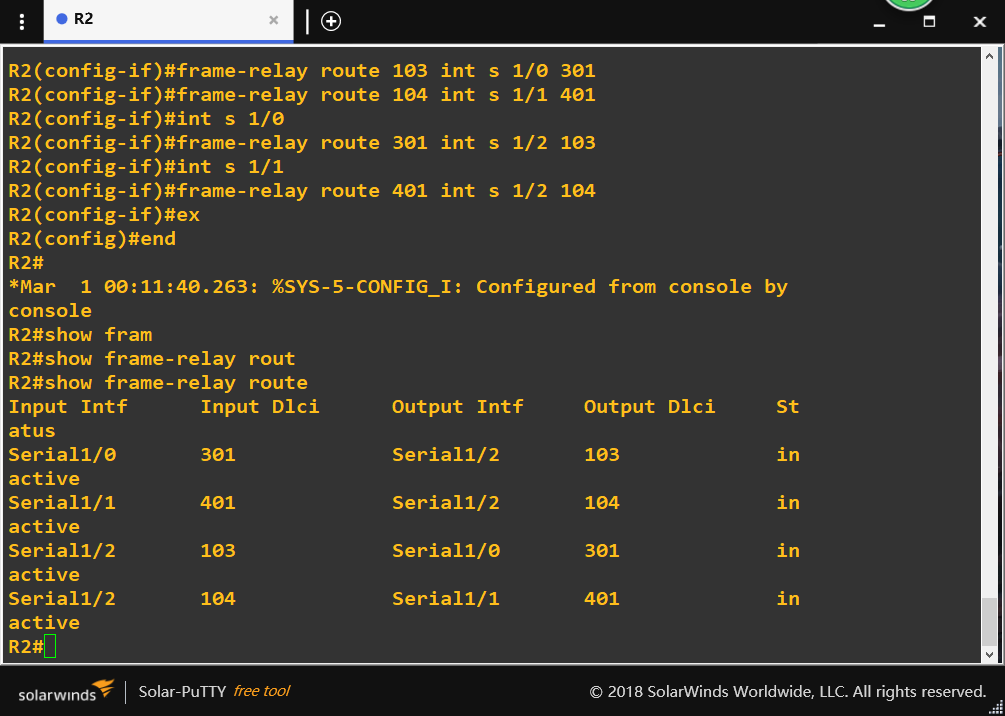
show frame-relay route检查帧中继交换机是否正常
R1(config)#int s 0/0
R1(config-if)#ip address 192.168.99.1 255.255.255.0
R1(config-if)#no shutdown
R1(config-if)#encapsulation frame-relay
R1(config-if)#frame-relay lmi-type cisco
R1(config-if)#no frame-relay inverse-arp
R1(config-if)#frame-relay map ip 192.168.99.3 103 broadcast
R1(config-if)#frame-relay map ip 192.168.99.4 104 broadcast
R3(config)#int s 0/0
R3(config-if)#ip address 192.168.99.3 255.255.255.0
R3(config-if)#no shutdown
R3(config-if)#encapsulation frame-relay
R3(config-if)#no frame-relay inverse-arp
R3(config-if)#frame-relay map ip 192.168.99.1 301 broadcast
R4(config)#int s 0/0
R4(config-if)#ip address 192.168.99.4 255.255.255.0
R4(config-if)#no shutdown
R4(config-if)#encapsulation frame-relay
R4(config-if)#no frame-relay inverse-arp
R4(config-if)#frame-relay map ip 192.168.99.1 401 broadcast
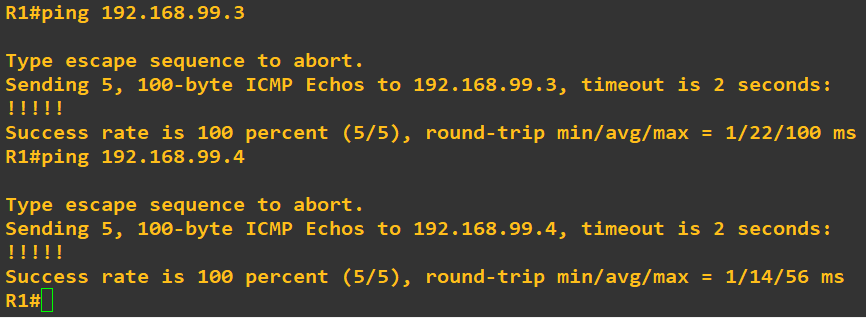
进行ping命令测试
从R1ping到R3与R4
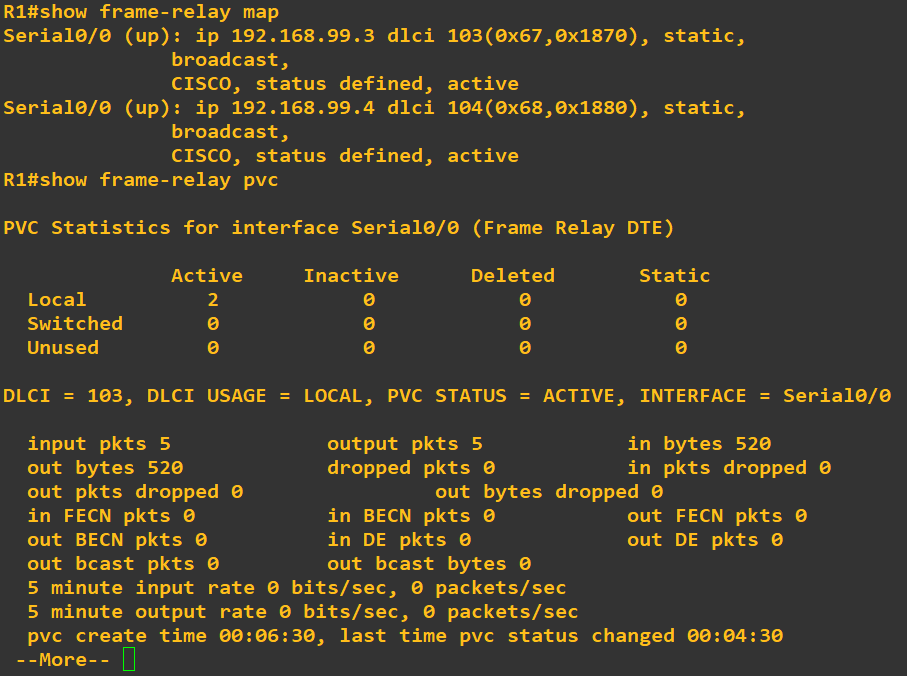
R1#show frame-relay map
配置ospf
先配置外部路由器ospf (R5.R8)
R6(config)#router ospf 1
R6(config-router)#router-id 6.6.6.6
R6 (config-router)#area 1 nssa――配置区域 1 为 NSSA 区域
R6(config)#interface loopback 0
R6(config-if)#ip add 6.6.6.6 255.255.255.255
R6(config)#int f 0/0
R6(config-if)#ip add 10.1.99.6 255.255.255.0
R6(config-if)#no shut
R6(config-if)#ip ospf 1 area 0
R6(config-if)#int f 0/1
R6(config-if)#ip add 11.1.99.6 255.255.255.0
R6(config-if)#no shut
R6(config-if)#ip ospf 1 area 1
R6(config-if)#exit
R6(config)#router ospf 1
R6(config-router)#network 6.6.6.6 0.0.0.0 area 0
R6(config-router)#network 10.1.99.0 0.0.0.255 area 0
R6(config-router)#network 11.1.99.0 0.0.0.255 area 1
R1(config)#router ospf 1
R1(config-router)#router-id 1.1.1.1
R1(config)#interface loopback 0
R1(config-if)#ip add 1.1.1.1 255.255.255.255
R1(config)#int f 0/0
R1(config-if)#ip add 10.1.99.1 255.255.255.0
R1(config-if)#no shut
R1(config-if)#ip ospf 1 area 0
R1(config-if)#int s 0/0
R1(config-if)#ip ospf 1 area 0
R1(config-if)#exit
R1(config)#router ospf 1
R1(config-router)#network 1.1.1.1 0.0.0.0 area 0
R1(config-router)#network 10.1.99.0 0.0.0.255 area 0
R1(config-router)#network 192.168.99.0 0.0.0.255 area 0
R1(config-router)#neighbor 192.168.99.3
R1(config-router)#neighbor 192.168.99.4
配置帧中继中路由器的ospf (R4)
R3(config)#router ospf 1
R3(config-router)#router-id 3.3.3.3
R3(config-router)#exit
R3(config)#int loopback 0
R3(config-if)#ip add 3.3.3.3 255.255.255.255
R3(config-if)#ip ospf 1 area 2
R3(config-if)#int s 0/0
R3(config-if)# ip ospf 1 area 2
R3(config-if)# ip ospf priority 0
R3(config)#router ospf 1
R3(config-router)#network 3.3.3.3 0.0.0.0 area 2
R3(config-router)#network 192.168.99.0 0.0.0.255 area 2
已完成OSPFv2配置,在R1上查ospf邻居关系
R1#show ipv6 ospf neighbor

测试路由通断情况
在R5上测试得出结果如下(从内部到外部皆ping 通,实验完成)

IPV6地址规划
|
Device |
Interface |
IP Address |
|
R4 |
S0/0 |
2001:DB8:99:1::2/64 |
|
R3 |
S0/0 |
2001:DB8:99:1::1/64 |
|
R2 |
S0/0 |
2001:DB8:99:1::3/64 |
|
F0/0 |
2001:DB8:99:2::1/64 |
|
|
R6 |
F0/0 |
2001:DB8:99:2::2/64 |
|
F0/1 |
2001:DB8:99:3::1/64 |
|
|
R7 |
F0/0 |
2001:DB8:99:2::3/64 |
|
F0/1 |
2001:DB8:99:4::1/64 |
|
|
R8 |
F0/0 |
2001:DB8:99:3::2/64 |
|
F0/1 |
2001:DB8:99:4::2/64 |
|
|
F1/0 |
2001:DB8:99:5::2/64 |
|
|
R5 |
F0/0 |
2001:DB8:99:5::1/64 |
在R1,R2,R3,R4,上配置帧中继,R1作为帧中继交换机
R1:
R1(config)#frame-relay switching
R1(config)#int s0/0
R1(config-if)#encapsulation frame-relay
R1(config-if)#frame-relay intf-type dce
R1(config-if)#clock rate 64000
R1(config-if)#frame-relay route 102 interface serial 0/1 201
R1(config-if)#frame-relay route 103 interface serial 0/2 301
R1(config-if)#no shutdown
R1(config)#int s0/1
R1(config-if)#encapsulation frame-relay
R1(config-if)#frame-relay intf-type dce
R1(config-if)#clock rate 64000
R1(config-if)#frame-relay route 201 interface serial 0/0 102
R1(config-if)#frame-relay route 104 interface serial 0/2 401
R1(config-if)#no shutdown
R1(config)#int s0/2
R1(config-if)#encapsulation frame-relay
R1(config-if)#frame-relay intf-type dce
R1(config-if)#clock rate 64000
R1(config-if)#frame-relay route 301 interface serial 0/0 103
R1(config-if)#frame-relay route 401 interface serial 0/1 104
R1(config-if)#no shutdown
R3:
R3(config)#ipv6 unicast-routing
R3(config)#ipv6 router ospf 1
R3(config-rtr)#router-id 1.1.1.5
R3(config-rtr)#int s0/0
R3(config-if)#ipv6 ospf 1 area 2
R3(config-if)#ipv6 enable
R3(config-if)#ipv6 address 2001:db8:99:1::1/64
R3(config-if)#encapsulation frame-relay
R3(config-if)#frame-relay map ipv6 2001:db8:99:1::2 102 broadcast
R3(config-if)#frame-relay map ipv6 2001:db8:99:1::3 103 broadcast
R3(config-if)#frame-relay map ipv6 FE80::C604:7FF:FE83:0 102 broadcast
R3(config-if)#frame-relay map ipv6 FE80::C602:7FF:FE65:0 103 broadcast
R3(config-if)#no shutdown
R4:
R4(config)#ipv6 unicast-routing
R4(config)#ipv6 router ospf 1
R4(config-rtr)#router-id 1.1.1.6
R4(config-rtr)#int s0/0
R4(config-if)#ipv6 ospf 1 area 2
R4(config-if)#ipv6 enable
R4(config-if)#ipv6 address 2001:db8:99:1::2/64
R4(config-if)#encapsulation frame-relay
R4(config-if)#frame-relay map ipv6 2001:db8:99:1::1 201 broadcast
R4(config-if)#frame-relay map ipv6 2001:db8:99:1::3 104 broadcast
R4(config-if)#frame-relay map ipv6 FE80::C603:7FF:FE74:0 201 broadcast
R4(config-if)#frame-relay map ipv6 FE80::C602:7FF:FE65:0 104 broadcast
R4(config-if)#no shutdown
R2:
R2(config)#ipv6 unicast-routing
R2(config)#ipv6 router ospf 1
R2(config-rtr)#router-id 1.1.1.1
R2(config)#int serial 0/0
R2(config-if)#ipv6 ospf 1 area 2
R2(config-if)#ipv6 enable
R2(config-if)#ipv6 address 2001:db8:99:4::3/64
R2(config-if)#encapsulation frame-relay
R2(config-if)#frame-relay map ipv6 2001:db8:99:1::1 301 broadcast
R2(config-if)#frame-relay map ipv6 2001:db8:99:1::2 401 broadcast
R2(config-if)#frame-relay map ipv6 FE80::C603:7FF:FE74:0 301 broadcast
R2(config-if)#frame-relay map ipv6 FE80::C604:7FF:FE83:0 401 broadcast
R2(config-if)#ipv6 ospf neighbor FE80::C603:7FF:FE74:0 priority 0
R2(config-if)#ipv6 ospf neighbor FE80::C604:7FF:FE83:0 priority 0
R2(config-if)#no shutdown
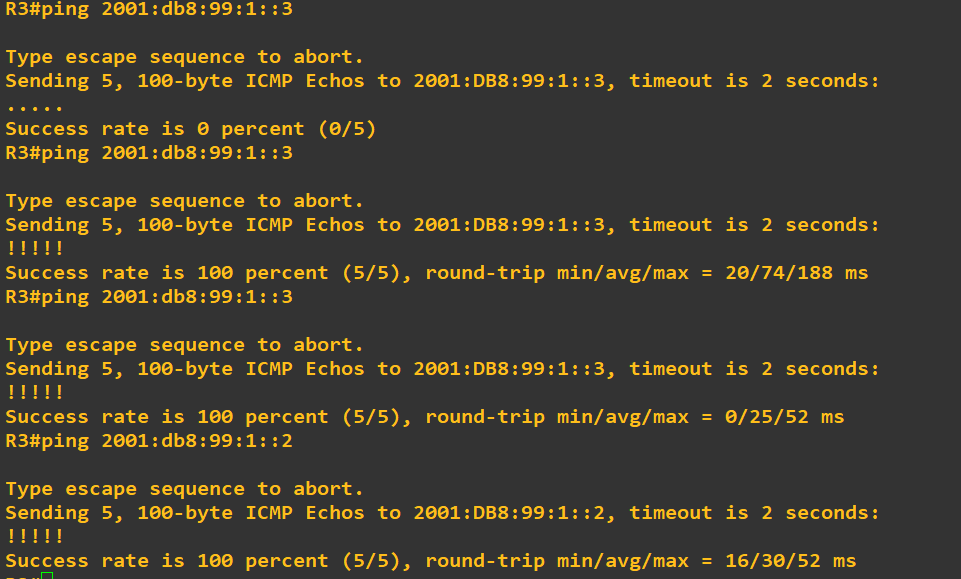
帧中继网络部分配置完成,R3 pingR2,R4测试结果如下:
配置R2,R6,R7的ospfv3,为area0。
R2:
R2(config)#int fastEthernet 0/0
R2(config-if)#ipv6 enable
R2(config-if)#ipv6 address 2001:db8:99:2::1/64
R2(config-if)#ipv6 ospf 1 area 0
R2(config-if)#no shutdown
R6:
R6(config)#ipv6 unicast-routing
R6(config)#ipv6 router ospf 1
R6(config-rtr)#router-id 1.1.1.2
R6(config-rtr)#exit
R6(config)#int fastEthernet 0/0
R6(config-if)#ipv6 enable
R6(config-if)#ipv6 address 2001:db8:99:2::2/64
R6(config-if)#ipv6 ospf 1 area 0
R6(config-if)#no shutdown
R7:
R7(config)#ipv6 unicast-routing
R7(config)#ipv6 router ospf 1
R7(config-rtr)#router-id 1.1.1.3
R7(config-rtr)#exit
R7(config)#int fastEthernet 0/0
R7(config-if)#ipv6 enable
R7(config-if)#ipv6 address 2001:db8:99:2::3/64
R7(config-if)#ipv6 ospf 1 area 0
R7(config-if)#no shutdown
然后查看R7在area0的ospf的邻居关系
R7#show ipv6 ospf neighbor

配置R6 F0/1,R7 F0/1,R8 F0/0 F0/1ospf area1为nssa 区域
R6:
R6(config)#ipv6 router ospf 1
R6(config-rtr)#area 1 nssa
R6(config-rtr)#int f0/1
R6(config-if)#ipv6 enable
R6(config-if)#ipv6 address 2001:db8:99:3::1/64
R6(config-if)#ipv6 ospf 1 area 1
R6(config-if)#no shutdown
R7:
R7(config)#ipv6 router ospf 1
R7(config-rtr)#area 1 nssa
R7(config-rtr)#int f0/1
R7(config-if)#ipv6 enable
R7(config-if)#ipv6 address 2001:db8:99:4::1/64
R7(config-if)#ipv6 ospf 1 area 1
R7(config-if)#no shutdown
R8:
R8(config)#ipv6 unicast-routing
R8(config)#ipv6 router ospf 1
R8(config-rtr)#router-id 1.1.1.4
R8(config-rtr)#area 1 nssa
R8(config-rtr)#int f0/0
R8(config-if)#ipv6 enable
R8(config-if)#ipv6 address 2001:db8:99:3::2/64
R8(config-if)#ipv6 ospf 1 area 1
R8(config-if)#no shutdown
R8(config-rtr)#int f0/1
R8(config-if)#ipv6 enable
R8(config-if)#ipv6 address 2001:db8:99:4::2/64
R8(config-if)#ipv6 ospf 1 area 1
R8(config-if)#no shutdown
查看R8 ospfv3路由表

到此ipv6 ospfv3部分配置完成,测试R4 ping R8成功

配置R5到R8 RIPng部分并且重分布到ospfv3
R5:
R5(config)#ipv6 unicast-routing
R5(config)#ipv6 router rip 1
R5(config)#int fastEthernet 0/0
R5(config-if)#ipv6 enable
R5(config-if)#ipv6 address 2001:Db8:99:5::1/64
R5(config-if)#ipv6 rip 1 enable
R5(config-if)#no shutdown
R8:
R8(config)#ipv6 router rip 1
R8(config)#int fastEthernet 1/0
R8(config-if)#ipv6 enable
R8(config-if)#ipv6 address 2001:Db8:99:5::2/64
R8(config-if)#ipv6 rip 1 enable
R8(config-if)#no shutdown
R8(config-if)#exit
R8(config)#ipv6 router ospf 1
R8(config-rtr)#redistribute rip 1
R8(config-rtr)#redistribute connected
R8(config-rtr)#exit
R8(config)#ipv6 router rip 1
R8(config-rtr)#redistribute ospf 1
R8(config-rtr)#redistribute connected
查看R5路由表,可获取area1,无法获取area 0和area2,可ping通R8
Ipv6的部分也做了一晚上,需要配置的地方很多很复杂,一个不小心就会配置出错,不是打错地址就是漏打什么,十分的考验耐心。配置已经到了最后的阶段,仅剩的几行代码,最后的实验结果就要出来了,可是正好十一点到了,电脑断网导致Vmware桥接模式的GNS3虚拟机IP失效了,GNS3也找不到服务器IP崩溃,我沉默了很久,放弃了再一次的配置。
OSPFv3与OSPF的配置的更多相关文章
- ospf基本配置协议
OSPF(开放最短路径优先)协议是链路状态路由协议类.对于 IPv4 的 OSPF 当前版本号 OSPFv2,的版本号 John Moy 在 RFC 1247 中引入,并在 RFC 2328 中 ...
- 路由器基础配置之ospf基础配置
我们将以上面的拓扑图进行本次ospf的实验,目的是能当三台pc机互通 先配置好pc机的IP地址,注意一定要给pc机设置好网关,接下来配置路由器的IP地址 router4 enable 进入特权模式 c ...
- H3C TE老版本OSPF正确配置
R1配置: ---------------------------------------------------- # sysname RT1# super password level 3 cip ...
- OSPF Sham-Link配置示例
在MPLS/VPN环境中,如果PE-CE之间使用OSPF交换路由信息,OSPF route将作为VPNv4 route(携带OSPF domain ID,OSPF Router ID,OSPF Rou ...
- 小结ospf基本配置的三个参数
实例:<华为路由器学习指南>P712 OSPF基本功能配置示例拓扑结构 配置思路:以E为例子 [E]ospf 100 router-id 5.5.5.5[E-ospf-100]area 1 ...
- OSPF 高级配置
这是一个综合的实验,包含了静态路由.默认路由.RIP.OSPF四种路由.通过配置,最终实现全网互通. 实验拓扑 如图所示连接,地址规划如下: 名称 接口 IP地址 R1 f0/0 192.168.10 ...
- H3C OSPF可选配置命令
- H3C OSPF基本配置命令
- OSPFv3实验配置(GNS3)
实验目的 1. 掌握 OSPFv3(v2) 的配置方法 2. 掌握在帧中继环境下 OSPFv3 (v2)的配置方法 3. 掌握 OSPFv3(v2) NSSA 的配置方法 4. 掌握外部路由汇总的配置 ...
随机推荐
- 个人作业4-Alpha阶段个人总结
一.个人总结 在alpha 结束之后, 每位同学写一篇个人博客, 总结自己的alpha 过程: 请用自我评价表:http://www.cnblogs.com/xinz/p/3852177.html 有 ...
- openGL实现图形学扫描线种子填充算法
title: "openGL实现图形学扫描线种子填充算法" date: 2018-06-11T19:41:30+08:00 tags: ["图形学"] cate ...
- Gvim:unable to load python
环境 系统win7 64 bit 软件: Gvim8.1 : MS-Windows 32bit 软件: python2.7.14 windows 64bit 问题 点击打开Gvim时,提示:unabl ...
- 利用BLEU进行机器翻译检测(Python-NLTK-BLEU评分方法)
双语评估替换分数(简称BLEU)是一种对生成语句进行评估的指标.完美匹配的得分为1.0,而完全不匹配则得分为0.0.这种评分标准是为了评估自动机器翻译系统的预测结果而开发的,具备了以下一些优点: 计算 ...
- 2018-2019-3 网络对抗技术 20165305 Exp3 免杀原理与实践
1.实验内容及步骤 1.1 正确使用msf编码器,msfvenom生成如jar之类的其他文件,veil-evasion,加壳工具,使用shellcode编程 将做实验二时生成的后门文件用virusto ...
- 用Java实现图片验证码功能
一.什么是图片验证码? 可以参考下面这张图: 我们在一些网站注册的时候,经常需要填写以上图片的信息. 1.图片生成实体类: package com.hexianwei.graphic; import ...
- ie8下new Date()指定时间
项目开发中很可能会需要创建一个指定日期的时间对象,火狐浏览器可以直接使用new Date('yyyy-mm-dd')生成时间,但是在ie8下就会发现生成的时间输出的是NaN-NaN-NaN.为了兼容可 ...
- 5.1JAVA基础复习——JAVA中的静态代码块、构造代码块、构造函数、局部代码块区别
构造代码块: 在类中定义可以给所有对象进行初始化.局部代码块: 在方法中定义属性的生命周期.静态代码块: 在类中定义用于给类调用时属性的初始化 构造函数与构造代码块的区别: 构造函数是给对应的对象进行 ...
- BindingResult 作用原理
controller代码 @RequestMapping("") public String index(@Valid User user , BindingResult bind ...
- hiberate 映射关系 详解
在我们平时所学的关系型数据库中,我们会大量处理表与表之间的关系,如果表比较多的话处理起来就比较繁琐了,但是hibernate给我们提供了很大的便利,这些便利让我们处理起来方便.我们所讲的源码地址:ht ...