
scrapy 下载图片 from cuiqingcai
import scrapy

class MzituScrapyItem(scrapy.Item):

    # define the fields for your item here like:

    # name = scrapy.Field()

    name = scrapy.Field()

    image_urls = scrapy.Field()

    url = scrapy.Field()

    pass
官方的:
https://doc.scrapy.org/en/latest/topics/media-pipeline.html?highlight=item_complete#scrapy.pipelines.images.ImagesPipeline.item_completed
https://doc.scrapy.org/en/latest/topics/media-pipeline.html?highlight=item_complete
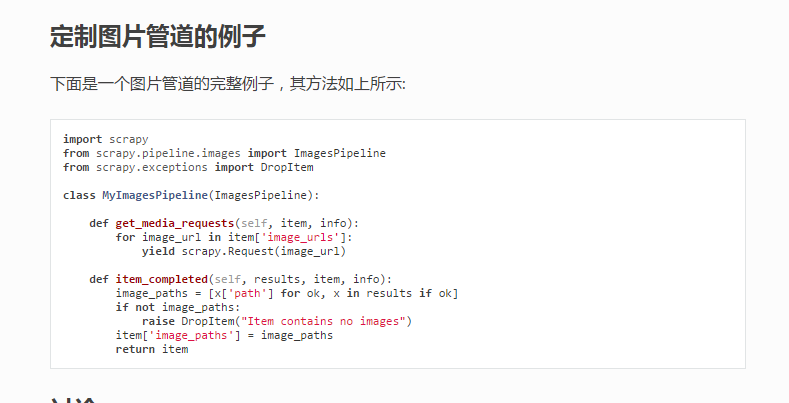
没有分类,很难看, 再重写一下ImagesPipeline中的file_path方法!
# -*- coding: utf-8 -*-

# Define your item pipelines here

#

# Don't forget to add your pipeline to the ITEM_PIPELINES setting

# See: http://doc.scrapy.org/en/latest/topics/item-pipeline.html

from scrapy import Request

from scrapy.pipelines.images import ImagesPipeline

from scrapy.exceptions import DropItem

import re

class MzituScrapyPipeline(ImagesPipeline):

    def file_path(self, request, response=None, info=None):

        """

        :param request: 每一个图片下载管道请求

        :param response:

        :param info:

        :param strip :清洗Windows系统的文件夹非法字符,避免无法创建目录

        :return: 每套图的分类目录

        """

        item = request.meta['item']

        folder = item['name']

        folder_strip = strip(folder)

        image_guid = request.url.split('/')[-1]

        filename = u'full/{0}/{1}'.format(folder_strip, image_guid)

        return filename

    def get_media_requests(self, item, info):

        """

        :param item: spider.py中返回的item

        :param info:

        :return:

        """

        for img_url in item['image_urls']:

            referer = item['url']

            yield Request(img_url, meta={'item': item,

                                         'referer': referer})

    def item_completed(self, results, item, info):

        image_paths = [x['path'] for ok, x in results if ok]

        if not image_paths:

            raise DropItem("Item contains no images")

        return item

    # def process_item(self, item, spider):

    #     return item

def strip(path):

    """

    :param path: 需要清洗的文件夹名字

    :return: 清洗掉Windows系统非法文件夹名字的字符串

    """

    path = re.sub(r'[?\\*|“<>:/]', '', str(path))

    return path

if __name__ == "__main__":

    a = '我是一个?\*|“<>:/错误的字符串'

    print(strip(a))
写一个中间件来处理图片下载的防盗链:
class MeiZiTu(object):

    def process_request(self, request, spider):

        '''设置headers和切换请求头

        :param request: 请求体

        :param spider: spider对象

        :return: None

        '''

        referer = request.meta.get('referer', None)

        if referer:

            request.headers['referer'] = referer
最后一步设置ImagesPipeline的存储目录!
在settings.py中写入:
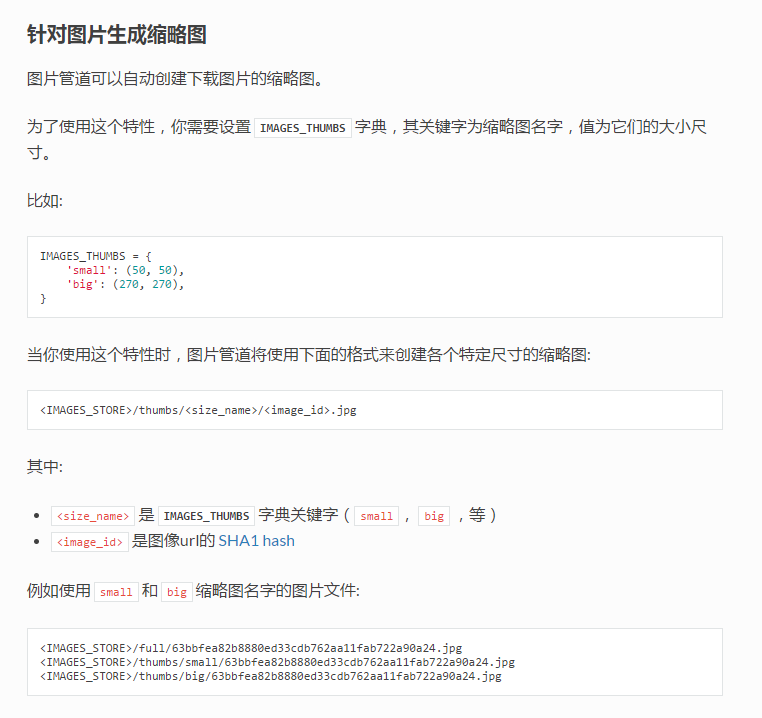
IMAGES_STORE = 'F:\mzitu\\'
在settings.py中写入以下配置。
# 30 days of delay for images expiration
DOWNLOADER_MIDDLEWARES = {
scrapy 下载图片 from cuiqingcai的更多相关文章
- scrapy下载图片到自己的目录,创建缩略图,存储入库
环境和工具:python2.7,scrapy 实验网站:http://www.27270.com/tag/333.html 爬去所有兔女郎图片,下面的推荐需要过滤 逻辑:分析网站信息,下载图片和入库 ...
- Scrapy下载图片及自定义分类下载路径
配置下载图片的流程如下 在items中定义两个属性,image_urls 和images .image_urls是用来存储需要下载的图片url链接,列表类型: 当文件下载完成后会把相关下载信息存入im ...
- 利用scrapy下载图片保存到本地
1.先声明一下,起始位置已经是将所有的图片链接都能到pipelines.py中 2.创建一个类,继承于ImagesPipeline,因此也就需要导入ImagesPipeline from scrapy ...
- [转]解决scrapy下载图片时相对路径转绝对路径的问题
专注自:http://blog.csdn.net/hjy_six/article/details/6862648 这段时间一直在研究利用scrapy抓取图片的问题,我发觉,用官网的http://doc ...
- Scrapy 下载图片时 ModuleNotFoundError: No module named'PIL'
使用scrapy的下载模块需要PIL(python图像处理模块)的支持,使用pip安装即可
- Scrapy 下载图片
参考 : https://www.jianshu.com/p/6c8d2730d088 https://docs.scrapy.org/en/latest/topics/item-pipeline.h ...
- scrapy下载图片报[scrapy.downloadermiddlewares.robotstxt] DEBUG: Forbidden by robots.txt:错误
本文转自:http://blog.csdn.net/zzk1995/article/details/51628205 先说结论,关闭scrapy自带的ROBOTSTXT_OBEY功能,在setting ...
- Day3-scrapy爬虫下载图片自定义名称
学习Scrapy过程中发现用Scrapy下载图片时,总是以他们的URL的SHA1 hash值为文件名,如: 图片URL:http://www.example.com/image.jpg 它的SHA1 ...
- 用Scrapy爬虫下载图片(豆瓣电影图片)
用Scrapy爬虫的安装和入门教程,这里有,这篇链接的博客也是我这篇博客的基础. 其实我完全可以直接在上面那篇博客中的代码中直接加入我要下载图片的部分代码的,但是由于上述博客中的代码已运行,已爬到快九 ...
随机推荐
- 安装OpenSSL中出现的问题及解决
1.报错:install-record.txt --single-version-externally-managed --compile" failed with error code 1 ...
- 单例模式多线程安全写法(double-lock-check)
原始版本 public static Object getInstance() { if (instance != null) { return instance; } instance = new ...
- Git Your branch is ahead of 'origin/master' by X commits解决方法
(1)方法1:git fetch origin (2)方法2(代码还需要):git push origin (3)方法3 (代码不需要):git reset --hard origin/$branch ...
- SQL Server2008 R2 数据库镜像实施手册(双机)SQL Server2014同样适用
这篇文章主要介绍了SQL Server2008 R2 数据库镜像实施手册(双机)SQL Server2014同样适用,需要的朋友可以参考下 一.配置主备机 1. 服务器基本信息 主机名称为:HOST_ ...
- Hybrid设计--Hybrid中Native能力的设计
稍微成熟的团队,header一定是不利于业务的UI组件,这个组件会封装在view层,方便前端使用.对业务前端开发来说,不用关注header是如何实现的,只用框架层释放的API.(一个前端有一个自己的U ...
- python date time
//test.py import time ticks = time.time()print tickslocaltime = time.localtime(time.time())print loc ...
- LeetCode107.二叉树的层次遍历II
给定一个二叉树,返回其节点值自底向上的层次遍历. (即按从叶子节点所在层到根节点所在的层,逐层从左向右遍历) 例如:给定二叉树 [3,9,20,null,null,15,7], 3 / \ 9 20 ...
- spark-shell下有提示了,但是发现不能退格
配好了Spark集群后,先用pyspark写了两个小例子,但是发现Tab键没有提示,于是打算转到scala上试试,在spark-shell下有提示了,但是发现不能退格,而且提示也不是复写,而是追加,这 ...
- java空心菱形
图 1 要输出如图1所示的菱形,第一反应是看看这个菱形有什么特点.在草稿纸上比划了半天,将图1转化成了图2用数字表示的图 图 2 比较图1和图2发现有以下特点: (1)图2中的每一个数字代表图1中每个 ...
- Cocos Creator学习目录
目录 安装和启动 文件结构 编辑器基础 基本概念 (场景树 节点 坐标 组件 ) Cocos Creator 脚本简介 Cocos Creator调试 节点 cc.Node 组件开发cc.Compon ...