
(GoRails)使用vue和Vuex管理嵌套的JavaScript评论, 使用组件vue-map-field
嵌套的JavaScript评论 Widget Models
创建类似https://disqus.com/ 的插件
交互插件:
- Real time comments:
- Adapts your site's lokk and feel,可以自定义的调整界面外观
- Rich media commenting读者可以增加图片和视频。
- Works everywhere.支持各种设备,语言。
https://gorails.com/系列视频:Embeddable JS widgets.
1.下载模版,按照vue.js
rails new embeded_comment -m template.rb

rails webpacker:install:vue
2. 创建数据库表格Discussion和Comment.
rails g scaffold Discussion url title comments_count:integer

rails g scaffold Comment discussion:references name email body:text ip_address user_agent

rails db:migrate
解释:
url属性,存储当前的讨论版的网址。
然后修改hello_vue为embed
mv app/javascript/packs/{hello_vue,embed}.js
添加代码:
let url = window.location.href

#encodeURIComponent()用于对输入的URl部分进行转义

fetch(`http://localhost:3000/api/v1/discussions/${encodeURIComponent(url)}`, {

  headers: { accept: 'application/json' }

})

.then(response => response.json())

.then(data => console.log(data))
3. 增加路径routes.rb,然后创建一个controller.
mkdir -p app/controllers/api/v1

touch app/controllers/api/v1/disscussions_controller.rb
改为:
  namespace :api do

    namespace :v1 do

      resources :discussions

    end

  end

  resources :discussions do

    resources :comments

  end
增加一个controller的show方法:
任何如http://localhost/?a=11之类的网址,会启用emben.js中的代码,然后执行show action行为,并转到对应的网页
class Api::V1::DiscussionsController < ApplicationController

  def show

    @discussion = Discussion.by_url(params[:id])

    render "discussions/show"

  end

end
在model,增加一个类方法by_url
#model, 增加by_url类方法。一个sanitize URL的方法,只要"/?"或者“/#”前面的URL部分
#http://localhost/?a=11
#http://localhost:3000/disscussions/#a=shanghai

class Discussion < ApplicationRecord

  has_many :comments

  def self.by_url(url)

    uri = url.split("?").first

    uri = url.split("#").first

    uri.sub!(/\/$/, '')

   # 如果comments中存在这个uri则选择它,不存在则创建它。

    where(url: uri).first_or_create

  end

end
改动:app/views/discussions/index.html.erb
在最后一行添加:
javascript_pack_tag "embed"
遇到一个问题:
NoMethodError in Devise::SessionsController#create
undefined method `current_sign_in_at' for #<User:0x00007fcad84de6f8>
      ## Trackable

      # t.integer  :sign_in_count, default: , null: false

      # t.datetime :current_sign_in_at

      # t.datetime :last_sign_in_at

      # t.string   :current_sign_in_ip

      # t.string   :last_sign_in_ip
2个方法解决:
- 添加上需要的属性,migration
- 或者从Devise model中去掉:trackable.
视频2
使用Vuex建立Vue前端和Rails后端的关联
1. 安装Vuex
Vuex是a state management pattern + library。用于Vue.js app。
yarn add vuex
2. 前端vue.js
事件监听:
# embed.js

const event = (typeof Turbolinks == "object" && Turbolinks.supported) ? "turbolinks:load" : "DOMContentLoaded"

document.addEventListener(event, () => {

  const el = document.querySelector("#comment")

  const app = new Vue({

    el,

    render: h => h(App)

  })

  console.log(app)

})
修改app.js
<template>

  <div id="comments">

    <p>{{ message }}</p>

  </div>

</template>
把上一视频的代码移动到store.js中
embed.js载入它。
import store from '../store'

// 使用Vuex关联store.调用store的action中的方法

store.dispatch("loadComments")
解释:Action通过store.dispatch来触发。
几张截图回顾一下Vuex和Vue
1. 比较vue, Vuex实例中的特性:
- data - state
- methods - actions/mutations
- computed - getters
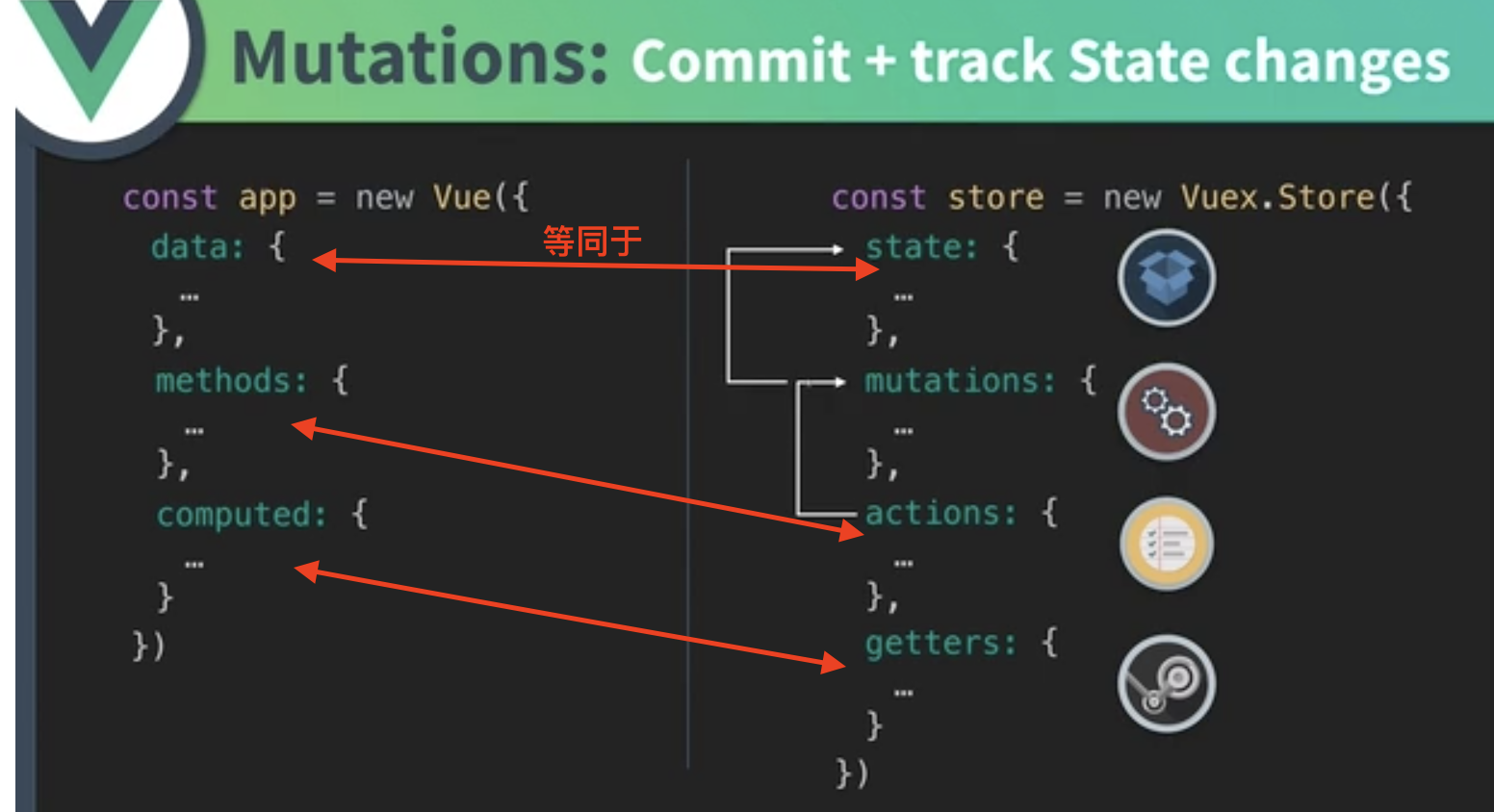
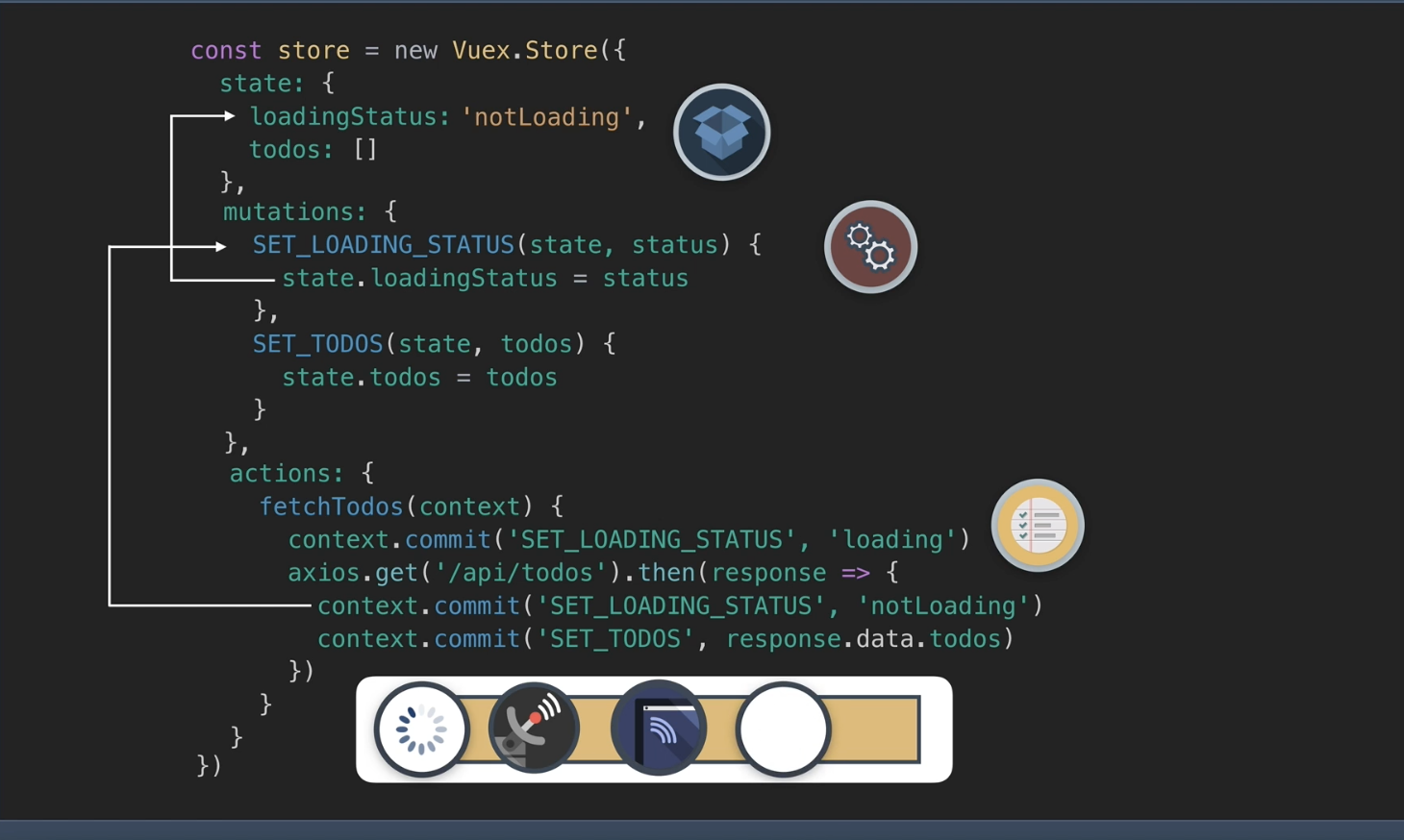
2.Vuex的motion。
- axios执行到context.commit,
- 执行mutations中的SET_LOADING_STATUS方法,
- 然后再对state中的特性进行修改。
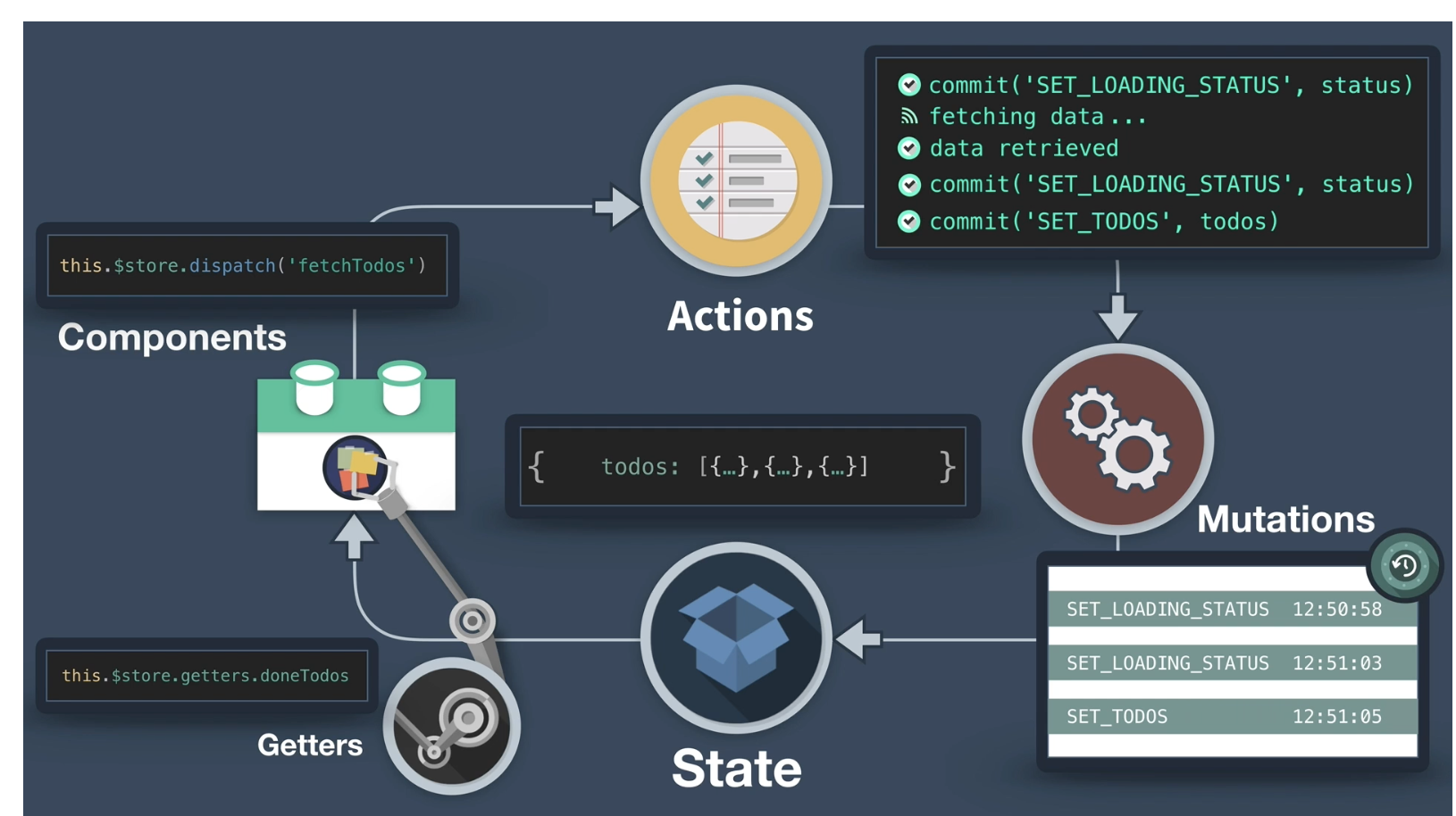
3. 执行fetchTodos方法的过程图
- 首先,执行:commit("SET_LOADING_STATUS", status), 最后State上更新loadingStatus: 'loading'
- 然后:取数据:axios.get('/api/todos'),
- 当数据被取回后,执行后面的context.commit。
- commit('SET_LOADING_STATUS', status), 最后更新loadingStatus: 'notLoading'
- 最后commit('SET_TODOS', todos), 最后更新State中的todos属性。
- 最后, 执行this.$store.getters.doneTodo
新建store.js文件:
import Vue from 'vue'
import Vuex from "vuex" Vue.use(Vuex) const store = new Vuex.Store({
state: {
comments: []
}, mutations: {
load(state, comments) {
state.comments = comments
}
}, action: {
// 使用了参数解构。用commit来代替context.commit。
// context其实是一个store实例。
//async异步函数的普通写法:解释见(GoRails)使用vue和Vuex管理嵌套的JavaScript评论, 使用组件vue-map-field的更多相关文章
- 十、Vue:Vuex实现data(){}内数据多个组件间共享
一.概述 官方文档:https://vuex.vuejs.org/zh/installation.html 1.1vuex有什么用 Vuex:实现data(){}内数据多个组件间共享一种解决方案(类似 ...
- 使用vuex管理数据
src/vuex/store.js 组件里面使用引入store.js,注意路径 import store from 'store.js' 然后在使用的组件内data(){}同级放入store 三大常用 ...
- 【09】Vue 之 Vuex 数据通信
9.1. 引言 Vue组件化做的确实非常彻底,它独有的vue单文件组件也是做的非常有特色.组件化的同时带来的是:组件之间的数据共享和通信的难题. 尤其Vue组件设计的就是,父组件通过子组件的prop进 ...
- 应用四:Vue之VUEX状态管理
(注:本文适用于有一定Vue基础或开发经验的读者,文章就知识点的讲解不一定全面,但却是开发过程中很实用的) 概念:Vuex 是一个专为 Vue.js 应用程序开发的状态管理模式.它采用集中式存储管理应 ...
- vue项目--vuex状态管理器
本文取之官网和其他文章结合自己的理解用简单化的语言表达.用于自己的笔记记录,也希望能帮到其他小伙伴理解,学习更多的前端知识. Vuex 是什么? Vuex 是一个专为 Vue.js 应用程序开发的状态 ...
- vue创建状态管理(vuex的store机制)
1:为什么说要是永远状态管理 在使用 Vue 框架做单页面应用时,我们时常会遇到传值,组件公用状态的问题.(子父间传值文章传送门) ,如果是简单的应用,兄弟组件之间通信还能使用 eventBus 来作 ...
- Vue之状态管理(vuex)与接口调用
Vue之状态管理(vuex)与接口调用 一,介绍与需求 1.1,介绍 1,状态管理(vuex) Vuex 是一个专为 Vue.js 应用程序开发的状态管理模式.它采用集中式存储管理应用的所有组件的状态 ...
- Vue笔记:使用 vuex 管理应用状态
如果你在使用 vue.js , 那么我想你可能会对 vue 组件之间的通信感到崩溃 . 我在使用基于 vue.js 2.0 的UI框架 ElementUI 开发网站的时候 , 就遇到了这种问题 : 一 ...
- 转 理解vuex -- vue的状态管理模式
转自:https://segmentfault.com/a/1190000012015742 vuex是什么? 先引用vuex官网的话: Vuex 是一个专为 Vue.js 应用程序开发的状态管理模式 ...
随机推荐
- python --- 21 MRO C3算法
一.python2.2之前用的是 经典类的MRO继承 ①深度递归继承 从左到右 ,一条路走到黑 ②广度继承 一层一层的继承 深度继承时 为 R 1 2 3 4 ...
- Flask学习【第4篇】:用Flask的扩展实现的简单的页面登录
from flask import Flask,render_template,request,redirect,session app = Flask(__name__,template_folde ...
- Restful framework【第六篇】认证组件
基本用法 -认证功能 1 写一个类,继承BaseAuthentication 2 def authenticate(self,request) ,记住传request对象 -如果验证通过,返回None ...
- 2-sat相关复习
2-sat相关复习 noi曾经考过,谁能说得准呢 sat问题 通俗的sat问题表述一般是这样的:有很多个集合,每个集合里面有若干元素,现给出一些取元素的规则,要你判断是否可行,可行则给出一个可行方案. ...
- 【问题解决:死锁】Lock wait timeout exceeded; try restarting transaction的问题
执行数据删除操作时一直超时并弹出Lock wait timeout exceeded; try restarting transaction错误 解决办法 1.先查看数据库的事务隔离级别 select ...
- SSM项目 单元测试中 注入bean 空指针异常
##特别 由于准备春招,所以希望各位看客方便的话,能去github上面帮我Star一下项目https://github.com/Draymonders/Campus-Shop java.lang.Nu ...
- js 二叉树删除最大值和最小值
//删除最小值function delMinNode (root){ if(!root) { return false; } var current = root; if (current.left ...
- 题解——UVA11997 K Smallest Sums
题面 背景 输入 输出 翻译(渣自翻) 给定K个包含K个数字的表,要求将其能产生的\( k^{k} \)个值中最小的K个输出出来 题解 k路归并问题的经典问题 可以转化为二路归并问题求解 考虑A[], ...
- 洛谷P2782 友好城市 DP
やはり まだあしたということは嘘でしょう.ぜんぶ忘れた( ´・ヮ・`) 所以今天就贴一道水题吧 原题>>https://www.luogu.org/problem/show?pid=278 ...
- win10 右键菜单很慢的解决方式
本来想用 win7 的,不想花很多时间折腾了.现在新电脑主板硬盘CPU都在排挤 win7 ,真是可怜呀.正题: 新电脑的性能应该还算不错的, 18 年跑分 29w 以上,但在图标上面右键却都要转圈几秒 ...