
Linux 配置yum源.
Linux 配置yum源.
环境:虚拟机中安装了RedHat ,在进行安装mariadb的时候,出现如下错误。是因为yum源的问题,需要进行配置yum源。本教程是配置本地yum源。
 [root@localhost yum.repos.d]# yum groups install mariadb mariadb-client -y

 Loaded plugins: langpacks, product-id, search-disabled-repos, subscription-manager

 This system is not registered with an entitlement server. You can use subscription-manager to register.

 There are no enabled repos.

  Run "yum repolist all" to see the repos you have.

  To enable Red Hat Subscription Management repositories:

      subscription-manager repos --enable <repo>

  To enable custom repositories:

      yum-config-manager --enable <repo>
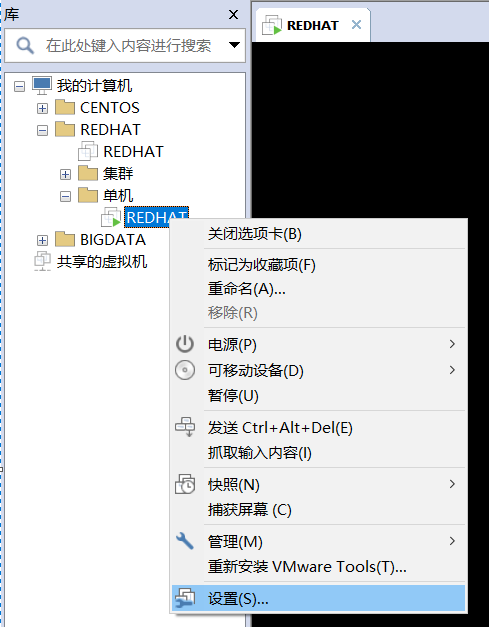
选中虚拟机中的操作系统,鼠标:右键-->>设置
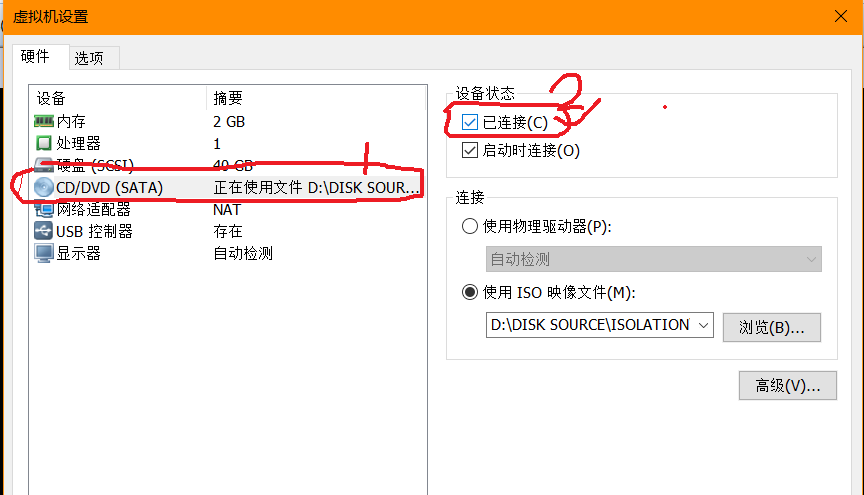
在弹出的“虚拟机设置” 窗口中,选择:CD/DVD -->>设备状态(已连接,确保打上勾即可)
在Linux的终端输入:mount 指令,可以查看到有块设备被加载进来了,见红色标注,相关信息如下:
 [root@localhost yum.repos.d]# mount

 sysfs on /sys type sysfs (rw,nosuid,nodev,noexec,relatime,seclabel)

 proc on /proc type proc (rw,nosuid,nodev,noexec,relatime)

 devtmpfs on /dev type devtmpfs (rw,nosuid,seclabel,size=917580k,nr_inodes=,mode=)

 securityfs on /sys/kernel/security type securityfs (rw,nosuid,nodev,noexec,relatime)

 tmpfs on /dev/shm type tmpfs (rw,nosuid,nodev,seclabel)

 devpts on /dev/pts type devpts (rw,nosuid,noexec,relatime,seclabel,gid=,mode=,ptmxmode=)

 tmpfs on /run type tmpfs (rw,nosuid,nodev,seclabel,mode=)

 tmpfs on /sys/fs/cgroup type tmpfs (ro,nosuid,nodev,noexec,seclabel,mode=)

 cgroup on /sys/fs/cgroup/systemd type cgroup (rw,nosuid,nodev,noexec,relatime,xattr,release_agent=/usr/lib/systemd/systemd-cgroups-agent,name=systemd)

 pstore on /sys/fs/pstore type pstore (rw,nosuid,nodev,noexec,relatime)

 cgroup on /sys/fs/cgroup/hugetlb type cgroup (rw,nosuid,nodev,noexec,relatime,hugetlb)

 cgroup on /sys/fs/cgroup/devices type cgroup (rw,nosuid,nodev,noexec,relatime,devices)

 cgroup on /sys/fs/cgroup/freezer type cgroup (rw,nosuid,nodev,noexec,relatime,freezer)

 cgroup on /sys/fs/cgroup/memory type cgroup (rw,nosuid,nodev,noexec,relatime,memory)

 cgroup on /sys/fs/cgroup/cpu,cpuacct type cgroup (rw,nosuid,nodev,noexec,relatime,cpuacct,cpu)

 cgroup on /sys/fs/cgroup/perf_event type cgroup (rw,nosuid,nodev,noexec,relatime,perf_event)

 cgroup on /sys/fs/cgroup/blkio type cgroup (rw,nosuid,nodev,noexec,relatime,blkio)

 cgroup on /sys/fs/cgroup/cpuset type cgroup (rw,nosuid,nodev,noexec,relatime,cpuset)

 cgroup on /sys/fs/cgroup/net_cls,net_prio type cgroup (rw,nosuid,nodev,noexec,relatime,net_prio,net_cls)

 cgroup on /sys/fs/cgroup/pids type cgroup (rw,nosuid,nodev,noexec,relatime,pids)

 configfs on /sys/kernel/config type configfs (rw,relatime)

 /dev/mapper/rhel-root on / type xfs (rw,relatime,seclabel,attr2,inode64,noquota)

 selinuxfs on /sys/fs/selinux type selinuxfs (rw,relatime)

 systemd- on /proc/sys/fs/binfmt_misc type autofs (rw,relatime,fd=,pgrp=,timeout=,minproto=,maxproto=,direct,pipe_ino=)

 hugetlbfs on /dev/hugepages type hugetlbfs (rw,relatime,seclabel)

 debugfs on /sys/kernel/debug type debugfs (rw,relatime)

 mqueue on /dev/mqueue type mqueue (rw,relatime,seclabel)

 nfsd on /proc/fs/nfsd type nfsd (rw,relatime)

 /dev/sda1 on /boot type xfs (rw,relatime,seclabel,attr2,inode64,noquota)

 sunrpc on /var/lib/nfs/rpc_pipefs type rpc_pipefs (rw,relatime)

 tmpfs on /run/user/ type tmpfs (rw,nosuid,nodev,relatime,seclabel,size=186704k,mode=,uid=,gid=)

 fusectl on /sys/fs/fuse/connections type fusectl (rw,relatime)

 gvfsd-fuse on /run/user//gvfs type fuse.gvfsd-fuse (rw,nosuid,nodev,relatime,user_id=,group_id=)

 tmpfs on /run/user/ type tmpfs (rw,nosuid,nodev,relatime,seclabel,size=186704k,mode=)

 /dev/sr0 on /run/media/hk-super/RHEL-7.4 Server.x86_64 type iso9660 (ro,nosuid,nodev,relatime,uid=,gid=,iocharset=utf8,mode=,dmode=,uhelper=udisks2)
使用root账号(切换root指令:su - root),在/mnt 目录下创建一个目录。
指令: mkdir /mnt/dvd
然后卸载/dev/sr0 ,然后挂在到/mnt/dvd ,进入的/mnt/dvd,就可以查看到镜像内的文件了。
相关指令如下:
卸载: umount /dev/sr0
重新挂在: mount /dev/sr0 /mnt/dvd
进入dvd目录: cd /mnt/dvd(此时也进入到镜像文件内了)
查看镜像内的文件:ls -l ( l是字母 )

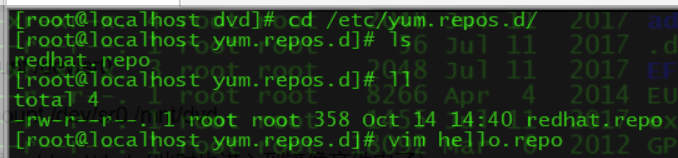
镜像加载到Linux之后,开始配置repo文件,相关指令如下:
cd /etc/yum.repos.d/
vim hello.repo (名字随便起,但后缀名必须是:.repo)
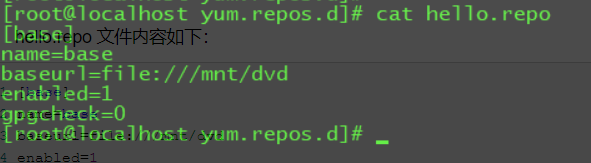
hello.repo 文件内容如下:
 [base]

 name=base

 baseurl=file:///mnt/dvd

 enabled=

 gpgcheck=
然后分别输入如下指令:
yum clean all
yum makecache
 [root@localhost yum.repos.d]# yum clean all

 Loaded plugins: langpacks, product-id, search-disabled-repos, subscription-manager

 This system is not registered with an entitlement server. You can use subscription-manager to register.

 Cleaning repos: base

 Cleaning up everything

 Maybe you want: rm -rf /var/cache/yum, to also free up space taken by orphaned data from disabled or removed repos

 [root@localhost yum.repos.d]#

 [root@localhost yum.repos.d]#

 [root@localhost yum.repos.d]#

 [root@localhost yum.repos.d]# yum makecache

 Loaded plugins: langpacks, product-id, search-disabled-repos, subscription-manager

 This system is not registered with an entitlement server. You can use subscription-manager to register.

 base                                                                                                       | 4.1 kB  ::

 (/): base/filelists_db                                                                                   | 3.4 MB  ::

 (/): base/group_gz                                                                                       |  kB  ::

 (/): base/other_db                                                                                       | 1.5 MB  ::

 (/): base/productid                                                                                      | 1.6 kB  ::

 (/): base/primary_db                                                                                     | 4.0 MB  ::

 Metadata Cache Created

 [root@localhost yum.repos.d]#
上面操作反显的日志,说明yum源配置完成。
然后再次输入安装指令:yum groups install mariadb mariadb-client -y 无报错信息,marridb安装成功。
如有问题,欢迎纠正!!!
如有转载,请标明源处:https://www.cnblogs.com/Charles-Yuan/p/9786415.html
Linux 配置yum源.的更多相关文章
- Linux 配置yum源(互联网)
Linux 配置yum源(互联网) 环境:操作系统Redhat 7.5 1.卸载现有的yum源 rpm -qa|grep yum|xargs rpm -e --nodeps #移除与原yum有 ...
- linux配置yum源
yum(全称为 Yellow dog Updater, Modified)是一个在Fedora和RedHat以及SUSE中的Shell前端软件包管理器.基於RPM包管理,能够从指定的服务器自动下载RP ...
- Linux配置yum源(离线和在线)
配置yum源有2种方法,一种是离线yum源,另外一种是在线yum源. 一.离线yum源,基于安装光盘提供的安装仓库. 建立一个属于仓库文件夹 mkdir /media/zidong cd /media ...
- linux配置yum源、mount及yum命令
配置yum源: 在/mnt目录下新建一个空的目录,名为rhel. [root@localhost mnt]# mkdir rhel 然后 [root@localhost Packages]# cd ...
- linux配置 yum 源
使用 yum 命令安装软件包需要一个yum仓库(即yum源),yum通过客户端(yum命令本身即是yum客户端)去连接yum源服务器,CentOS默认yum源为官方的 http://mirrorlis ...
- Linux配置yum源(本地源和网络源)
目录 一:配置本地yum源 二:配置网络yum源 更新源可以获取最新的软件信息,以更新您的系统 Redhat7配置源 YUM(Yellow dog Updater Modified): yum是Re ...
- Linux本地yum源配置以及使用yum源安装gcc编译环境
本文档是图文安装本地yum源的教程,以安装gcc编译环境为例. 适用范围:所有的cetos,红帽,fedroa版本 适用人群:有一点linux基础的小白 范例系统版本:CentOS Linux rel ...
- RHEL 7.0 本地配置yum源
RHEL 7.0 本地配置yum源 yum简介 yum = Yellow dog Updater, Modified 主要功能是更方便的添加/删除/更新RPM包. 它能自动解决包的倚赖性问题. 它 ...
- RedHat linux配置yum本地资源
今天安装个linux平台的oracle数据库,在oracle检测的时候发现有些系统补丁包没有安装,手动rpm安装报有些关联包也没有安装,想想如果一个一个rpm的话累死人了要,所以想起用yum来进行安装 ...
随机推荐
- C#配置.INI文件
百度搜了一些资料,好多没给示例,只给了代码.让人看了直接懵逼,后来找了个靠谱的:http://www.jb51.net/article/118591.htm
- Chap1:基本概念[《区块链中文词典》维京&甲子]
- [nginx] 从源码编译安装NGINX
nginx通过rpm包进行的安装和配置: [web][nginx] 初识nginx -- 使用nginx搭建https DPI解码测试环境 现在,要通过源码进行安装. 参考:https://nginx ...
- flash插件如何生成
1.通过flash 原生的代码开发插件界面: 2.对于需要使用到的文件,表现mxi 文件, 该文件为adobe extension infomation file, 示例如下 <macromed ...
- javaweb连接数据库并完成增删改查
一.连接数据库 1.mysql数据库的安装和配置 在网上找到了篇关于mysql的安装详细说明,供读者自己学习 https://www.jb51.net/article/23876.htm 2.mysq ...
- pacakge-info.java
翻看以前的笔记,看到一个特殊的java文件:pacakge-info.java,虽然有记录,但是不全,就尝试着追踪一下该问题, 分享一下流水账式的结果. 首先,它不能随便被创建.在Eclipse中, ...
- sshd_config配置详解
sshd_config配置详解 名称 sshd_config - OpenSSH SSH 服务器守护进程配置文件 大纲 /etc/ssh/sshd_config 描述 sshd(8) 默认从 /etc ...
- 【PyQt5-Qt Designer】工具箱(QToolBox)控件的使用
工具箱(QToolBox)+toolButton+tabWidget 总体介绍 QToolBox类提供了一列选项卡的小部件(选项卡内含项目). 工具箱是一个小部件,它将选项卡一个一个的显示,当前项目显 ...
- python numpy初始化一个图像矩阵
mask_all = np.zeros((256, 256), dtype='uint8') 单通道 mask_all_enlarge = np.zeros((256, 256, 3), dtype ...
- python解析VOC的xml文件并转成自己需要的txt格式
在进行神经网络训练的时候,自己标注的数据集往往会有数据量不够大以及代表性不强等问题,因此我们会采用开源数据集作为训练,开源数据集往往具有特定的格式,如果我们想将开源数据集为我们所用的话,就需要对其格式 ...