
Canvas制作天气预报走势图
要实现的效果如下图:
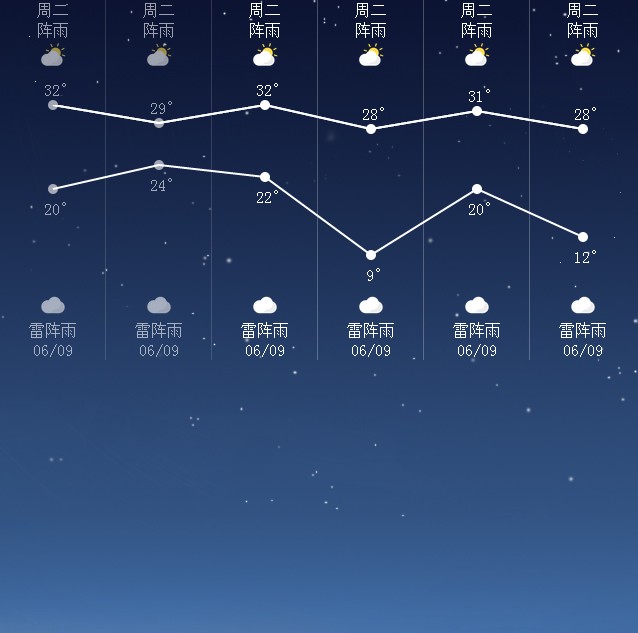
HTML代码如下:
<!DOCTYPE html>

<html>

<head>

    <title></title>

    <link rel="stylesheet" type="text/css" href="common.css"/>

</head>

<body>

    <div class="weather-container">

        <canvas id="myCanvas" width="640" height="150"></canvas>

        <a class="oneDayWeather pastDay" href="http://www.sinohuaxia.cn" target="_blank">

            <div class="weekDay">周二</div>

            <div class="curWeather">阵雨</div>

            <div class="curWeatherPic"></div>

            <div class="highTempNum" id="highTempNum0">32°</div>

            <div class="highTemp" id="highTemp0"></div>

            <div class="lowTemp" id="lowTemp0"></div>

            <div class="lowTempNum" id="lowTempNum0">20°</div>

            <div class="dayWeatherPic"></div>

            <div class="dayWeather">雷阵雨</div>

            <div class="dayDate">06/09</div>

        </a>

        <a class="oneDayWeather pastDay" href="http://www.sinohuaxia.cn" target="_blank">

            <div class="weekDay">周二</div>

            <div class="curWeather">阵雨</div>

            <div class="curWeatherPic"></div>

            <div class="highTempNum" id="highTempNum1">29°</div>

            <div class="highTemp" id="highTemp1"></div>

            <div class="lowTemp" id="lowTemp1"></div>

            <div class="lowTempNum" id="lowTempNum1">24°</div>

            <div class="dayWeatherPic"></div>

            <div class="dayWeather">雷阵雨</div>

            <div class="dayDate">06/09</div>

        </a>

        <a class="oneDayWeather" href="http://www.sinohuaxia.cn" target="_blank">

            <div class="weekDay">周二</div>

            <div class="curWeather">阵雨</div>

            <div class="curWeatherPic"></div>

            <div class="highTempNum" id="highTempNum2">32°</div>

            <div class="highTemp" id="highTemp2"></div>

            <div class="lowTemp" id="lowTemp2"></div>

            <div class="lowTempNum" id="lowTempNum2">22°</div>

            <div class="dayWeatherPic"></div>

            <div class="dayWeather">雷阵雨</div>

            <div class="dayDate">06/09</div>

        </a>

        <a class="oneDayWeather" href="http://www.sinohuaxia.cn" target="_blank">

            <div class="weekDay">周二</div>

            <div class="curWeather">阵雨</div>

            <div class="curWeatherPic"></div>

            <div class="highTempNum" id="highTempNum3">28°</div>

            <div class="highTemp" id="highTemp3"></div>

            <div class="lowTemp" id="lowTemp3"></div>

            <div class="lowTempNum" id="lowTempNum3">9°</div>

            <div class="dayWeatherPic"></div>

            <div class="dayWeather">雷阵雨</div>

            <div class="dayDate">06/09</div>

        </a>

        <a class="oneDayWeather" href="http://www.sinohuaxia.cn" target="_blank">

            <div class="weekDay">周二</div>

            <div class="curWeather">阵雨</div>

            <div class="curWeatherPic"></div>

            <div class="highTempNum" id="highTempNum4">31°</div>

            <div class="highTemp" id="highTemp4"></div>

            <div class="lowTemp" id="lowTemp4"></div>

            <div class="lowTempNum" id="lowTempNum4">20°</div>

            <div class="dayWeatherPic"></div>

            <div class="dayWeather">雷阵雨</div>

            <div class="dayDate">06/09</div>

        </a>

        <a class="oneDayWeather" href="http://www.sinohuaxia.cn" target="_blank">

            <div class="weekDay">周二</div>

            <div class="curWeather">阵雨</div>

            <div class="curWeatherPic"></div>

            <div class="highTempNum" id="highTempNum5">28°</div>

            <div class="highTemp" id="highTemp5"></div>

            <div class="lowTemp" id="lowTemp5"></div>

            <div class="lowTempNum" id="lowTempNum5">12°</div>

            <div class="dayWeatherPic"></div>

            <div class="dayWeather">雷阵雨</div>

            <div class="dayDate">06/09</div>

        </a>

    </div>


    <script type="text/javascript">

    var canvas=document.getElementById('myCanvas');

    var canvasTop=canvas.offsetTop;

    var ctx=canvas.getContext('2d');

    var sixdayHighTemperature=[32,29,32,28,31,28];

    var sixdayLowTemperature=[20,24,22,9,20,12];

    var picHeight=150;

    var maxHighTemp=maxNum(sixdayHighTemperature);

    var minLowTemp=minNum(sixdayLowTemperature);

    var maxRange=maxHighTemp-minLowTemp;

    function maxNum(arr){

        var maxNum=0;

        if(arr.length){

            for(var i=0,len=arr.length;i<len;i++){

                if(i==0){

                    maxNum=arr[0];

                }else if(maxNum<arr[i]){

                    maxNum=arr[i];

                }

            }

        }

        return maxNum;

    }

    function minNum(arr){

        var minNum=0;

        if(arr.length){

            for(var i=0,len=arr.length;i<len;i++){

                if(i==0){

                    minNum=arr[0];

                }else if(minNum>arr[i]){

                    minNum=arr[i];

                }

            }

        }

        return minNum;

    }

    ctx.strokeStyle="#fff";

    ctx.lineWidth=2;

    (function drawHighTemp(temps){

            var drawX=0,drawY=0;

            var distance=Math.floor(picHeight/maxRange);

            for(var i=0,len=temps.length;i<len;i++){

                drawX=i*106+53;

                drawY=(maxHighTemp-temps[i])*distance;

                document.getElementById('highTemp'+i).style.top=(canvasTop+drawY-5)+"px";

                document.getElementById('highTempNum'+i).style.top=(canvasTop+drawY-25)+"px";

                if(i==0){

                    ctx.moveTo(drawX,drawY);

                }else{

                    ctx.lineTo(drawX,drawY);

                }

            }

            ctx.stroke();

        })(sixdayHighTemperature);

        (function drawHighTemp(temps){

            var drawX=0,drawY=0;

            var distance=Math.floor(picHeight/maxRange);

            for(var i=0,len=temps.length;i<len;i++){

                drawX=i*106+53;

                drawY=picHeight-((temps[i]-minLowTemp)*distance);

                document.getElementById('lowTemp'+i).style.top=(canvasTop+drawY-5)+"px";

                document.getElementById('lowTempNum'+i).style.top=(canvasTop+drawY+10)+"px";

                if(i==0){

                    ctx.moveTo(drawX,drawY);

                }else{

                    ctx.lineTo(drawX,drawY);

                }

            }

            ctx.stroke();

        })(sixdayLowTemperature)


    </script>

</body>

</html>
CSS代码如下:
body {

    background: url(img/bg_night_sunny.jpg) no-repeat;

    margin: 0;

    padding: 0;

}

.weather-container{

    width:640px;

    height:360px;

    position:relative;

}

.oneDayWeather{

    position: relative;

    overflow: hidden;

    width:105px;

    height:360px;

    float:left;

    text-align: center;

    line-height: 20px;

    color:#fff;

    border-right:1px solid rgba(255,255,255,0.25);

}

.oneDayWeather:last-child{

    border:none;

}

.oneDayWeather:active{

    background:rgba(0,0,0,0.2);

}

.pastDay{

    opacity: 0.6;

}

.weekDay{

    position: absolute;

    left:0;

    top:0;

    width:100%;

}

.curWeather{

    position: absolute;

    left:0;

    top:20px;

    width:100%;

}

.curWeatherPic{

    position: absolute;

    left:0;

    top:40px;

    width:100%;

    height:30px;

    background:url(img/w1.png) center 0 no-repeat;

    background-size:contain;

}

.highTemp,.lowTemp{

    position: absolute;

    left:0;

    top:-240px;

    width:100%;

    height:10px;

    background: url(img/splash_indicator_focused.png) center 0 no-repeat;

}

.highTempNum,.lowTempNum{

    position: absolute;

    left:0;

    top:-20em;

    width:100%;

    height:20px;

    text-indent: 15px

}

.dayWeatherPic{

    position: absolute;

    left:0;

    bottom:40px;

    width:100%;

    height:30px;

    background:url(img/w2.png) center 0 no-repeat;

    background-size:contain;

}

.dayWeather{

    position: absolute;

    left:0;

    bottom:20px;

    width:100%;

}

.dayDate{

    position: absolute;

    left:0;

    bottom:0;

    width:100%;

}

#myCanvas{

    position:absolute;

    top:105px;

    left:0;

}
Canvas制作天气预报走势图的更多相关文章
- Html5 canvas 绘制彩票走势图
因须要 要实现一个类似彩票走势图的功能,初次学Html5 ,非常多地方不明白,前段时间也发帖请教过这个问题.也是没给个明白说话,在网上搜了非常多,也没有实现的样例,今天细致研究了下.发现事实上也不是非 ...
- canvas制作柱形图/折线图/饼状图,Konva写动态饼状图
制作饼状图 <!DOCTYPE html> <html lang="en"> <head> <meta charset="UTF ...
- WebService学习--股票走势图+天气预报实现
互联网上面有很多的免费webService服务,我们可以调用这些免费的WebService服务,将一些其他网站的内容信息集成到我们的Web应用中显示,下面就以获取股票数据和天气预报为例进行学习 ...
- 用Canvas制作简单的画图工具
今天用Canvas制作了一个画图工具,非常简单,功能也不是很多,主要有背景网格,画线,画圆,画矩形和画圆角矩形,也用到了canvas的一些基本知识,在这里一一列举. 1.线段的绘制: 如何绘制真正的1 ...
- Vue+WebSocket+ES6+Canvas 制作「你画我猜」小游戏
Vue+WebSocket+ES6+Canvas 制作「你画我猜」小游戏 转载 来源:jrainlau 链接:https://segmentfault.com/a/1190000005804860 项 ...
- HTML5 canvas制作童年的回忆大风车
今天看到一篇CSS3写的大风车http://www.cnblogs.com/yaojaa/archive/2013/01/30/2882521.html,感觉CSS3太神奇了,这在以前用CSS是想都不 ...
- 使用canvas制作的移动端color picker
使用canvas制作的移动端color picker 项目演示地址(用手机或者手机模式打开) 我在另一个中demo,需要用到color picker,但是找不到我需要的移动端color picker, ...
- 【转】使用Python matplotlib绘制股票走势图
转载出处 一.前言 matplotlib[1]是著名的python绘图库,它提供了一整套绘图API,十分适合交互式绘图.本人在工作过程中涉及到股票数据的处理如绘制K线等,因此将matplotlib的使 ...
- 酷!使用 jQuery & Canvas 制作相机快门效果
在今天的教程中,我们将使用 HTML5 的 Canvas 元素来创建一个简单的摄影作品集,它显示了一组精选照片与相机快门的效果.此功能会以一个简单的 jQuery 插件形式使用,你可以很容易地整合到任 ...
随机推荐
- THINKPHP源码学习--------文件上传类
TP图片上传类的理解 在做自己项目上传图片的时候一直都有用到TP的上传图片类,所以要进入源码探索一下. 文件目录:./THinkPHP/Library/Think/Upload.class.php n ...
- ORACLE 利用 REPLACE函数替换字段字符串
REPLACE(string,s1,s2) string 希望被替换的字符或变量 s1 被替换的字符串 s2 要替换的字符串 SQL> select replace(he love you,he ...
- [LeetCode] Factorial Trailing Zeroes 求阶乘末尾零的个数
Given an integer n, return the number of trailing zeroes in n!. Note: Your solution should be in log ...
- [LeetCode] Surrounded Regions 包围区域
Given a 2D board containing 'X' and 'O', capture all regions surrounded by 'X'. A region is captured ...
- Android中基于CGroup的memory子系统HAL层分析-lmkd
Android在内存管理上于Linux有些小的区别,其中一个就是引入了lowmemorykiller.从lowmemorykiller.c位于drivers/staging/android也可知道,属 ...
- 浅谈javascript面向对象
我们常用的两种编程模式 POP--面向过程编程(Process-oriented programming) 面向过程编程是以功能为中心来进行思考和组织的一种编程方法,它强调的是系统的数据被加工和处理的 ...
- 【转】线程及同步的性能 - 线程池 / ThreadPoolExecutors / ForkJoinPool
线程池和ThreadPoolExecutors 虽然在程序中可以直接使用Thread类型来进行线程操作,但是更多的情况是使用线程池,尤其是在Java EE应用服务器中,一般会使用若干个线程池来处理来自 ...
- ubuntu16.04配置py-faster-rcnn
在ubuntu16.04下编译安装了py-faster-rcnn. 主要步骤包括:安装cuda/cudnn,换apt源,装开源显卡驱动,装caffe依赖的apt包和python包,下载py-faste ...
- java swing 双人五子棋源代码
import java.awt.Color; import java.awt.Font; import java.awt.Graphics; import java.awt.Toolkit; impo ...
- MVC5知识点记录
IIS/ASP.NET管道 原理永远是重中之重,所以在开篇的地方,先了解一下地址栏输入网址回车之后的故事. 不同IIS版本处理请求也不一样 IIS5 IIS 5.x 运行在进程InetInfo.exe ...