
Eclipse Photon 小技巧(tips)
本文内容:
Eclipse 4.8版本 代号 photon 光量子 ,感觉更像ide了,虽然这些技巧广为认知,但是作为eclipse来说,也是很重要的、
Code completion allows you to quickly complete statements in your code. For example, start typing a part of a method name and press CTRL+Space to complete it. Multiple choices are presents to you via a popup.
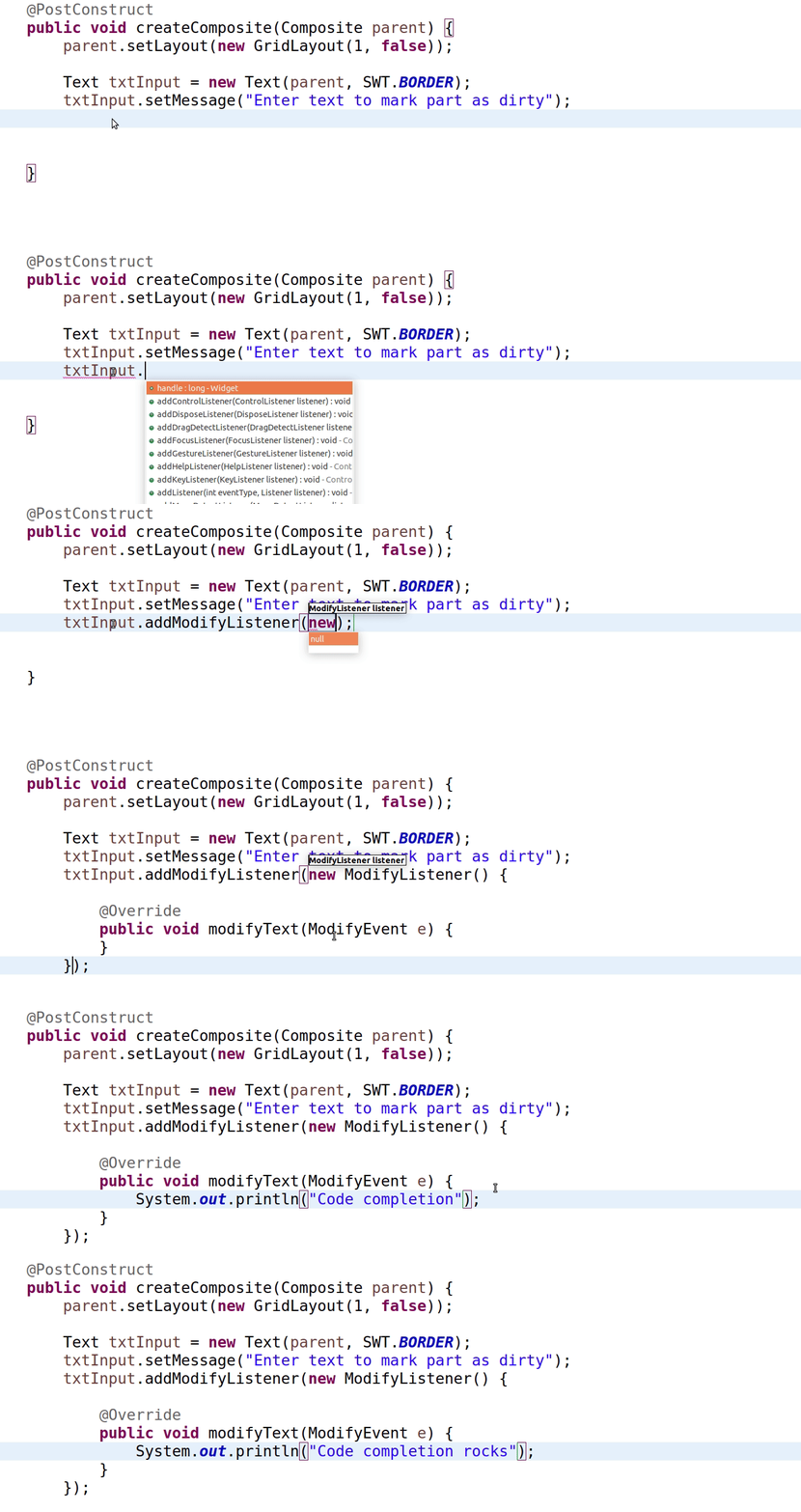
The 'new' Template
Use the 'new' template for quick object creation. (通过键入new 快速选择类)
Extract class refactoring (Alt+Shift+T)
The 'Extract class...' refactoring (from Alt+Shift+T) extracts a group of fields into a separate class and replaces all occurrences to fit the new structure.
Add Module
You don't need to know which module contains a class in Java9. Ctrl-1 can identify the module and add it for you.
The 'ifnull' Template
Use the 'ifnull' template to quickly create an if null check.
Block Selection
Use the Edit -> Block Selection (Alt+Shift+A) while working with Java9.
Use CSV as Parameter Source
You can directly use a CSV file as a parameter source in JUnit5 parameterised tests for a large number of cases.
CSV in Parameterised Tests
In JUnit5 parameterised tests also accept CSV literals (and files) as a source of parameters. Quite handy to feed your tests!
Streams as Test Parameters
You can use methods returning Java streams as a source of parameters in JUnit5 tests. Use @MethodSource as shown below(推荐使用)
Jump to Javadoc on Web
Put your cursor on a class name (or method) and press Shift+F2 to jump to the web version of your library's Javadoc. ()
CTRL+3 - The Master Shortcut
Use the 'Quick Access' box (Ctrl+3) to be more productive. Just type what you want and you'll probably find it.
Private Methods in Interfaces
Private methods in interfaces are allowed in Java9. Here's an example use case with a shared 'worker' method. ]
Invert Equals
Always safer to 'Invert equals' on literal strings in order to avoid a NullPointerException! Ctrl+1 does it for you.
'Show in' for more Details
Whatever element you have selected, code or item, 'Show in...' (Alt+Shift+W) command pops up useful views for various details.
Alt+Up and Alt+Down
Press Alt+Up/Dn to move the selected lines along with the cursor. Indenting is corrected for you. Alt+Shift+Up/Down copies the selection.
Toggle Block Selection
Edit -> Toggle Block Selection tool (or just hit Shift+Alt+A) is demonstrated below.
Inspect Variable Declaration
If you want to see where and how a variable was declared press Shift while hovering and you'll see it in-place.
Show Implementation In-place
Press Shift while hovering a method and it will show implementation in-place.
Select Enclosing Structure
The 'enclosing' selection (Alt+Shift+Up/Dn) shortcut selects the enclosing structure, e.g. var->if->method->class
Java 10 'var'
Use Java 10 and the new 'var' statement in Eclipse with its quick assists (Ctrl+1). Install Java 10 support from Eclipse Marketplace first.
Eclipse Photon 小技巧(tips)的更多相关文章
- [Tools] Eclipse使用小技巧-持续更新
[背景] 使用之中发现一些eclipse使用的小技巧,记录下来供以后查阅 Eclipse保存preferences,并导入到其他workspaces The Export wizard can b ...
- eclipse debug小技巧
测试 Expressions 代码 public static void main(String[] args) { int x=100; System.out.println("----& ...
- Eclipse全面提速小技巧
转自:http://rongmayisheng.com/post/eclipse%E5%85%A8%E9%9D%A2%E6%8F%90%E9%80%9F 欢迎关注我的社交账号: 博客园地址: http ...
- eclipse使用小技巧
1.eclipse中SVN无版本信息显示,window-preference-general-appeerance-label decoration-svn勾上,显示有关项目中受 SVN 控制的资源的 ...
- eclipse的小技巧
Eclipse 保存文件时自动格式化代码 很多同学不知道Eclipse有个很有用的功能,就是自动格式源代码的功能,一般大家都是直接Ctrl+Shift+F手动格式化,多浪费时间. 其实Eclipse里 ...
- eclipse 的小技巧
1. ctrl+o:快速outline 如果想要查看当前类的方法或某个特定方法,但又不想把代码拉上拉下,也不想使用查找功能的话,就用ctrl+o吧.它可以列出当前类中的所有方法及属性,你只需输入你想要 ...
- Eclipse 那些小技巧(值得收藏)
1.菜单命令系列 Edit→content Assist→add Alt+/ 代码关联 Windows→Next Editor→add Ctrl+Tab 切换窗口 Run→Debug Toggle L ...
- 工具——eclipse debug小技巧
1.开启调试: 在代码编辑处右键单击,在弹出菜单中点击Debug As开始调试 2.几个快捷键: F5:跟入Step into, 一般会跟踪进入到调用函数的函数体,Step Over则不会跟踪进入,直 ...
- 软件——eclipse debug小技巧
1.开启调试: 在代码编辑处右键单击,在弹出菜单中点击Debug As开始调试 2.几个快捷键: F5:跟入Step into, 一般会跟踪进入到调用函数的函数体,Step Over则不会跟踪进入,直 ...
随机推荐
- 2-mybatis框架
mybatis是一个持久层的框架,是apache下的顶级项目. mybatis让程序将主要精力放在sql上,通过mybatis提供的映射方式,自由灵活生成(半自动化,大部分需要程序员编写sql)满足需 ...
- 在PyCharm上创建Django项目
声明:此Django分类下的教程是追梦人物所有,地址http://www.jianshu.com/u/f0c09f959299,本人写在此只是为了巩固复习使用 首先我们在Pycharm上新建一个Dja ...
- access 驱动在win64位出现问题
如果是调试的话,将应用程序池的 启动win32应用程序池 为 true
- RQNOJ 117 最佳课题选择:多重背包
题目链接:https://www.rqnoj.cn/problem/117 题意: NaCN_JDavidQ要在下个月交给老师n篇论文,论文的内容可以从m个课题中选择. 由于课题数有限,NaCN_JD ...
- 五年java工作应具备的技能
具有一到五年开发经验 需要学习内容很多 JVM/分布式/高并发/性能优化/Spring MVC/Spring Boot/Spring Cloud/MyBatis/Netty源码分析等等等 01.透彻理 ...
- POJ 3620 Avoid The Lakes(dfs算法)
题意:给出一个农田的图,n行m列,再给出k个被淹没的坐标( i , j ).求出其中相连的被淹没的农田的最大范围. 思路:dfs算法 代码: #include<iostream> #inc ...
- linux进程学习-进程描述符,控制块
从数据结构的角度,进程用task_struct结构来描述,称为“进程描述符 (Process Descriptor)”或者“进程控制块(Process Control Block, PCB)”,其包含 ...
- MySQL-with rollup函数运用 _20160930
在博客里http://www.cnblogs.com/Mr-Cxy/p/5898839.html提到了行转列, 如果想在下面这个表下面添加一行 总计 数据行SQL代码怎么实现 并且根据9月金额进行城市 ...
- [转]Javascript高性能动画与页面渲染
No setTimeout, No setInterval 作者 李光毅 发布于 2014年4月30日 如果你不得不使用setTimeout或者setInterval来实现动画,那么原因只能是你需要精 ...
- WPF 中 UserControl作为另一个Process宿主到Window里, ErrorTemplate的默认红框没有出现
最近做WPF项目遇到一个问题, 我有2个process, 一个Process里只有Usercontrol, 另一个Process获取前一个Process中Usercontrol并host到当前的win ...