
[Python Cookbook] Numpy: Multiple Ways to Create an Array
Convert from list
Apply np.array() method to convert a list to a numpy array:
 import numpy as np

 mylist = [1, 2, 3]

 x = np.array(mylist)

 x
Output: array([1, 2, 3])
Or just pass in a list directly:
y = np.array([4, 5, 6])

y
Output: array([4, 5, 6])
Pass in a list of lists to create a multidimensional array:
m = np.array([[7, 8, 9], [10, 11, 12]])

m
Output:
array([[ 7, 8, 9],
[10, 11, 12]])
Array Generation Functions
arange returns evenly spaced values within a given interval.
n = np.arange(0, 30, 2) # start at 0 count up by 2, stop before 30

n
Output:
array([ 0, 2, 4, 6, 8, 10, 12, 14, 16, 18, 20, 22, 24, 26, 28])
reshape returns an array with the same data with a new shape.
n = n.reshape(3, 5) # reshape array to be 3x5

n
Output:
array([[ 0, 2, 4, 6, 8],
[10, 12, 14, 16, 18],
[20, 22, 24, 26, 28]])
linspace returns evenly spaced numbers over a specified interval.
o = np.linspace(0, 4, 9) # return 9 evenly spaced values from 0 to 4

o
Output:
array([0. , 0.5, 1. , 1.5, 2. , 2.5, 3. , 3.5, 4. ])
resize changes the shape and size of array in-place.
o.resize(3, 3)

o
Output:
array([[0. , 0.5, 1. ],
[1.5, 2. , 2.5],
[3. , 3.5, 4. ]])
ones returns a new array of given shape and type, filled with ones.
np.ones((3, 2))
Output:
array([[1., 1.],
[1., 1.],
[1., 1.]])
zeros returns a new array of given shape and type, filled with zeros.
np.zeros((2, 3))
Output:
array([[0., 0., 0.],
[0., 0., 0.]])
eye returns a 2-D array with ones on the diagonal and zeros elsewhere.
np.eye(3)
Output:
array([[1., 0., 0.],
[0., 1., 0.],
[0., 0., 1.]])
diag extracts a diagonal or constructs a diagonal array.
np.diag(y)
Output:
array([[4, 0, 0],
[0, 5, 0],
[0, 0, 6]])
Create an array using repeating list (or see np.tile)
np.array([1, 2, 3] * 3)
Output:
array([1, 2, 3, 1, 2, 3, 1, 2, 3])
Repeat elements of an array using repeat.
np.repeat([1, 2, 3], 3)
Output:
array([1, 1, 1, 2, 2, 2, 3, 3, 3])
Random Number Generator
The numpy.random subclass provides many methods for random sampling. The following tabels list funtions in the module to generate random numbers.
Simple random data
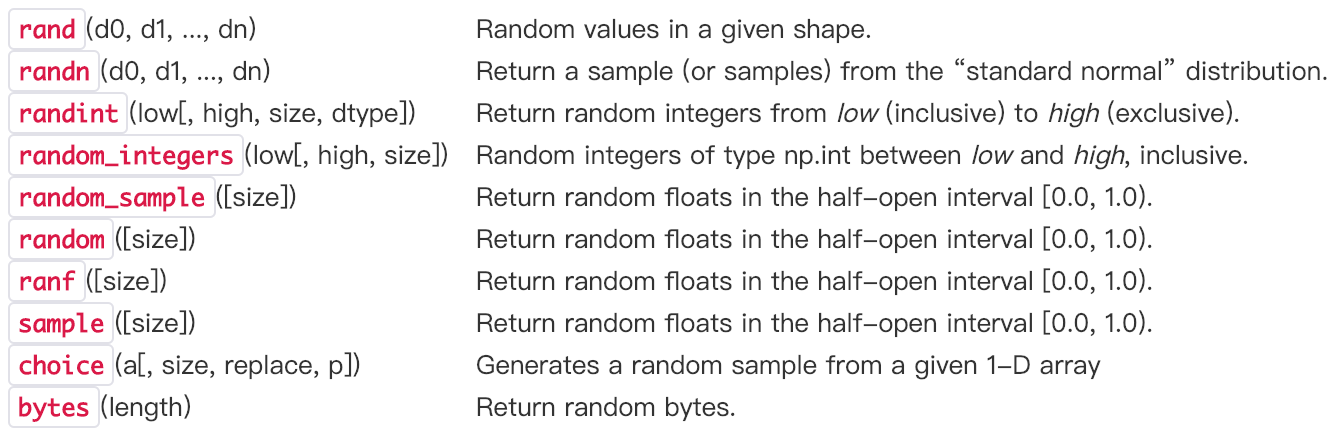
Now I will summarize the usage of the first three funtions which I have met frequently.
numpy.random.rand creates an array of the given shape and populate it with random samples from a uniform distribution over [0, 1). Parameters d0, d1, ..., dn define dimentions of returned array.
np.random.rand(2,3)
Output:
array([[0.20544659, 0.23520889, 0.11680902],
[0.56246922, 0.60270525, 0.75224416]])
numpy.random.randn creates an array of the given shape and populate it with random samples from a strandard normal distribution N(0,1). If any of the  are floats, they are first converted to integers by truncation. A single float randomly sampled from the distribution is returned if no argument is provided.
 # single random variable

 print(np.random.randn(),'\n')

 # N(0,1)

 print(np.random.randn(2, 4),'\n')

 # N(3,6.26)

 print(2.5 * np.random.randn(2, 4) + 3,'\n')
Output:
-1.613647405772221
[[ 1.13147436 0.19641141 -0.62034454 0.61118876]
[ 0.95742223 1.91138142 0.2736291 0.29787331]]
[[ 1.997092 2.6460653 3.2408004 -0.81586404]
[ 0.15120766 1.23676426 6.59249789 -1.04078213]]
numpy. random.randint returns random integers from the “discrete uniform” distribution of the specified dtype in the interval [low, high). If high is None (the default), then results are from [0, low). The specific format is
numpy.random.randint(low, high=None, size=None, dtype='l')
np.random.seed(10)

np.random.randint(100,200,(3,4))
np.random.randint(100,200)
Output:
array([[109, 115, 164, 128],
[189, 193, 129, 108],
[173, 100, 140, 136]])
109
Permutation
There are another two funtions used for permutations. Both of them can randomly permute an array. The only difference is that shuffle changes the original array but permutation doesn't.

Here are some examples of permutation.
np.random.permutation([1, 4, 9, 12, 15])
Output: array([ 9, 4, 1, 12, 15])
np.random.permutation(10)
Output: array([3, 7, 4, 6, 8, 2, 1, 5, 0, 9])
Usually, we use the following statements to perform random sampling:
permutation = list(np.random.permutation(m))  #m is the number of samples

shuffled_X = X[:, permutation]

shuffled_Y = Y[:, permutation].reshape((1,m))
[Python Cookbook] Numpy: Multiple Ways to Create an Array的更多相关文章
- 「Python」Numpy equivalent of MATLAB's cell array
转自Stackoverflow.备忘用. Question I want to create a MATLAB-like cell array in Numpy. How can I accompli ...
- [Python Cookbook] Numpy Array Slicing and Indexing
1-D Array Indexing Use bracket notation [ ] to get the value at a specific index. Remember that inde ...
- [Python Cookbook] Numpy: Iterating Over Arrays
1. Using for-loop Iterate along row axis: import numpy as np x=np.array([[1,2,3],[4,5,6]]) for i in ...
- [Python Cookbook] Numpy Array Joint Methods: Append, Extend & Concatenate
数组拼接方法一 思路:首先将数组转成列表,然后利用列表的拼接函数append().extend()等进行拼接处理,最后将列表转成数组. 示例1: import numpy as np a=np.arr ...
- [Python Cookbook] Numpy: How to Apply a Function to 1D Slices along the Given Axis
Here is a function in Numpy module which could apply a function to 1D slices along the Given Axis. I ...
- [Python Cookbook] Pandas: 3 Ways to define a DataFrame
Using Series (Row-Wise) import pandas as pd purchase_1 = pd.Series({'Name': 'Chris', 'Item Purchased ...
- [Python Cookbook] Numpy Array Manipulation
1. Reshape: The np.reshape() method will give a new shape to an array without changing its data. Not ...
- [转]python与numpy基础
来源于:https://github.com/HanXiaoyang/python-and-numpy-tutorial/blob/master/python-numpy-tutorial.ipynb ...
- 【Python】numpy 数组拼接、分割
摘自https://docs.scipy.org 1.The Basics 1.1 numpy 数组基础 NumPy’s array class is called ndarray. ndarray. ...
随机推荐
- DiyCode开源项目 TopicActivity 分析
1.首先看看TopActivity效果. 2.TopicActivity是一个继承BaseActivity的.前面分析过BaseActivity了.主要有一个标题栏,有返回的图标. 3.贴一下T ...
- Windows 2008 WinRM和WinRS能帮你做什么?
介绍 WinRM及WinRS更新包含在Windows Vista, Windows Server 2003 R2, Windows Server 2008 (及 Server 2008 Cor ...
- Leetcode 649.Dota2参议院
Dota2参议院 Dota2 的世界里有两个阵营:Radiant(天辉)和 Dire(夜魇) Dota2 参议院由来自两派的参议员组成.现在参议院希望对一个 Dota2 游戏里的改变作出决定.他们以一 ...
- Summary—【base】(HTML)
Html知识点: 1. 建议开发人员计算机基本配置 a) 显示所有文件的后缀名* b) 文件的排列方式改为详细信息,并且名称一定要能够全部显示出来 c) 使用小的任务栏 d) 将常用的工具锁定到任务栏 ...
- Eclipse的Web项目完成后怎么发布到Tomcat
打开eclipse,在“Server Locations”处,可以看到默认的是“Use Workspace metadata”. 而我们选择“Use Tomcat installation”,使用to ...
- [luoguP2657] [SCOI2009]windy数(数位DP)
传送门 f[i][j]表示位数为i,第i位为j的windy数的个数 先预处理出f数组. 求的时候先算没有前导0的答案,再算位数和给定的数相同的答案. #include <cmath> #i ...
- [luoguP2587] [ZJOI2008]泡泡堂(贪心)
传送门 贪心,很像田忌赛马那样,但是因为有平局加一分导致那样的贪心不好处理. 先将两个数组从小到大排序. 比较a最大和b最大,如果a比b大,那么直接赢掉 否则 比较a最小和b最小,如果a比b大,那么直 ...
- [BZOJ2456] mode(一道很有意思的题)
传送门 看到这个题的第一反应是离散化+线段树乱搞.. eeeeeeeeeeee感觉数据结构学傻了,其实直接存下来,sort一遍,n/2的位置的就是答案 当然前提是空间够的话 1m的空间连数组都开不下 ...
- Python之面向对象:继承
概念:子类继承父类的属性和方法. 一个派生类(derived class)继承基类(bass class)字段和方法.继承也允许把一个派生类的对象作为一个基类对象对待. 一.单继承 :推崇.特点和使用 ...
- html5 的 webScoket 和 C# 建立Socket连接
最近使用的web项目中,需要服务器直接触发前端显示效果. 所以研究了一下websocket: 名词解释: WebSocketWebSocket协议是一种双向通信协议,它建立在TCP之上,同http一样 ...