
elementui table 分页 和 tabel 前加序列号
记录下来备忘
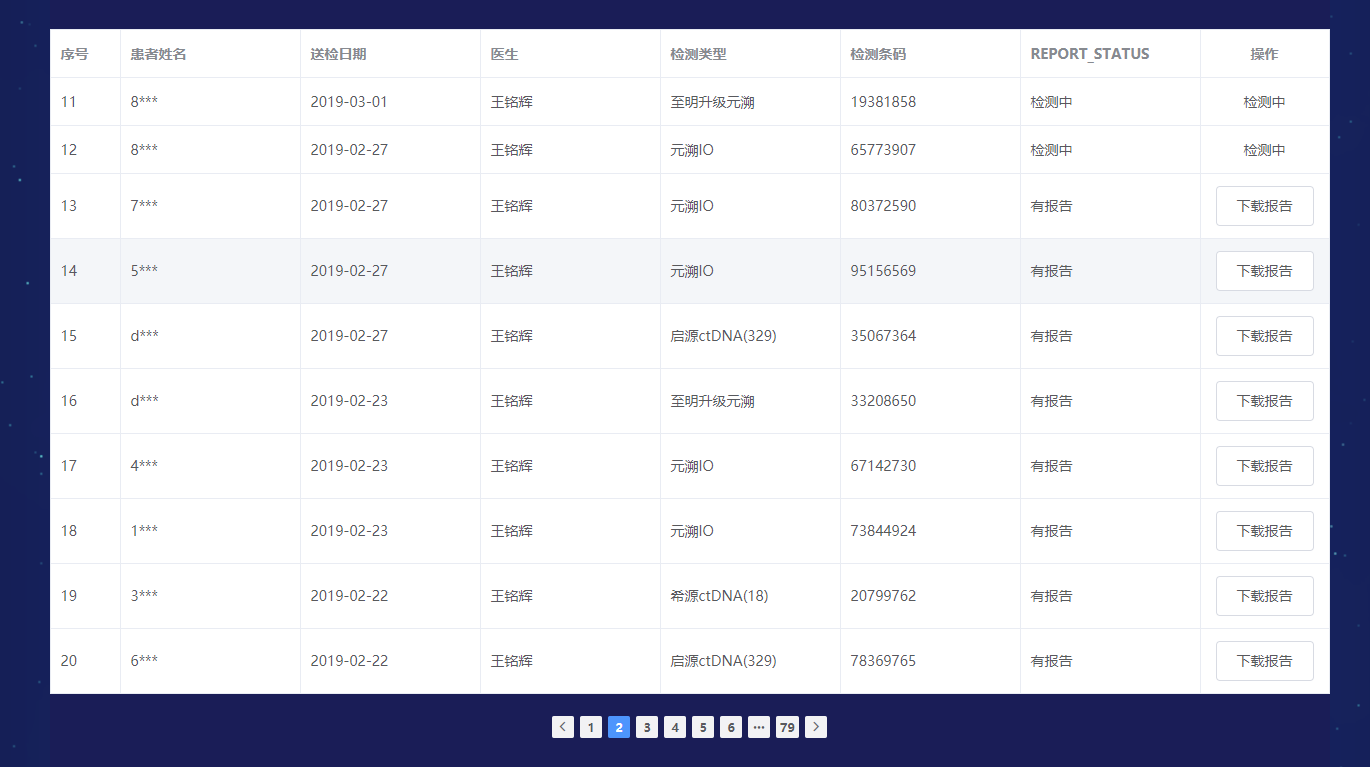
结构如下

Report.vue
<template>

  <div>

    <home-header></home-header>

    <div class="report">

      <div class="rs_1"></div>

      <div class="rs_4">检测报告查询</div>

      <div class="tools">

      <table-view @changPage="changPage" :reportData="reportData" :count="count" :Offset="Offset" :Limit="Limit"></table-view>

      </div>

    </div>

    <footer-view></footer-view>

  </div>

</template>

<script>

import HomeHeader from '../header/Header'

import FooterView from '../footer/FooterView'

import TableView from './components/TableView'

import axios from 'axios'

import {urlApi} from '@/api/api.js'

import { format } from '@/util/util.js'

export default {

  name:'Report',

  components:{

    HomeHeader,

    FooterView,

    TableView

  },

  data(){

    return{

      reportData:[],

      count:0,

      Offset:0,

      Limit:10

    }

  },

  methods:{

    changPage(v){

      this.Offset = (v-1)*10;

      this.getReport(this.Offset,this.Limit);

    },

    getReport(Offset=0,Limit=10){

      /* post */

      let params = new URLSearchParams();

      params.append('Offset',Offset);

      params.append('Limit',10);

      params.append('Limit',10);

      params.append('postType','web');

      axios.post(urlApi.getReport,params)

         .then(this.getReportSucc)

      /* post */

    },

    getReportSucc(res){

      this.reportData = [];

      if(res.data.error_code==0 && res.data.reason){

        this.count = res.data.count;

        res.data.reason.forEach((item,index) => {

         // console.log(format(item.SEND_TIME));

         // item.PATIENT_NAME = item.PATIENT_NAME.split(',')[0]

          item.PATIENT_NAME = item.PATIENT_NAME.charAt(0)+'***';

          item.SEND_TIME = format(item.SEND_TIME)

        });

        this.reportData = res.data.reason;

      }

    }

  },

  mounted() {

    this.getReport();

  },

}

</script>

<style lang="stylus">

  .report

    width 1280px

    min-height 900px

    background #161F60

    margin 51px auto 0

    position relative

    color white

    float left

    left 50%

    margin-left -640px

    .rs_1

      position absolute

      top 0

      left 0

      width 73px

      height 75px

      background url('../../assets/dat/rs_1.png') no-repeat

    .rs_2

      position absolute

      bottom 0

      left 0

      width 1280px

      height 228px

      background url('../../assets/dat/rs_2.png') no-repeat

      z-index 9

    .rs_3

      position absolute

      top 0px

      right 0

      width 80px

      height 6px

      background url('../../assets/dat/rs_3.png') no-repeat

    .rs_4

      position absolute

      top 28px

      left 25px

      width 221px

      height 46px

      background url('../../assets/dat/rs_4.jpg') no-repeat

      text-align center

      line-height 46px

      font-size 18px

    .tools

      margin-top 140px

</style>
Table.vue
<template>

  <div>

    <el-table

      :data="reportData"

      border

      style="width: 100%">

      <el-table-column

        label="序号"

        width="70"

      >

      <template scope="scope">

        <span>

          {{scope.$index+((Offset+10)/10-1)*Limit+1}}

        </span>

      </template>

      </el-table-column>

      <el-table-column

        prop="PATIENT_NAME"

        label="患者姓名"

        width="180">

      </el-table-column>

      <el-table-column

        prop="SEND_TIME"

        label="送检日期"

        width="180">

      </el-table-column>

      <el-table-column

        prop="PHY_NAME"

        label="医生"

        width="180">

      </el-table-column>

      <el-table-column

        prop="REPORT_TYPE"

        label="检测类型"

        width="180">

      </el-table-column>

      <el-table-column

        prop="PKG_NUM"

        label="检测条码"

        width="180">

      </el-table-column>

      <el-table-column

        prop="REPORT_STATUS"

        label="REPORT_STATUS"

        width="180">

      </el-table-column>

      <el-table-column label="操作" align="center">

        <template slot-scope="scope">

          <el-button type="button" v-if="scope.row.REPORT_STATUS == '有报告'"  @click="checkDetail(scope.row.REPORT_CODE,scope.row.PATIENT_NAME)">下载报告</el-button>

          <div v-else>{{scope.row.REPORT_STATUS}}</div>

        </template>

      </el-table-column>

    </el-table>

    <div class="page">

      <el-pagination

        @current-change="handleCurrentChange"

        small

        background

        layout="prev, pager, next"

        :total="count">

      </el-pagination>

    </div>

    <el-dialog :title="name" :visible.sync="dialogTableVisible">

      <el-table border :data="ihcdata">

        <el-table-column property="REPORT_TYPE" label="报告类型" width="150"></el-table-column>

        <el-table-column property="SEND_TIME" label="送检日期" width="200"></el-table-column>

        <el-table-column property="BARCODE" label="样本检测条码"></el-table-column>

        <el-table-column label="操作" align="center">

        <template slot-scope="scope">

          <el-button type="button" @click="checkDownload(scope.row.ATTACH_ID)">下载</el-button>

        </template>

        </el-table-column>

      </el-table>

      <el-table border :data="ngsdata" class="myrow">

        <el-table-column property="REPORT_TYPE" label="报告类型" width="150"></el-table-column>

        <el-table-column property="SEND_TIME" label="送检日期" width="200"></el-table-column>

        <el-table-column property="BARCODE" label="样本检测条码"></el-table-column>

        <el-table-column label="操作" align="center">

        <template slot-scope="scope">

          <el-button type="button" @click="checkDownload(scope.row.ATTACH_ID)">下载</el-button>

        </template>

        </el-table-column>

      </el-table>

    </el-dialog>

  </div>

</template>

<script>

import axios from 'axios'

import {urlApi} from '@/api/api.js'

import { format } from '@/util/util.js'

export default {

  name:'TableView',

  props:{

    reportData:Array,

    count:Number,

    Offset:Number,

    Limit:Number

  },

  data(){

    return{

      dialogTableVisible:false,

      name:'',

      ihcdata: [],

      ngsdata:[],

    }

  },

  methods:{

    checkDownload(id){

      //console.log(v);

      /* post */

      /*

      let iparams = new URLSearchParams();

      iparams.append('ATTACH_ID',id);

      axios.post(urlApi.downloadReport,iparams)

           .then(this.downloadReportSucc)

      */

      /* post */

      window.location.href=urlApi.downloadReport+'&ATTACH_ID='+id;

    },

    downloadReportSucc(res){

      if(res.data.error_code != 0){

        this.$message(res.data.msg);

      }else{

        console.log(res);

        window.location.href=res;

      }

    },

    handleCurrentChange(currentPage){

      this.$emit("changPage",currentPage);

    },

    checkDetail(detail,name){

      this.name = name+'的检测报告';

      this.getReportsByOrderId(detail,name);

    },

    getReportsByOrderId(reportcode,name){

      /* post */

      let params = new URLSearchParams();

      params.append('REPORT_CODE',reportcode);

      params.append('postType','web');

     axios.post(urlApi.getReportsByOrderId,params)

         .then(this.getReportsByOrderIdSucc)

      /* post */

    },

    getReportsByOrderIdSucc(res){

      if(res.data.error_code==0 && res.data.reason){

        console.log(res.data.reason)

        res.data.reason.IHCList.forEach((item,index) => {

          //console.log(res.data.reason);

         item.SEND_TIME = format(item.SEND_TIME)

        });

        res.data.reason.NGSList.forEach((item,index) => {

          //console.log(res.data.reason);

         item.SEND_TIME = format(item.SEND_TIME)

        });

        this.ihcdata = [];

        this.ngsdata = [];

        this.ihcdata = res.data.reason.IHCList;

        this.ngsdata = res.data.reason.NGSList;

        this.dialogTableVisible = true;

      }

    }

  }

}

</script>

<style lang="stylus">

  .page

    width 100%

    text-align center

    margin-top 20px

  .myrow

    margin-top 30px

</style>
elementui table 分页 和 tabel 前加序列号的更多相关文章
- element-UI table分页之后保存已经勾选的标签
- 项目总结17-使用layui table分页表格
项目总结17-使用layui table分页表格总结 前言 在项目中,需要用到分页的表格来展示数据,发现layui的分页表格,是一个很好的选择:本文介绍layui table分页表格的前后端简单使用 ...
- bootstrap table分页(前后端两种方式实现)
bootstrap table分页的两种方式: 前端分页:一次性从数据库查询所有的数据,在前端进行分页(数据量小的时候或者逻辑处理不复杂的话可以使用前端分页) 服务器分页:每次只查询当前页面加载所需要 ...
- 关于【vue + element-ui Table的数据多选,多页选择数据回显,分页记录保存选中的数据】的优化
之前写的[vue + element-ui Table的数据多选,多页选择数据回显,分页记录保存选中的数据]这篇博客.功能虽然实现了相对应的功能.但是用起来很不爽.所以进行了优化. 备注:最近可能没时 ...
- vue+element-ui 实现分页(根据el-table内容变换的分页)
官方例子 官方提示: 设置layout,表示需要显示的内容,用逗号分隔,布局元素会依次显示.prev表示上一页,next为下一页,pager表示页码列表,除此以外还提供了jumper和total,si ...
- vue+elementUI实现 分页表格的单选或者多选、及禁止部分选择
一.vue+elementUI实现 分页表格前的多选 多选效果图: 代码如下: <el-table ref="multipleTable" :data="listD ...
- Table 分页处理
介绍两种table分页处理:PHP分页 和 js(jquery.table)分页. 一:jquery.table: 1:下载两个文件:table_jui.css 和 jquery.dataTables ...
- JQuery实现table分页
1.直接贴代码: ; //每页显示的记录条数 ; //显示第curPage页 var len; //总行数 var page; //总页数 $(function(){ len =$(; //去掉表头 ...
- C++在字符串前加一个L作用:
在字符串前加一个L作用: 如 L"我的字符串" 表示将ANSI字符串转换成unicode的字符串,就是每个字符占用两个字节. strlen("asd" ...
随机推荐
- JQuery EasyUI学习记录(四)
1.EasyUI中的validatebox使用 提供的校验规则: 1.非空校验required="required" 2.使用validType指定 email: 正则表达式匹配电 ...
- NOIP模拟赛 麻将
[题目描述] 众所周知,麻将是我们国家的国粹.这段时间,小D也迷上了麻将这个老少皆宜的游戏. 小D觉得这些不同规则的麻将太麻烦了,所以他集合了很多种麻将规则创造出了一套D麻将.下面是D麻将的几个特点: ...
- Git - revert详解
git revert 撤销 某次操作,此次操作之前和之后的commit和history都会保留,并且把这次撤销作为一次最新的提交 * git revert HEAD ...
- 【android】6大布局
线性布局 相对布局 绝对布局 网格布局 表格布局 帧布局
- Applied Nonparametric Statistics-lec5
今天继续two-sample test Ref: https://onlinecourses.science.psu.edu/stat464/print/book/export/html/6 Mann ...
- console_init()分析
启动阶段初始化控制台流程分析, start_kernel console_init(); -->tty_ldisc_begin(); /* Setup the default TTY line ...
- debian 7 安装vagrant
下载 vagrant_1.4.3_x86_64.deb: $ wget http://966b.http.dal05.cdn.softlayer.net/data-production/2f0b88e ...
- python基础学习笔记——字典
字典(Dictionary) 字典是另一种可变容器模型,且可存储任意类型对象. 字典的每个键值 key=>value 对用冒号 : 分割,每个键值对之间用逗号 , 分割,整个字典包括在花括号 { ...
- tarjan - SPFA - Luogu 3387【模板】缩点
[模板]缩点 题目描述 给定一个n个点m条边有向图,每个点有一个权值,求一条路径,使路径经过的点权值之和最大.你只需要求出这个权值和. 允许多次经过一条边或者一个点,但是,重复经过的点,权值只计算一次 ...
- 常见python快捷键
http://www.cnblogs.com/toutou/p/4778818.html Ctrl+/注释(取消注释)选择的行 Shift + Enter开始新行 Ctrl + Enter智能换行 T ...