
spring-data-mongodb
【引入maven依赖】
<!-- mongodb spring -->
<dependency>
<groupId>org.springframework.data</groupId>
<artifactId>spring-data-mongodb</artifactId>
<version>1.0.0.M5</version>
</dependency>
【修改配置文件】
<?xml version="1.0" encoding="UTF-8"?>
<beans xmlns="http://www.springframework.org/schema/beans"
xmlns:xsi="http://www.w3.org/2001/XMLSchema-instance" xmlns:context="http://www.springframework.org/schema/context"
xmlns:mongo="http://www.springframework.org/schema/data/mongo"
xsi:schemaLocation="http://www.springframework.org/schema/context
http://www.springframework.org/schema/context/spring-context-3.0.xsd
http://www.springframework.org/schema/data/mongo
http://www.springframework.org/schema/data/mongo/spring-mongo-1.0.xsd
http://www.springframework.org/schema/beans
http://www.springframework.org/schema/beans/spring-beans-3.0.xsd">
<context:property-placeholder location="classpath*:META-INF/mongodb/mongodb.properties"/>
<!-- 定义mongo对象,对应的是mongodb官方jar包中的Mongo,replica-set设置集群副本的ip地址和端口 -->
<mongo:mongo id="mongo" replica-set="localhost:27017">
<!-- 一些连接属性的设置 -->
<mongo:options
connections-per-host="${mongo.connectionsPerHost}"
threads-allowed-to-block-for-connection-multiplier="${mongo.threadsAllowedToBlockForConnectionMultiplier}"
connect-timeout="${mongo.connectTimeout}"
max-wait-time="${mongo.maxWaitTime}"
auto-connect-retry="${mongo.autoConnectRetry}"
socket-keep-alive="${mongo.socketKeepAlive}"
socket-timeout="${mongo.socketTimeout}"
slave-ok="${mongo.slaveOk}"
write-number="1"
write-timeout="0"
write-fsync="true"/>
</mongo:mongo>
<!-- mongo的工厂,通过它来取得mongo实例,dbname为mongodb的数据库名,没有的话会自动创建 -->
<mongo:db-factory dbname="test" mongo-ref="mongo"/>
<!-- mongodb的主要操作对象,所有对mongodb的增删改查的操作都是通过它完成 -->
<bean id="mongoTemplate" class="org.springframework.data.mongodb.core.MongoTemplate">
<constructor-arg name="mongoDbFactory" ref="mongoDbFactory"/>
</bean>
<!-- 映射转换器,扫描back-package目录下的文件,根据注释,把它们作为mongodb的一个collection的映射 -->
<mongo:mapping-converter base-package="com.xxx.xxx.domain" />
<!-- mongodb bean的仓库目录,会自动扫描扩展了MongoRepository接口的接口进行注入 -->
<mongo:repositories base-package="com.xxx.xxx.persist.mongodb"/>
<!-- To translate any MongoExceptions thrown in @Repository annotated classes -->
<context:annotation-config />
</beans>
【实体映射】
MongoMappingConverter这个类实现的。它可以通过注释把
java类转换为mongodb的文档。
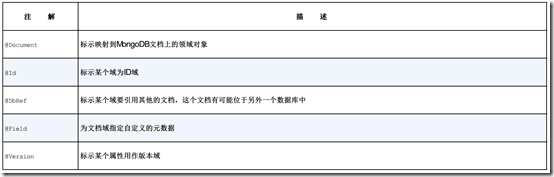
它有以下几种注释:
@Id - 文档的唯一标识,在mongodb中为ObjectId,它是唯一的,通过时间戳+机器标识+进程ID+自增计数器(确保同一秒内产生的Id不会冲突)构成。
@Document - 把一个java类声明为mongodb的文档,可以通过collection参数指定这个类对应的文档。
@DBRef - 声明类似于关系数据库的关联关系。ps:暂不支持级联的保存功能,当你在本实例中修改了DERef对象里面的值时,单独保存本实例并不能保存DERef引用的对象,它要另外保存,如下面例子的Person和Account。
@Indexed - 声明该字段需要索引,建索引可以大大的提高查询效率。
@CompoundIndex - 复合索引的声明,建复合索引可以有效地提高多字段的查询效率。
@GeoSpatialIndexed - 声明该字段为地理信息的索引。
@Transient - 映射忽略的字段,该字段不会保存到mongodb。
@PersistenceConstructor - 声明构造函数,作用是把从数据库取出的数据实例化为对象。该构造函数传入的值为从DBObject中取出的数据。
以下引用一个官方文档的例子:
Person类
@Document(collection="person")
@CompoundIndexes({
@CompoundIndex(name = "age_idx", def = "{'lastName': 1, 'age': -1}")
})
public class Person<T extends Address> {
@Id
private String id;
@Indexed(unique = true)
private Integer ssn;
private String firstName;
@Indexed
private String lastName;
private Integer age;
@Transient
private Integer accountTotal;
@DBRef
private List<Account> accounts;
private T address;
public Person(Integer ssn) {
this.ssn = ssn;
}
@PersistenceConstructor
public Person(Integer ssn, String firstName, String lastName, Integer age, T address) {
this.ssn = ssn;
this.firstName = firstName;
this.lastName = lastName;
this.age = age;
this.address = address;
}
}
Account类
@Document
public class Account {
@Id
private ObjectId id;
private Float total;
}
【MongoRepository实现增删改查和复杂查询】
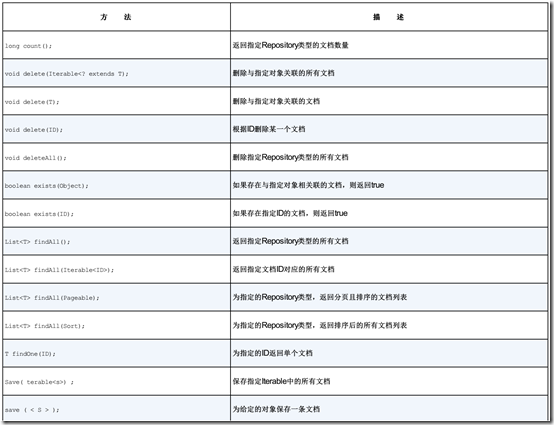
与HibernateRepository类似,通过继承MongoRepository接口,我们可以非常方便地实现对一个对象的增删改查,要使用Repository的功能,先继承MongoRepository<T, TD>接口,其中T为仓库保存的bean类,TD为该bean的唯一标识的类型,一般为ObjectId。之后在service中注入该接口就可以使用,无需实现里面的方法,spring会根据定义的规则自动生成。
例:
public interface PersonRepository extends MongoRepository<Person, ObjectId>{
//这里可以添加额外的查询方法
}
但是MongoRepository实现了的只是最基本的增删改查的功能,要想增加额外的查询方法,可以按照以下规则定义接口的方法。自定义查询方法,格式为“findBy+字段名+方法后缀”,方法传进的参数即字段的值,此外还支持分页查询,通过传进一个Pageable对象,返回Page集合。
例:
public interface PersonRepository extends MongoRepository<Person, ObjectId>{
//查询大于age的数据
public Page<Product> findByAgeGreaterThan(int age,Pageable page) ;
}
下面是支持的查询类型,每三条数据分别对应:(方法后缀,方法例子,mongodb原生查询语句)
GreaterThan(大于)
findByAgeGreaterThan(int age)
{"age" : {"$gt" : age}}
LessThan(小于)
findByAgeLessThan(int age)
{"age" : {"$lt" : age}}
Between(在...之间)
findByAgeBetween(int from, int to)
{"age" : {"$gt" : from, "$lt" : to}}
IsNotNull, NotNull(是否非空)
findByFirstnameNotNull()
{"age" : {"$ne" : null}}
IsNull, Null(是否为空)
findByFirstnameNull()
{"age" : null}
Like(模糊查询)
findByFirstnameLike(String name)
{"age" : age} ( age as regex)
(No keyword) findByFirstname(String name)
{"age" : name}
Not(不包含)
findByFirstnameNot(String name)
{"age" : {"$ne" : name}}
Near(查询地理位置相近的)
findByLocationNear(Point point)
{"location" : {"$near" : [x,y]}}
Within(在地理位置范围内的)
findByLocationWithin(Circle circle)
{"location" : {"$within" : {"$center" : [ [x, y], distance]}}}
Within(在地理位置范围内的)
findByLocationWithin(Box box)
{"location" : {"$within" : {"$box" : [ [x1, y1], x2, y2]}}}
尽管以上查询功能已经很丰富,但如果还不能满足使用情况的话可以用一下方法---基于mongodb原本查询语句的查询方式。
例:在原接口中加入
@Query("{ 'name':{'$regex':?2,'$options':'i'}, sales': {'$gte':?1,'$lte':?2}}")
public Page<Product> findByNameAndAgeRange(String name,double ageFrom,double ageTo,Pageable page);
注释Query里面的就是mongodb原来的查询语法,我们可以定义传进来的查询参数,通过坐标定义方法的参数。
还可以在后面指定要返回的数据字段,如上面的例子修改如下,则只通过person表里面的name和age字段构建person对象。
@Query(value="{ 'name':{'$regex':?2,'$options':'i'}, sales':{'$gte':?1,'$lte':?2}}",fields="{ 'name' : 1, 'age' : 1}")
public Page<Product> findByNameAndAgeRange(String name,double ageFrom,double ageTo,Pageable page);
【官方地址】
http://projects.spring.io/spring-data-mongodb/
【示例代码】
https://github.com/snzigod/jdish/tree/master/spring/spring-data-mongodb
【参考资料】
spring-data-mongodb的更多相关文章
- spring data mongodb 配置遇到的几个问题
一. mongodb 2.2版本以上的配置 spring.data.mongodb.uri = mongodb://newlook:newlook@192.168.0.109:27017/admin ...
- spring data mongodb中,如果对象中的属性不想加入到数据库字段中
spring data mongodb中,如果对象中的属性不想加入到数据库字段中,可加@Transient注解,声明为透明属性 spring data mongodb 官网帮助文档 http://ww ...
- Spring Data MongoDB example with Spring MVC 3.2
Spring Data MongoDB example with Spring MVC 3.2 Here is another example web application built with S ...
- 使用Spring访问Mongodb的方法大全——Spring Data MongoDB查询指南
1.概述 Spring Data MongoDB 是Spring框架访问mongodb的神器,借助它可以非常方便的读写mongo库.本文介绍使用Spring Data MongoDB来访问mongod ...
- Spring data mongodb 聚合,投射,内嵌数组文档分页.
尽量别直接用 DBObject ,Spring data mongodb 的api 本来就没什么多大用处,如果还直接用 DBObject 那么还需要自己去解析结果,说动做个对象映射,累不累 Spri ...
- JAVA 处理 Spring data mongodb 时区问题
Spring data mongodb 查询出结果的时候会自动 + 8小时,所以我们看起来结果是对的 但是我们查询的时候,并不会自动 + 8小时,需要自己处理 解决方法 1 @JsonFormat ...
- Spring data mongodb ObjectId ,根据id日期条件查询,省略@CreatedDate注解
先看看ObjectId 的json 结构,非常丰富,这里有唯一机器码,日期,时间戳等等,所以强烈建议ID 使用 ObjectId 类型,并且自带索引 Spring data mongodb 注解 @C ...
- Spring data mongodb @CreatedBy@LastModifiedBy@CreatedBy@LastModifiedBy SpringSecurityAuditorAware,只记录用户名
要在Spring data mongodb 中使用@CreatedBy@LastModifiedBy@CreatedBy@LastModifiedBy 这四个注解 必须实现 SpringSecuri ...
- Spring Data MongoDB 三:基本文档查询(Query、BasicQuery)(一)
一.简单介绍 Spring Data MongoDB提供了org.springframework.data.mongodb.core.MongoTemplate对MongoDB的CRUD的操作,上一 ...
- Introduction to Spring Data MongoDB
Introduction to Spring Data MongoDB I just announced the new Spring 5 modules in REST With Spring: & ...
随机推荐
- 设计模式--观察者模式(KVO)
观察者模式(Observer):观察者模式定义了一种一对多的依赖关系,让多个观察者对象同时监听某一个主题对象.这个主题对象在状态上发生变化时,会通知所有观察者对象,使它们能够自动更新自己. 举个例子, ...
- 一、基础知识 React API 一览
1.10 Hooks 参考文章:https://juejin.im/post/5be3ea136fb9a049f9121014 demo: /** * 必须要react和react-dom 16.7以 ...
- 洛谷 P1281 书的复制
书的复制 Code: #include <iostream> #include <cstdio> #include <cstring> using namespac ...
- 原生css3作响应式布局
<!DOCTYPE html> <html xmlns="http://www.w3.org/1999/xhtml"> <head> <m ...
- 微信小程序开发入门首选
推荐一本书吧,直接上图,微信开发,微信网页开发,微信小程序开发,都用得着. 推荐一本书吧,直接上图,微信开发,微信网页开发,微信小程序开发,都用得着. 推荐一本书吧,直接上图,微信开发,微信网页开发, ...
- ubuntu双屏调整分辨率
查看屏幕硬件指标 # xrandr Screen 0: minimum 8 x 8, current 2390 x 768, maximum 32767 x 32767 LVDS1 connected ...
- JavaScript-判断语句(if...else)
语法: if(条件) { 条件成立时执行的代码 } else { 条件不成立时执行的代码 } 假设我们通过年龄来判断是否为成年人,如年龄大于等于18岁,是成年人,否则不是成年人.代码表示如下: < ...
- C++ vector类详解
转自http://blog.csdn.net/whz_zb/article/details/6827999 vector简介 vector是STL中最常见的容器,它是一种顺序容器,支持随机访问.vec ...
- NYOJ-255-C小加 之 随机数
原题链接 C小加 之 随机数 时间限制:3000 ms | 内存限制:65535 KB 难度:1 描述 ACM队的“C小加”同学想在学校中请一些同学一起做一项问卷调查,为了实验的客观性,他先用 ...
- PHP:php遍历数组each()方法总结
each()的作用是将数组当前元素的键值对拆成一个新数组,并把下一个元素作为当前元素.比如Array(...,'Robert'=>'Bob',...)中的'Robert'=>'Bob'键值 ...