
spring 组件自动装载示例(@ComponentScan,@Component,@Scope)
今天学习spring的bean组件装载功能,个人不太喜欢xml文件一个个配置bean的方式,所以主要学习测试注解式的自动装载方式。下面将简单说明下@Component的用法,简单入门示例献给大家。
实现主要步骤说明:
1、ApplicationContext.xml(spring上下文环境配置)文件先配置好需要自动扫描的包位置。注册完成后,在spring初始化上下文环境时,会自动扫描声明的包以及子包下面有注解(@Component,@Repository,@Service,@Controller)的类型,并缓存起来。这里需要提一下@Component是一个基础的注解,不对代码功能分类进行区分,@Repository一般用于业务逻辑层的类注解,@Service用于dao层注解,@Controller用于控制器注解。
<?xml version="1.0" encoding="UTF-8"?>

<beans xmlns="http://www.springframework.org/schema/beans"

  xmlns:xsi="http://www.w3.org/2001/XMLSchema-instance"

  xmlns:context="http://www.springframework.org/schema/context"

  xsi:schemaLocation="http://www.springframework.org/schema/beans http://www.springframework.org/schema/beans/spring-beans.xsd

    http://www.springframework.org/schema/context http://www.springframework.org/schema/context/spring-context.xsd">

  <!-- 定义 bean 的 id,以及对应的 java 类 -->

  <context:component-scan base-package="com.spring.simm" use-default-filters="true"/>

  <!--<bean id="helloWorld" class="com.spring.simm.impls.HelloWorld">

    <property name="message" value="Hello World!" />

  </bean>-->

</beans>
2、添加一个HelloWorld组件。需要注意的是@Component注解的组件,默认都是单例模式,即缺省的@Scope("singleton")。通过spring去getBean实例时,其实都是同一个对象。我这里将改组件设置成多例模式,即添加注解@Scope("prototype")。
@Scope的模式有:singleton、prototype、request、session、global session,其他模式各位可以查阅网上资料
public interface IHelloWorld {

   void say(String name);

}
@Scope("prototype")

//@Scope("singleton")

@Component("hello")

public class HelloWorld implements IHelloWorld {

    private static int no = 0;

    public HelloWorld(){

        no++;

        System.out.println("IHelloWorld[" + no +"]运行");

    }

    /**

     * 说话

     */

    public void say(String name) {

        // TODO Auto-generated method stub

        System.out.println(name +" : hello world!");

    }

}
3、再添加一个HelloWorldService组件,注解成@Service,单例模式(后面,我们针对单例、多例两个组件的表现进行测试)。在服务内声明了一个自动装载的HelloWorld组件(@AutoWired),通过getHelloWorld方法返回,由于服务类是单例模式,因此这个helloworld对象也是唯一的,在服务的整个生命周期中不变。getHelloWorld2方法则每次都创建一个新的HelloWorld对象。
public interface IHelloWorldService {

    HelloWorld getHelloWorld();

    HelloWorld getHelloWorld2();

}
/**

 * Hello world 服务,默认情况下就是单例的

 * @author wh-simm

 *

 */

@Service("helloservice")

public class HelloWorldService implements IHelloWorldService {

    private static int no = 0;

    public HelloWorldService(){

        no++;

        System.out.println("HelloWorldService["+no+"]启动");

    }

    /**

     * 自动装载

     */

    @Autowired

    private HelloWorld helloWorld;

    /**

     * 获取自动装载的实例

     */

    public HelloWorld getHelloWorld(){

        return helloWorld;

    }

    /**

     * 新建实例

     */

    public HelloWorld getHelloWorld2(){

        return new HelloWorld();

    }

}
4、添加测试代码
public class app {

    public static void main(String[] args) {

        // 获取 classpath 中的 Beans.xml 到上下文 context

        //1.装载spring上下文配置文件,完成spring容器的初始化

        ApplicationContext context = new ClassPathXmlApplicationContext("Beans.xml");

        //2.从spring容器中获取bean-helloworld 实例1

        IHelloWorld obj1 = (IHelloWorld) context.getBean("hello");

        obj1.say("simm1");

        //3.从spring容器中获取bean-helloworld 实例2

        IHelloWorld obj2 = (IHelloWorld) context.getBean("hello");

        obj2.say("simm2");

        //3.从spring容器中获取bean-HelloWorldService 实例1(单例)

        IHelloWorldService service = (IHelloWorldService)context.getBean("helloservice");

        service.getHelloWorld().say("simm3");

        service.getHelloWorld().say("simm4");

        //3.从spring容器中获取bean-HelloWorldService 实例2(单例)

        IHelloWorldService service2 = (IHelloWorldService)context.getBean("helloservice");

        service2.getHelloWorld2().say("simm5");

        service2.getHelloWorld2().say("simm6");

        // 关闭上下文,防止内存泄漏

        ((ClassPathXmlApplicationContext) context).close();

    }

}
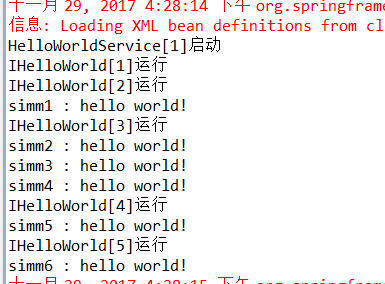
5、测试结果显示,从spring容器中两次获取HelloWorldService服务,确实只运行了一次,说明默认情况下Component确实是单例的,而HelloWorld组件每次获取都是创建新的对象,属于多例模式。服务中自动装载的HelloWorld组件(@AutoWired)在单例的组件中使用时,要考虑清楚对象的生命周期。
参考资料
https://www.cnblogs.com/lonecloud/p/5745902.html
http://blog.csdn.net/qiuhan/article/details/45581371
spring 组件自动装载示例(@ComponentScan,@Component,@Scope)的更多相关文章
- spring 组件@Scope(request,session)示例
上回说到, spring组件的注解Scope大约有singleton.prototype.request.session.global session 这么几种常用的场景.这里需要特别说明一下,根据源 ...
- 【译】Spring 4 自动装配、自动检测、组件扫描示例
前言 译文链接:http://websystique.com/spring/spring-auto-detection-autowire-component-scanning-example-with ...
- Spring Boot 自动配置的原理、核心注解以及利用自动配置实现了自定义 Starter 组件
本章内容 自定义属性快速入门 外化配置 自动配置 自定义创建 Starter 组件 摘录:读书是读完这些文字还要好好用心去想想,写书也一样,做任何事也一样 图 2 第二章目录结构图 第 2 章 Spr ...
- Spring组件扫描<context:component-scan/>使用详解
1.如果不想在xml文件中配置bean,我们可以给我们的类加上spring组件注解,只需再配置下spring的扫描器就可以实现bean的自动载入. <!-- 注解注入 --> <co ...
- 转 Spring 组件 <context:component-scan base-pakage="">用法
1.如果不想在xml文件中配置bean,我们可以给我们的类加上spring组件注解,只需再配置下spring的扫描器就可以实现bean的自动载入. <!-- 注解注入 --> <co ...
- spring Bean类自动装载实现
先贴spring的开发文档,有助于大家学习http://shouce.jb51.net/spring/beans.html#beans-factory-class 一直想研究一下spring bean ...
- Spring核心技术(八)——Spring自动装载的注解
本文针对自动装载的一些注解进行描述. 基于注解的容器配置 @Required注解 @Required注解需要应用到Bean的属性的setter方法上面,如下面的例子: public class Sim ...
- Spring深入浅出(二)IOC的单例 ,继承,依赖,JDBC,工厂模式以及自动装载
IOC的单例模式--Bean Spring中的bean是根据scope来决定的. scope有4种类型: 1.singleton:单例模型,表示通过Spring容器获取的该对象是唯一的.常用并且默认. ...
- Spring框架——IOC 自动装载
IOC自动装载有两种形式 <?xml version="1.0" encoding="UTF-8"?> <beans xmlns=" ...
随机推荐
- 懒人小技巧, Toad 常用偷懒方法
用toad很久了, 感叹它的功能强大的同时整理了一些相关技巧, 有以前在网上看到的也有自己平时用的时候偶尔发现的, 分享一下, 它对用户体验方面做的真的很到位, 通过各种方式来方便用户的操作. 菜鸟 ...
- underscore.js 源码阅读 一 整体结构
// 整个underscore的实现包在一个立即执行函数中,避免污染全局对象 // 通过call(this)来入全局变量 (function() { // 缓存this var root = this ...
- java1.8--OptionalInt,OptionalDouble,OptionalLong类
OptionalInt,OptionalDouble,OptionalLong类的工作方式与Optional类十分类似,只不过他们是专门操作int,都变了,long类型的值而设计的.因此,他们分别定义 ...
- 理解JS中的call、apply、bind方法(*****************************************************************)
在JavaScript中,call.apply和bind是Function对象自带的三个方法,这三个方法的主要作用是改变函数中的this指向. call.apply.bind方法的共同点和区别:app ...
- DNS服务器解析域名的过程
最近在读许令波老师的<深入分析Java Web技术内幕>,算是对DNS服务器域名解析有个大体的理解,以下的内容来自个人对书中内容的整理 1.什么是域名解析? 当我们在浏览器的地址栏输入一个 ...
- 【转】Shell执行MySql操作
mysql -hhostname -Pport -uusername -ppassword -e 相关mysql的sql语句,不用在mysql的提示符下运行mysql,即可以在shell中操作m ...
- Gitlab备份与恢复[七]
标签(linux): git 笔者Q:972581034 交流群:605799367.有任何疑问可与笔者或加群交流 备份 配置文件中加入 gitlab_rails['bakup_path']='/da ...
- MongoDB 基本操作学习笔记
// 查看所有数据库 show dbs // amdin 0.000GB // local 0.000GB // 使用数据库 use admin // switched to db admin // ...
- Win10微软帐户切换不回Administrator本地帐户的解决方法--(转,虽转但亲测有效)
在Win10系统中经常会用到微软帐户登录,如应用商店等地方,不过一些用户反馈原来使用Administrator帐户被绑定微软帐户后无法切换回本地帐户,连[改用本地帐户登录]按钮都没有,那么怎么解决呢? ...
- 常用的几个PHP加密函数
1.前言 PHP加密方式分为单项散列加密,对称加密,非对称加密这几类. 像常用的MD5.hash.crypt.sha1这种就是单项散列加密,单项散列加密是不可逆的. 像URL编码.base64编码这种 ...