
jquery实现对div的拖拽功能
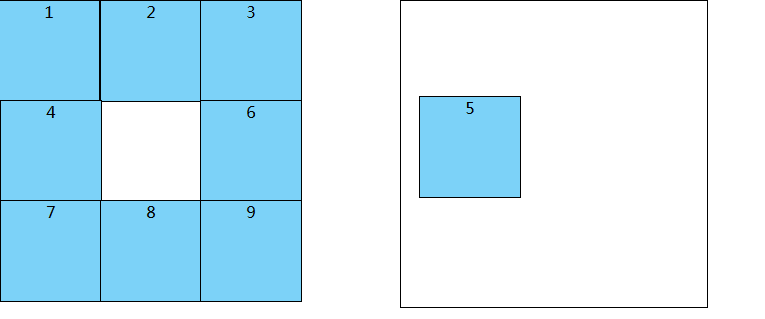
<!DOCTYPE html PUBLIC "-//W3C//DTD XHTML 1.0 Transitional//EN" "http://www.w3.org/TR/xhtml1/DTD/xhtml1-transitional.dtd">

<html xmlns="http://www.w3.org/1999/xhtml">

    <head>

        <meta http-equiv="Content-Type" content="text/html; charset=utf-8" />

        <title>拖动DIV</title>

        <style type="text/css">

        #show1 {

                background: #7cd2f8;

                width: 100px;

                height: 100px;

                text-align: center;

                position: absolute;

                z-index: 1;

                left: 0px;

                top: 0px;

                border: 1px solid black;

                }

        #show2 {

                background: #7cd2f8;

                width: 100px;

                height: 100px;

                text-align: center;

                position: absolute;

                z-index: 1;

                left: 100px;

                top: 0px;

                border: 1px solid black;

                }

        #show3 {

                background: #7cd2f8;

                width: 100px;

                height: 100px;

                text-align: center;

                position: absolute;

                z-index: 1;

                left: 200px;

                top: 0px;

                border: 1px solid black;

                }

        #show4 {

                background: #7cd2f8;

                width: 100px;

                height: 100px;

                text-align: center;

                position: absolute;

                z-index: 1;

                left: 0px;

                top: 100px;

                border: 1px solid black;

                }

        #show5 {

                background: #7cd2f8;

                width: 100px;

                height: 100px;

                text-align: center;

                position: absolute;

                z-index: 1;

                left: 100px;

                top: 100px;

                border: 1px solid black;

                }

        #show6 {

                background: #7cd2f8;

                width: 100px;

                height: 100px;

                text-align: center;

                position: absolute;

                z-index: 1;

                left: 200px;

                top: 100px;

                border: 1px solid black;

                }

        #show7 {

                background: #7cd2f8;

                width: 100px;

                height: 100px;

                text-align: center;

                position: absolute;

                z-index: 1;

                left: 0px;

                top: 200px;

                border: 1px solid black;

                }

        #show8 {

                background: #7cd2f8;

                width: 100px;

                height: 100px;

                text-align: center;

                position: absolute;

                z-index: 1;

                left: 100px;

                top: 200px;

                border: 1px solid black;

                }

        #show9 {

                background: #7cd2f8;

                width: 100px;

                height: 100px;

                text-align: center;

                position: absolute;

                z-index: 1;

                left: 200px;

                top: 200px;

                border: 1px solid black;

                }

        #right{

            width: 306px;

            height: 306px;

            position: absolute;

            top: 0px;

            left: 400px;

            border: 1px solid black;

        }

        </style>

        <script type="text/javascript" src="gongju/jquery-1.11.2.min.js"></script>

    </head>

    <body>

            <div class="show" id="show1" bs="1">

                1

            </div>

            <div class="show" id="show2" bs="2">

                2

            </div>

            <div class="show" id="show3" bs="3">

                3

            </div>

            <div class="show" id="show4" bs="4">

                4

            </div>

            <div class="show" id="show5" bs="5">

                5

            </div>

            <div class="show" id="show6" bs="6">

                6

            </div>

            <div class="show" id="show7" bs="7">

                7

            </div>

            <div class="show" id="show8" bs="8">

                8

            </div>

            <div class="show" id="show9" bs="9">

                9

            </div>

     <!----------------------------------------------->

         <div id="right">

         </div>

    </body>

</html>

<script type="text/javascript">

   var biao;

$(document).ready(function() {

    $(".show").mousedown(function(e) //e鼠标事件

        {

            biao=$(this).attr("bs");

            $(this).css("cursor", "move"); //改变鼠标指针的形状

            var offset = $(this).offset(); //DIV在页面的位置

            var x = e.pageX - offset.left; //获得鼠标指针离DIV元素左边界的距离

            var y = e.pageY - offset.top; //获得鼠标指针离DIV元素上边界的距离

            $(document).bind("mousemove", function(ev) //绑定鼠标的移动事件,因为光标在DIV元素外面也要有效果,所以要用doucment的事件,而不用DIV元素的事件

                {

                    $("#show"+biao+"").stop(); //加上这个之后

                    var _x = ev.pageX - x; //获得X轴方向移动的值

                    var _y = ev.pageY - y; //获得Y轴方向移动的值

                    $("#show"+biao+"").animate({

                        left: _x + "px",

                        top: _y + "px"

                    }, 10);

                });

        });

    $(document).mouseup(function() {

        $("#show"+biao+"").css("cursor", "default");

        $(this).unbind("mousemove");

    })

})

</script>
jquery实现对div的拖拽功能的更多相关文章
- 移动端多个DIV简单拖拽功能
移动端多个DIV简单拖拽功能. 这个demo与之前写的一个例子差不了多少,只是这个多了一层遍历而已. <!DOCTYPE html> <html lang="en" ...
- JS实现多Div模块拖拽功能
空闲时间,同事让帮忙整个JS拖拽div模块功能.于是便在网上搜索,总结如下一个可实现多div模块拖拽的功能.一下是整体的HTML代码, 里边可以控制到 拖拽开始(onStart),拖拽时候(onMov ...
- 使用jQuery Draggable和Droppable实现拖拽功能
上篇博客中已经介绍了web开发中基本拖放原理,现在给出需要完成的功能.最后运行的效果如下图所示: 主要功能需求说明: 1.左侧的元素结构最后会通过Ajax call服务器的数据来生成,能支持多级元素. ...
- JQuery UI的拖拽功能
JQuery UI是JQuery官方支持的WebUI 代码库,包含底层交互.动画.特效等API,并且封装了一些Web小部件(Widget).同时,JQuery UI继承了jquery的插件支持,有大量 ...
- JQuery UI的拖拽功能实现方法小结
JQuery UI提供的API极大简化了拖拽功能的开发.只需要分别在拖拽源(source)和目标(target)上调用draggable和droppable两个函数即可. 拖拽原理 首先要明确几个概念 ...
- js进阶 12-17 jquery实现鼠标左键按下拖拽功能
js进阶 12-17 jquery实现鼠标左键按下拖拽功能 一.总结 一句话总结:监听的对象必须是文档,鼠标按下运行mousemove事件,鼠标松开取消mousemove事件的绑定,div的偏移的话是 ...
- DIV 实现可拖拽 功能(留档)
//可拖拽 功能 $.fn.extend({ //用法:$(element).jqDrag(); //element需要具备定位属性,需要手动调整层叠样式,这里只是修改鼠标拖动效果 ...
- 通过 JS 实现简单的拖拽功能并且可以在特定元素上禁止拖拽
前言 关于讲解 JS 的拖拽功能的文章数不胜数,我确实没有必要大费周章再写一篇重复的文章来吸引眼球.本文的重点是讲解如何在某些特定的元素上禁止拖拽.这是我在编写插件时遇到的问题,其实很多插件的拖拽功能 ...
- Js元素拖拽功能实现
Js元素拖拽功能实现 需要解决的问题 最近项目遇到了一个问题,就是用户某个操作需要弹出一个自定义的内容输入框,但是有个缺点,当浏览太大的时候没办法点击确认和取消按钮,应为这个弹出框是采用绝对定位的,取 ...
随机推荐
- C++学习-4
1.一个类重写了operator(),可以f()-相当于匿名对象-f()()相当于调用operator()函数 把对象名当成函数名来使用--伪函数 2.通过成员函数创建多线程 a) 可以用成员函 ...
- java基本语法特殊点
一.关系运算符 instanceof(类型比较运算符) example:a instanceof hello // hello是一个class ==与!=可以用于引用相等运算符( 二.数组 (数组是对 ...
- 2018-3 WebStorm最新版本破解方法
今天重新打开WebStorm发现之前输入的License Server没法用了,不能通过WebStorm的检测,搜索良久,终于找到了最新版本WebStorm的破解方法. 在激活页面选择License ...
- 用Node.js写爬虫,撸羞羞的图片
说到爬虫,很多人都认为是很高大上的东西.哇塞,是不是可以爬妹纸图啊,是不是可以爬小片片啊.答案就是对的.爬虫可以完成这些东西的操作.但是,作为一个正直的程序员,我们要在法律允许范围内用爬虫来为我们服务 ...
- NOIP2017 总结
联赛结束,但是我并没有得到预期的结果,特写此文分析原因,希望我不会就此退役. 回顾一年,我做了什么? 2016年联赛,我水了两天,抱着挂掉的心态拿到了1=. 2016-2017寒假,参加集训,三天考试 ...
- WordPress源代码压缩优化及常见问题的解决
先来看看效果: 意思就是让你的源代码看起来都挤在一起,这样如果别人想看你的源代码的话就不容易看懂了,(当然如果别人实在想看的话也可以通过某些软件的整理代码的功能来实现,比如IDEA的Ctrl+alt+ ...
- ps智能对象
- Linux档案权限与目录配置
一.档案权限: Linux 最优秀的地方之一,就在于他的多人多任务环境.而为了让各个使用者具有较保密的档案数据,因此档案的权限管理就变的很重要了. Linux 一般将档案可存取的身份分为三个类别,分别 ...
- jar包和war包的介绍与区别
在学习maven的过程中接触到了jar包和war包.之前在写小项目的时候真的遇到过war包,当时为了找到jar包,把war包 的后缀名改成了.rar的压缩文件,在里面提取出来jar包来用.其实jar包 ...
- 研华ADAM 6000系列型号枚举值
public enum Adam6000Type { Non = 0, Adam6015 = 6015, Adam6017 = 6017, ...