
纯CSS美化的checkbox 和 radio
html
<!DOCTYPE HTML>

<html>

<head>

<title>纯CSS3实现自定义美化复选框和单选框</title>

<link rel="stylesheet" type="text/css" href="style2.css" />

</head>

<body>

<div id="holder">

    <div>

        <div class="tag">Checkbox Small</div>

        <input type="checkbox" id="checkbox-1-1" class="regular-checkbox" /><label for="checkbox-1-1"></label>

        <input type="checkbox" id="checkbox-1-2" class="regular-checkbox" /><label for="checkbox-1-2"></label>

        <input type="checkbox" id="checkbox-1-3" class="regular-checkbox" /><label for="checkbox-1-3"></label>

        <input type="checkbox" id="checkbox-1-4" class="regular-checkbox" /><label for="checkbox-1-4"></label>

    </div>

    <div>

        <div class="tag">Checkbox Big</div>

        <input type="checkbox" id="checkbox-2-1" class="regular-checkbox big-checkbox" /><label for="checkbox-2-1"></label>

        <input type="checkbox" id="checkbox-2-2" class="regular-checkbox big-checkbox" /><label for="checkbox-2-2"></label>

        <input type="checkbox" id="checkbox-2-3" class="regular-checkbox big-checkbox" /><label for="checkbox-2-3"></label>

        <input type="checkbox" id="checkbox-2-4" class="regular-checkbox big-checkbox" /><label for="checkbox-2-4"></label>

    </div>

    <div style="text-align:center;clear:both;margin:10px 0">

<script src="/gg_bd_ad_720x90.js" type="text/javascript"></script>

<script src="/follow.js" type="text/javascript"></script>

</div>

    <div>

        <div class="tag">Radio Small</div>

        <div class="button-holder">

            <input type="radio" id="radio-1-1" name="radio-1-set" class="regular-radio" checked /><label for="radio-1-1"></label><br />

            <input type="radio" id="radio-1-2" name="radio-1-set" class="regular-radio" /><label for="radio-1-2"></label><br />

            <input type="radio" id="radio-1-3" name="radio-1-set" class="regular-radio" /><label for="radio-1-3"></label><br />

            <input type="radio" id="radio-1-4" name="radio-1-set" class="regular-radio" /><label for="radio-1-4"></label><br />

        </div>

    </div>

    <div>

        <div class="tag">Radio Big</div>

        <div class="button-holder">

            <input type="radio" id="radio-2-1" name="radio-2-set" class="regular-radio big-radio" /><label for="radio-2-1"></label><br />

            <input type="radio" id="radio-2-2" name="radio-2-set" class="regular-radio big-radio" /><label for="radio-2-2"></label><br />

            <input type="radio" id="radio-2-3" name="radio-2-set" class="regular-radio big-radio" checked /><label for="radio-2-3"></label><br />

            <input type="radio" id="radio-2-4" name="radio-2-set" class="regular-radio big-radio" /><label for="radio-2-4"></label><br />

            <input type="radio" id="radio-2-5" name="radio-2-set" class="regular-radio big-radio" /><label for="radio-2-5"></label><br />

        </div>

    </div>

</div>

</body>

</html>
css
body {

    background: #fff;

    padding:; margin:;

}

#holder {

    width: 100%;

}

#holder > div {

    clear: both;

    padding: 2%;

    margin-bottom: 20px;

    border-bottom: 1px solid #eee;

    float: left;

    width: 96%;

}

label {

    display: inline;

}

.regular-checkbox {

    display: none;

}

.regular-checkbox + label {

    background-color: #fafafa;

    border: 1px solid #cacece;

    box-shadow: 0 1px 2px rgba(0,0,0,0.05), inset 0px -15px 10px -12px rgba(0,0,0,0.05);

    padding: 9px;

    border-radius: 3px;

    display: inline-block;

    position: relative;

}

.regular-checkbox + label:active, .regular-checkbox:checked + label:active {

    box-shadow: 0 1px 2px rgba(0,0,0,0.05), inset 0px 1px 3px rgba(0,0,0,0.1);

}

.regular-checkbox:checked + label {

    background-color: #e9ecee;

    border: 1px solid #adb8c0;

    box-shadow: 0 1px 2px rgba(0,0,0,0.05), inset 0px -15px 10px -12px rgba(0,0,0,0.05), inset 15px 10px -12px rgba(255,255,255,0.1);

    color: #99a1a7;

}

.regular-checkbox:checked + label:after {

    content: '\2714';

    font-size: 14px;

    position: absolute;

    top: 0px;

    left: 3px;

    color: #99a1a7;

}

.big-checkbox + label {

    padding: 18px;

}

.big-checkbox:checked + label:after {

    font-size: 28px;

    left: 6px;

}

.tag {

    font-family: Arial, sans-serif;

    width: 200px;

    position: relative;

    top: 5px;

    font-weight: bold;

    text-transform: uppercase;

    display: block;

    float: left;

}

.radio-1 {

    width: 193px;

}

.button-holder {

    float: left;

}

/* RADIO */

.regular-radio {

    display: none;

}

.regular-radio + label {

    -webkit-appearance: none;

    background-color: #fafafa;

    border: 1px solid #cacece;

    box-shadow: 0 1px 2px rgba(0,0,0,0.05), inset 0px -15px 10px -12px rgba(0,0,0,0.05);

    padding: 9px;

    border-radius: 50px;

    display: inline-block;

    position: relative;

}

.regular-radio:checked + label:after {

    content: ' ';

    width: 12px;

    height: 12px;

    border-radius: 50px;

    position: absolute;

    top: 3px;

    background: #99a1a7;

    box-shadow: inset 0px 0px 10px rgba(0,0,0,0.3);

    text-shadow: 0px;

    left: 3px;

    font-size: 32px;

}

.regular-radio:checked + label {

    background-color: #e9ecee;

    color: #99a1a7;

    border: 1px solid #adb8c0;

    box-shadow: 0 1px 2px rgba(0,0,0,0.05), inset 0px -15px 10px -12px rgba(0,0,0,0.05), inset 15px 10px -12px rgba(255,255,255,0.1), inset 0px 0px 10px rgba(0,0,0,0.1);

}

.regular-radio + label:active, .regular-radio:checked + label:active {

    box-shadow: 0 1px 2px rgba(0,0,0,0.05), inset 0px 1px 3px rgba(0,0,0,0.1);

}

.big-radio + label {

    padding: 16px;

}

.big-radio:checked + label:after {

    width: 24px;

    height: 24px;

    left: 4px;

    top: 4px;

}

/* ------- IGNORE */

#header {

    width: 100%;

    margin: 0px auto;

}

#header #center {

    text-align: center;

}

#header h1 span {

    color: #000;

    display: block;

    font-size: 50px;

}

#header p {

    font-family: 'Georgia', serif;

}

#header h1 {

    color: #892dbf;

    font: bold 40px 'Bree Serif', serif;

}

#travel {

    padding: 10px;

    background: rgba(0,0,0,0.6);

    border-bottom: 2px solid rgba(0,0,0,0.2);

    font-variant: normal;

    text-decoration: none;

    margin-bottom: 20px;

}

#travel a {

    font-family: 'Georgia', serif;

    text-decoration: none;

    border-bottom: 1px solid #f9f9f9;

    color: #f9f9f9;

}
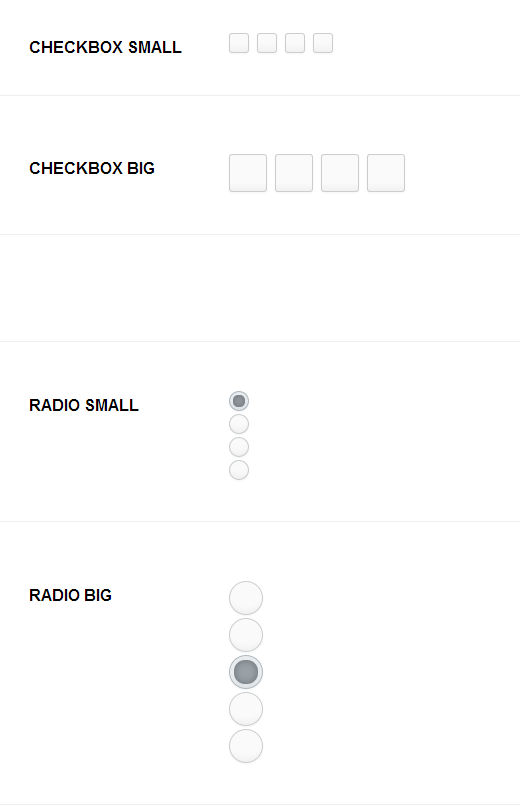
效果
纯CSS美化的checkbox 和 radio的更多相关文章
- 用纯CSS美化radio和checkbox
Radio和checkbox需要美化吗?答案是必须的,因为设计风格一直都会变化,原生的样式百年不变肯定满足不了需求. 先看看纯CSS美化过后的radio和checkbox效果:查看. 项目地址:mag ...
- 利用纯CSS美化checkbox和radio和滑动按钮的实现
W3C提供的CheckBox和radio的原始样式非常的丑,而且在不同的额浏览器表现还不一样,使用常规的方法添加样式没法进行修改样式 一, 单选按钮 <html> <head> ...
- 纯CSS+HTML实现checkbox的思路与实例
checkbox应该是一个比较常用的html功能了,不过浏览器自带的checkbox往往样式不怎么好看,而且不同浏览器效果也不一样.出于美化和统一视觉效果的需求,checkbox的自定义就被提出来了. ...
- CSS效果篇--纯CSS+HTML实现checkbox的思路与实例
checkbox应该是一个比较常用的html功能了,不过浏览器自带的checkbox往往样式不怎么好看,而且不同浏览器效果也不一样.出于美化和统一视觉效果的需求,checkbox的自定义就被提出来了. ...
- 自定义常用input表单元素一:纯css 实现自定义checkbox复选框
最下面那个是之前写的 今天在做项目的时候发现,之前写的貌似还是有点多,起码增加的span标签可以去掉,这样保持和原生相同的结构最好的,仅仅是样式上的变化.今天把项目中的这个给更新上来.下面就直接还是 ...
- 纯css美化下拉框、复选框以及单选框样式并用jquery获取到其被选中的val
具体样式如图所示: 注:获取val值时记得要先引入jquery库奥. 1.下拉框 css部分 #cargo_type_id{ font-size: 13px; border: solid 1px #b ...
- 原创:纯CSS美化单复选框(checkbox、radio)
最重要的一点,隐藏选择框本身.不多说了,上代码: <!doctype html> <html> <head> <meta charset="utf- ...
- 纯css美化复选框,单选框,滑动条(range)
<div class="box"> <!-- 借鉴地址:http://www.cnblogs.com/xiaoxianweb/p/5465607.html --& ...
- 纯css美化单选、复选框
<!doctype html> <html> <head> <meta charset="utf-8"> <title> ...
随机推荐
- SMC MCU
Holtek推出e-Banking智能卡读卡器MCU——HT56RU25,继HT56RB27.HT56RB688 USB接口单片机之后,推出全新UART接口单片机.HT56RU25内建ISO7816- ...
- USB信号是什么类型的? 为什么在D+,D-处要接上拉下拉电阻呢,具体阻值要如何计算
USB协议要求的,1.5K上拉在D+时表示是全速设备,在D-表示不是全速设备有些方案里面(比如PNX5230)推荐D+/D-接下拉1M的电阻是为了提高数据传输稳定性的 ① usb有主从设备之分,主设 ...
- Mac OS X用户,使用homebrew安装,FreeBSD也可以
qtkeychain 这是编译和运行软件必须的库.各平台都可以编译安装.对于Mac OS X用户,使用homebrew安装: brew install qt5keychain (旧版本的Mac OS ...
- 【Xamarin挖墙脚系列:关闭 OS X El Capitan 中 SIP 安全设置功能】
比如需要修改内核配置文件: com.apple.Boot.plist 那么我们需要解锁权限. 禁止SIP模式,那么就可以修改此文件了. 在 OS X El Capitan 中有一个跟安全相关的模式叫 ...
- Grid++Report支持CS/BS模式的表报插件
Grid++Report 可用于开发桌面C/S报表与WEB报表(B/S报表),C/S报表开发适用于VB.NET.C#.VB.VC.Delphi等.WEB报表开发适用于ASP.ASP.NET.JSP/J ...
- 模块工具类--utils
File: js\utils.js/** * 模块工具类,用来初始化各模块视图.自定绑定事件以及其他辅助功能等 * @class Utils */Utils = (function() { var i ...
- hdu1106 字符串水题strtok()&&strchr()&&sscanf()+atoi()使用
字符串的题目 用库函数往往能大大简化代码量 以hdu1106为例 函数介绍 strtok() 原型: char *strtok(char s[], const char *delim); 功能: 分解 ...
- 关于VS 2010 RDLC 报表的详细使用说明
各位技术屌丝们好, 之前我用了很长一段时间通过不断的研究揣摩,终于把RDLC报表给搞透了,今天跟大家做个总结,希望能够帮助到大家. 需求分析 我想把datagridview 中的数据打印出来. 首先 ...
- 将json格式日期(毫秒数)转成日常日期格式和日常格式时间对比
第一:是把生成的Json格式的时间转换,注意要看清楚时间的格式 function (cellval) { var date = new Date(parseInt(cellval.replace(&q ...
- ASP.NET通用权限验证组件实现
沙发(SF)通用权限验证组件 开篇 本篇介绍通用权限验证的实现代码思路,总共分为导入参数.解析XML.根据XML配置进行处理.返回结果. 代码架构图 1. 类介绍 1.SFWebPermissio ...