
利用纯CSS美化checkbox和radio和滑动按钮的实现
W3C提供的CheckBox和radio的原始样式非常的丑,而且在不同的额浏览器表现还不一样,使用常规的方法添加样式没法进行修改样式
一, 单选按钮
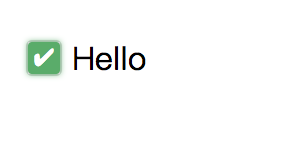
<html>

<head>

    <style type="text/css">

        .switch {

            margin: 20px 20px 0 0;

            display: flex;

            align-items: center;

            width: auto;

        }

        .checkbox-input {

            display: none

        }

        .checkbox {

            -webkit-transition: background-color 0.3s;

            transition: background-color 0.3s;

            background-color: #fff;

            border: 1px solid #d7d7d7;

            border-radius: 3px;

            width: 16px;

            height: 16px;

            vertical-align:middle;

            margin: 0 5px;

        }

        .checkbox-input:checked+.checkbox {

            background-color: #57ad68;

        }

        .checkbox-input:checked+.checkbox:after {

            content: "\2714";

            display: inline-block;

            height: 100%;

            width: 100%;

            color: #fff;

            text-align: center;

            line-height: 16px;

            font-size: 12px;

            box-shadow: 0 0 4px #57ad68;

        }

    </style>

</head>

<body>

    <label class="switch">

        <input class="checkbox-input" id="checkbox" type="checkbox" name="demo-checkbox1">

        <label class="checkbox" for="checkbox"></label>

        <span>Hello</span>

    </label>

</body>

</html>
利用的就是label和CSS3的选中状态checked来修改样式, 中间的那个小✔️是一个unicode编码的字符, 如果需要更改参考http://blog.csdn.net/wy_97/article/details/77749405
二, 复选按钮

<html>

<head>

    <style type="text/css">

        .switch {

            display: flex;

            align-items: center;

            width: auto;

            float: left;

        }

        .radio-beauty-container .radio-beauty {

            width: 16px;

            height: 16px;

            box-sizing: border-box;

            display: inline-block;

            border: 1px solid #d7d7d7;

            margin: 0 5px;

            border-radius: 50%;

            transition: 0.2s;

        }

        .radio-beauty-container input[type="radio"]:checked+.radio-beauty {

            border: solid 1px green;

            padding: 3px;

            background-color: green;

            background-clip: content-box;

            box-shadow: inset 0 0 1px rgba(0,128,0, 0.2), 0 0 3px green;

        }

    </style>

</head>

<body>

    <div class="radio-beauty-container">

        <label class="switch">

            <span class="radio-name">radio2</span>

            <input type="radio" name="radioName" id="radioName2" hidden/>

            <label for="radioName2" class="radio-beauty"></label>

        </label>

        <label class="switch">

            <span class="radio-name">radio3</span>

            <input type="radio" name="radioName" id="radioName3" hidden/>

            <label for="radioName3" class="radio-beauty"></label>

        </label>

    </div>

</body>

</html>
和单选按钮的思路一样都是利用选中状态来进行判断
三, 实现滑动按钮

<html>

<head>

    <style type="text/css">

        .switch-slide-label {

            display: block;

            width: 34px;

            height: 18px;

            background: #ccc;

            border-radius: 30px;

            cursor: pointer;

            position: relative;

            -webkit-transition: 0.3s ease;

            transition: 0.3s ease;

        }

        .switch-slide-label:after {

            content: '';

            display: block;

            width: 16px;

            height: 16px;

            border-radius: 100%;

            background: #fff;

            box-shadow: 0 1px 1px rgba(0, 0, 0, .1);

            position: absolute;

            left: 1px;

            top: 1px;

            -webkit-transform: translateZ(0);

            transform: translateZ(0);

            -webkit-transition:0.3s ease;

            transition:0.3s ease;

        }

        .switch-slide input:checked+label {

            background: #34bf49;

            transition: 0.3s ease;

        }

        .switch-slide input:checked+label:after {

            left: 17px;

        }

    </style>

</head>

<body>

    <div class="radio-beauty-container">

        <label class="switch-slide">

            <input type="checkbox" id="menu-right" hidden>

            <label for="menu-right" class="switch-slide-label"></label>

        </label>

    </div>

</body>

</html>
利用纯CSS美化checkbox和radio和滑动按钮的实现的更多相关文章
- 用纯CSS美化radio和checkbox
Radio和checkbox需要美化吗?答案是必须的,因为设计风格一直都会变化,原生的样式百年不变肯定满足不了需求. 先看看纯CSS美化过后的radio和checkbox效果:查看. 项目地址:mag ...
- 纯css实现checkbox开关切换按钮
我们都知道 checkbox 标签默认样式 实在是太low了,故对CheckBox美化很有必要. 现提供两种方式对其进行美化. 方法一 <div class="switch-wrap ...
- input美化 checkbox和radio样式
input美化 checkbox和radio样式 看惯了input[checkbox]和input[radio]默认样式,有没有想要改变一下呢?比如下面的样式: 比起html默认的样式,上图这些 ...
- 用纯css改变默认的radio和checkbox的样式
利用css的label的伪类(::before)代替checkbox和radio效果: 优点:需要图片来调整选中前和选中后的样式,纯css搞定 缺点:兼容性,IE8以下不支持 在线例子: css改变默 ...
- 用CSS美化checkbox复选按钮和raido单选按钮-适用于移动端
最终效果: 实现方法 index.html: <!DOCTYPE html> <html> <head> <title></title> & ...
- Css实现checkbox及radio样式自定义
前言 checkbox和radio样式自定义在网页中是很常见的, 比如在进行表单输入时性别的选择,用户注册时选择已阅读用户协议.随着用户对产品体验要求越来越高,我们都会对checkbox和radio重 ...
- css美化checkbox的样式
使用iCheck插件可以改变checkbox.radio的原有样式,但是改变的样式尺寸有些大修改起来也比较麻烦,并且需要使用iCheck的调用方法才能使用,有时候iCheck方法还会覆盖掉同级元素的c ...
- 纯CSS美化的checkbox 和 radio
html <!DOCTYPE HTML> <html> <head> <title>纯CSS3实现自定义美化复选框和单选框</title> ...
- 原创:纯CSS美化单复选框(checkbox、radio)
最重要的一点,隐藏选择框本身.不多说了,上代码: <!doctype html> <html> <head> <meta charset="utf- ...
随机推荐
- [Bayes] Variational Inference for Bayesian GMMs
为了世界和平,为了心知肚明,决定手算一次 Variational Inference for Bayesian GMMs 目的就是达到如下的智能效果,扔进去六个高斯,最后拟合结果成了两个高斯,当然,其 ...
- YYHS-分数(二分+容斥)
题目描述 KJDH是个十分善于探索的孩子,有一天他把分子分母小于等于n的最简分数列在了纸上,他想找到这些分数里第k小的数,这对于KJDH来说当然是非常轻易,但是KJDH最近多了很多妹子,他还要去找妹子 ...
- Lua的函数调用和协程中,栈的变化情况
Lua的函数调用和协程中,栈的变化情况 1. lua_call / lua_pcall 对于这两个函数,对栈底是没有影响的--调用的时候,参数会被从栈中移除,当函数返 回的时候,其返回值会从函数处 ...
- B. An express train to reveries
B. An express train to reveries time limit per test 1 second memory limit per test 256 megabytes inp ...
- linux dig 命令
dig 命令主要用来从 DNS 域名服务器查询主机地址信息. 查询单个域名的 DNS 信息 dig 命令最典型的用法就是查询单个主机的信息. $ dig baidu.com dig 命令默认的输出信息 ...
- phpstorm2016.3+xdebug调试
1.首先打开PHP配置文件,php.in修改相关xedebug配置 ; XDEBUG Extension [xdebug] zend_extension ="d:/wamp64/bin/ph ...
- PHPMailer < 5.2.21 - Local File Disclosure(CVE-2017-5223)
CVE-2017-5223 :PHPMailer < 5.2.21 - Local File Disclosure 本文主要介绍一下PHPMailer < 5.2.21 - Local F ...
- 虚拟机通信配置与Xshell连接
本文主要讲解虚拟机通信配置的详细步骤和Xshell工具连接,以及如何诊断网络问题并进行相应配置的问题. 1. 虚拟机通信配置 虚拟机通信配置的基本流程如图所示: 首先,我们先打开新建的虚拟机,然后输入 ...
- Linux下安装ActiveMQ CPP
ActiveMQ CPP ActiveMQ CPP是用C++语言访问ActiveMQ的客户端开发库,也称cms(cpp message service),安装cms开发库需要先安装一些基础库. 如下: ...
- sublime text3添加右键打开的操作
前一段重新安装了Sublime Text3,不过一直不在右键菜单中,所以决定添加,有如下2种方法. 方法一(推荐). 把以下代码,复制到SublimeText3的安装目录,然后重命名为:sublime ...