
使用Gird++打印出现“Retrieving the COM class factory for component with CLSID”的解决办法
我们的接口需要返回一个gird++生成PDF文件的二进制数据,在本地测试都很好,发布到服务器上一直出现“Retrieving the COM class factory for component with CLSID”问题。
最后终于找到问题的解决方法:把程序池里的Enable 32-Bit Applications 设置为True
(ps: 服务器上要安装Grid++的客户端)
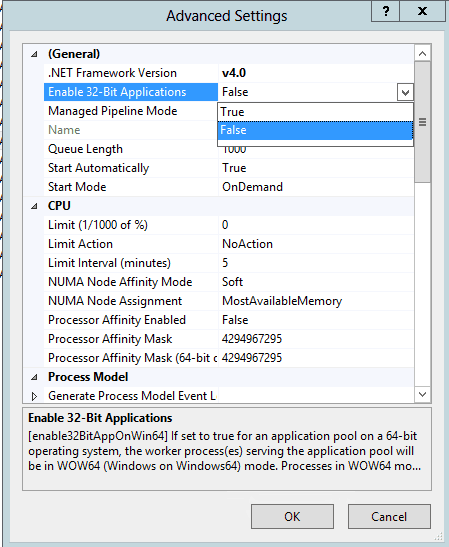
另外 附上代码
    public struct MatchFieldPairType

    {

        public IGRField grField;

        public int MatchColumnIndex;

    }

    public class PrintHelper

    {

        // 将 DataTable 的数据转储到 Grid++Report 的数据集中

        public static void FillRecordToReport(IGridppReport Report, DataTable dt)

        {

            MatchFieldPairType[] MatchFieldPairs = new MatchFieldPairType[Math.Min(Report.DetailGrid.Recordset.Fields.Count, dt.Columns.Count)];

            //根据字段名称与列名称进行匹配,建立DataReader字段与Grid++Report记录集的字段之间的对应关系

            int MatchFieldCount = ;

            for (int i = ; i < dt.Columns.Count; ++i)

            {

                foreach (IGRField fld in Report.DetailGrid.Recordset.Fields)

                {

                    if (String.Compare(fld.Name, dt.Columns[i].ColumnName, true) == )

                    {

                        MatchFieldPairs[MatchFieldCount].grField = fld;

                        MatchFieldPairs[MatchFieldCount].MatchColumnIndex = i;

                        ++MatchFieldCount;

                        break;

                    }

                }

            }

            // 将 DataTable 中的每一条记录转储到 Grid++Report 的数据集中去

            Report.PrepareRecordset();

            foreach (DataRow dr in dt.Rows)

            {

                //Report.PrepareRecordset();

                Report.DetailGrid.Recordset.Append();

                for (int i = ; i < MatchFieldCount; ++i)

                {

                    if (!dr.IsNull(MatchFieldPairs[i].MatchColumnIndex))

                        MatchFieldPairs[i].grField.Value = dr[MatchFieldPairs[i].MatchColumnIndex];

                }

                Report.DetailGrid.Recordset.Post();

            }

        }

}
var report = new GridppReport();
report.LoadFromFile(Server.MapPath("~/eExpressReportbulk.grf"));
                 PrintHelper.FillRecordToReport(report, printDt);

                            string fileName = ConfigurationSettings.AppSettings["pdfPath"] + shipmentNumber + ".pdf";

                            //直接调用ExportDirect方法执行导出任务

                            report.ExportDirect(GRExportType.gretPDF, fileName, false, false);

                            FileStream stream = new FileStream(fileName, FileMode.OpenOrCreate);

                            byte[] buffer = new byte[stream.Length];

                            stream.Read(buffer, , Convert.ToInt32(stream.Length));

                            stream.Close();
附上Grid++破解dll: 下载
使用Gird++打印出现“Retrieving the COM class factory for component with CLSID”的解决办法的更多相关文章
- Retrieving the COM class factory for component with CLSID {00024500-0000-0000-C000-000000000046} failed due to the following error: 80070005.
Retrieving the COM class factory for component with CLSID {00024500-0000-0000-C000-000000000046} fai ...
- 【Excel】Retrieving the COM class factory for component with CLSID {00024500-0000-0000-C000-000000000046}:
[Excel]Retrieving the COM class factory for component with CLSID {00024500-0000-0000-C000-0000000000 ...
- C# - (0x80040154): Retrieving the COM class factory for component with CLSID {877AA945-1CB2-411C-ACD7-C70B1F9E2E32} failed
1. Exeption Error: System.Runtime.InteropServices.COMException (0x80040154): Retrieving the COM clas ...
- Retrieving the COM class factory for component with CLSID XX failed due to the following error: 80070005 拒绝访问。
环境及异常信息说明 环境说明: Win2008 R2 企业版 x64 .IIS 7.0 功能说明:服务端操作Excel,(上传Excel到服务器,并在服务器端读取Excel中的数据) 异常信息:Ret ...
- Retrieving the COM class factory for component with CLSID {00024500-0000-0000-C000-000000000046} failed due to the following error: 80070005 拒绝访问
异常信息:Retrieving the COM class factory for component with CLSID {00024500-0000-0000-C000-000000000046 ...
- C# Retrieving the COM class factory for component with CLSID {00024500-0000-0000-C000-000000000046} failed due to the following error: 80070005
环境说明: Win2008 R2(中文版) x64 .IIS 7.0 功能说明:上传Excel到服务器,并在服务器端读取Excel中的数据: 异常信息:Retrieving the COM class ...
- 异常:Retrieving the COM class factory for component with CLSID {00024500-0000-0000-C000-000000000046} failed due to the following error: 80070005.
异常:Retrieving the COM class factory for component with CLSID {00024500-0000-0000-C000-000000000046} ...
- C#-Retrieving the COM class factory for component with CLSID {00024500-0000-0000-C000-000000000046}
异常信息如下 捕获到执行这句时异常: Excel.Application ep = new Excel.ApplicationClass(); Retrieving the COM class fac ...
- Retrieving the COM class factory for component with CLSID {000209FF-0000-0000-C000-000000000046} failed due to the following error: 80070005 拒绝访问。
这几天在写一个导出word的功能,使用 Microsoft.Vbe.Interop.dll和Office.dll 在本地都可以正常运行,但是上传到服务器后就报错,如下图: 对于此问题,也在网上查了一些 ...
随机推荐
- react相关
react 简单入门 ant 蚂蚁金服react组件 redux 阮一峰入门react material-ui组件库 webpack入门 http://www.jianshu.com/p/42e115 ...
- javascript之闭包深入理解(一)
曾经在开始学习javascript的时候,很是不理解闭包的概念.今天想对它详细的剖析. 在说清楚闭包之前,必须先清楚作用域链. 作用域链 我们知道,执行环境是js中最为重要的一个概念.执行环境定义了变 ...
- RequireJS学习笔记(转)
前言 进入移动前端是很不错的选择,这块也是我希望的道路,但是不熟悉啊... 现在项目用的是require+backbone,整个框架被封装了一次,今天看了代码搞不清楚,觉得应该先从源头抓起,所以再看看 ...
- delphi2010 开发及调试WebService 实例
使用delphi已经10多年了,一直搞桌面程序开发,对Webservice一直很陌生,近来因工作需要,学习delphi开发WebService,担心遗忘,作此笔记. 特别感谢 中塑在线技术总监 大犇 ...
- C#中HashTable和快速排序的用法
题目主要是写一个程序,分析一个文本文件(英文文章)中各个词出现的频率,并且把频率最高的10个词打印出来. 自从周四拿到题目以后,发现又要用到万恶的数据结构了,不得不说这是我的短板,所有上周20号到 ...
- Selenium2+Python自动化测试实战
本人在网上查找了很多做自动化的教程和实例,偶然的一个机会接触到了selenium,觉得非常好用.后来就在网上查阅各种selenium的教程,但是网上的东西真的是太多了,以至于很多东西参考完后无法系统的 ...
- C语言+ODBC+SQL 操作(向SQL里面添加数据)
为了节省时间,我就引用上一节的数据库的表和C语言的结构体数组,在结构体数组中添加数据,清空数据库数据. 第一步查询:SQLBindParameter函数的用法. SQLRETURN SQLBindPa ...
- PreparedStatement執行sql語句
import java.sql.Connection; import java.sql.PreparedStatement; import java.sql.ResultSet; import org ...
- c语言输入一行未知个数数字存入数组
一直有个疑问输入一行数字存入数组时若不知道数字的个数怎么办,最容易想到的办法就是接收字符然后转化为数字,但这样太过麻烦. 今天上网查了下,说可以用ungetc()函数将字符送回输入流,在这里总结归纳一 ...
- ASP.NET 表单认证与角色授权
参考 : http://hi.baidu.com/iykqqlpugocfnqe/item/e132329bdea22acbb6253105 ASP.NET中处理请求的流程图 http://www. ...