
C# Retrieving the COM class factory for component with CLSID {00024500-0000-0000-C000-000000000046} failed due to the following error: 80070005
环境说明: Win2008 R2(中文版) x64 、IIS 7.0
功能说明:上传Excel到服务器,并在服务器端读取Excel中的数据;
异常信息:Retrieving the COM class factory for component with CLSID {00024500-0000-0000-C000-000000000046} failed due to the following error: 80070005 拒绝访问。 (Exception from HRESULT: 0x80070005 (E_ACCESSDENIED)).
处理过程
1.服务器端安装Office Excel软件;
2. 【开始】--【运行】--输入“Dcomcnfg”--【确定】,打开【组件服务】窗口
3.【组件服务】--【计算机】--【我的电脑】--【DCOM配置】--【Microsoft Excel Application】(x64为系统需要按照下面的方法配置,才能找到)
若找不到【Microsoft Excel Application】,请参照以下方法:
①【开始】--【运行】--输入“mmc -32”--【确定】,打开【控制台】窗口;
② 选择【文件】—【添加/删除管理单元】--在“可用的管理单元”中选择【组件服务】--单击【添加】--【确定】;
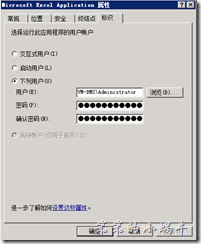
4. 右键--【属性】,在【标识】选项卡中选择“下列用户”,填入用户的用户名和密码(Administrator即可),如图:
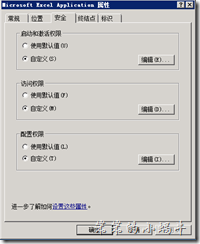
5. 【安全】选项卡中,“启动和激活权限”、“访问权限”都选择【自定义】,如图:
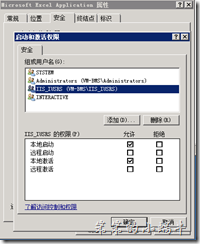
”启动和激活权限“中,点击【编辑】--【添加】—“IIS_IUSRS”用户,并在权限中选择【本地启动】、【本地激活】,如图:
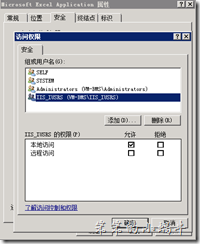
”访问权限”中,点击【编辑】--【添加】—“IIS_IUSRS”用户,并在权限中选择【本地访问】,如图:
点击【确定】,即可。
转载地址:http://blog.csdn.net/lllljz/article/details/44917545
C# Retrieving the COM class factory for component with CLSID {00024500-0000-0000-C000-000000000046} failed due to the following error: 80070005的更多相关文章
- Retrieving the COM class factory for component with CLSID {00024500-0000-0000-C000-000000000046} failed due to the following error: 80070005.
Retrieving the COM class factory for component with CLSID {00024500-0000-0000-C000-000000000046} fai ...
- 【Excel】Retrieving the COM class factory for component with CLSID {00024500-0000-0000-C000-000000000046}:
[Excel]Retrieving the COM class factory for component with CLSID {00024500-0000-0000-C000-0000000000 ...
- C# - (0x80040154): Retrieving the COM class factory for component with CLSID {877AA945-1CB2-411C-ACD7-C70B1F9E2E32} failed
1. Exeption Error: System.Runtime.InteropServices.COMException (0x80040154): Retrieving the COM clas ...
- 使用Gird++打印出现“Retrieving the COM class factory for component with CLSID”的解决办法
我们的接口需要返回一个gird++生成PDF文件的二进制数据,在本地测试都很好,发布到服务器上一直出现“Retrieving the COM class factory for component w ...
- Retrieving the COM class factory for component with CLSID XX failed due to the following error: 80070005 拒绝访问。
环境及异常信息说明 环境说明: Win2008 R2 企业版 x64 .IIS 7.0 功能说明:服务端操作Excel,(上传Excel到服务器,并在服务器端读取Excel中的数据) 异常信息:Ret ...
- Retrieving the COM class factory for component with CLSID {00024500-0000-0000-C000-000000000046} failed due to the following error: 80070005 拒绝访问
异常信息:Retrieving the COM class factory for component with CLSID {00024500-0000-0000-C000-000000000046 ...
- 异常:Retrieving the COM class factory for component with CLSID {00024500-0000-0000-C000-000000000046} failed due to the following error: 80070005.
异常:Retrieving the COM class factory for component with CLSID {00024500-0000-0000-C000-000000000046} ...
- C#-Retrieving the COM class factory for component with CLSID {00024500-0000-0000-C000-000000000046}
异常信息如下 捕获到执行这句时异常: Excel.Application ep = new Excel.ApplicationClass(); Retrieving the COM class fac ...
- 错误:Retrieving the COM class factory for component with CLSID {000209FF-0000-0000-C000-000000000046} failed due to the following error: 80070005 拒绝访问。
最近,把一个网站部署到另一个服务器上,网站中一个功能word转pdf报下面错误: 在此附上解决方案: 方法1:配置Web.Config文件,在每次请求时模拟本地系统的账户. 具体操作:在Web.Con ...
随机推荐
- MATLAB左除和右除
矩阵的除法包括左除(A\B).右除(A/B)和点除(A./B)三种. 一般情况下,x = A\b是方程组A*x = b的解, 而x = b/A是方程组x*A = b的解, x = A./B表示同型矩阵 ...
- Django admin 继承user表后密码为明文,继承UserAdmin,重写其方法
Django用户继承AbstractUser后密码为明文 其实本不应该有这个问题,却花了我很久的时间,因为还是初学阶段. 造成这个原因是因为在admin注册的生活没有指定Admin 在app的admi ...
- 【神经网络】Reducing the Dimensionality of Data with Neural Networks
这篇paper来做什么的? 用神经网络来降维.之前降维用的方法是主成分分析法PCA,找到数据集中最大方差方向.(附:降维有助于分类.可视化.交流和高维信号的存储) 这篇paper提出了一种非线性的PC ...
- ThinkPHP使用Smarty
ThinkPHP支持多种php模板引擎,可以根据个人需要加以配置. 第一步: 首先去Smarty官网上下载一个Smarty. 第二步: 解压压缩包,会有两个文件夹:demo和libs.打开libs文件 ...
- iOS App中第一次运行添加半透明新手指引
实现方式: 在当前View上一个蒙层,然后找出需要标记的地方圈为白色,那些箭头和提示文字都是UI做出来的图上自带的. 代码: 判断是第一次运行APP后进入页面调用 -(void)newGuide { ...
- C语言 · 确定元音字母位置
算法训练 确定元音字母位置 时间限制:1.0s 内存限制:512.0MB 输入一个字符串,编写程序输出该字符串中元音字母的首次出现位置,如果没有元音字母输出0.英语元音字母只有‘a’ ...
- Writing your first Django
Quick install guide 1.1 Install Python, it works with Python2.6, 2.7, 3.2, 3.3. All these version ...
- Mac下配置Apache Httpd的Https/SSL
Mac下配置Apache Httpd的Https/SSL httpd版本: httpd-2.4.17 jdk版本: jdk1.8.0_65 参考来源: Mac下安装Apache Httpd Mac O ...
- Java编程的逻辑 (43) - 剖析TreeMap
本系列文章经补充和完善,已修订整理成书<Java编程的逻辑>,由机械工业出版社华章分社出版,于2018年1月上市热销,读者好评如潮!各大网店和书店有售,欢迎购买,京东自营链接:http:/ ...
- ClassNotFoundException和NoClassDefFoundError的解决办法
程序在其他手机都没有问题,但在刷到版本稍微较低的平板或手机上时就会直接闪退,并报出以下异常: java.lang.RuntimeException: Unable to instantiate act ...