
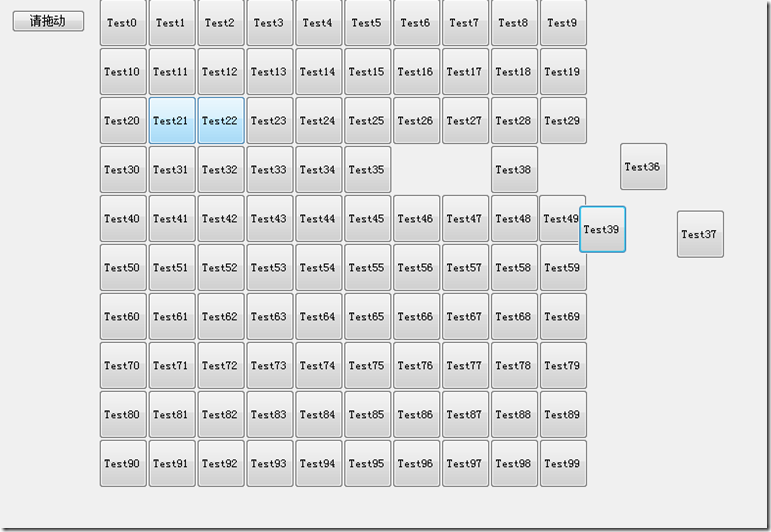
20150506—WinForm自动生成按钮&按钮拖动
using System;

using System.Collections.Generic;

using System.ComponentModel;

using System.Data;

using System.Drawing;

using System.Linq;

using System.Text;

using System.Windows.Forms;

namespace xiaojian2

{

    public partial class Form1 : Form

    {

        public Form1()

        {

            InitializeComponent();

        }

        private void Form1_Load(object sender, EventArgs e)

        {

        }

        private void button1_Click(object sender, EventArgs e)

        {

            this.splitContainer1.Panel2.Controls.Clear();

            for (int i = ; i < ; i++)

            {

                //Form1 xx = new Form1();

                //xx.Show();

                Button btn = new Button() { Name = "btn" + i, Text = "Test" + i, Size = new Size(, ) };

                btn.Location = new Point( * (i % ),  * (i / ));

                btn.MouseDown += button1_MouseDown;

                btn.MouseMove += button1_MouseMove;

                this.splitContainer1.Panel2.Controls.Add(btn); //向前台页面添加生成的按钮,

            }

        }

        Point pt;

        private void button1_MouseDown(object sender, MouseEventArgs e)

        {

            pt = Cursor.Position;

        }

        private void button1_MouseMove(object sender, MouseEventArgs e)

        {

            if (MouseButtons == MouseButtons.Left)

            {

                int px = Cursor.Position.X - pt.X;

                int py = Cursor.Position.Y - pt.Y;

                Button butt = (Button)sender;//获取是哪个按钮,并转换

                butt.Location = new Point(butt.Location.X + px, butt.Location.Y + py);

                pt = Cursor.Position;

            }

        }

    }

}
20150506—WinForm自动生成按钮&按钮拖动的更多相关文章
- 懒人小工具1:winform自动生成Model,Insert,Select,Delete以及导出Excel的方法
懒人小工具2:T4自动生成Model,Insert,Select,Delete以及导出Excel的方法 github地址:https://github.com/Jimmey-Jiang/J ...
- JavaScript自动生成博文目录导航/TOP按钮
博客园页面添加返回顶部TOP按钮 进入网页管理->设置 在"页面定制CSS代码"中添加如下css样式,当然你可以改为自己喜欢的样式 此处可以将背景色background-co ...
- winform基本控件----按钮
这次来引用一个我们上课时候老师给的一个实验内容,来说一下winform程序设计中的按钮控件的使用.下面是我们老师给的实验内容. 实验目的: 掌握Winform的开发环境. 掌握窗体的创建和基本方法. ...
- C# 动态生成的按钮及定义按钮的事件的代码
内容闲暇时间,把内容过程中比较常用的内容备份一下,如下的内容内容是关于C# 动态生成的按钮及定义按钮的事件的内容,应该对码农们也有用途. HtmlGenericControl control = ne ...
- Net实现钩子函数(Hook)以及通过SendMessage实现自动点击按钮和给文本框赋值
1.实现钩子函数 钩子(Hook)的实现需要三个主要的函数和一个委托 [DllImport("user32.dll", CharSet = CharSet.Auto, Callin ...
- c#:winform从一个toolstriptool上拖动一个图标到一个自定义usercontrol内。
效果: 在一个winform工程中,添加一个ToolStrip然后给它添加一个ToolStripButton(tsbStart,它就是红色框圈选的图标) this.toolStripTools = n ...
- Winform自动更新组件分享
作者:圣殿骑士 出处:http://www.cnblogs.com/KnightsWarrior/ 关于作者:专注于微软平台项目架构.管理和企业解决方案.自认在面向对象及面向服务领域有一定的造诣,熟悉 ...
- JavaScript自动生成博文目录导航
转载于:JavaScript自动生成博文目录导航 我们在写博客的时候,如果博文里面有目录,会给人结构清晰.一种一目了然的感觉,看目录就知道这篇博文要讲解的内容,并且点击目录标题就可以跳转到 具体的内容 ...
- Eclipse自动生成作者、日期注释等功能设置
我们在使用Eclipse 编写Java代码时,自动生成的注释信息都是按照预先设置好的格式生成的. 修改作者.日期注释格式:打开Windows->Preferences->Java-> ...
随机推荐
- 5.ScrollView无法填充满屏幕
问题: <?xml version="1.0" encoding="utf-8"?> <android.support.v4.widget.D ...
- onConfigurationChanged is not called&& 翻转屏幕不执行onConfigurationChanged方法&&onConfigurationChanged不执行
我总结出一句话: 如果target sdk>=13,必须使用如下方式声明activity:android:configChanges="orientation|screenSize&q ...
- spring security源码分析之web包分析
Spring 是一个非常流行和成功的 Java 应用开发框架.Spring Security 基于 Spring 框架,提供了一套 Web 应用安全性的完整解决方案.一般来说,Web 应用的安全性包括 ...
- Creating a CSRF protection with Spring 3.x--reference
reference from:http://info.michael-simons.eu/2012/01/11/creating-a-csrf-protection-with-spring-3-1/ ...
- 向linux内核版本号添加字符/为何有时会自动添加“+”号
转载:http://blog.csdn.net/adaptiver/article/details/7225980 1. 引子 编译2.6.35.7 kernel版本的时候发现,“2.6.35.7 ...
- iOS-UITextField中给placeholder动态设置颜色的四种方法
思路分析: 0.自定义UITextField 1.设置占位文字的颜色找-->placeholderColor,结果发现UITextField没有提供这个属性 2.在storyboard/xib中 ...
- 10分钟学会AngularJS的数据绑定
前言:为什么要用AngularJS? 相信用过.NetMVC的人都知道用rezor绑定数据是一件很爽的事情,C#代码直接在前台页面中输出.然后这种比较适用于同步请求. 当我们的项目离不开异步请 ...
- Windows环境下安装Redis
1:首先下载redis.从下面地址下:https://github.com/MSOpenTech/redis/releases2:创建redis.conf文件:这是一个配置文件,指定了redis的监听 ...
- iOS UINavigationController 详解
developer.apple.com/cn/ 导航条 UINavigationBar继承UIView 导航控制器 UINavigationController (压栈,出栈) ...
- Android 自定义Dialog工具类
由于项目的需要,系统的弹出框已经不能满足我们的需求,我们需要各式各样的弹出框,这时就需要我们去自定义弹出框了. 新建布局文件 dialog_layout.xml,将下面内容复制进去 <?xml ...