
ASP.NET伪静态-无法读取配置文件,因为它超过了最大文件大小的解决办法
一直都在使用微软URLRewriter,具体的使用方法我就不多说了,网上文章很多。
但最近遇到一个问题,就是当web.config文件里面设置伪静态规则过多,大于2M的时候,就报错:无法读取配置文件,因为它超过了最大文件大小的解决办法,如图:
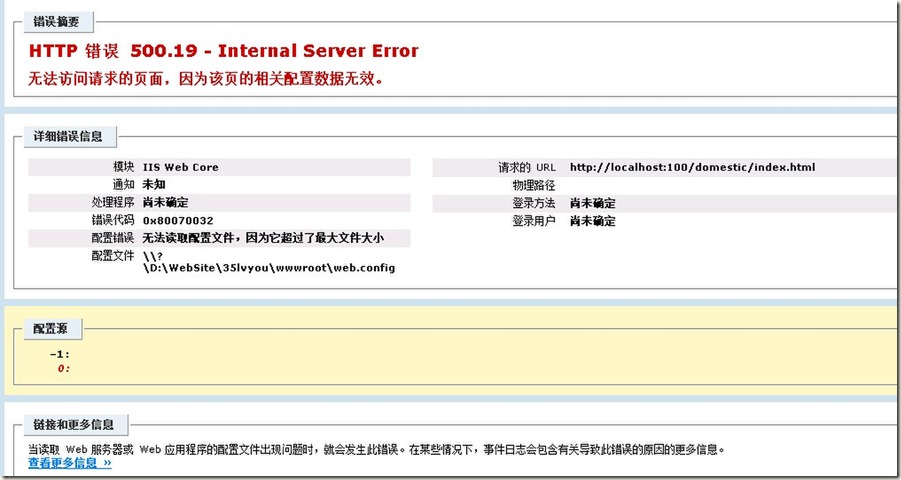
URLRewriting所有的映射规则都是保存在web.config里面的,导致这个文件过大,所以最好的解决办法就是把里面的映射规则保存到另外一个文件中去。
1、下载和安装MSDNURLRewriting.msi地址
2、打开源码 Config/RewriterConfiguration.cs 找到下面代码,
/// <summary>

/// GetConfig() returns an instance of the <b>RewriterConfiguration</b> class with the values populated from

/// the Web.config file.  It uses XML deserialization to convert the XML structure in Web.config into

/// a <b>RewriterConfiguration</b> instance.

/// </summary>

/// <returns>A <see cref="RewriterConfiguration"/> instance.</returns>

public static RewriterConfiguration GetConfig()

{

    if (HttpContext.Current.Cache["RewriterConfig"] == null)

        HttpContext.Current.Cache.Insert("RewriterConfig", ConfigurationSettings.GetConfig("RewriterConfig"));

    return (RewriterConfiguration) HttpContext.Current.Cache["RewriterConfig"];

}
修改为
/// <summary>

/// GetConfig() returns an instance of the <b>RewriterConfiguration</b> class with the values populated from

/// the Web.config file.  It uses XML deserialization to convert the XML structure in Web.config into

/// a <b>RewriterConfiguration</b> instance.

/// </summary>

/// <returns>A <see cref="RewriterConfiguration"/> instance.</returns>

public static RewriterConfiguration GetConfig()

{

    if (HttpContext.Current.Cache["RewriterConfig"] == null)

    {

        object obj = Acexe.Common.APIXMLSerializer.DeSerializeFromFile(HttpContext.Current.Server.MapPath("~/URLRewriter.config"), typeof(RewriterConfiguration));

        HttpContext.Current.Cache.Insert("RewriterConfig", obj);

    }

    return (RewriterConfiguration)HttpContext.Current.Cache["RewriterConfig"];

}
其中,反序列化类:
using System;

using System.IO;

using System.Text;

using System.Xml;

using System.Xml.Serialization;

namespace Acexe.Common

{

    public class APIXMLSerializer

    {

        public static object DeSerialize(string xml, Type type)

        {

            return DeSerialize(xml, type, Encoding.UTF8);

        }

        public static object DeSerialize(string xml, Type type, Encoding encode)

        {

            return DeSerialize(xml, type, encode, false);

        }

        public static object DeSerialize(string xml, Type type, Encoding encode, bool needException)

        {

            try

            {

                XmlSerializer serializer = new XmlSerializer(type);

                MemoryStream stream = new MemoryStream(encode.GetBytes(xml));

                object obj2 = serializer.Deserialize(stream);

                stream.Close();

                stream.Dispose();

                return obj2;

            }

            catch (Exception)

            {

                return null;

            }

        }

        public static object DeSerializeFromFile(string filepath, Type type)

        {

            try

            {

                XmlSerializer serializer = new XmlSerializer(type);

                FileStream stream = new FileStream(filepath, FileMode.Open);

                object obj2 = serializer.Deserialize(stream);

                stream.Close();

                stream.Dispose();

                return obj2;

            }

            catch (Exception)

            {

                return null;

            }

        }

        public static object DeSerializeUTF8(string xml, Type type)

        {

            return DeSerialize(xml, type, Encoding.UTF8);

        }

        public static string Serialize(object ob)

        {

            return Serialize(ob, ob.GetType(), Encoding.UTF8);

        }

        public static string Serialize(object ob, Type type)

        {

            return Serialize(ob, type, Encoding.UTF8);

        }

        public static string Serialize(object ob, Type type, Encoding encode)

        {

            try

            {

                XmlSerializer serializer = new XmlSerializer(type);

                XmlSerializerNamespaces namespaces = new XmlSerializerNamespaces();

                namespaces.Add(string.Empty, string.Empty);

                XmlWriterSettings settings = new XmlWriterSettings();

                MemoryStream output = new MemoryStream();

                settings.OmitXmlDeclaration = true;

                XmlWriter xmlWriter = XmlWriter.Create(output, settings);

                serializer.Serialize(xmlWriter, ob, namespaces);

                xmlWriter.Flush();

                xmlWriter.Close();

                string str = encode.GetString(output.GetBuffer());

                output.Close();

                output.Dispose();

                return str.TrimEnd(new char[1]);

            }

            catch (Exception)

            {

                return "";

            }

        }

        public static void SerializeToFile(object ob, Type type, string filepath)

        {

            try

            {

                XmlSerializer serializer = new XmlSerializer(type);

                StreamWriter writer = new StreamWriter(filepath);

                serializer.Serialize((TextWriter)writer, ob);

                writer.Close();

                writer.Dispose();

            }

            catch (Exception)

            {

            }

        }

        public static string SerializeUTF8(object ob, Type type)

        {

            return Serialize(ob, type, Encoding.UTF8);

        }

    }

}
3、配置伪静态规则到网站根目录下URLRewriter.config(路径根据实际需要可调整)
<?xml version="1.0"?>
<RewriterConfig>
<Rules>
<!--首页-->
<RewriterRule>
<LookFor>~/index.html</LookFor>
<SendTo>~/default.aspx</SendTo>
</RewriterRule>
<RewriterRule>
<LookFor>~/Vacations/(.[0-9]*)S(.[0-9]*)A(.[0-9]*)C(.[0-9]*)D(.[0-9]*)E(.[0-9]*)F(.[0-9]*)H(.[0-9]*)J(.[0-9]*)R(.[0-9]*)T(.[0-9]*)W(.[0-9]*)X(.[0-9]*)Y(.[0-9]*)P(.[0-9]*)/index.html</LookFor>
<SendTo>~/Vacations/List.aspx?sid=$1&A=$3&C=$4&D=$5&E=$6&F=$7&H=$8&J=$9&R=$10&T=$11&W=$12&X=$13&Y=$14&P=$15</SendTo>
</RewriterRule>
</Rules>
</RewriterConfig>
4、配置Web.Config文件(和网上其他说明的配置一样)
(1)添加下面内容到configSections节点下
<section name="RewriterConfig" type="URLRewriter.Config.RewriterConfigSerializerSectionHandler, URLRewriter"/>
(2)添加下面内容到httpHandlers节点下
<add verb="*" path="*.aspx" type="URLRewriter.RewriterFactoryHandler, URLRewriter"/>

<add verb="*" path="*.html" type="URLRewriter.RewriterFactoryHandler, URLRewriter"/>
(3)如果是IIS7,添加下面内容到handlers节点下
<!--IIS7URL重写配置开始-->

<add name="all" path="*" verb="*" modules="IsapiModule" scriptProcessor="C:\Windows\Microsoft.NET\Framework64\v2.0.50727\aspnet_isapi.dll" resourceType="Unspecified" requireAccess="None" preCondition="classicMode,runtimeVersionv2.0,bitness64" />

<add name="Html" path="*.html" verb="*" modules="IsapiModule" scriptProcessor="C:\Windows\Microsoft.NET\Framework64\v2.0.50727\aspnet_isapi.dll" resourceType="Unspecified" requireAccess="Script" preCondition="classicMode,runtimeVersionv2.0,bitness64" />

<add name="ASPNET_ISAPI" path="*" verb="*" modules="IsapiModule" scriptProcessor="C:\Windows\Microsoft.NET\Framework\v2.0.50727\aspnet_isapi.dll" resourceType="Unspecified" requireAccess="None" preCondition="classicMode,runtimeVersionv2.0,bitness32" />

<!--IIS7URL重写配置结束—>
以下是全部Web.Config文件配置
<?xml version="1.0"?>

<!--

    注意: 除了手动编辑此文件外,您还可以使用

    Web 管理工具来配置应用程序的设置。可以使用 Visual Studio 中的

    “网站”->“Asp.Net 配置”选项。

    设置和注释的完整列表可以在

    machine.config.comments 中找到,该文件通常位于

      \Windows\Microsoft.Net\Framework\vx.x\Config 中

-->

<configuration>

  <configSections>

    <sectionGroup name="system.web.extensions" type="System.Web.Configuration.SystemWebExtensionsSectionGroup, System.Web.Extensions, Version=3.5.0.0, Culture=neutral, PublicKeyToken=31BF3856AD364E35">

      <sectionGroup name="scripting" type="System.Web.Configuration.ScriptingSectionGroup, System.Web.Extensions, Version=3.5.0.0, Culture=neutral, PublicKeyToken=31BF3856AD364E35">

        <section name="scriptResourceHandler" type="System.Web.Configuration.ScriptingScriptResourceHandlerSection, System.Web.Extensions, Version=3.5.0.0, Culture=neutral, PublicKeyToken=31BF3856AD364E35" requirePermission="false" allowDefinition="MachineToApplication"/>

        <sectionGroup name="webServices" type="System.Web.Configuration.ScriptingWebServicesSectionGroup, System.Web.Extensions, Version=3.5.0.0, Culture=neutral, PublicKeyToken=31BF3856AD364E35">

          <section name="jsonSerialization" type="System.Web.Configuration.ScriptingJsonSerializationSection, System.Web.Extensions, Version=3.5.0.0, Culture=neutral, PublicKeyToken=31BF3856AD364E35" requirePermission="false" allowDefinition="Everywhere"/>

          <section name="profileService" type="System.Web.Configuration.ScriptingProfileServiceSection, System.Web.Extensions, Version=3.5.0.0, Culture=neutral, PublicKeyToken=31BF3856AD364E35" requirePermission="false" allowDefinition="MachineToApplication"/>

          <section name="authenticationService" type="System.Web.Configuration.ScriptingAuthenticationServiceSection, System.Web.Extensions, Version=3.5.0.0, Culture=neutral, PublicKeyToken=31BF3856AD364E35" requirePermission="false" allowDefinition="MachineToApplication"/>

          <section name="roleService" type="System.Web.Configuration.ScriptingRoleServiceSection, System.Web.Extensions, Version=3.5.0.0, Culture=neutral, PublicKeyToken=31BF3856AD364E35" requirePermission="false" allowDefinition="MachineToApplication"/>

        </sectionGroup>

      </sectionGroup>

    </sectionGroup>

    <section name="RewriterConfig" type="URLRewriter.Config.RewriterConfigSerializerSectionHandler, URLRewriter"/>

  </configSections>

  <system.web>

    <!--

            设置 compilation debug="true" 可将调试符号插入到

            已编译的页面。由于这会

            影响性能,因此请仅在开发过程中将此值

            设置为 true。

        -->

    <compilation debug="true">

      <assemblies>

        <add assembly="System.Core, Version=3.5.0.0, Culture=neutral, PublicKeyToken=B77A5C561934E089"/>

        <add assembly="System.Web.Extensions, Version=3.5.0.0, Culture=neutral, PublicKeyToken=31BF3856AD364E35"/>

        <add assembly="System.Data.DataSetExtensions, Version=3.5.0.0, Culture=neutral, PublicKeyToken=B77A5C561934E089"/>

        <add assembly="System.Xml.Linq, Version=3.5.0.0, Culture=neutral, PublicKeyToken=B77A5C561934E089"/>

      </assemblies>

      <buildProviders>

        <add extension=".html" type="System.Web.Compilation.PageBuildProvider" />

      </buildProviders>

    </compilation>

    <!--

            通过 <authentication> 节可以配置

            安全身份验证模式,ASP.NET

            使用该模式来识别来访用户身份。

        -->

    <authentication mode="Windows"/>

    <!--

            如果在执行请求的过程中出现未处理的错误,

            则通过 <customErrors> 节

            可以配置相应的处理步骤。具体而言,

            开发人员通过该节可配置要显示的 html 错误页,

            以代替错误堆栈跟踪。

        <customErrors mode="RemoteOnly" defaultRedirect="GenericErrorPage.htm">

            <error statusCode="403" redirect="NoAccess.htm" />

            <error statusCode="404" redirect="FileNotFound.htm" />

        </customErrors>

        -->

    <pages>

      <controls>

        <add tagPrefix="asp" namespace="System.Web.UI" assembly="System.Web.Extensions, Version=3.5.0.0, Culture=neutral, PublicKeyToken=31BF3856AD364E35"/>

        <add tagPrefix="asp" namespace="System.Web.UI.WebControls" assembly="System.Web.Extensions, Version=3.5.0.0, Culture=neutral, PublicKeyToken=31BF3856AD364E35"/>

      </controls>

    </pages>

    <httpHandlers>

      <remove verb="*" path="*.asmx"/>

      <add verb="*" path="*.asmx" validate="false" type="System.Web.Script.Services.ScriptHandlerFactory, System.Web.Extensions, Version=3.5.0.0, Culture=neutral, PublicKeyToken=31BF3856AD364E35"/>

      <add verb="*" path="*_AppService.axd" validate="false" type="System.Web.Script.Services.ScriptHandlerFactory, System.Web.Extensions, Version=3.5.0.0, Culture=neutral, PublicKeyToken=31BF3856AD364E35"/>

      <add verb="GET,HEAD" path="ScriptResource.axd" type="System.Web.Handlers.ScriptResourceHandler, System.Web.Extensions, Version=3.5.0.0, Culture=neutral, PublicKeyToken=31BF3856AD364E35" validate="false"/>

      <add verb="*" path="*.aspx" type="URLRewriter.RewriterFactoryHandler, URLRewriter"/>

      <add verb="*" path="*.html" type="URLRewriter.RewriterFactoryHandler, URLRewriter"/>

    </httpHandlers>

    <httpModules>

      <add name="ScriptModule" type="System.Web.Handlers.ScriptModule, System.Web.Extensions, Version=3.5.0.0, Culture=neutral, PublicKeyToken=31BF3856AD364E35"/>

    </httpModules>

  </system.web>

  <system.codedom>

    <compilers>

      <compiler language="c#;cs;csharp" extension=".cs" warningLevel="4" type="Microsoft.CSharp.CSharpCodeProvider, System, Version=2.0.0.0, Culture=neutral, PublicKeyToken=b77a5c561934e089">

        <providerOption name="CompilerVersion" value="v3.5"/>

        <providerOption name="WarnAsError" value="false"/>

      </compiler>

      <compiler language="vb;vbs;visualbasic;vbscript" extension=".vb" warningLevel="4" type="Microsoft.VisualBasic.VBCodeProvider, System, Version=2.0.0.0, Culture=neutral, PublicKeyToken=b77a5c561934e089">

        <providerOption name="CompilerVersion" value="v3.5"/>

        <providerOption name="OptionInfer" value="true"/>

        <providerOption name="WarnAsError" value="false"/>

      </compiler>

    </compilers>

  </system.codedom>

  <!--

        system.webServer 节是在 Internet Information Services 7.0 下运行 ASP.NET AJAX

        所必需的。对早期版本的 IIS 来说则不需要此节。

    -->

  <system.webServer>

    <validation validateIntegratedModeConfiguration="false"/>

    <modules>

      <remove name="ScriptModule"/>

      <add name="ScriptModule" preCondition="managedHandler" type="System.Web.Handlers.ScriptModule, System.Web.Extensions, Version=3.5.0.0, Culture=neutral, PublicKeyToken=31BF3856AD364E35"/>

    </modules>

    <handlers>

      <remove name="WebServiceHandlerFactory-Integrated"/>

      <remove name="ScriptHandlerFactory"/>

      <remove name="ScriptHandlerFactoryAppServices"/>

      <remove name="ScriptResource"/>

      <add name="ScriptHandlerFactory" verb="*" path="*.asmx" preCondition="integratedMode" type="System.Web.Script.Services.ScriptHandlerFactory, System.Web.Extensions, Version=3.5.0.0, Culture=neutral, PublicKeyToken=31BF3856AD364E35"/>

      <add name="ScriptHandlerFactoryAppServices" verb="*" path="*_AppService.axd" preCondition="integratedMode" type="System.Web.Script.Services.ScriptHandlerFactory, System.Web.Extensions, Version=3.5.0.0, Culture=neutral, PublicKeyToken=31BF3856AD364E35"/>

      <add name="ScriptResource" preCondition="integratedMode" verb="GET,HEAD" path="ScriptResource.axd" type="System.Web.Handlers.ScriptResourceHandler, System.Web.Extensions, Version=3.5.0.0, Culture=neutral, PublicKeyToken=31BF3856AD364E35"/>

      <!--IIS7URL重写配置开始-->

      <add name="all" path="*" verb="*" modules="IsapiModule" scriptProcessor="C:\Windows\Microsoft.NET\Framework64\v2.0.50727\aspnet_isapi.dll" resourceType="Unspecified" requireAccess="None" preCondition="classicMode,runtimeVersionv2.0,bitness64" />

      <add name="Html" path="*.html" verb="*" modules="IsapiModule" scriptProcessor="C:\Windows\Microsoft.NET\Framework64\v2.0.50727\aspnet_isapi.dll" resourceType="Unspecified" requireAccess="Script" preCondition="classicMode,runtimeVersionv2.0,bitness64" />

      <add name="ASPNET_ISAPI" path="*" verb="*" modules="IsapiModule" scriptProcessor="C:\Windows\Microsoft.NET\Framework\v2.0.50727\aspnet_isapi.dll" resourceType="Unspecified" requireAccess="None" preCondition="classicMode,runtimeVersionv2.0,bitness32" />

      <!--IIS7URL重写配置结束-->

    </handlers>

    <defaultDocument>

      <files>

        <clear />

        <add value="default.aspx" />

        <add value="index.html" />

        <add value="index.asp" />

      </files>

    </defaultDocument>

  </system.webServer>

  <runtime>

    <assemblyBinding appliesTo="v2.0.50727" xmlns="urn:schemas-microsoft-com:asm.v1">

      <dependentAssembly>

        <assemblyIdentity name="System.Web.Extensions" publicKeyToken="31bf3856ad364e35"/>

        <bindingRedirect oldVersion="1.0.0.0-1.1.0.0" newVersion="3.5.0.0"/>

      </dependentAssembly>

      <dependentAssembly>

        <assemblyIdentity name="System.Web.Extensions.Design" publicKeyToken="31bf3856ad364e35"/>

        <bindingRedirect oldVersion="1.0.0.0-1.1.0.0" newVersion="3.5.0.0"/>

      </dependentAssembly>

    </assemblyBinding>

  </runtime>

</configuration>

三五旅游网 http://www.35lvyou.com
ASP.NET伪静态-无法读取配置文件,因为它超过了最大文件大小的解决办法的更多相关文章
- ASP.NET Core开发-读取配置文件Configuration
ASP.NET Core 是如何读取配置文件,今天我们来学习. ASP.NET Core的配置系统已经和之前版本的ASP.NET有所不同了,之前是依赖于System.Configuration和XML ...
- ASP.NET Core开发-读取配置文件Configuration appsettings.json
https://www.cnblogs.com/linezero/p/Configuration.html ASP.NET Core 是如何读取配置文件,今天我们来学习. ASP.NET Core的配 ...
- SQL2005SP4补丁安装时错误: -2146233087 MSDTC 无法读取配置信息。。。错误代码1603的解决办法
是在安装slq2005sp3和sp4补丁的时候碰到的问题. 起先是碰到的错误1603的问题,但网上搜索的1603的解决办法都试过了,google也用了,外文论坛也读了,依然没有能解决这个问题. 其实一 ...
- Win7下VS2010使用“ASP.Net 3.5 Claims-aware Template”创建ClaimsAwareWebSite报"HRESULT: 0x80041FEB"错误的解决办法
问题描述: 使用VS2010的WIF开发模板创建“Claims-aware ASP.NET Site”.“Claims-aware WCF Service”,下载安装后,创建网站时,报错"H ...
- python使用xlrd读取excel数据时,整数变小数的解决办法
python使用xlrd读取excel数据时,整数变小数: 解决方法: 1.有个比较简单的就是在数字和日期的单元格内容前加上一个英文的逗号即可.如果数据比较多,也可以批量加英文逗号的前缀(网上都有方法 ...
- 在ASP.NET 5中读取配置文件
(此文章同时发表在本人微信公众号"dotNET每日精华文章",欢迎右边二维码来关注.) 在ASP.NET 5中摒弃了之前配置文件的基础结构,引入了一个全新配置文件系统.今天推荐的文 ...
- asp.net core mvc 读取配置文件appsettings.json
上一篇我们将了读取自定义配置文件.这篇我们讲一下asp.net core mvc里读取自带的配置文件 appsettings.json 首先创建个asp.net core mvc项目,项目里有Prog ...
- asp.net core-6.Bind读取配置文件到C#实例中
1,创建asp.net core web应用程序,选择空网站 2,创建一个appsettings.json文件 为什么要叫appsettings.json呢?因为在Iwebhost启动的时候没有添加任 ...
- C#读取Excel,DataTable取值为空的解决办法
连接字符串这么些就行了 string strConn = "Provider=Microsoft.Jet.OLEDB.4.0;Data Source=" + opnFileName ...
随机推荐
- C++中的虚函数解析[The explanation for virtual function of CPlusPlus]
1.什么是虚函数? ...
- Java之正则表达式
/* * 正则表达式对字符串的常见操作: * 1.匹配 * * 2.切割 * * 3.替换 * * 4.获取:Pattern p = Pattern.compile(" ...
- iOS语音播放之切换听筒和扬声器的方法解决方案
关于流媒体播放的相关知识可以加本人QQ:564702640 一起来讨论 [[UIDevice currentDevice] setProximityMonitoringEnabled:YES]; // ...
- MVC上传文件目录至共享目录
1.需在共享目录的服务器上加入一个有权限(所有权限,包括读.写.删除等权限)的账号名2.MVC站点webconfig文件中,<system.web>节点中加入配置节点, <id ...
- cocos2d-x 手势之简单实现
转自:http://blog.sina.com.cn/s/blog_61ece099010187tl.html 手势之前也发过一篇,但是我感觉那个还不够轻巧. 而且大多数游戏里面不会有那么复杂的手势, ...
- 从零开始学android开发-项目debug
在红框处能看到变量值
- HOG特征-理解篇
网上去找关于HOG的资料,发现理解性的较少,并且较为冗长,为方便大家理解便自己写了篇,希望能对奋斗在特征提取第一线的同志们有所帮助: HOG即histogram of oriented gradien ...
- TQ210裸机编程(3)——按键(查询法)
首先查看TQ210的底板原理图 这次编程只操作KEY1和KEY2,在TQ210核心板原理图中搜索XEINT0 可以看出KEY1和KEY2分别接在S5PV210的GPH0_0和GPH0_1引脚. 这次编 ...
- mysqldump备份7
http://www.cnblogs.com/ivictor/p/5505307.html 对于MySQL的备份,可分为以下两种: 1. 冷备 2. 热备 其中,冷备,顾名思义,就是将数据库关掉, ...
- [Effective C++ --019]设计class犹如设计type
前言 我们在编写程序的时候,无论哪一种语言,总是会告诉你这种语言应该有的类型.我们将它们直接拿来使用,可是从来没有考虑过这些类到底是怎么设计出来的! 所幸的是:在OOP中,每当我们定义一个新的clas ...