
WordCount
一.Gitee地址:https://gitee.com/zjgss99/WordCount
二.项目分析:
对程序设计语言源文件统计字符数、单词数、行数,统计结果以指定格式输出到默认文件中,以及其他扩展功能,并能够快速地处理多个文件。
命令格式:
wc.exe [para] <filename> [para] <filename> ... -o <filename>
基础功能:
-c:统计文件中的字符数,不包括换行符;
-w:统计文件中的单词数;
-l:统计文件的行数;
-o:指定输出文件;
三.PSP表格:
| PSP2.1 | PSP阶段 | 预估耗时(分钟) | 实际耗时(分钟) |
|---|---|---|---|
| Planning | 计划 | 15 | 10 |
| · Estimate | · 估计这个任务需要多少时间 | 15 | 10 |
| Development | 开发 | 400 | 660 |
| · Analysis | · 需求分析(包括学习新技术) | 30 | 90 |
| · Design Spec | · 生成设计文档 | 30 | 20 |
| · Design Review | · 设计复审(和同事审核设计文档) | 10 | 20 |
| · Coding Standard | · 代码规范(为目前的开发制定合适的规范) | 5 | 5 |
| · Design | · 具体设计 | 30 | 15 |
| · Coding | · 具体编码 | 240 | 450 |
| · Code Review | · 代码复审 | 40 | 30 |
| · Test | · 测试(自我测试,修改代码,提交修改) | 15 | 30 |
| Reporting | 报告 | 65 | 35 |
| · Test Report | · 测试报告 | 20 | 10 |
| · Size Measurement | · 计算工作量 | 15 | 10 |
| · Postmortem & Process improvement Plan | · 事后总结,并提出过程改进计划 | 30 | 15 |
| 合计 | 480 |
705 |
四.解题思路:
项目大致分为三个部分:
1)对用户输入的命令进行判断,读取文件,处理,传递参数给功能处理部分
2)对几种命令对应的功能分别进行实现,接收参数
3)根据命令将输出结果保存到相应的输出文件中
项目构成:
1)主函数:
读取文件,对用户输入的命令分别调用功能处理模块,并对一些异常情况做处理
2)功能处理模块:
对基本功能进行实现,通过主函数传递的参数确定需要输出的输出文件及输出文件需要的内容。
五.代码展示:
1)模块处理方法(通过主方法传递的参数确定输出内容)
import java.io.*;

public class Handle {

    int line = 0;

    int word = 0;

    int charnum = 0;

    public void deal(String readPath,String writePath, String flag) {

        boolean flagexist = true;

        try {

            String str = "";

            String[] linenum;

            File file = new File(readPath);

            BufferedReader br = new BufferedReader(new FileReader(readPath));

            try {

                try {

                    while ((str = br.readLine()) != null) {

                        linenum = str.split(",| ");

                        for (int i = 0; i < linenum.length; i++) {

                            if (linenum[i] != null)

                                word++;

                        }

                        line++;

                        charnum += str.length();

                    }

                   System.out.println("行数:"+line+ " 单次数:" + word+" 字符数:"+ charnum);

                } catch (FileNotFoundException e) {

                    e.printStackTrace();

                }

            } catch (IOException e) {

                e.printStackTrace();

            } finally {

                try {

                    if (br != null) {

                        br.close();

                    }

                } catch (IOException e) {

                    System.out.println("关闭BufferedReader错误");

                }

            }

        } catch (FileNotFoundException e) {

            flagexist = false;

            System.out.println("未找到文件.");

        }

        if(!flagexist){

        }

        else{

            String output = "";

            switch (flag){

                case "-o":

                    output = readPath+",字符数:"+charnum;

                    try{

                        File outputFile = new File(writePath);

                        outputFile.createNewFile();

                        BufferedWriter bw = new BufferedWriter(new FileWriter(outputFile));

                        bw.write(output);

                        bw.flush();

                        bw.close();

                    }catch (IOException e)

                    {

                        e.printStackTrace();

                    }

                    break;

                case "-w":

                    output = readPath+",单词数:"+word;

                    try{

                        File outputFile = new File(writePath);

                        outputFile.createNewFile();

                        BufferedWriter bw = new BufferedWriter(new FileWriter(outputFile));

                        bw.write(output);

                        bw.flush();

                        bw.close();

                    }catch (IOException e)

                    {

                        e.printStackTrace();

                    }

                    break;

                case "-l":

                    output = readPath+",行数:"+line;

                    try{

                        File outputFile = new File(writePath);

                        outputFile.createNewFile();

                        BufferedWriter bw = new BufferedWriter(new FileWriter(outputFile));

                        bw.write(output);

                        bw.flush();

                        bw.close();

                    }catch (IOException e)

                    {

                        e.printStackTrace();

                    }

                    break;

                case "-c":

                    output = readPath+",字符数:"+charnum;

                    try{

                        File outputFile = new File(writePath);

                        outputFile.createNewFile();

                        BufferedWriter bw = new BufferedWriter(new FileWriter(outputFile));

                        bw.write(output);

                        bw.flush();

                        bw.close();

                    }catch (IOException e)

                    {

                        e.printStackTrace();

                    }

                    break;

            }

        }

    }

}
2)主方法(对用户的输入命令进行处理并传递给功能处理模块)
import java.io.*;

public class Main {

    public static void main(String[] args) throws IOException {

        BufferedReader bf = new BufferedReader(new InputStreamReader(System.in));

        String read = null;

        System.out.println("请输入命令(格式:wc.exe [parameter] [input_file_name]):");

        try{

                String readPath = "file.c";

                String writePath = "result.txt";

                read = bf.readLine();

              //  System.out.println(read);

                String [] getRead;

                getRead = read.split(" ");

                if(getRead.length == 3){

                    if(getRead[0].equals("wc.exe")){

                        if(getRead[1].equals("-o")){

                            if(getRead[2].endsWith(".txt")){

                                Handle handle = new Handle();

                                writePath = getRead[2];

                                handle.deal(readPath,writePath,"-o");

                            }

                            else {

                                System.out.println("命令格式输入错误");

                            }

                        }

                        else if(getRead[1].equals("-c")){

                            if(getRead[2].endsWith(".c")){

                                Handle handle = new Handle();

                                readPath = getRead[2];

                                handle.deal(readPath,writePath,"-c");

                            }

                            else {

                                System.out.println("命令格式输入错误");

                            }

                        }

                        else if(getRead[1].equals("-w")){

                            if(getRead[2].endsWith(".c")){

                                Handle handle = new Handle();

                                readPath = getRead[2];

                                handle.deal(readPath,writePath,"-w");

                            }

                            else {

                                System.out.println("命令格式输入错误");

                            }

                        }

                        else if(getRead[1].equals("-l")){

                            if(getRead[2].endsWith(".c")){

                                Handle handle = new Handle();

                                readPath = getRead[2];

                                handle.deal(readPath,writePath,"-l");

                            }

                            else {

                                System.out.println("命令格式输入错误");

                            }

                        }

                        else {

                            System.out.println("命令格式输入错误");

                        }

                    }

                    else{

                        System.out.println("可执行文件名输入错误");

                    }

                }

                else{

                    System.out.println("命令输入格式错误.");

                }

        }catch(Exception e){

            e.printStackTrace();

        }

    }

}
六.测试
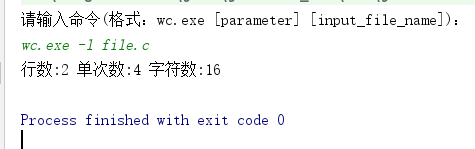
正常按格式输入命令
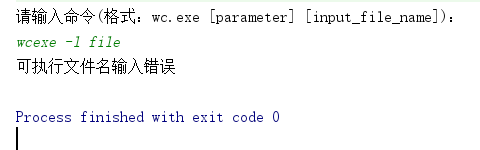
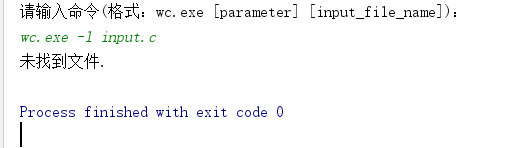
错误的输入



七.参考文献:
java文件操作 https://www.cnblogs.com/xwlych/p/5987022.html
将jar包生成.exe文件 https://blog.csdn.net/u011752272/article/details/80697198
WordCount的更多相关文章
- hadoop 2.7.3本地环境运行官方wordcount
hadoop 2.7.3本地环境运行官方wordcount 基本环境: 系统:win7 虚机环境:virtualBox 虚机:centos 7 hadoop版本:2.7.3 本次先以独立模式(本地模式 ...
- Hadoop3 在eclipse中访问hadoop并运行WordCount实例
前言: 毕业两年了,之前的工作一直没有接触过大数据的东西,对hadoop等比较陌生,所以最近开始学习了.对于我这样第一次学的人,过程还是充满了很多疑惑和不解的,不过我采取的策略是还是先让环 ...
- Eclipse 执行成功的 Hadoop-1.2.1 WordCount 源码
万事开头难.最近在学习Hadoop,先是搭建各种版本环境,从2.2.0到2.3.0,再到1.2.1,终于都搭起来了,折腾了1周时间,之后开始尝试使用Eclipse编写小demo.仅复制一个现成的Wor ...
- 软件工程:Wordcount程序作业
由于时间的关系,急着交作业,加上这一次也不是那么很认真的去做,草草写了“Wordcount程序”几个功能,即是 .txt文件的读取,能计算出文件内容的单词数,文件内容的字符数,及行数. 这次选用C来做 ...
- Spark源码编译并在YARN上运行WordCount实例
在学习一门新语言时,想必我们都是"Hello World"程序开始,类似地,分布式计算框架的一个典型实例就是WordCount程序,接触过Hadoop的人肯定都知道用MapRedu ...
- MapReduce剖析笔记之一:从WordCount理解MapReduce的几个阶段
WordCount是一个入门的MapReduce程序(从src\examples\org\apache\hadoop\examples粘贴过来的): package org.apache.hadoop ...
- 软件工程-构建之法 WordCount小程序 统计文件中字符串个数,单词个数,词频,行数
一.前言 在之前写过一个词频统计的C语言课设,别人说你一个大三的怎么写C语言课程,我只想说我是先学习VB,VB是我编程语言的开始,然后接触到C语言及C++:再后来我是学习C++,然后反过来学习C语言, ...
- eclipse连hadoop2.x运行wordcount 转载
转载地址:http://my.oschina.net/cjun/blog/475576 一.新建java工程,并且导入hadoop相关jar包 此处可以直接创建mapreduce项目就可以,不用下面折 ...
- Hadoop中wordcount程序
一.测试过程中 输入命令: 首先需要在hadoop集群中添加文件 可以首先进行查看hadoop集群中文件目录 hadoop fs -ls / hadoop fs -ls -R / hadoop fs ...
- Hadoop示例程序WordCount详解及实例(转)
1.图解MapReduce 2.简历过程: Input: Hello World Bye World Hello Hadoop Bye Hadoop Bye Hadoop Hello Hadoop M ...
随机推荐
- 利用Zabbix来监控Windows Performance Counter
Windows的性能计数器提供了很多系统的性能指标度量,通过Windows的性能计数器,我们可以对Windows的服务器的当前运行状态有个即时的情况了解. Zabbix Agent支持(Win) pe ...
- 学习Python--变量进阶
变量进阶(理解) 目标 变量的引用 可变和不可变类型 局部变量和全局变量 01. 变量的引用 变量 和 数据 都是保存在 内存 中的 在 Python 中 函数 的 参数传递 以及 返回值 都是靠 引 ...
- [Reversing.kr] Easy ELF Writeup
IDA打开,看到main()函数,当sub_8048451() 返回1 是flag正确. 跟踪函数. 脚本: #!usr/bin/env python #!coding=utf-8 __author_ ...
- Python内置函数(35)——issubclass
英文文档: issubclass(class, classinfo) Return true if class is a subclass (direct, indirect or virtual) ...
- asp.net core 系列 11 配置configuration (下)
四. 文件配置提供程序AddIniFile. AddXmlFile.AddJsonFile FileConfigurationProvider 是从文件系统加载配置的基类. 以下配置提供程序专用于特定 ...
- 设计模式java实现合集
http://www.cnblogs.com/maowang1991/archive/2013/04/15/3023236.html 桥接模式:http://blog.csdn.net/jason05 ...
- .NET快速信息化系统开发框架 V3.2 -> WinForm“组织机构管理”界面组织机构权限管理采用新的界面,操作权限按模块进行展示
对于某些大型的企业.信息系统,涉及的组织机构较多,模块多.操作权限也多,对用户或角色一一设置模块.操作权限等比较繁琐.我们可以直接对某一组织机构进行权限的设置,这样设置后,同一组织机构的用户就可以拥有 ...
- 阿里云HBase携X-Pack再进化,重新赋能轻量级大数据平台
一.八年双十一,造就国内最大最专业HBase技术团队 阿里巴巴集团早在2010开始研究并把HBase投入生产环境使用,从最初的淘宝历史交易记录,到蚂蚁安全风控数据存储.持续8年的投入,历经8年双十一锻 ...
- Linux 文件权限于目录配置
用户与用户组 我們以王三毛為例,王三毛這個『檔案』的擁有者為王三毛,他屬於王大毛這個群組, 而張小豬相對於王三毛,則只是一個『其他人(others)』而已. 不過,這裡有個特殊的人物要來介紹的,那就是 ...
- [ SSH框架 ] Spring框架学习之三(AOP开发和注解的使用)
一.Spring 使用 AspectJ 进行 AOP 的开发:注解的方式 1.1 引入相关的jar包 1.2 引入spring的配置文件 <?xml version="1.0" ...