
非常好用的sersync同步工具
作者:邓聪聪
常用同步工具sync的进阶软件
服务端的配置:
uid = rsync

gid = rsync

port =

use chroot = on

max connections =

timeout =

lock file = /var/run/rsyncd.lock

log file = /var/log/rsyncd.log

read only = false

list = false

fake super = yes

hosts allow = 172.16.16.0/

hosts deny = 0.0.0.0/

secrets file = /etc/rsyncd.password

auth users = rsync

[backup]

path = /data
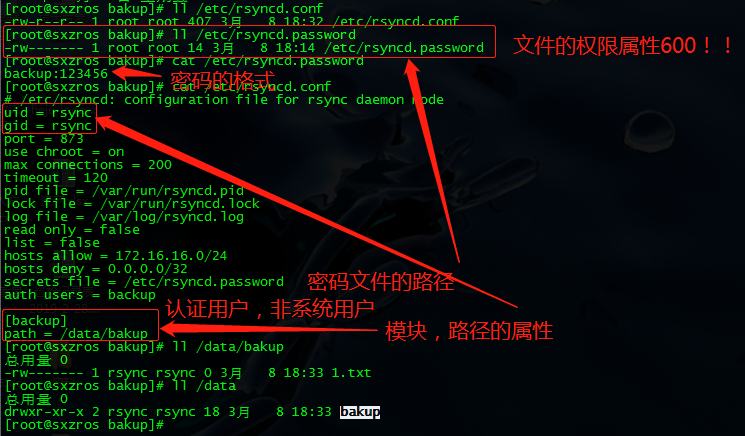
客户端在推送时,有这样一个报错,但不影响文件的传输:
[root@ data]# rsync -avzP a.txt backup@172.16.16.10::backup

Password:

sending incremental file list

a.txt

               %    .00kB/s    :: (xfr#, to-chk=/)

rsync: chgrp "/.a.txt.llMDKO" (in backup) failed: Operation not permitted ()    ###无法操作

sent  bytes  received  bytes  90.00 bytes/sec

total size is   speedup is 0.04

rsync error: some files/attrs were not transferred (see previous errors) (code ) at main.c() [sender=3.1.]

解决后:
[root@ data]# rsync -avzP /root/data/b.txt rsync@172.16.16.10::backup

Password:

sending incremental file list

b.txt

               %    .00kB/s    :: (xfr#, to-chk=/)

sent  bytes  received  bytes  56.40 bytes/sec

total size is   speedup is 0.04
源同步服务器上,同步本端目录内容到目标服务器,用sersync:
将 sersync2.5.4_64bit_binary_stable_final.tar.gz 文件解压后(主要用sersync、inotify)
[root@ansible-server ~]# cd sersync/

[root@ansible-server sersync]# ll

total

drwxr-xr-x.   root  root        Mar   : GNU-Linux-x86

drwxrwxrwx.   rsync rsync    Mar    inotify-tools-3.14

-rw-r--r--.   root  root   Mar   : inotify-tools-3.14.tar.gz

-rw-r--r--.   root  root    Mar   : README.md

drwxrwxr-x.  root  root     Mar   : rsync-3.1.

-rw-r--r--.   root  root   Mar   : rsync-3.1..tar.gz
为了方便管理调整目录结构:
[root@ansible-server sersync]# tree /usr/local/sersync/

/usr/local/sersync/

├── bin

│   └── sersync

├── conf

│   ├── conf-www.xml

│   ├── confxml.xml

│   └── confxml.xml-bak

└── log

    ├── rsync_fail_log

    └── rsync_fail_log-www
mv GNU-Linux-x86/sersync /usr/local/sersync/bin/
mv GNU-Linux-x86/confxml.xml /usr/local/sersync/conf
[root@ansible-server sersync]# cat /usr/local/sersync/conf/confxml.xml

<?xml version="1.0" encoding="ISO-8859-1"?>

<head version="2.5">

    <host hostip="localhost" port=""></host>

    <debug start="false"/>

    <fileSystem xfs="false"/>

    <filter start="false">

        <exclude expression="(.*)\.svn"></exclude>

        <exclude expression="(.*)\.gz"></exclude>

        <exclude expression="^info/*"></exclude>

        <exclude expression="^static/*"></exclude>

    </filter>

    <inotify>

        <delete start="true"/>

        <createFolder start="true"/>

        <createFile start="false"/>

        <closeWrite start="true"/>

        <moveFrom start="true"/>

        <moveTo start="true"/>

        <attrib start="false"/>

        <modify start="false"/>

    </inotify>

    <sersync>

        <localpath watch="/tmp">   #需要监听的本地目录

            <remote ip="172.16.16.10" name="backup"/>  #目标及目标路径的模块

            <!--<remote ip="192.168.8.39" name="tongbu"/>-->

            <!--<remote ip="192.168.8.40" name="tongbu"/>-->

        </localpath>

        <rsync>

            <commonParams params="-artuz"/>

            <auth start="true" users="rsync" passwordfile="/etc/rsync.pwd"/>  #目标服务器的rsync认证用户及密码,本端保存的认证密码文件

            <userDefinedPort start="true" port=""/><!-- port= -->  #监听端口

            <timeout start="false" time=""/><!-- timeout= -->

            <ssh start="false"/>

        </rsync>

        <failLog path="/usr/local/sersync/log/rsync_fail_log.sh" timeToExecute=""/><!--default every 60mins execute once-->

        <crontab start="false" schedule=""><!--600mins-->

            <crontabfilter start="false">

                <exclude expression="*.php"></exclude>

                <exclude expression="info/*"></exclude>

            </crontabfilter>

        </crontab>

        <plugin start="false" name="command"/>

    </sersync>

    <plugin name="command">

        <param prefix="/bin/sh" suffix="" ignoreError="true"/>  <!--prefix /opt/tongbu/mmm.sh suffix-->

        <filter start="false">

            <include expression="(.*)\.php"/>

            <include expression="(.*)\.sh"/>

        </filter>

    </plugin>

    <plugin name="socket">

        <localpath watch="/opt/tongbu">

            <deshost ip="192.168.138.20" port=""/>

        </localpath>

    </plugin>

    <plugin name="refreshCDN">

        <localpath watch="/data0/htdocs/cms.xoyo.com/site/">

            <cdninfo domainname="ccms.chinacache.com" port="" username="xxxx" passwd="xxxx"/>

            <sendurl base="http://pic.xoyo.com/cms"/>

            <regexurl regex="false" match="cms.xoyo.com/site([/a-zA-Z0-9]*).xoyo.com/images"/>

        </localpath>

    </plugin>

</head>
非常好用的sersync同步工具的更多相关文章
- Rsync数据同步工具及sersync同步工具
Rsync简介 Rsync英文全称Remote synchronization,从软件的名称就可以看出来,Rsync具有可使本地和远程两台主机之间的数据快速复制同步镜像,远程备份的功能,这个功能类似s ...
- 三十、sersync高级同步工具实时数据同步架构
一.项目介绍 Sersync项目利用inotity与rsync技术实现对服务器数据实时同步的解决方案,其中inotity用于监控sersync所在服务器上的文件变化. Sersync项目的优点: 1. ...
- Linux实战教学笔记21:Rsync数据同步工具
第二十一节 Rsync数据同步工具 标签(空格分隔): Linux实战教学笔记-陈思齐 ---本教学笔记是本人学习和工作生涯中的摘记整理而成,此为初稿(尚有诸多不完善之处),为原创作品,允许转载,转载 ...
- rsync数据同步工具的配置
rsync数据同步工具的配置 1. rsync介绍 1.1.什么是rsync rsync是一款开源的快速的,多功能的,可实现全量及增量的本地或远程数据同步备份的优秀工具.Rsync软件适用于 unix ...
- RSYNC 同步工具
Rsync 数据同步工具 一.Rsync简介 1.检测一下你的机器上是否已经安装 --->可以通过yum安装 或者 源码 Server 192.168.201.151 Client ...
- 【基础】:Rsync数据同步工具
第二十一节 Rsync数据同步工具 1.1 Rsync介绍 1.1.1 什么是Rsync? 1.1.2 Rsync简介 1.3 Rsync的特性 1.1.4 Rsync的企业工作场景说明 1.2 Rs ...
- Java并发之CyclicBarrier 可重用同步工具类
package com.thread.test.thread; import java.util.Random; import java.util.concurrent.*; /** * Cyclic ...
- Java并发之CountDownLatch 多功能同步工具类
package com.thread.test.thread; import java.util.Random; import java.util.concurrent.*; /** * CountD ...
- Java核心知识点学习----线程同步工具类,CyclicBarrier学习
线程同步工具类,CyclicBarrier日常开发较少涉及,这里只举一个例子,以做备注.N个人一块出去玩,相约去两个地方,CyclicBarrier的主要作用是等待所有人都汇合了,才往下一站出发. 1 ...
随机推荐
- Day9 轨道角动量
转自中山大学电子与信息工程 http://seit.sysu.edu.cn/node/1004 能量.动量(角动量和线动量)光子的基本属性,其中光子角动量包括自旋角动量和轨道角动量(Orbital a ...
- 制作自己cocoapods库
https://www.cnblogs.com/czc-wjm/p/5958103.html 今天来讲一下cocoapods制作,网上教程很多,就不再讲理论,直接操作: 1.创建仓库: 2.将仓库克隆 ...
- Ubuntu18.04LTS安装Nvidia显卡
笔者在为Ubuntu18.04LTS安装Nvidia显卡驱动之前,早就听说了一系列关于由于Nvidia驱动引起的疑难杂症.选择高质量的教程并保持足够的耐心,就能解 决这些问题.很重要的一点,不要怕把电 ...
- C++通用WMI接口实现获取Windows操作系统内核版本号
作为一名Windows开发者,能熟练掌握WMI技术,在开发Windows应用程序的时候往往能够事半功倍.今天来给大家分享一个使用WMI来获取Windows操作系统内核版本号的例子. 首先我们打开WMI ...
- Django(四) ORM 外键操作及初识Ajax
一.内容回顾 1.Django请求的生命周期: 路由系统 -> 视图函数(获取模板+数据 -> 渲染) -> 字符串返回给用户 2.路由系统: /index/ #-> 函数 ...
- this直接加在函数或者是 “原型”对象的区别
如果加在函数上,可以用函数直接调用,如果是加在原型对象时,那就的创建新对象,才能使用,最重要的是影响继承 直接加在函数上的,不能被新对象继承
- Node.js Error: Cannot find module express的解决办法
1.全局安装express框架,cmd打开命令行,输入如下命令: npm install -g express express 4.x版本中将命令工具分出来,安装一个命令工具,执行命令: npm in ...
- SpringBoot配置mybatis
一直都说SpringBoot是零配置,当然,真正实现零配置是不可能的,但是在配置mybatis这里真的是太简单了,哈哈,下面我们一起看一下. 1.先导入基于SpringBoot的mybatis依赖包 ...
- 【C++】GSL(GNU Scientific Library) 的安装及在 Visual Studio 2017 中的使用
GSL 是 GNU 开发并维护的科学计算的库,其中包括: 复数 多项式的根 特殊函数 向量和矩阵 排列 排序 BLAS支持 线性代数 Eigensystems 快速傅立叶变换 正交 随机数 准随机序列 ...
- python3 魔法方法
魔法方法是一些内置的函数,开头和结尾都是两个下划线,它们将在特定情况下(具体是哪种情况取决于方法的名称)被Python调用,而几乎不需要直接调. 1.__new__ 2.__init__ 3.__st ...