
SpringBoot配置mybatis
一直都说SpringBoot是零配置,当然,真正实现零配置是不可能的,但是在配置mybatis这里真的是太简单了,哈哈,下面我们一起看一下。
1.先导入基于SpringBoot的mybatis依赖包
        <dependency>

            <groupId>org.mybatis.spring.boot</groupId>

            <artifactId>mybatis-spring-boot-starter</artifactId>
       <version>1.3.0</version>

        </dependency>
2.引入mybatis的基本配置文件mybatis.cfg.xml,这里就不过多做其他的配置了,一个最简单的配置文件如下
<!DOCTYPE configuration PUBLIC "-//mybatis.org//DTD Config 3.0//EN"

        "http://mybatis.org/dtd/mybatis-3-config.dtd">

<configuration>

    <!-- 进行Mybatis的相应的环境的属性定义 -->

    <settings>   <!-- 在本项目中开启二级缓存 -->

            <setting name="cacheEnabled" value="true"/>

    </settings>

</configuration>
3.在application.yml下配置mybatis相关。此配置主要是针对mybatis配置文件和mapper配置文件以及bean的路径。
mybatis:

  config-location: classpath:mybatis/mybatis.cfg.xml      #mybatis配置文件所在路径

  type-aliases-package: cn.mldn.microboot.vo              #定义所有操作类的别名所在包

  mapper-locations:                                       #所有的mapper映射文件

  - classpath:mybatis/mapper/**/*.xml
4.我们做一个Student对象的映射,实现基本的增删改查功能,Student表和bean已经提前建好。
<?xml version="1.0" encoding="UTF-8" ?>

<!DOCTYPE mapper PUBLIC "-//mybatis.org//DTD Mapper 3.0//EN"

        "http://mybatis.org/dtd/mybatis-3-mapper.dtd">

<mapper namespace="cn.mldn.microboot.dao.IStudentDAO">

    <select id="findAll" resultType="Student">

        SELECT * FROM student;

    </select>

    <insert id="doCreate" parameterType="Student">

        INSERT INTO    student(name,age,sex,birthday) VALUES(#{name},#{age},#{sex},#{birthday})

    </insert>

    <update id="doUpdate" parameterType="Student">

        UPDATE student set name = #{name} where id=#{id}

    </update>

    <delete id="doDelete" parameterType="int">

        Delete from student Where id=#{id}

    </delete>

</mapper>
这里的namespace属性值对应我们Dao层,id则为方法名。先看一下Dao层的代码。
import java.util.List;

import org.apache.ibatis.annotations.Mapper;

import cn.mldn.microboot.vo.Student;

@Mapper

public interface IStudentDAO {

        public List<Student> findAll();

        public boolean doCreate(Student vo);

        public boolean doUpdate(Student vo);

        public boolean doDelete(Integer id);

}
看到了,就是这么简单,一个Mapper注解,解决了所有问题。
5.接下来我们写一下Servic层和调用的测试类。
Service层接口定义如下:
import java.util.List;

import org.springframework.transaction.annotation.Propagation;

import org.springframework.transaction.annotation.Transactional;

import cn.mldn.microboot.vo.Student;

public interface IStudentService {

    @Transactional(readOnly = true)

    public List<Student> list();

    @Transactional(propagation=Propagation.REQUIRED)

    public boolean add(Student vo);

    @Transactional(propagation=Propagation.REQUIRED)

    public boolean update(Student vo);

    @Transactional(propagation=Propagation.REQUIRED)

    public boolean delete(Integer id);

}
Transactional注解是对事物的控制。
下面是Service的实现
import java.util.List;

import javax.annotation.Resource;

import org.springframework.stereotype.Service;

import cn.mldn.microboot.dao.IStudentDAO;

import cn.mldn.microboot.service.IStudentService;

import cn.mldn.microboot.vo.Student;

@Service

public class StudentServiceImpl implements IStudentService {

    @Resource

    private IStudentDAO studentDao;

    @Override

    public List<Student> list() {

        return this.studentDao.findAll();

    }

    @Override

    public boolean add(Student vo) {

        return this.studentDao.doCreate(vo);

    }

    @Override

    public boolean update(Student vo) {

        return this.studentDao.doUpdate(vo);

    }

    @Override

    public boolean delete(Integer id) {

        return this.studentDao.doDelete(id);

    }

}
最后我们写下测试类
import javax.annotation.Resource;

import org.junit.Test;

import org.junit.runner.RunWith;

import org.springframework.boot.test.context.SpringBootTest;

import org.springframework.test.context.junit4.SpringJUnit4ClassRunner;

import org.springframework.test.context.web.WebAppConfiguration;

import cn.mldn.microboot.StartSpringBootMain;

import cn.mldn.microboot.service.IStudentService;

import cn.mldn.microboot.vo.Student;

@SpringBootTest(classes = StartSpringBootMain.class)

@RunWith(SpringJUnit4ClassRunner.class)

@WebAppConfiguration

public class TestStudentService {

    @Resource

    private IStudentService studentService;

    @Test

    public void testList() throws Exception{

        System.out.println(this.studentService.list());

    }

    @Test

    public void testAdd() throws Exception{

        Student student = new Student();

        student.setAge(26);

        student.setName("来来来");

        student.setBirthday("2018/03/01");

        student.setSex(true);

        System.out.println(this.studentService.add(student));

    }

}
这里只写了查询和添加的测试类,测试
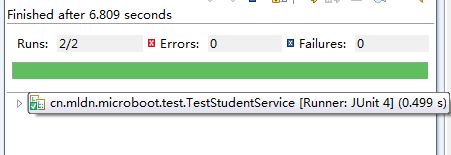
测试后,成功添加与查询。
SpringBoot配置mybatis的更多相关文章
- springboot 配置mybatis 配置mapper.xml
# 插件 进行配置 也可以用yml # 1. 配置 Tomcat 修改端口号 server.port=8848 server.context-path=/zxf #2.配置数据源 spring.dat ...
- 【记录】spring/springboot 配置mybatis打印sql
======================springboot mybatis 打印sql========================================== 方式 一: ##### ...
- springboot配置mybatis的mapper路径
1.在src/main/resources/目录下新建mybatis文件夹,将xxx.xml文件放入该文件夹内 2.在application.yml文件中配置: mybatis: configurat ...
- springboot 配置mybatis打印sql
方式 一: ###########################################################配置打印sql############################ ...
- springboot 配置mybatis
- IDEA springboot配置
基于springboot2.1.7 springboot项目创建 springboot热部署 springboot配置swagger2 springboot配置mybatis springboot配置 ...
- springboot添加多数据源连接池并配置Mybatis
springboot添加多数据源连接池并配置Mybatis 转载请注明出处:https://www.cnblogs.com/funnyzpc/p/9190226.html May 12, 2018 ...
- SpringBoot集成mybatis配置
一个有趣的现象:传统企业大都喜欢使用hibernate,互联网行业通常使用mybatis:之所以出现这个问题感觉与对应的业务有关,比方说,互联网的业务更加的复杂,更加需要进行灵活性的处理,所以myba ...
- SpringBoot系列七:SpringBoot 整合 MyBatis(配置 druid 数据源、配置 MyBatis、事务控制、druid 监控)
1.概念:SpringBoot 整合 MyBatis 2.背景 SpringBoot 得到最终效果是一个简化到极致的 WEB 开发,但是只要牵扯到 WEB 开发,就绝对不可能缺少数据层操作,所有的开发 ...
随机推荐
- confd+etcd实现高可用自动发现
Confd是什么 Confd是一个轻量级的配置管理工具. 通过查询后端存储,结合配置模板引擎,保持本地配置最新,同时具备定期探测机制,配置变更自动reload. 对应的后端存储可以是etcd,redi ...
- 使用Atlas进行元数据管理之Atlas简介
背景:笔者和团队的小伙伴近期在进行数据治理/元数据管理方向的探索, 在接下来的系列文章中, 会陆续与读者们进行分享在此过程中踩过的坑和收获. 元数据管理系列文章: [0] - 使用Atlas进行元数据 ...
- asp.net core系列 30 EF管理数据库架构--必备知识 迁移
一.管理数据库架构概述 EF Core 提供两种主要方法来保持 EF Core 模型和数据库架构同步.一是以 EF Core 模型为基准,二是以数据库为基准. (1)如果希望以 EF Core 模型为 ...
- 【已采纳】最快获取package和activity的方式
意外找到一个本人自认为是最快获取package和activity的方法,欢迎来辩! 用adb命令快速查看某应用appPackage及appActivity的方法(前提是需要用数据线连接真机\模拟器也可 ...
- 获取DataTable前几条数据
#region 获取DataTable前几条数据 /// <summary> /// 获取DataTable前几条数据 /// </summary> /// <param ...
- Windows Server(r12) - 配置 MySQL 远程访问
Windows Server(r12) - 配置 MySQL 远程访问 工作主要为两部分, 一部分是 Windows 防火墙, 一部分是 MySQL 自身 Windows 端口远程访问 其实就是在 W ...
- OSXFUSE file system is not available 解决方法
操作系统版本:10.14 macos mojeva 今天用truecrypt加载加密盘时候提示次错误:用window加载也有错误,不过用windows自带的工具检查修复了错误. 解决办法: 1.访问h ...
- 中国移动能力开放商店OneNET View数据可视化公测 10分钟轻便生成行业可视化界面
随着云计算,5G技术,人工智能等底层技术的发展,万物互联时代已经到来,同时带来了海量数据,如何效果好.低成本.短时间的表现据,成为物联网行业从业者和公司的当务之急. OneNET View传统的数据展 ...
- Linux:Day18(上) dns服务基础进阶
DNS:Domain Name Service,协议(C/S,53/udp,53/tcp):应用层协议. BIND:Bekerley Internat Name Domain,ISC(www.isc. ...
- python基础杂记
一.编码 1.ACSII 0000 0001 8位 一个字节 2. uncoide ...