
<scrapy爬虫>爬取猫眼电影top100详细信息
1.创建scrapy项目
dos窗口输入:
scrapy startproject maoyan
cd maoyan
2.编写item.py文件(相当于编写模板,需要爬取的数据在这里定义)
# -*- coding: utf-8 -*-

# Define here the models for your scraped items

#

# See documentation in:

# https://doc.scrapy.org/en/latest/topics/items.html

import scrapy

class MaoyanItem(scrapy.Item):

    # define the fields for your item here like:

    #影片中文名称/英文名称

    ztitle = scrapy.Field()

    etitle = scrapy.Field()

    #影片类型

    type = scrapy.Field()

    #导演

    dname = scrapy.Field()

    #主演

    star = scrapy.Field()

    #上映时间

    releasetime = scrapy.Field()

    #影片时间

    time = scrapy.Field()

    # 评分

    score = scrapy.Field()

    #图片链接

    image = scrapy.Field()

    #详情信息

    info = scrapy.Field()
3.创建爬虫文件
dos窗口输入:
scrapy genspider -t crawl myspider maoyan.com
4.编写myspider.py文件(接收响应,处理数据)
# -*- coding: utf-8 -*-

import scrapy

#导入链接规则匹配

from scrapy.linkextractors import LinkExtractor

from scrapy.spiders import CrawlSpider, Rule

#导入模板

from maoyan.items import MaoyanItem

class MaoyanSpider(CrawlSpider):

    name = 'myspider'

    allowed_domains = ['maoyan.com']

    start_urls = ['https://maoyan.com/board/4?offset=0']

    rules = (

        Rule(LinkExtractor(allow=r'offset=\d+'),follow=True),

        Rule(LinkExtractor(allow=r'/films/\d+'),callback='parse_maoyan',follow=False),

    )

    def parse_maoyan(self, response):

        item = MaoyanItem()

        # 影片中文名称/英文名称

        item['ztitle'] = response.xpath('//h3/text()').extract()[0]

        item['etitle'] = response.xpath('//div[@class="ename ellipsis"]/text()').extract()[0]

        # 影片类型

        item['type'] = response.xpath('//li[@class="ellipsis"][1]/text()').extract()[0]

        # 导演

        item['dname'] = response.xpath('//a[@class="name"]/text()').extract()[0].strip()

        # 主演

        star_1 = response.xpath('//li[@class="celebrity actor"][1]//a[@class="name"]/text()').extract()[0].strip()

        star_2 = response.xpath('//li[@class="celebrity actor"][2]//a[@class="name"]/text()').extract()[0].strip()

        star_3 = response.xpath('//li[@class="celebrity actor"][3]//a[@class="name"]/text()').extract()[0].strip()

        item['star'] = star_1 + "\\" + star_2 + '\\' +star_3

        # 上映时间

        item['releasetime'] = response.xpath('//li[@class="ellipsis"][3]/text()').extract()[0]

        # 影片时间

        item['time'] = response.xpath('//li[@class="ellipsis"][2]/text()').extract()[0].strip()[-5:]

        # 评分,没抓到

        # item['score'] = response.xpath('//span[@class="stonefont"]/text()').extract()[0]

        item['score'] = "None"

        # 图片链接

        item['image'] = response.xpath('//img[@class="avatar"]/@src').extract()[0]

        # 详情信息

        item['info'] = response.xpath('//span[@class="dra"]/text()').extract()[0].strip()

        yield item
5.编写pipelines.py(存储数据)
# -*- coding: utf-8 -*-

# Define your item pipelines here

#

# Don't forget to add your pipeline to the ITEM_PIPELINES setting

# See: https://doc.scrapy.org/en/latest/topics/item-pipeline.html

import json

class MaoyanPipeline(object):

    def __init__(self):

        self.filename = open('maoyan.txt','wb')

    def process_item(self, item, spider):

        text = json.dumps(dict(item),ensure_ascii=False) + '\n'

        self.filename.write(text.encode('utf-8'))

        return item

    def close_spider(self,spider):

        self.filename.close()
6.编写settings.py(设置headers,pipelines等)
robox协议
# Obey robots.txt rules

ROBOTSTXT_OBEY = False
headers
DEFAULT_REQUEST_HEADERS = {

    'user-agent': 'Mozilla/5.0 (Windows NT 10.0; Win64; x64) AppleWebKit/537.36 (KHTML, like Gecko) Chrome/68.0.3440.106 Safari/537.36',

    'Accept': 'text/html,application/xhtml+xml,application/xml;q=0.9,*/*;q=0.8',

  # 'Accept-Language': 'en',

}
pipelines
ITEM_PIPELINES = {

    'maoyan.pipelines.MaoyanPipeline': 300,

}
7.运行爬虫
dos窗口输入:
scrapy crawl myspider
运行结果:
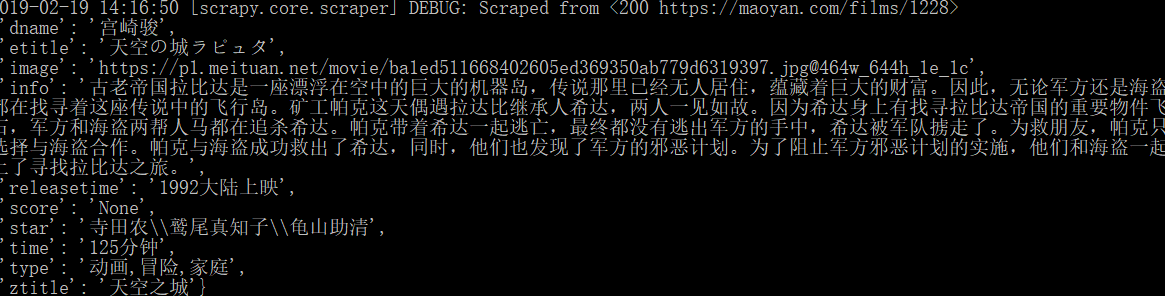
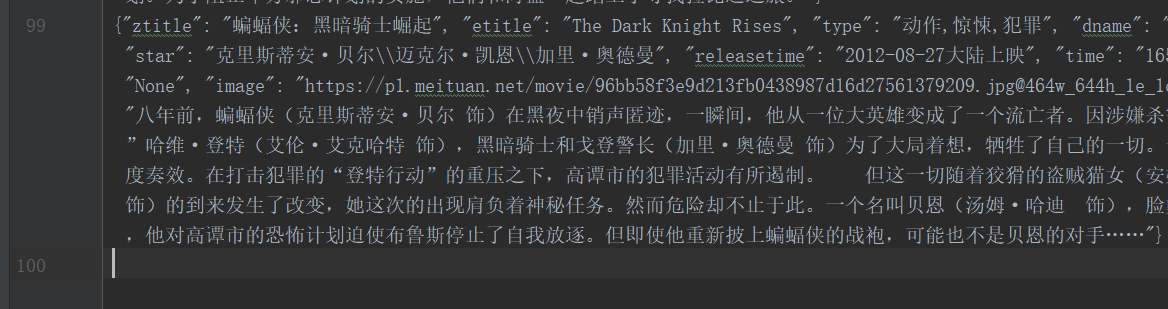
emmmm,top100只爬到99个,
问题:

源码里面评分是□.□!!!全是套路,外面可以找到这个评分,懒得折腾了
单独爬取zname是100个,可能是哪个属性的xpath匹配,网页详情页没有,实现功能就行了
爬取成功
8.存储到mysql数据库
在mysql数据库建立相应的数据库和表:
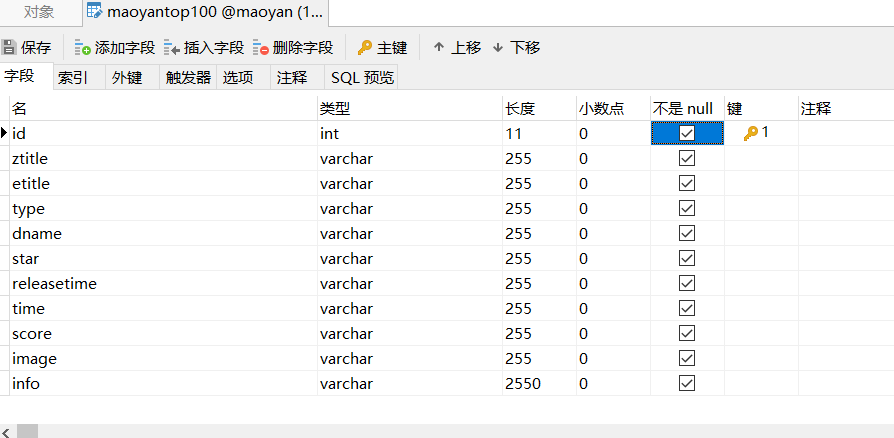
改写一下pipelines.py文件即可:
import pymysql.cursors

class MaoyanPipeline(object):

    def __init__(self):

        #连接数据库

        self.connect = pymysql.connect(

            host = 'localhost',

            user = 'root',

            password = '',

            database = 'maoyan',

            charset = 'utf8'  # 别写成utf-8

            )

        self.cursor = self.connect.cursor()  # 建立游标

    def process_item(self, item, spider):

        item = dict(item)

        sql = "insert into maoyantop100(ztitle,etitle,type,dname,star,releasetime,time,score,image,info) values(%s,%s,%s,%s,%s,%s,%s,%s,%s,%s)"

        self.cursor.execute(sql,(item['ztitle'],item['etitle'],item['type'],item['dname'],item['star'],item['releasetime'],item['time'],item['score'],item['image'],item['info'],))

        self.connect.commit()

        return item

    def close_spider(self,spider):

        self.cursor.close()

        self.connect.close()
运行:

存储成功:
<scrapy爬虫>爬取猫眼电影top100详细信息的更多相关文章
- python3爬虫爬取猫眼电影TOP100(含详细爬取思路)
待爬取的网页地址为https://maoyan.com/board/4,本次以requests.BeautifulSoup css selector为路线进行爬取,最终目的是把影片排名.图片.名称.演 ...
- 爬虫系列(1)-----python爬取猫眼电影top100榜
对于Python初学者来说,爬虫技能是应该是最好入门,也是最能够有让自己有成就感的,今天在整理代码时,整理了一下之前自己学习爬虫的一些代码,今天先上一个简单的例子,手把手教你入门Python爬虫,爬取 ...
- 50 行代码教你爬取猫眼电影 TOP100 榜所有信息
对于Python初学者来说,爬虫技能是应该是最好入门,也是最能够有让自己有成就感的,今天,恋习Python的手把手系列,手把手教你入门Python爬虫,爬取猫眼电影TOP100榜信息,将涉及到基础爬虫 ...
- python 爬取猫眼电影top100数据
最近有爬虫相关的需求,所以上B站找了个视频(链接在文末)看了一下,做了一个小程序出来,大体上没有修改,只是在最后的存储上,由txt换成了excel. 简要需求:爬虫爬取 猫眼电影TOP100榜单 数据 ...
- PYTHON 爬虫笔记八:利用Requests+正则表达式爬取猫眼电影top100(实战项目一)
利用Requests+正则表达式爬取猫眼电影top100 目标站点分析 流程框架 爬虫实战 使用requests库获取top100首页: import requests def get_one_pag ...
- # [爬虫Demo] pyquery+csv爬取猫眼电影top100
目录 [爬虫Demo] pyquery+csv爬取猫眼电影top100 站点分析 代码君 [爬虫Demo] pyquery+csv爬取猫眼电影top100 站点分析 https://maoyan.co ...
- 40行代码爬取猫眼电影TOP100榜所有信息
主要内容: 一.基础爬虫框架的三大模块 二.完整代码解析及效果展示 1️⃣ 基础爬虫框架的三大模块 1.HTML下载器:利用requests模块下载HTML网页. 2.HTML解析器:利用re正则表 ...
- 用requests库爬取猫眼电影Top100
这里需要注意一下,在爬取猫眼电影Top100时,网站设置了反爬虫机制,因此需要在requests库的get方法中添加headers,伪装成浏览器进行爬取 import requests from re ...
- # 爬虫连载系列(1)--爬取猫眼电影Top100
前言 学习python有一段时间了,之前一直忙于学习数据分析,耽搁了原本计划的博客更新.趁着这段空闲时间,打算开始更新一个爬虫系列.内容大致包括:使用正则表达式.xpath.BeautifulSoup ...
随机推荐
- iOS开发系列-定时器强引用问题
概述 iOS开发中常用的定时器NSTimer.CADisplayLink. NSTimer 和 CADisplayLink 基本使用 NSTimer的创建方法有两个scheduledTimerWith ...
- 2018-10-8-3分钟教你搭建-gitea-在-Centos-服务器
title author date CreateTime categories 3分钟教你搭建 gitea 在 Centos 服务器 lindexi 2018-10-08 09:54:39 +0800 ...
- mysql 复制原理详解
http://www.cnblogs.com/kristain/articles/4142970.html
- sleep()与wait()的区别
①sleep()实现线程阻塞的方法,我们称之为“线程睡眠”,方式是超时等待,怎么理解?就是sleep()通过传入“睡眠时间”作为方法的参数,时间一到就从“睡眠”中“醒来”: ②wait()方法实现线程 ...
- hive中,lateral view 与 explode函数
hive中常规处理json数据,array类型json用get_json_object(#,"$.#")这个方法足够了,map类型复合型json就需要通过数据处理才能解析. exp ...
- 【转载】OpenCL实现矩阵相乘
矩阵相乘其实就是前一个矩阵的每一行乘以后一个矩阵的每一列,然后将乘后的每一个数字相加,得到结果矩阵的指定位置的数值.具体算法回顾一下线性代数即可.但是这种行列相乘其实都是独立的,如果是CPU计算必须串 ...
- MySQL 知识点随记
1.存储过程中声明变量要在程序的最前面,也要在声明事务开始的前,不然会报错 2.Mysql 获取32位guid: REPLACE(UUID(),"-","") ...
- Delphi屏幕截图的实现
首先要获得设备环境的句柄,可以通过GetDC函数来获得,对于这个函数,MSDN上是这样说明的 The GetDC function retrieves a handle to a device con ...
- ListenerExecutionFailedException: Listener threw exception
rabbitmq 监听的队列名称写错导致404找不到队列
- Vue Virtual Dom 和 Diff原理(面试必备) 极简版
我又来了,这是Vue面试三板斧的最后一招,当然也是极其简单了,先说Virtual Dom,来一句概念: 用js来模拟DOM中的节点.传说中的虚拟DOM. 再来一张图: 是不是一下子秒懂 没懂再来一张 ...