
dev、test、pre和prod是什么意思?
开发环境(dev):开发环境是程序猿们专门用于开发的服务器,配置可以比较随意,为了开发调试方便,一般打开全部错误报告。
测试环境(test):一般是克隆一份生产环境的配置,一个程序在测试环境工作不正常,那么肯定不能把它发布到生产机上。
灰度环境(pre):灰度环境,外部用户可以访问,但是服务器配置相对低,其它和生产一样。 <很多企业将test环境作为Pre环境 >
生产环境(prod):是值正式提供对外服务的,一般会关掉错误报告,打开错误日志。
三个环境也可以说是系统开发的三个阶段:开发->测试->上线,其中生产环境也就是通常说的真实环境。

分成多个环境的原因
大多数人都知道四个环境指的是什么,但是很多人却不知道为什么要这么区别,甚至为了省事就只有dev和pro环境。如果项目没有上线之前没有问题,如果项目上线之后就会有非常麻烦的事情发生。下面我们针对这四种环境,来分析一下对应的各种场景。
dev+pro
如果我们只有dev和pro环境,pro突然发现bug,需要紧急处理,只有两个环境,这个时候我们要如何解决呢???
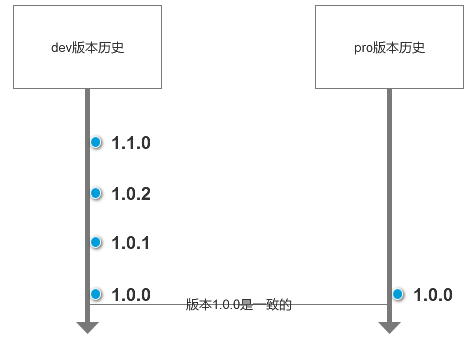
首先dev现在已经更新到1.1.0,而pro现在才1.0.0,所以这个时候我们需要重新创建一个brunch分支,这边我们可以叫做1.0.0.1,然后修改代码之后需要放到dev环境上面进行测试,这个时候就会变成如下所示状态:
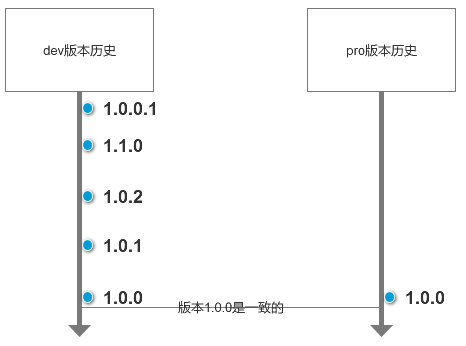
然后测试通过之后,我们需要将1.0.0.1发布到pro环境,然后合并1.0.0.1的代码到1.1.0中,最后将dev环境修改为1.1.1,如下所示:
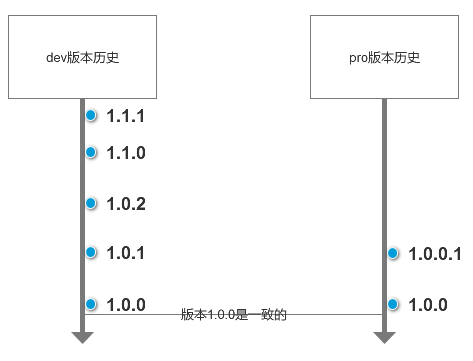
在dev1.0.0.1测试期间,所以开发工作全部得停止,必须等测试通过发布到生产上面才可以,如果仅仅只有两个环境,代价实在是太大了!!
dev+test+pro
如果我们多了一个test环境情况就会好很多了,比如上面说所的问题,我们就可以这么来处理。
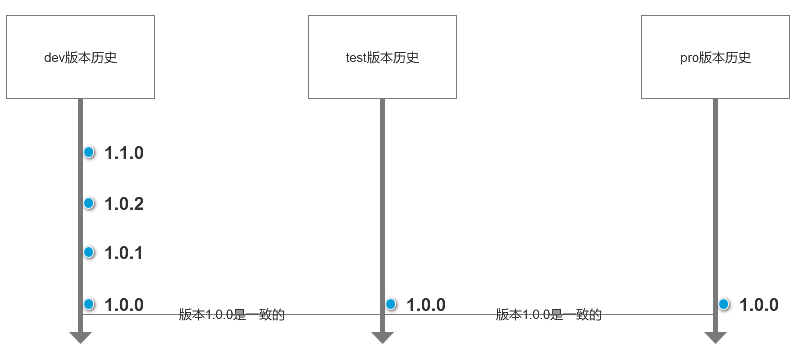
我们可以在test1.0.0上面直接修改,修改后的版本是1.0.0.1,测试通过之后直接发布到pro环境即可。然后再将test中1.0.0.1代码合并到1.1.0,最后dev的版本升一级就可以了。
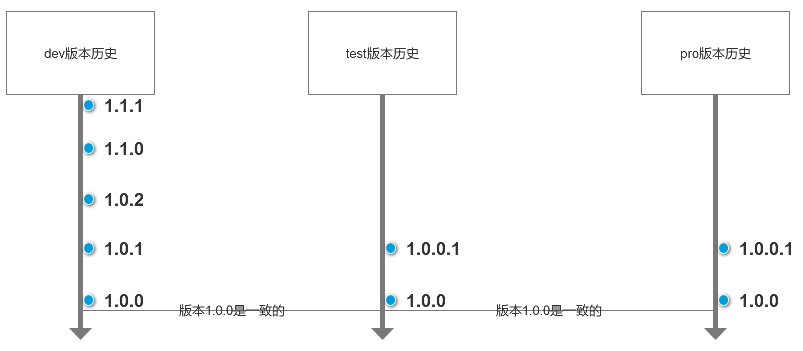
这样的好处就是不会影响dev开发环境,不管怎么修改test,都不会造成dev暂停。
dev+test+pre+pro
如果test环境和pro环境版本不同步,还是会有问题存在,比如test环境在测试1.0.1版本的代码而生产上面运行的是pro环境的代码,这个时候pro出现问题修改的时候就会比较麻烦。
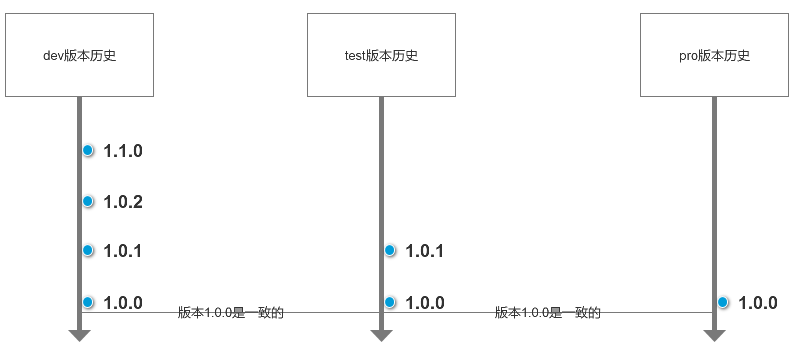
这个时候和之前的做法一样,创建一个新的brunch分支(1.0.0.1)然后在1.0.0.1中修复bug,然后发布到test最新版本中,测试通过之后发布到pro环境中。然后就是复杂的合代码操作了,将1.0.0.1代码合并到1.0.1中,将dev的1.1.0添加上修复的代码变成1.1.1。
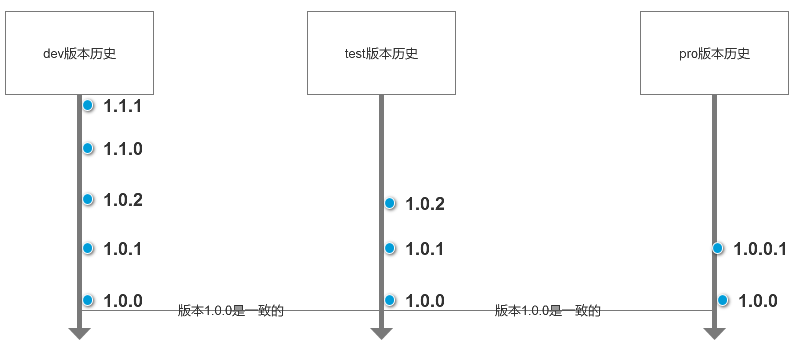
这种情况下,首先在test测试期间,1.0.1的测试工作会停止,其次步骤太繁琐,所以这边我们新增了pre环境。

我们只要保证pre的版本和pro环境的版本一致,就可以解决上面的问题了。如上图所示,我们只需要在pre的1.0.0环境上面修复bug就可以了,修复好之后发布到pro环境就可以了,然后将代码同步到test和dev中即可。
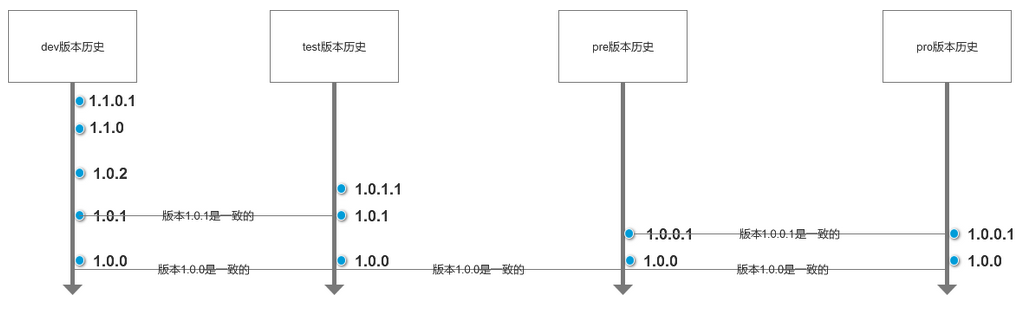
这样以后不管pro遇到什么问题,我们都可以按照上面的步骤来解决。
总结:
四个环境最大的好处就是各司其职,既不会影响开发,也不会影响测试工作。而且增加一个pre环境也可以尽可能的模仿pro的真实环境,让测试结果更加准确。
Ref:
http://spacebug.com/effective_development_environments/
一开始,你可能觉得你只需要一个环境,well, at most two: 一个Dev环境(aka ur PC) + one server. 但是随着项目的发展,可能需要更多的环境,那它们是什么,又有什么用处呢?

. 环境的定义

Environment – In hosted software (eg web site/application, database not shrinkwrap software) development, environment refers to a server tier designated to a specific stage in a release process.

. a typical product release cycle

Development Environment

This is where the software is developed. In some situations this could be the developer’s desktop, in other situations this would be a server shared by several developers working together on the same project. This environment should resemble the production environment as much as possible to prevent issues were the software acts differently on production.

Testing Environment

After the application was developed to an agreed stage it is released to the testing environment. This is where the testers ensures the quality of the application, open bugs and review bug fixes. This environment must resemble the production environment accurately, because this is the last safe place to find and fix environment-related bugs.

User Acceptance Test Environment (UAT)

In a client-vendor projects, the software then moves from internal testing (done by the vendor’s testers) to client testing. This is where the client’s testers verify the quality of the application and send issues for the vendor to fix. This is also where the client assesses the application and can request changes to better fit his requirements. Some clients do not require UAT.

Staging Environment (AKA pre production)

The staging site is used to assemble, test and review new versions of a website before it goes into production. The staging phase of the software lifecycle is often tested on hardware that mirrors hardware used in the production environment. The staging site is often different from the development site, and provides a final QA zone that is separate from the development or production environments.

Production Environment

This is where the application goes out to the world and become production. Content can be updated from the staging environment in to Production Environment, when available, as well as new application functionality and bug fixes release from UAT or staging environment.

So, how many do I need?

Note that small to medium software projects might not need all environments, on the other hand, from time to time you might want to add additional environments (for example to accommodate separate concurrent versions of the same application, or stress/load environment)

To make things even more complex, you might not need to have all these environments up and running on the same time – you might want to buy the Staging Environment hardware only after the first release to the Testing Environment, in order to save money.

. Conclusion

The main purpose of these environments is to improve the development, testing, and release processes in client-server applications.

There is no magic number of environments that make everything work OK. hopefully, with this article, you can determine what best suites your project.

It is the job of the architect, project manager, operations manager or change manager (pick one) to determine which environments are needed, to make sure these environments are in place and on time, in order to make the developers, testers, and client's life easier and happier.
·
dev、test、pre和prod是什么意思?的更多相关文章
- 170310、Jenkins部署Maven多环境项目(dev、beta、prod)的参数设置
使用Jenkins配置Git+Maven的自动化构建: http://blog.csdn.net/xlgen157387/article/details/50353317 在一个多开发和生产环境的项目 ...
- springboot多环境(dev、test、prod)配置
propertiest配置格式在Spring Boot中多环境配置文件名需要满足application-{profile}.properties的格式,其中{profile}对应你的环境标识,比如: ...
- 项目开发中dev、test和prod是什么意思
开发环境(dev):开发环境是程序猿们专门用于开发的服务器,配置可以比较随意,为了开发调试方便,一般打开全部错误报告. 测试环境(test):一般是克隆一份生产环境的配置,一个程序在测试环境工作不正常 ...
- spring boot 多环境(dev、test、prod)配置文件---命令行切换
properties配置格式 在Spring boot 中多环境配置文件名需要满足application-{profile}.properties的格式,其中{profile}对于你的环境标识,比如: ...
- 配置webpack中dev.env.js、prod.env.js,解决不同命令下项目启动和打包到指定的环境
前后端分离的项目开发中,我们有开发环境.测试环境.预生产环境和生产环境. 1.开发环境下调试接口的时候,一般都会有好几个接口地址(开发服务器上的,本地的,接口开发人员的,七七八八的接口地址),要根据情 ...
- DEV SIT UAT PET SIM PRD PROD常见环境英文缩写含义
英文缩写 英文 中文 DEV development 开发 SIT System Integrate Test 系统整合测试(内测) UAT User Acceptance Test 用户验收测试 P ...
- pro、pre、test、dev环境
开发过程中四个环境分别是:pro.pre.test.dev环境,中文名字:生产环境.灰度环境.测试环境.开发环境 环境介绍: pro环境:生产环境,面向外部用户的环境,连接上互联网即可访问的正式环境. ...
- 关于vue的npm run dev和npm run build
├─build │ ├─build.js │ ├─check-versions.js │ ├─dev-client.js │ ├─dev-server.js │ ├─utils.js │ ├─vue- ...
- Salt状态管理
Salt状态管理 前言 上一篇文章概括性的介绍了Salt的用途和它的基本组成和实现原理,也深入的的介绍了Salt的命令编排和批量执行,但是对于状态管理只是简单的介绍了一下,因为状态管理是一个比较重 ...
随机推荐
- SQL JOIN 的解析
1.SQL语句结构 select distinct < select_list > from < left_table > < join_type > joi ...
- Java连载74-字符串常用方法、正则表达式简介
一.字符串相关的常用方法简介 package com.bjpowernode.java_learning; public class D74_1_StringCommonMethod { pub ...
- Docke-ce 安装
Docker-ce 的安装 安装系统工具 yum install -y yum-utils device-mapper-persistent-data lvm2 添加docker镜像源 yum-con ...
- @Value注解没有起作用的梳理
今天在使用@Value注解的时候遇到其不起作用的现象,先把场景说明一下:现在有A类和B类,而A类对象是通过new操作生成的临时对象,而B类对象是在A类中使用的:调试步骤如下: (1)将B类的属性字段都 ...
- script标签的async和defer
兼容性 IE对于defer一直都支持,async属性IE6-9都没有支持,IE10及以上支持 相同点与不同点 带有async或defer的script都会立刻下载并不阻塞页面解析,而且都提供一个可选的 ...
- mysql 数据库中存在重复记录,删除保留其中一条
DELETE FROM people WHERE peopleName IN ( SELECT peopleName FROM people GROUP BY peopleName HAVING ) ...
- Eigen库学习---Map类
Eigen中定义了一系列的vector和matrix,相比copy数据,更一般的方式是复用数据的内存,将它们转变为Eigen类型.Map类很好地实现了这个功能. Map定义 Map(PointerAr ...
- nohup npm start &启动之后关闭终端程序没有后台运行
感谢:https://blog.csdn.net/nsj820/article/details/5862231 “在当shell中提示了nohup成功后,还需要按终端上键盘任意键退回到shell输入命 ...
- 解决ios手机中input输入框光标过长的问题
修改前css部分代码: .receiving-info .receiving-info-list input { display: inline-block; width: 70%; font-siz ...
- FLUSH+RELOAD技术
FLUSH+RELOAD技术是PRIME+PROBE技术的变体,攻击间谍进程和目标进程的共享页.在共享页中,间谍进程可以确保一个特定的内存的映射从整个cache的层级中剔除.间谍进程就是使用这一点去监 ...