
HTML5存储(带一个粗糙的打怪小游戏案例)
本地存储localStorage
设置存储内容setItem(key,value)
localStorage.setItem('leo','23');
更新存储内容
对象[key]=value
对象.key=value
    localStorage.leo = 25;

    localStorage['leo'] = 24;
获取存储内容getItem(key)
console.log(localStorage.getItem('leo'))
删除存储内容removeItem(key)
localStorage.removeItem('leo');
清空存储内容clear()
localStorage.clear();
获取存储内容长度
console.log(localStorage.length);
sessionStorage
    sessionStorage.a = 10;

    console.log(sessionStorage);
localStorage与sessionStorage的区别
localStorage:
存储会持久化
容量2-5MB
sessionStorage:
在网页会话结束后失效
容量不一,部分浏览器不设限
Storage使用注意:
1、存储容量超出限制,需要使用try catch捕获异常
2、存储类型限制:只能是字符串
3、sessionStorage失效机制:
刷新页面不能使sessionStorage失效
相同URL不同标签页不能共享sessionStorage
鼠标点击掉血游戏案例:
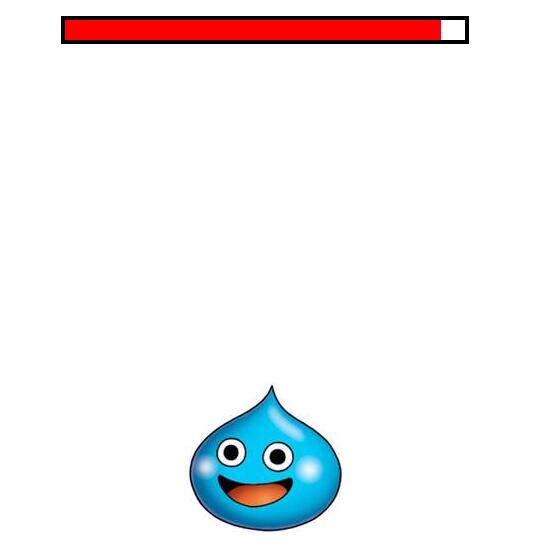
<!doctype html>

<html>

<head>

    <meta charset="utf-8">

    <title></title>

    <style type="text/css">

*{margin: 0;padding: 0;list-style: none;}

body{position: relative;height: 100%;}

html{height: 100%;}

.guai{position: absolute;left: 50%;top: 50%;margin: -75px 0 0 -100px;}

.line{width: 400px;height: 20px;border:4px solid black;position: absolute;left: 50%;top: 20px;margin: 0 0 0 -204px;}

.xie{width: 400px;height: 100%;background: red;transition: .3s;}

    </style>

</head>

<body>

    <div class='line'>

        <div class='xie'></div>

    </div>

    <img src="1.jpeg" class='guai'>

    <script type="text/javascript">

        var num = 0,timer = null,max = 400,

        xieNode = document.querySelector('.xie');

        if(localStorage.x){

            max = localStorage.x;

            xieNode.style.width = max + 'px';

        };

        onclick = function(){

            var r = Math.random() * 5 + 5;

            max -= r;

            localStorage.setItem('x',max);

            console.log(localStorage)

            xieNode.style.width = max + 'px';

            clearInterval(timer);

            timer = setInterval(function(){

                num++;

                if(num == 10){

                    clearInterval(timer);

                    num = 0;

                    document.body.style.left = 0;

                    document.body.style.top = 0;

                    return;

                };

                document.body.style.left = Math.random() * -20 + 10 + 'px';

                document.body.style.top = Math.random() * -20 + 10 + 'px';

            },30)

        }

    </script>

</body>

</html>
一个带过期机制的localStorage
<!doctype html>

<html>

<head>

    <meta charset="utf-8">

    <title></title>

</head>

<body>

    储存数据:

    <input type="" name="" id='need'>

    储存数据的时间:

    <input type="" name="" id='timer'>

    <button id='btn'>保存</button>

    数据展示:

    <span id='span'>暂无数据</span>

    <script type="text/javascript">

        var nowTime = new Date().getMinutes();

        if(nowTime >= localStorage.timer){

            localStorage.clear();

        }

        else{

            if(localStorage.leo){

                span.innerHTML = localStorage.leo;

            }

        }

        btn.onclick = function(){

            localStorage.setItem('leo',need.value);

            localStorage.setItem('timer',new Date().getMinutes() + Number(timer.value));

            span.innerHTML = localStorage.leo;

        };

    </script>

</body>

</html>
HTML5 - 数据库:indexedDB
创建数据库indexedDB.open('随便起个名字',版本号)
如果有这个数据就打开,没有就创建
版本号只能往上走,不可以降
var request = indexedDB.open('testDBLeo',6);
onsuccess 数据库创建或打开成功
onerror 打开失败 (版本号不能降低)
onupgradeneeded 版本升级时触发的函数
    // 数据库创建成功

    request.onsuccess = function(){

        console.log('创建数据库成功');

    };

    // 数据库创建失败

    request.onerror = function(){

        console.log('数据库读取失败');

    };

    // 数据库版本升级

    request.onupgradeneeded = function(){

        console.log('版本号升级了')

    };
createObjectStore 创建一个表
自动递增的 - createObjectStore 表里面递增
{autoIncrement: true}
{keyPath:数据中的字段}
    request.onupgradeneeded = function(){

        var db = request.result;

        // 一个ObjectStore相当于一张表

        // 指定表的主键自增

        db.createObjectStore('test3',{autoIncrement: true});

    };
设置主键为id
db.createObjectStore('test3',{keyPath: 'id'}
unique true 唯一性 如果有多个同样的的情况下 就不写入了
store.createIndex('test3','name',{unique:true});
transaction使用事务获取表
readwrite 读写模式
readonly 只能读不能写
        var transaction = db.transaction('test3','readwrite');

        var store = transaction.objectStore('test3');
操作数据表
add 添加数据,添加 readonly 是报错的
get 里面放入key值就可以的
getAll 可以获取所有的表中的数据 result 是以数组的形式表现
put 继续添加数据
delete 删除某一条数据 参数就是key值
clear 删除所有的数据
onsuccess 如果指令成功了执行的回调函数
result 可以看到相关的数据
        var json = [{

            "id":200,

            "name":"Modoy",

            "age":"15"

        },{

            "id":201,

            "name":"Busy",

            "age":"21"

        },{

            "id":202,

            "name":"Blue",

            "age":"23"

        }]

        // add 添加数据

        store.add(json);

        // 读取数据store.get()参数是主键的值

        var requestNode = store.get(1);

        //获取成功后的操作

        requestNode.onsuccess = function(){

            console.log(requestNode.result);

            for(var i=0;i<3;i++){

                console.log('名字叫'+requestNode.result[i].name);

                console.log('年龄今年已经'+requestNode.result[i].age+'岁了');

            }

        };
更新指定主键的数据
    store.put({

        "id":203,

        "name":"Sky",

        "age":"29"

    });
获取所有数据
var requestNode = store.getAll();
删除指定id的数据
store.delete(201);
游标,此处表示主键<=202
    var requestNode = store.openCursor(IDBKeyRange.upperBound(202));

    requestNode.onsuccess = function(){

        //获取游标所取得的值

        var cursor = requestNode.result;

        if(cursor){

            console.log(cursor.value);

            cursor.continue();

        };

    };
索引 唯一性
    store.createIndex(表名称,数据key值,{unique:true});

----------

    var index = store.index(表的名称)get(key值的名称).onsuccess = function(){

        e.target.result 找到的数据的内容

    }
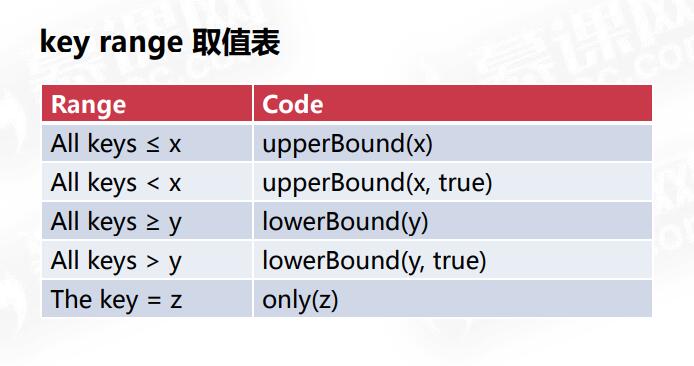
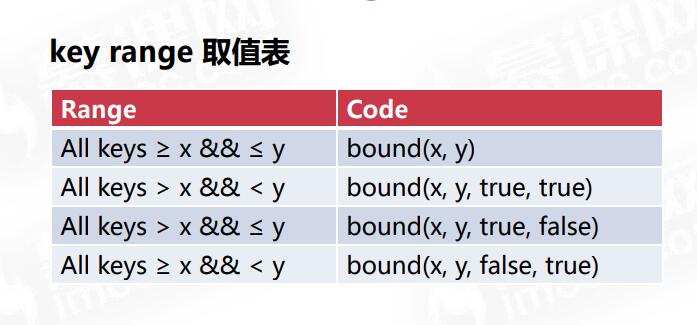
游标指定范围:
IDBKeyRange.only//参数一是范围
upperBound // 小于等于之前的 true 不包含自己的 false 包含自己的
lowerBound // 大于等于之前的 true 不包含自己的 false 包含自己的
bound 参数1 大于等于的 参数2 小于等于的 如果有参数 3 和 4 就是true 和 false
true 不包含自己的 false 包含自己的
参数3 对应着参数1 参数4 对应着参数2
设置游标的direction:
next 顺序查询
nextunique 顺序唯一查询
prev 逆序查询
prevunique 逆序唯一查询
var requestNode = store.openCursor(IDBKeyRange.bound(200,202),'prev');
索引和游标结合
       //指定数据表

        var index = store.index('test3');

        //游标指定范围

        var requestNode = index.openCursor(IDBKeyRange.upperBound(31));

        requestNode.onsuccess = function(){

            var cursor = requestNode.result;

            if(cursor){

                //如果查询的数据name为Leo

                if(cursor.value.name == 'Leo'){

                    // 更新数据

                    cursor.update({

                        "id":209,

                        "name":"Leoooo",

                        "age":31

                    });

                }

                console.log(cursor.value);

                cursor.continue();

            }

        };
IndexedDB与Web Storage比较:
优点:IndexedDB存储类型丰富
条件搜索强大
存储容量更大
可以在Worker中使用
缺点:兼容性问题
HTML5存储(带一个粗糙的打怪小游戏案例)的更多相关文章
- HTML5游戏开发,剪刀石头布小游戏案例
剪刀石头布,非常可爱的小游戏,相信大家都非常的怀念这款小游戏,小时候也玩过很多次,陪伴着我的童年的成长,现在是不是还会玩一下,剪刀石头布游戏的规则我们都知道是:剪刀剪布,石头砸剪刀,布包石头.跟朋友. ...
- 基于HTML5的WebGL实现的2D3D迷宫小游戏
为了实现一个基于HTML5的场景小游戏,我采用了HT for Web来实现,短短200行代码,我就能实现用"第一人称"来操作前进后退上下左右,并且实现了碰撞检测. 先来看下实现的效 ...
- 一个很有意思的小游戏:Dig2China
最近通关了一个小游戏,游戏故事是这样的:一个美国小男孩想要去中国,他决定从自家后院往下挖,横穿地心去中国,期间经历了很多次失败.但是,每次尝试都能收获一批钱,用这些钱升级钻地机,调整自己的工具,终于在 ...
- 一听就懂:用Python做一个超简单的小游戏
写它会用到 while 循环random 模块if 语句输入输出函数
- 一个打砖块的小游戏1.0 KILL THE BLOCKS !
/******************************************** * 程序名称:MR.DUAN 的打砖块(KILL THE BLOCKS !) * 作 者:WindAutum ...
- 一个控制台贪吃蛇小游戏(wsad控制移动)
/******************************************** * 程序名称:MR.DUAN 的贪吃蛇游戏(链表法) * 作 者:WindAutumn <flutti ...
- 简单的鼠标操作<一个填充格子的小游戏>
#include "graphics.h" #include "conio.h" void main(){ // 初始化界面 initgraph(, ); ; ...
- 带你使用h5开发移动端小游戏
带你使用h5开发移动端小游戏 在JY1.x版本中,你要做一个pc端的小游戏,会非常的简单,包括说,你要在低版本的浏览器IE8中,也不会出现明显的卡顿现象,你只需要关心游戏的逻辑就行了,比较适合逻辑较为 ...
- Chrome自带恐龙小游戏的源码研究(一)
目录 Chrome自带恐龙小游戏的源码研究(一)——绘制地面 Chrome自带恐龙小游戏的源码研究(二)——绘制云朵 Chrome自带恐龙小游戏的源码研究(三)——昼夜交替 Chrome自带恐龙小游戏 ...
随机推荐
- java中的四种监听类用法
在此列举四种方法: 自身类实现ActionListener接口,作为事件监听器 通过匿名类处理 通过内部类处理 通过外部类处理 下面依次介绍: 第一种:自身类实现ActionListener接口,作为 ...
- Spring中的可扩展接口
1.监听器Listener(点此连接,执行流程带源码分析及demo) 2.bean定义的后置处理器(BeanDefinitionRegistryPostProcessor)和bean工厂的后置处理器( ...
- 09-SpringMVC03
今日知识 1. SpringMVC自定义异常处理 2. SpringMVC的interceptor(过滤器) SpringMVC自定义异常处理 1.web.xml正常写 <servlet> ...
- pytorch之 Variable
import torch from torch.autograd import Variable # Variable in torch is to build a computational gra ...
- 解决关闭SSH进程CobaltStrike自动关闭
解决关闭SSH进程CobaltStrike自动关闭 0x0 那么为什么ssh一关闭,程序就不再运行了? 答:元凶:SIGHUP 信号 让我们来看看为什么关掉窗口/断开连接会使得正在运行的程序死掉. 在 ...
- 修饰符 public、 private 和 protected和区别
TypeScript 可以使用三种访问修饰符(Access Modifiers),分别是 public.private 和 protected. public 修饰的属性或方法是公有的,可以在任何地方 ...
- vue 的点击事件怎么获取当前点击的元素
手机赚钱怎么赚,给大家推荐一个手机赚钱APP汇总平台:手指乐(http://www.szhile.com/),辛苦搬砖之余用闲余时间动动手指,就可以日赚数百元 首先 vue的点击事件 是用 @cl ...
- CSS中的圣杯布局与双飞翼布局
一,圣杯布局 1,什么是圣杯布局? 所谓圣杯布局就是用于实现一个两侧宽度固定,中间宽度自适应的三栏布局 2,构建圣杯布局的步骤: 2.1,添加一个容器,在这个容器中添加放三个盒子(左.中.右): 2. ...
- Vue.js 从源码理解v-for和v-if的优先级的高低
在vue.js里面,v-for和v-if是可以一起使用作用在某个元素上,网上看到一篇文章说永远不要把v-for和v-if同时用在同一个元素上,感觉有点瞎扯,官网也注明了可以一起使用的,还把两个指令的优 ...
- JS DOM中getElement系列和querySelector系列获取节点
节点查找方法 document.getElementById() 前面必须是document document.getElementsByName() 前面必须是document ele.getEl ...