
NX二次开发-UFUN拉伸函数UF_MODL_create_extruded
     NX9+VS2012

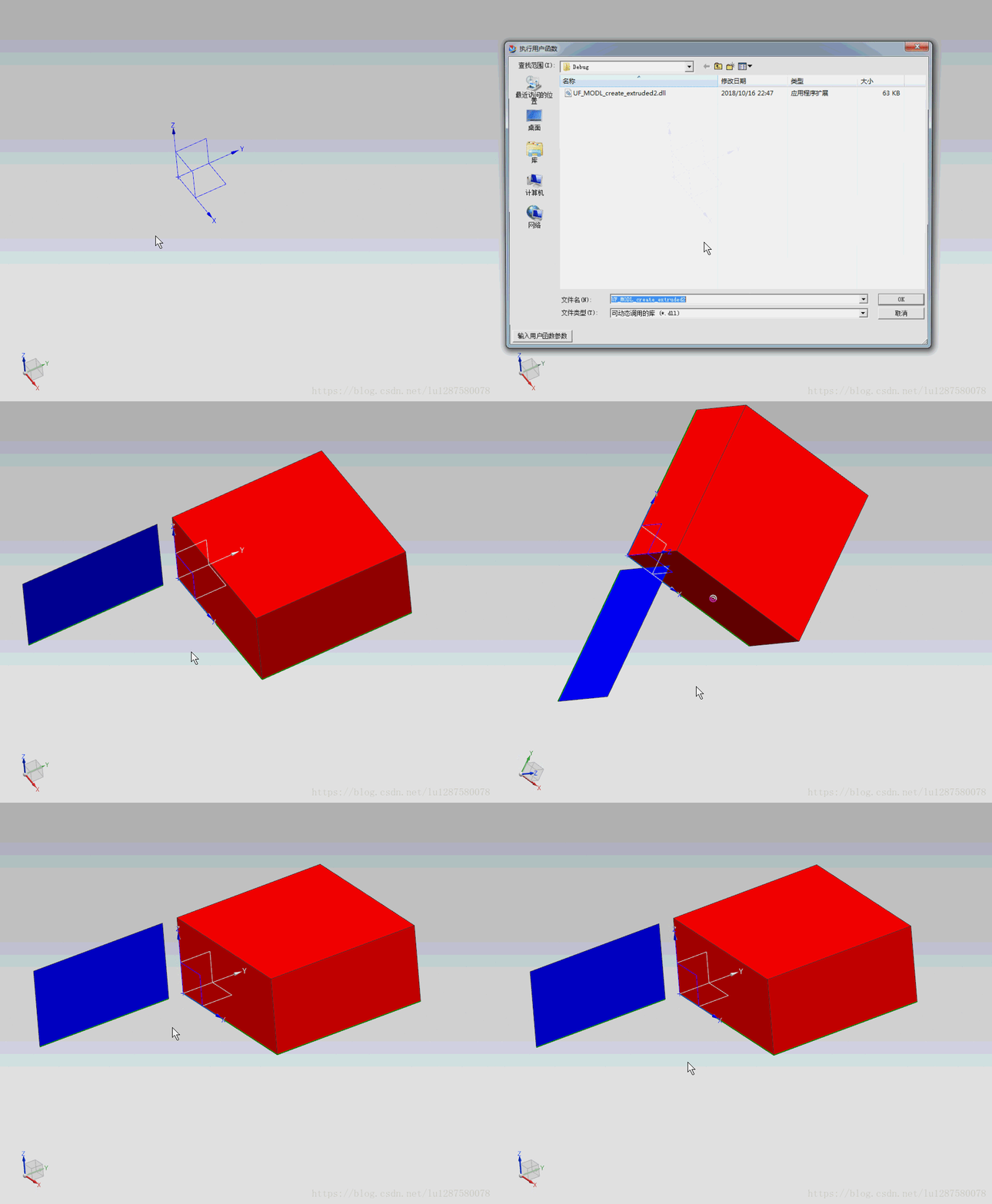
     //NX二次开发中常用拉伸函数为UF_MODL_create_extruded2,但是此函数不能拉伸片体,

     //想要拉伸片体用函数UF_MODL_create_extruded。

     #include <uf.h>

     #include <uf_curve.h>

     #include <uf_modl.h>

     #include <uf_obj.h>

     UF_initialize();

     //创建直线1

     UF_CURVE_line_t LineCoords1;

     LineCoords1.start_point[] = 0.0;

     LineCoords1.start_point[] = 0.0;

     LineCoords1.start_point[] = 0.0;

     LineCoords1.end_point[] = 0.0;

     LineCoords1.end_point[] = 100.0;

     LineCoords1.end_point[] = 0.0;

     tag_t LineTag[];

     UF_CURVE_create_line(&LineCoords1, &LineTag[]);

     //创建直线2

     UF_CURVE_line_t LineCoords2;

     LineCoords2.start_point[] = 0.0;

     LineCoords2.start_point[] = 100.0;

     LineCoords2.start_point[] = 0.0;

     LineCoords2.end_point[] = 100.0;

     LineCoords2.end_point[] = 100.0;

     LineCoords2.end_point[] = 0.0;

     UF_CURVE_create_line(&LineCoords2, &LineTag[]);

     //创建直线3

     UF_CURVE_line_t LineCoords3;

     LineCoords3.start_point[] = 100.0;

     LineCoords3.start_point[] = 100.0;

     LineCoords3.start_point[] = 0.0;

     LineCoords3.end_point[] = 100.0;

     LineCoords3.end_point[] = 0.0;

     LineCoords3.end_point[] = 0.0;

     UF_CURVE_create_line(&LineCoords3, &LineTag[]);

     //创建直线4

     UF_CURVE_line_t LineCoords4;

     LineCoords4.start_point[] = 100.0;

     LineCoords4.start_point[] = 0.0;

     LineCoords4.start_point[] = 0.0;

     LineCoords4.end_point[] = 0.0;

     LineCoords4.end_point[] = 0.0;

     LineCoords4.end_point[] = 0.0;

     UF_CURVE_create_line(&LineCoords4, &LineTag[]);

     //创建链表

     uf_list_p_t LineList;

     UF_MODL_create_list(&LineList);

     //插入对象到链表

     for (int i = ; i < ; i++)

     {

         UF_MODL_put_list_item(LineList, LineTag[i]);

     }

     //函数1

     //创建拉伸(UF_MODL_create_extruded2)

     //备注:此函数不能做拉伸片体,只能拉伸封闭的线。拉伸片体用UF_MODL_create_extruded

     char *TaperAngle = "0.0";

     char *Limit[] = {"0.0", "50.0"};

     double Point1[] = {0.0, 0.0, 0.0};

     double Direction[] = {0.0, 0.0, 1.0};

     UF_FEATURE_SIGN Sign = UF_NULLSIGN;

     uf_list_p_t Features1;

     UF_MODL_create_extruded2(LineList, TaperAngle, Limit, Point1, Direction, Sign, &Features1);

     //特征找体

     tag_t BodyTag = NULL_TAG;

     UF_MODL_ask_feat_body(Features1->eid, &BodyTag);

     //将拉伸设置成红色

     UF_OBJ_set_color(BodyTag,);

     //释放内存

     UF_MODL_delete_list(&LineList);

     //创建直线

     UF_CURVE_line_t LineCoords5;

     LineCoords5.start_point[] = 0.0;

     LineCoords5.start_point[] = -10.0;

     LineCoords5.start_point[] = 0.0;

     LineCoords5.end_point[] = 0.0;

     LineCoords5.end_point[] = -100.0;

     LineCoords5.end_point[] = 0.0;

     tag_t LineTag5 = NULL_TAG;

     UF_CURVE_create_line(&LineCoords5, &LineTag5);

     //创建链表

     uf_list_p_t LineList1;

     UF_MODL_create_list(&LineList1);

     //插入对象到链表

     UF_MODL_put_list_item(LineList1, LineTag5);

     //函数2

     //创建拉伸(UF_MODL_create_extruded)

     char *TaperAngle1 = "0.0";

     char *Limit1[] = {"0.0", "50.0"};

     double Point2[] = {0.0, 0.0, 0.0};

     double Direction1[] = {0.0, 0.0, 1.0};

     UF_FEATURE_SIGN Sign1 = UF_NULLSIGN;

     uf_list_p_t Features2;

     UF_MODL_create_extruded(LineList1, TaperAngle1, Limit1, Point2, Direction1, Sign1, &Features2);

     //特征找体

     tag_t BodyTag1 = NULL_TAG;

     UF_MODL_ask_feat_body(Features2->eid, &BodyTag1);

     //将拉伸设置成蓝色

     UF_OBJ_set_color(BodyTag1,);

     //释放内存

     UF_MODL_delete_list(&LineList1);

     UF_terminate();
NX二次开发-UFUN拉伸函数UF_MODL_create_extruded的更多相关文章
- NX二次开发-UFUN拉伸函数UF_MODL_create_extruded2
NX9+VS2012 //NX二次开发中常用拉伸函数为UF_MODL_create_extruded2,但是此函数不能拉伸片体, //想要拉伸片体用函数UF_MODL_create_extruded. ...
- NX二次开发-UFUN发射线函数UF_MODL_trace_a_ray的用法
今天是国庆节,放假休息懒得动,没有出去玩,在家研究一下发射线函数UF_MODL_trace_a_ray.小弟以前在软件公司混的时候,当时我做的那个项目就用到了UF_MODL_trace_a_ray,当 ...
- NX二次开发-UFUN计时函数UF_begin_timer
NX9+VS2012 #include <uf.h> #include <uf_modl.h> UF_initialize(); //计时开始 UF_timer_t Timer ...
- NX二次开发-UFUN计时函数UF_end_timer
1 NX9+VS2012 2 3 #include <uf.h> 4 #include <uf_modl.h> 5 6 7 UF_initialize(); 8 9 //计时开 ...
- NX二次开发-UFUN遍历函数UF_OBJ_cycle_objs_in_part
NX11+VS2013 #include <uf.h> #include <uf_obj.h> #include <uf_modl.h> #include < ...
- NX二次开发-UFUN遍历函数UF_OBJ_cycle_all
NX11+VS2013 #include <uf.h> #include <uf_obj.h> #include <uf_modl.h> #include < ...
- 【NX二次开发】拉伸面、拉伸封闭曲线成片体UF_MODL_create_extrusion
用那几个拉伸,不能将封闭的曲线拉伸成片体,用UF_MODL_create_extrusion函数是可以的,下面是例子. 帮助上说拉伸片体不能有拔模角度,应该是错误的,下面是一个封闭曲线带拔模角度拉伸片 ...
- NX二次开发-UFUN将工程图转成CGM和PDF文件UF_CGM_export_cgm
文章转载自唐康林NX二次开发论坛,原文出处: http://www.nxopen.cn/thread-126-1-1.html 刚才有同学问到这个问题,如果是用NXOpen来做,直接录制一下就可以了: ...
- NX二次开发-UFUN获取NX系统默认导出CGM的选项设置UF_CGM_ask_default_export_options
文章转载自唐康林NX二次开发论坛,原文出处: http://www.nxopen.cn/thread-126-1-1.html 刚才有同学问到这个问题,如果是用NXOpen来做,直接录制一下就可以了: ...
随机推荐
- Atcoder arc093
D-Grid Components 在一个100*100的网格图上染色,问黑格四连通块的个数为A,白格四连通块的个数为B的一种构造方案?(A,B<=500) 将整个平面分成50*100的两部分, ...
- SpringCloud---分布式服务跟踪---Spring Cloud Sleuth
1.概述 1.1 为什么要用到服务跟踪? 随着业务的发展,系统规模也会变得越来越大,各服务之间的调用关系也变得越来越错综复杂: 通常一个由客户端发起的请求 在后端系统中会经过多个不同的微服务调用 ...
- Magento笔记/记录(1)
1.Magento eav_attribute表中source如何指定自定义数据来源 如果你引用的类名为yebihai_usermanage_model_entity_school你必须完整的给出地 ...
- 查看git HEAD
如果想看 HEAD 指向,可以通过 cat .git/HEAD 查看, 如果 HEAD 指向的是一个引用,还可以用 git symbolic-ref HEAD 查看它的指向.
- BAT批处理知识 及 常用批处理
1.常用DOS命令:https://blog.csdn.net/qq_38676810/article/details/79584531 或 https://www.jb51.net/articl ...
- SQL server 数据库安装
一.安装 1.点击setup双击 2.选择第一条-安装一个新的SQLserver 3.一路点击next 4.product Key-选择第一个:试用版 5.setup Role-选择所有 6.sell ...
- 工具类--MD5Utils
public class MD5Utils { private static final String[] HEX_DIGITS = { "0", "1", & ...
- jQuery 事件委派
/******************************************************************/ $(function(){ //live()事件委派,后续添加 ...
- Java反射机制调用私有方法
1.获取目标类: 每个类都有一个class属性,通过实体类的class属性获取: Class clazz = Person.class 通过对象获取. Person p1 = new Person( ...
- 剑指offer——49礼物的最大价值
题目描述 在一个m*n的棋盘的每一格都放有一个礼物,每个礼物都有一定的价值(价值大于0).你可以从棋盘的左上角开始拿格子里的礼物,并每次向左或者向下移动一格,知道到达棋盘的右下角.给定一个棋盘及其上面 ...