
Flask(5)- Flask-Session组件、WTForms组件、数据库连接池(POOL)
一、Flask-Session
我们使用过flask内置的session,知道它是把session存放在浏览器,即客户端。今天要学习的flask-session是flask的第三方组件,看一下它和flask内置的session有什么不同以及它的使用方法。
flask-session是flask框架的session组件,flask内置session使用签名cookie保存,而该组件则将支持session保存到多个地方,如:
- redis
- memcached
- filesystem
- mongodb
- sqlalchmey
1、安装flask-session
pip3 install flask-session
2、回顾flask自带的session的使用方法
  from flask import Flask, session

  app = Flask(__name__)

  app.secret_key = 'afhaslhg'    # 一定要有这句

  @app.route('/')

  def index():

      session['user'] = 'value'

      return 'hello'

  if __name__ == '__main__':

      app.run(debug=True)
启动程序,使用浏览器访问http://127.0.0.1:5000时,会看到如下session:

3、flask-session的使用(以保存到redis中为例)
  from flask import Flask, session

  from flask_session import Session   # 导入flask-session中的Session类

  from redis import Redis

  app = Flask(__name__)

  # 对实例进行配置

  app.config["SESSION_TYPE"] = "redis"

  app.config["SESSION_REDIS"] = Redis(host="127.0.0.1",port=6379,db=6)


  Session(app)   # 把原来app中的 session 进行替换

  @app.route('/')

  def index():

      session['user'] = 'value'

      return 'hello'

  if __name__ == '__main__':

      app.run(debug=True)
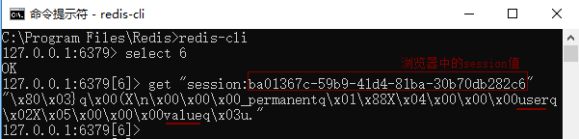
启动程序(redis服务端要),浏览器访问http://127.0.0.1:5000时,浏览器session如下图:

打开redis客户端,进行如下操作:
二、WTForms组件
WTForms是flask的组件,类似于django的modelform组件。
1、安装
pip3 install wtforms
2、使用(以登陆和注册为例)
wtf.py文件:
from flask import Flask, render_template, request

from wtforms.fields import simple, core

from wtforms import validators

from wtforms import Form

app = Flask(__name__)

# 定义注册类

class RegForm(Form):

    username = simple.StringField(

        label="用户名",

        validators=[

            validators.DataRequired(message='该字段不能为空'),

            validators.Length(min=3, max=10, message='用户名必须3-10个字符')

        ],

        id="user_id",

        render_kw={"class": "user_name"}

    )

    password = simple.PasswordField(

        label="密码",

        validators=[

            validators.DataRequired(message='该字段不能为空'),

            validators.Length(min=6, max=12, message='用户名必须6-12个字符')

        ],

        id="pwd",

        render_kw={"class": "pwd"}

    )

    repassword = simple.PasswordField(

        label="确认密码",

        validators=[

            validators.EqualTo(fieldname='password', message='两次密码不一致')

        ],

        id="re_pwd",

        render_kw={"class": "re_pwd"}

    )

    email = simple.StringField(

        label="邮箱",

        validators=[

            validators.DataRequired(message='该字段不能为空'),

            validators.Email(message='必须符合邮箱格式')

        ],

        id="email",

        render_kw={"class": "email"}

    )

    gender = core.RadioField(

        label='性别',

        coerce=int,   # 提交的数据类型,即1或者2的数据类型

        choices=(

            (1, '女'),  # 元组第一个元素是value,第二个元素是显示的值

            (2, '男')

        ),

        default=1   # 默认值为1

    )

    hobby = core.SelectMultipleField(

        label='爱好',

        validators=[validators.Length(min=1, max=3, message='爱好可为1-3个')],

        coerce=str,  # 注意,类型为str时,下面choices中每个元组第一个值必须带引号

        choices=(

            ('', '足球'),

            ('', '篮球'),

            ('', '唱歌'),

            ('', '跳舞')

        ),

        default=(1,3)  # 默认选中两个

    )

    # button = simple.SubmitField()  # 渲染提交按钮

# 定义登陆类

class LoginForm(Form):

    username = simple.StringField(

        label="用户名", # lable标签标记内容

        validators=[

            validators.DataRequired(message='该字段不能为空'),

            validators.Length(min=3, max=10, message='用户名必须3-10个字符')

        ], # 校验条件,可迭代条件,因为可能校验多个条件

        description='this is a description',  # 描述标记

        id="user_id",  # 标签id

        widget=None,  # 默认组件(比如input type="text") 在StringField中已经被实例化了

        render_kw={"class":"my_login"}  # 添加属性和值

    )

    password = simple.PasswordField(

        label="密码",

        validators=[

            validators.DataRequired(message='该字段不能为空'),

            validators.Length(min=6, max=12, message='用户名必须6-12个字符')

        ],

        description='this is a description',

        id="pwd",

        default=None,

        render_kw={"class": "pwd"}

    )

@app.route("/reg", methods=["GET", "POST"])

def reg():

    if request.method == "GET":

        rf = RegForm()

        return render_template('reg.html', wtf=rf)

    else:

        rf = RegForm(request.form)

        if rf.validate():

            return rf.data.get('username')

        else:

            print(rf.data)

            print(rf.errors)

            return render_template('reg.html', wtf=rf)

@app.route("/login", methods=["GET", "POST"])

def login():

    if request.method == "GET":

        lf = LoginForm()  # 实例化登录类

        return render_template('index.html', wtf=lf)

    else:

        lf = LoginForm(request.form)  # 将用户提交数据传入登陆类

        if lf.validate():  # 校验用户提交的数据

            return lf.data.get('username')  # 正确的在lf.data中

        else:   # 错误的在lf.errors中

            return render_template('index.html', wtf=lf)

app.run(debug=True)
reg.html文件:
<!DOCTYPE html>

<html lang="en">

<head>

  <meta charset="UTF-8">

  <title>注册</title>

</head>

<body>

<form action="" method="post" novalidate>

  {% for field in wtf %}

    <p>

    {{ field.label }}

    {{ field }}

    {{ field.errors.0 }}

    </p>

  {% endfor %}

  <input type="submit" value="注册">

</form>

</body>

</html>
login.html文件:
<!DOCTYPE html>

<html lang="en">

<head>

  <meta charset="UTF-8">

  <title>登录</title>

</head>

<body>

<form action="" method="post" novalidate>

  <p>

    {{ wtf.username.label }}

    {{ wtf.username }}{{ wtf.username.errors.0 }}

  </p>

  <p>

    {{ wtf.password.label }}

    {{ wtf.password }}{{ wtf.password.errors.0 }}

  </p>

  <input type="submit" value="登录">

</form>

</body>

</html>
三、数据库连接池(POOL)
1、回顾pymysql(python操作数据库的模块)的使用
参考博客:https://www.cnblogs.com/li-li/p/9810867.html
2、DBUtils - python数据库连接池
1)安装DBUtils
pip3 install DBUtils
2)创建并使用连接池
dbpool.py文件:
import pymysql

from DBUtils.PooledDB import PooledDB

POOL = PooledDB(

    creator=pymysql,  # 使用链接数据库的模块

    maxconnections=6,  # 连接池允许的最大连接数,0和None表示不限制连接数

    mincached=2,  # 初始化时,链接池中至少创建的空闲的链接,0表示不创建

    maxcached=5,  # 链接池中最多闲置的链接,0和None不限制

    maxshared=3,  # 链接池中最多共享的链接数量,0和None表示全部共享。PS: 无用,因为pymysql和MySQLdb等模块的 threadsafety都为1,所有值无论设置为多少,_maxcached永远为0,所以永远是所有链接都共享。

    blocking=True,  # 连接池中如果没有可用连接后,是否阻塞等待。True,等待;False,不等待然后报错

    maxusage=None,  # 一个链接最多被重复使用的次数,None表示无限制

    setsession=[],  # 开始会话前执行的命令列表。如:["set datestyle to ...", "set time zone ..."]

    ping=0,

    # ping MySQL服务端,检查是否服务可用。

    # 如:0 = None = never,

    # 1 = default = whenever it is requested,

    # 2 = when a cursor is created,

    # 4 = when a query is executed,

    # 7 = always

    host="127.0.0.1",

    port=3306,

    user="root",

    password="",

    charset="utf8",

    db="s15"

)
sqlhelper.py文件:
from dbpool import POOL

import pymysql

def create_conn():

    conn = POOL.connection()

    cursor = conn.cursor(cursor=pymysql.cursors.DictCursor)

    return conn,cursor

def close_conn(conn,cursor):

    cursor.close()

    conn.close()

def insert(sql,args):

    conn,cursor = create_conn()

    res = cursor.execute(sql,args)

    conn.commit()

    close_conn(conn,cursor)

    return res

def fetch_one(sql,args):

    conn,cursor = create_conn()

    cursor.execute(sql,args)

    res = cursor.fetchone()

    close_conn(conn,cursor)

    return res

def fetch_all(sql,args):

    conn,cursor = create_conn()

    cursor.execute(sql,args)

    res = cursor.fetchall()

    close_conn(conn,cursor)

    return res

sql = "insert into users(name,age) VALUES (%s, %s)"

insert(sql,("mjj",9))

sql = "select * from users where name=%s and age=%s"

print(fetch_one(sql,("mjj",9)))
Flask(5)- Flask-Session组件、WTForms组件、数据库连接池(POOL)的更多相关文章
- Flask(4):wtforms组件 & 数据库连接池 DBUtils
wtforms 组件的作用: --- 生成 HTML 标签 --- form 表单验证 示例代码: app.py from flask import Flask, render_template, r ...
- Flask&&人工智能AI --5 Flask-session、WTForms、数据库连接池、Websocket
未完待续.... DButils 什么是数据库连接池 数据库连接池负责分配.管理和释放数据库连接,它允许应用程序重复使用一个现有的数据库连接,而不是再重新建立一个:释放空闲时间超过最大空闲时间的数据库 ...
- flask数据库连接池DBUtils
数据库连接池 为啥要使用数据库连接池 频繁的连接和断开数据库,消耗大,效率低 DBUtils可以创建多个线程连接数据库,且一直保持连接,不会断开 执行数据库操作时,由数据池分配线程,当数据池空时,可选 ...
- 基于DBUtils实现数据库连接池及flask项目部署
阅读目录 flask中是没有ORM的,如果在flask里面连接数据库有两种方式 数据库连接池原理 模式一: 模式二: 数据库连接池 flask中是没有ORM的,如果在flask里面连接数据库有两种方式 ...
- [数据库连接池] Java数据库连接池--DBCP浅析.
前言对于数据库连接池, 想必大家都已经不再陌生, 这里仅仅设计Java中的两个常用数据库连接池: DBCP和C3P0(后续会更新). 一. 为何要使用数据库连接池假设网站一天有很大的访问量,数据库服务 ...
- java数据库连接池技术简单使用
JDBCDemo.java: package com.itheima.jdbc; import java.sql.Connection; import java.sql.PreparedStateme ...
- Java数据库连接池--DBCP浅析.
一. 为何要使用数据库连接池假设网站一天有很大的访问量,数据库服务器就需要为每次连接创建一次数据库连接,极大的浪费数据库的资源,并且极易造成数据库服务器内存溢出.拓机.数据库连接是一种关键的有限的昂贵 ...
- Flask Session ,pymysql ,wtforms组件 虚拟virtualenv venv
https://www.cnblogs.com/wupeiqi/articles/5713330.html session def create_app(): print() app=Flask(__ ...
- flask wtforms组件详解
一.简介 在flask内部并没有提供全面的表单验证,所以当我们不借助第三方插件来处理时候代码会显得混乱,而官方推荐的一个表单验证插件就是wtforms.wtfroms是一个支持多种web框架的form ...
随机推荐
- linux学习笔记18---目录结构
对于每一个Linux学习者来说,了解Linux文件系统的目录结构,是学好Linux的至关重要的一步.,深入了解linux文件目录结构的标准和每个目录的详细功能,对于我们用好linux系统至关重要,下面 ...
- hdu6035 Colorful Tree 树形dp 给定一棵树,每个节点有一个颜色值。定义每条路径的值为经过的节点的不同颜色数。求所有路径的值和。
/** 题目:hdu6035 Colorful Tree 链接:http://acm.hdu.edu.cn/showproblem.php?pid=6035 题意:给定一棵树,每个节点有一个颜色值.定 ...
- toString() 和 (String) 以及 valueOf() 三者的对照关系[java]
简述 在Java中,往往需要把一个类型的变量转换成String 类型.作为菜鸟,有时候我会使用(String) data,有时候就使用data.toString(),如果不行还会试试 String.v ...
- Java 设计模式01 - 简单工厂模式
先要学习设计模式之前的先看看一些基础 UML类图简单说明 可以先看看我的这篇博客: UML类图简单说明,学习编程思路的必会技能 接下来才是重点,开始我们的旅程吧. 一.UML类图展示 我们要用简单工厂 ...
- 在HTML5中如何提高网站前端性能
1. 用web storage替换cookiesCookie最大的问题是每次都会跟在请求后面.在HTML5中,用sessionStorage和localStorage把用户数据直接在客户端,这样 ...
- 【SVM】清晰明了的理论文章
http://www.cnblogs.com/jerrylead/archive/2011/03/13/1982639.html 松弛变量和惩罚因子: http://blog.csdn.net/yan ...
- 【Raspberry Pi】crontab 定时任务
在linux上做定时任务一般用crond 两种方法上文已列,但昨天写的crond命令却一直都没有运行,上网查,有说是环境变量的,也有说是时间问题的,都改过,但还没有效. 今天再次认真读了一遍cront ...
- SmartStoreNet解图
概述: Ioc: Autofac 1. 通过继承, 对MVC的Controller的加强.
- django数据库读写分离,分库
读写分离 在settings中配置不同名称的数据库连接参数,并配置一条数据库选择路由 DATABASES = { 'default': { 'ENGINE': 'django.db.backends. ...
- Windows 10 上安装 3D Studio Max 2016 报错的解决办法
在 Windows 10 上安装 3D Stuido Max 2016 报错,无法正常安装,查看日志是 VC 运行时安装错误,经过分析发现在 Windows 10 上已经有这些运行时并且版本比安装包中 ...