
css中attribute selector及pseudo class
https://developer.mozilla.org/en-US/docs/Web/CSS/Reference#Selectors
在css3规范中,定义了以下几种类型的selector:
- Basic selector
- type selector: elementname
- class selector: .classname
- ID selector: #idName
- universal selector: * ns|* *|*
- attribute selector [attr=value]
- Combinators
- adjacent sibling selectors A+B
- General sibling selectors A~B
- Child selectors A>B
- Descendant Selectors A B
- Pseudo-elements
- Pseudo-classes
对于外部链接标识为蓝色;
a[href^="http://"] {
color: blue;
}
[attr~=special]{} 实际上 类选择器就是这种属性选择器的特例 .special = [class~="special"]
则选中所有class属性中包含了special并且以空格分割(或者在首位上),比如<a class="special"> <a class="one special">都将被选中
[attr=value]{}表示包含一个值为value的属性的元素,实际上id选择器就是这种属性选择器的特例 #value = [id="value"]
对于内部链接标识为红色
a[href^="/internal"] {
color: red;
}
[lang |=en]这个将选中 <p lang="en"> <p lang="en-us"> <p lang="en-au">,一般用的很少
对于以.pdf结尾的href链接,其背景将增加一个pdf.png来标识这是一个pdf文件
a[href$=".pdf"] {
background:url('/images/pdf.png') no-repeat 0 2px;
}
对于src属性中包含thumb的img元素,则更改border属性
img[src*="thumb"]{
borader: 5px solid;
}
再比如a[href*="lady.xx.com"]{color: purple}所有女性频道都以purple作为文字颜色
- pseudo classes:(:active,:any,:checked,:default,:dir(),:disabled,:empty,:enabled,:first,:first-child,:first-of-type,:fullscreen,:focus,:hover,:indeterminate,:in-range,:invalid,:lang(),:last-child,:last-of-type,:left,:link,:not(),:nth-child(),nth-last-child(),:nth-last-of-type(),:nth-of-type(),:only-child,:only-of-type,:optional,:out-of-range,:read-only,:read-write,:required,:right,:root,:scope,:targe,:valid,:visited,::first-letter,::first-line)

li:nth-child(an+b) 比如3n+2则每隔3个就会被选择,而第一个被选中的是第2个li
div:nth-of-type(odd)所有奇数的div被选择(无论是否其前后有无非div元素干扰)
div:nth-last-of-type(2) :从最后一个div来计算,其倒数第2个div将被选择
p:only-of-type { 只有一个p元素情况下,这个p元素就将被选择
}
:root 指示根元素,这个必html有更多的specifity,除此外实际上和html 元素选择器是一样的;
:target: href{
background: blue;
color: white;
}
中所指示的元素,也就是说当点击后将会target到对应的元素,这个pseudo就选择这个target元素
:empty{ 所有没有任何东西在里面的元素都将被选中;
}
div:empty{}所有空的div元素将被选中;
div:not(:empty){} 所有非空的div元素被选择;
div:not([id="s1"])所有除了id为s1以外的所有div元素将被选择
ipnut[type="submit"]所有type属性为submit的input元素都被选择
:enabled 被使能的元素;
input[type="text"]:enabled{}所有被enabled的text input元素
:disabled 被disable的元素;
input[type="radio"]:checked + label { 被选中状态的radio及其对应label字体放大
font-size: 22px;font-weight: bold;
}
.intro::first-line{}在.intro这个类中,第一行将被选中
.intro::first-letter{ 注意.intro段落中的首字母被设置为float,并且设置相关marging,padding
float:left;
margin: 10px 10px;
padding: 5px 10px;
background: #e0e0e0;
font-size: 100px;
line-height: 1;
}
<div>

    <h2>标题</h2>

    <p>段落1(h2+p/h2~p) </p>

    <p>段落2(h2~p)</p>

</div>
上面的例子中,h2+p选中前面为h2的p元素,h2~p则选中前面有一个h2的p元素(但是没有必要是直接紧邻!!)
- pseudo elements(::after, ::before,,::selection,::backdrop)
::before可以在一个特定元素前增加content。例如,在一个blockquote内容前增加一个左双引号或者在一个特定的段落前“添加”一个image
::after可以在一个特定元素后面增加content.比如,在一个blockquote后面增加右双引号。或者更多的,::after pseudo element用于实现clearfix的功能,也就是在一个元素内容后面增加一个empty space但是却无需额外增加任何html markup来实现clear floats
Pseudo Elements vs Pseudo Selectors
之所以我们把::before/::after称之为pseduo elements(而不是selector)是因为他们本身并不会选择到任何存在于page的dom中的"real" element。而像前面提到过的first-letter,first-line他们本身是选择到dom中的首字母,首行,所以我们称它为pseduo-class
Pseduo class和一般的class有相同的specificity
li:first-line {}  /* specificity = 0,0,1,1 */

li.red  {}        /* specificity = 0,0,1,1 */
::after/::before详解
::after是一个pseduo element,使用它允许你通过css向一个page中插入content(同时不需要::after本身存在于html中!)虽然最终的::after定义的内容本身不在DOM中,但是它却就像普通元素一样显示在html页面中,就像下图所示:
CSS:

div::after {

  content: "hi";

}

HTML:

<div>

  <!-- Rest of stuff inside the div:该div的其他任何内容!hi将被叠加在这个content的后面! -->

  hi

</div>
::before和::after是完全一样的,唯一的区别仅仅是:它将在content之前插入::before定义的内容。你可能在以下几种场景选择使用:
你希望generated content位置上放在element content之前;
::after content也确实在source-order上是靠后面的,所以::after在自然stack时将被放在::before的上面
content的值可以是:
- string:注意特殊的字符需要特别被编码成为一个unicode entity
Special Characters
| " | " | " | quotation mark | u+0022 ISOnum | p:before { content:"\0022"; } | alert("\42") |
| & | & | & | ampersand | u+0026 ISOnum | p:before { content:"\0026"; } | alert("\46") |
| < | < | < | less-than sign | u+003C ISOnum | p:before { content:"\003c"; } | alert("\74"); |
| > | > | > | greater-than sign | u+003E ISOnum | p:before { content:"\003e"; } | alert("\76"); |
https://css-tricks.com/snippets/html/glyphs/
http://inamidst.com/stuff/unidata/
- image
content: url(/path/to/image.jpg); the image is inserted at it's exact dimentions and can not be resized.
- nothing: 对于clearfix非常有用
- counter: content: counter(li);
注意你不能插入HTML,比如: content: "<h1>nope</h1>"
使用before/after pseudo element通过一个element来实现多重背景或者边框的案例
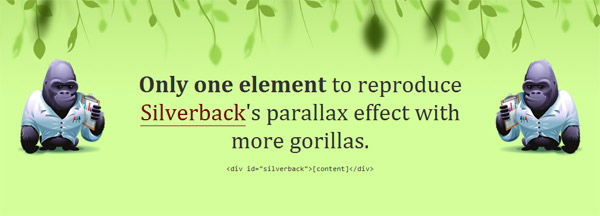
为了实现上面的目标,我们可以把pseudo-element pushed behind the content layer and pinned to the desired points of the HTML element using absolute positioning.

pseudo elements本身不含任何content,他们被absolutely positioned.这意味着他们可以被拉伸并且放到任何“parent" element中而不用影响parent的content.这可以通过使用top,right,bottom,left,width和height属性来实现。
上面的多背景样例:元素本身有其background image并且可以设置任何希望的padding.通过relatively positioning the element,parent element就将成为当对pseudo-elements做absolute 定位时的reference point.而改变z-index的值就将允许调整随在前谁在后。
#silverback {

  position: relative;

  z-index:;

  min-width: 200px;

  min-height: 200px;

  padding: 120px 200px 50px;

  background: #d3ff99 url(vines-back.png) -10% 0 repeat-x;

}

#silverback:before,

#silverback:after {

  position: absolute;

  z-index: -1;

  top:;

  left:;

  right:;

  bottom:;

  padding-top: 100px;

}

#silverback:before {

  content: url(gorilla-1.png);

  padding-left: 3%;

  text-align: left;

  background: transparent url(vines-mid.png) 300% 0 repeat-x;

}

#silverback:after {

  content: url(gorilla-2.png);

  padding-right: 3%;

  text-align: right;

  background: transparent url(vines-front.png) 70% 0 repeat-x;

}
两个pseudo-elements都被绝对定位并且固定在元素的两边,z-index设置为-1意味着pseudo-elments将被放到content layer的后面。这种情况下,pseudo-elements将在element的background的上方,而在元素内容本身的下层,所以元素仍然可以被选择。
http://nicolasgallagher.com/multiple-backgrounds-and-borders-with-css2/
<div id="silverback">
<strong>Only one element</strong> to reproduce <a href="http://silverbackapp.com/">Silverback</a>'s parallax effect with more gorillas.
<pre><code><div id="silverback">[content]</div></code></pre>
</div>
css中attribute selector及pseudo class的更多相关文章
- CSS: Multiple Attribute Selector [name="value"][name2="value2"]
this.document.querySelectorAll('div[id*="dayselector"][class*="x-autocontainer-innerC ...
- CSS中的一些内容总结
一.选择器 1.选择器的分组:一个Style可以对多个选择器生效,只用在不同的选择器中间加入逗号即可.如: h1,h2,h3,h4,h5,h6 { color: green; } PS:CSS规定,所 ...
- css3笔记系列-3.css中的各种选择器详解,不看后悔系列
点击上方蓝色字体,关注我 最详细的css3选择器解析 选择器是什么? 比较官方的解释:在 CSS 中,选择器是一种模式,用于选择需要添加样式的元素. 最常见的 CSS 选择器是元素选择器.换句话说 ...
- 理解与应用css中的display属性
理解与应用css中的display属性 display属性是我们在前端开发中常常使用的一个属性,其中,最常见的有: none block inline inline-block inherit 下面, ...
- CSS中的display属性(none,block,inline,inline-block,inherit)
css中的display属性(none,block,inline,inline-block,inherit) display属性是我们在前端开发中常常使用的一个属性,其中,最常见的有: none bl ...
- CSS中各种长度单位总结
在前端开发工作过程中曾碰到这样一问题: <style type="text/css"> .parent{ width:400px; height:300px; bord ...
- CSS中的偏僻知识点
一.css中的calc 在CSS中有calc属性用于尺寸的计算,可以让百分比和像素值进行运算. div {width : calc(100% - 30px);} 为了兼容性 /*Firefox*/ - ...
- css中:not()选择器和jQuery中.not()方法
因为老是将这两个的not方法弄混,所以写一下备忘. css中:not()选择器用法 :not 伪类选择器可以筛选不符合表达式的元素,:not(selector) 其中的selector为css选择器 ...
- CSS中的样式层叠机制Cascade
CSS中的样式层叠机制Cascade 一.样式冲突 样式冲突是CSS渲染过程要解决的一个关键问题,样式冲突主要由两个原因造成: 元素包含了不同对象所赋予的样式:浏览器.用户.作者.其中,浏览器样式 ...
随机推荐
- RabbitMQ---初识
1.概述 1.1 RabbitMQ 是 实现了 高级消息队列协议(AMQP) 的开源 消息代理软件,也称为 面向消息的中间件: AMQP:Advanced Message Queuin ...
- APP开发的三种技术对比
目前来说主流的App开发方式有三种:Native App .Web App.Hybird App.下面我们来分析一下这三种App开发方式的优劣对比: 一 :Native App 即 原生App开发 优 ...
- pip升级最新版本
1.如果是python2.7输入以下指令 python -m pip install --upgrade pip 2.如果是python 3.+输入以下指令 python3 -m pip instal ...
- BAE+Python+Django+Wechatpy+Baidu weather api +微信订阅号 = 实现微信查询天气
最近想在微信上面实现天气查询,分两个步骤: 1.被动回复:输入天气.xx天气获取天气情况 2.主动推送:每天定时推送天气(针对24小时内产生交互的人) 目前已经实现第一个步骤,如下: 现将实现此功能环 ...
- 解决display none到display block 渲染时间过长的问题,以及bootstrap模态框导致其他框中input不能获得焦点问题的解决
在做定制页面的时候,遇到这么一个问题,因为弹出框用的是bootstrap的自带的弹出框,控制显示和隐藏也是用自带的属性控制 控制显示,在触发的地方 例如botton上面加上 data-toggle=& ...
- 将Mysql的一张表导出至Excel格式文件
将Mysql的一张表导出至Excel格式文件 导出语句 进入mysql数据库,输入如下sql语句: select id, name, age from tablename into outfile ' ...
- 带有Apache Spark的Lambda架构
欢迎大家前往腾讯云+社区,获取更多腾讯海量技术实践干货哦~ 目标 市场上的许多玩家已经建立了成功的MapReduce工作流程来每天处理以TB计的历史数据.但是谁愿意等待24小时才能获得最新的分析结果? ...
- hibernate 返回自定义对象
关键代码老是忘记 setResultTransformer(Transformers.aliasToBean(LabourResult.class)) 代码用例: public List<Lab ...
- MVVMLight - IOC Containers and MVVM
在面向对象编程的早期,开发者要面对在应用程序或者类库中创建或检索类的实例的问题.针对这个问题有很多的解决方案.在过去几年中,依赖注入(DI)和控制反转(IoC)在开发者中很流行,并且取代了老的方案,比 ...
- MyBatis 指定的转换无效
表字段Pay类型设置的是float,生成类的属性如下: public double Pay{get;set;} 读取列表时出现如下错误: 错误信息: 查看堆栈跟踪信息, get_Decimal()提示 ...