
如何生成Junit报告
前言: 对Eclipse的工程写单元测试:
1. 一个工程有多个测试类,将测试类放到一个测试包下。
2. 每一个测试类写好,都单独执行run as ->JUnit Test测一下。
3. Junit 测试报告简单明了。
一、使用maven-surefire-plugin插件自带report功能
注意:
1、单独运行mvn test,默认执行的就是maven-surefire-plugin
2、配置了maven-surefire-plugin后,运行mvn test,结果和1一致,生成xml、txt文件
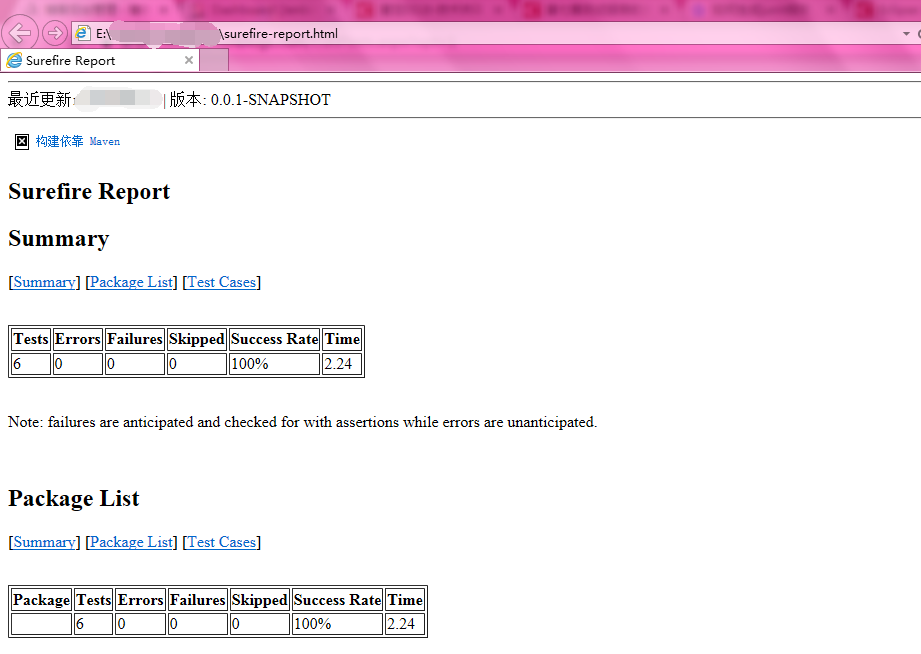
3、运行mvn test surefire-report:report 即是:运行mvn test的基础上,根据生成的xml、txt文件,再生成默认格式的report
<plugins>

    <plugin>

        <groupId>org.apache.maven.plugins</groupId>

        <artifactId>maven-compiler-plugin</artifactId>

        <version>2.0.2</version>

        <configuration>

            <source>1.8</source>

            <target>1.8</target>

        </configuration>

    </plugin>

    <plugin>

        <artifactId>maven-surefire-plugin</artifactId>

        <configuration>

            <testFailureIgnore>true</testFailureIgnore>

            <includes>

                <include>**/*Test.java</include>

            </includes>

            <excludes>

                <!-- -->

            </excludes>

        </configuration>

    </plugin>

</plugins>
二、用Maven 运行项目。
mvn surefire-report:report

三、使用maven-antrun-extended-plugin
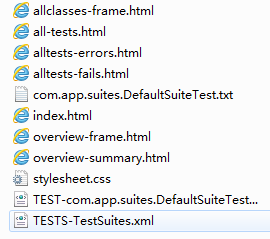
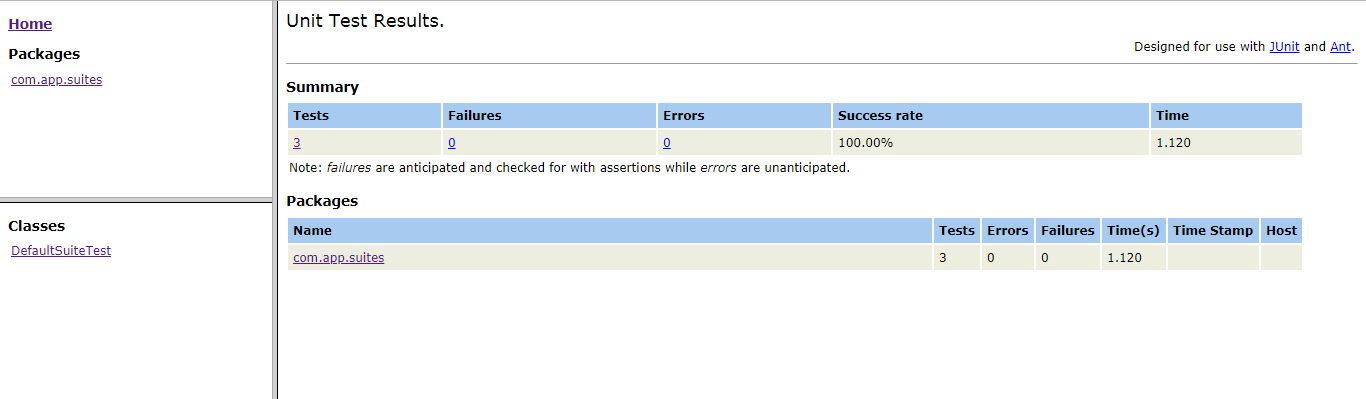
使用maven-surefire-plugin生成的报告太简陋,可以通过maven-antrun系列插件生成更好的报告。
<!-- 用mvn ant生成格式更友好的report -->

            <plugin>

                <groupId>org.jvnet.maven-antrun-extended-plugin</groupId>

                <artifactId>maven-antrun-extended-plugin</artifactId>

                <executions>

                    <execution>

                        <id>test-reports</id>

                        <phase>test</phase>

                        <configuration>

                            <tasks>

                                <junitreport todir="${basedir}/target/surefire-reports">

                                    <fileset dir="${basedir}/target/surefire-reports">

                                        <include name="**/*.xml" />

                                    </fileset>

                                    <report format="frames" todir="${basedir}/target/surefire-reports" />

                                </junitreport>

                            </tasks>

                        </configuration>

                        <goals>

                            <goal>run</goal>

                        </goals>

                    </execution>

                </executions>

                <dependencies>

                    <dependency>

                        <groupId>org.apache.ant</groupId>

                        <artifactId>ant-junit</artifactId>

                        <version>1.8.0</version>

                    </dependency>

                    <dependency>

                        <groupId>org.apache.ant</groupId>

                        <artifactId>ant-trax</artifactId>

                        <version>1.8.0</version>

                    </dependency>

                </dependencies>

            </plugin>

            <plugin>

                <groupId>org.apache.maven.plugins</groupId>

                <artifactId>maven-compiler-plugin</artifactId>

                <version>2.3.1</version>

                <configuration>

                    <source>1.6</source>

                    <target>1.6</target>

                    <encoding>utf8</encoding>

                </configuration>

            </plugin>
用Maven运行后会自动生成单元测试报告,效果如下:
如何生成Junit报告的更多相关文章
- pytest 11 allure2生成html报告
allure是一个report框架,支持java的Junit/testng等框架,当然也可以支持python的pytest框架,也可以集成到Jenkins上展示高大上的报告界面. 环境准备 1.pyt ...
- pytest文档13-allure2生成html报告(史上最详细)
前言 allure是一个report框架,支持java的Junit/testng等框架,当然也可以支持python的pytest框架,也可以集成到Jenkins上展示高大上的报告界面. 环境准备 1. ...
- pytest十六:allure2 生成 html 报告
allure 是一个 report 框架,支持 java 的 Junit/testng 等框架,当然也可以支持 python 的 pytest 框架,也可以集成到 Jenkins 上展示高大上的报告界 ...
- pytest生成allure报告
在pytest框架中可以用很多插件来生成测试报告,本文总结下怎么生成allure报告 allure allure是一款开源的,专门用来展示测试结果的一个工具,allure可以与很多的测试框架做集成,比 ...
- pytest_allure2 生成html报告
前言 allure是一个report框架,支持java的Junit/testng等框架,当然也可以支持python的pytest,也可以集成到Jenkins上展示高大上的报告界面. 环境准备 ...
- [转载]Matlab生成Word报告
最近在进行一批来料的检验测试,一个个手动填写报告存图片太慢了,就有了种想要使用Matlab在分析完后数据可以自动生成PDF报告的想法,于是就去网上搜索了相关的资料,发现Matlab中文论坛上有xiez ...
- ORACLE AWR概述及生成AWR报告
1.Overview of the Automatic Workload Repository The Automatic Workload Repository (AWR) collects, pr ...
- 生成awr报告
主要参考文献: http://343766868.blog.163.com/blog/static/48314056201110124513396/ 概况 Oracle内部以一定的频率把系统关键的统计 ...
- 自动生成AWR报告
--自动生成AWR报告 -------------------2013/09/23 脚本代码: #!/bin/bash AWR_FORMAT=html NUM_DAYS=1 MAX_S ...
随机推荐
- Java自定义注解的使用
什么是注解? #============================================================================================ ...
- js中定义配置文件
var config = (function($){ $.testConfig = { contextPath:'http://localhost:8080/test', maps:[ {id:'ma ...
- Android 8 蓝牙 扫描流程
记录android 8 蓝牙扫描设备的流程 src/com/android/settings/bluetooth/BluetoothSettings.java @Override protected ...
- 终于把eShopOnContainer部署成功了。
先上图说明一下,然后把步骤一部一部写上来吧.
- 【2019年04月03日】A股最便宜的股票
太钢不锈(SZ000825) - 当前便宜指数:161.66 - 滚动扣非市盈率PE:4.62 - 滚动市净率PB:1.03 - 动态年化股息收益率:4.53% - 太钢不锈(SZ000825)的历史 ...
- SpringBoot------连接MySQL报错:The server time zone value 'Öйú±ê׼ʱ¼ä' is unrecognized
报错提示: The server time zone value 'Öйú±ê׼ʱ¼ä' is unrecognized or represents more than one time zon ...
- 更改了react-redux 官方网站的todolist结构
最近在学习胡子大哈的react小书,内容讲的由浅入深,很值得react,react-redux小白一读. 废话不多说直接上地址:http://huziketang.mangojuice.top/boo ...
- RTX临界段,中断锁与任务锁
临界段 代码的临界段也称为临界区,一旦这部分代码开始执行,则不允许任何中断打断.为确保临界段代码的执行不被中断,在进入临界段之前须关中断,而临界段代码执行完毕后,要立即开中断. ...
- Excel导入工具类兼容xls和xlsx
package com.bj58.finance.platform.operation.provider.util; import org.apache.log4j.Logger; import or ...
- C# windows GDI+仿画图 绘图程序设计
C# windows GDI+仿画图 绘图程序设计 1.介绍 这里分享一个简单的画图程序 原作者:author: ping3108@163.com 2.程序主窗体设计 3.程序设计 本程序工程使用VS ...