
java.lang.IllegalStateException: Failed to load property source from location 'classpath:/application-dev.yml'
如果你的项目没有配置错误,配置文件名称也正常,还出现这个问题,那一定是你的yml文件编码的问题
先附上一张项目架构图
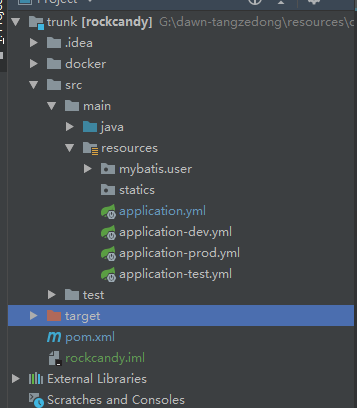
当我启动服务器寻找配置文件的时候,服务器提示这样的错误信息
java.lang.IllegalStateException: Failed to load property source from location 'classpath:/application-dev.yml'

    at org.springframework.boot.context.config.ConfigFileApplicationListener$Loader.load(ConfigFileApplicationListener.java:549)

    at org.springframework.boot.context.config.ConfigFileApplicationListener$Loader.loadForFileExtension(ConfigFileApplicationListener.java:488)

    at org.springframework.boot.context.config.ConfigFileApplicationListener$Loader.load(ConfigFileApplicationListener.java:468)

    at org.springframework.boot.context.config.ConfigFileApplicationListener$Loader.lambda$null$6(ConfigFileApplicationListener.java:450)

    at java.lang.Iterable.forEach(Iterable.java:75)

    at org.springframework.boot.context.config.ConfigFileApplicationListener$Loader.lambda$load$7(ConfigFileApplicationListener.java:449)

    at java.lang.Iterable.forEach(Iterable.java:75)

    at org.springframework.boot.context.config.ConfigFileApplicationListener$Loader.load(ConfigFileApplicationListener.java:446)

    at org.springframework.boot.context.config.ConfigFileApplicationListener$Loader.load(ConfigFileApplicationListener.java:336)

    at org.springframework.boot.context.config.ConfigFileApplicationListener.addPropertySources(ConfigFileApplicationListener.java:215)

    at org.springframework.boot.context.config.ConfigFileApplicationListener.postProcessEnvironment(ConfigFileApplicationListener.java:198)

    at org.springframework.boot.context.config.ConfigFileApplicationListener.onApplicationEnvironmentPreparedEvent(ConfigFileApplicationListener.java:185)

    at org.springframework.boot.context.config.ConfigFileApplicationListener.onApplicationEvent(ConfigFileApplicationListener.java:171)

    at org.springframework.context.event.SimpleApplicationEventMulticaster.doInvokeListener(SimpleApplicationEventMulticaster.java:172)

    at org.springframework.context.event.SimpleApplicationEventMulticaster.invokeListener(SimpleApplicationEventMulticaster.java:165)

    at org.springframework.context.event.SimpleApplicationEventMulticaster.multicastEvent(SimpleApplicationEventMulticaster.java:139)

    at org.springframework.context.event.SimpleApplicationEventMulticaster.multicastEvent(SimpleApplicationEventMulticaster.java:127)

    at org.springframework.boot.context.event.EventPublishingRunListener.environmentPrepared(EventPublishingRunListener.java:74)

    at org.springframework.boot.SpringApplicationRunListeners.environmentPrepared(SpringApplicationRunListeners.java:54)

    at org.springframework.boot.SpringApplication.prepareEnvironment(SpringApplication.java:361)

    at org.springframework.boot.SpringApplication.run(SpringApplication.java:320)

    at org.springframework.boot.SpringApplication.run(SpringApplication.java:1258)

    at org.springframework.boot.SpringApplication.run(SpringApplication.java:1246)

    at com.dawn.rockcandy.RockCandyApplication.main(RockCandyApplication.java:11)

Caused by: org.yaml.snakeyaml.error.YAMLException: java.nio.charset.MalformedInputException: Input length = 1

    at org.yaml.snakeyaml.reader.StreamReader.update(StreamReader.java:254)

    at org.yaml.snakeyaml.reader.StreamReader.<init>(StreamReader.java:58)

    at org.yaml.snakeyaml.Yaml.loadAll(Yaml.java:537)

    at org.springframework.beans.factory.config.YamlProcessor.process(YamlProcessor.java:166)

    at org.springframework.beans.factory.config.YamlProcessor.process(YamlProcessor.java:139)

    at org.springframework.boot.env.OriginTrackedYamlLoader.load(OriginTrackedYamlLoader.java:75)

    at org.springframework.boot.env.YamlPropertySourceLoader.load(YamlPropertySourceLoader.java:50)

    at org.springframework.boot.context.config.ConfigFileApplicationListener$Loader.loadDocuments(ConfigFileApplicationListener.java:567)

    at org.springframework.boot.context.config.ConfigFileApplicationListener$Loader.load(ConfigFileApplicationListener.java:523)

    ... 23 common frames omitted

Caused by: java.nio.charset.MalformedInputException: Input length = 1

    at java.nio.charset.CoderResult.throwException(CoderResult.java:281)

    at sun.nio.cs.StreamDecoder.implRead(StreamDecoder.java:339)

    at sun.nio.cs.StreamDecoder.read(StreamDecoder.java:178)

    at java.io.InputStreamReader.read(InputStreamReader.java:184)

    at org.yaml.snakeyaml.reader.UnicodeReader.read(UnicodeReader.java:125)

    at org.yaml.snakeyaml.reader.StreamReader.update(StreamReader.java:223)

    ... 31 common frames omitted
我的application.yml和application-dev.yml是没有配置错误的,而且我的文件名称是完全正常的,编译后的target文件里面也有application-dev.yml,我就很纳闷问题出在哪儿了!
打开target文件,查看application-dev.yml文件,发现这个文件居然是空的,说明这个文件编译失败了!!!
最后找到问题,因为这个文件的编码格式是GBK,项目的编码格式是UTF-8,里面有注释,注释乱码,导致编译失败
1.修改你的编码格式
2.删除注释
java.lang.IllegalStateException: Failed to load property source from location 'classpath:/application-dev.yml'的更多相关文章
- java.lang.IllegalStateException: Failed to load property source from location 'classpath:/application.yml'
java.lang.IllegalStateException: Failed to load property source from location 'classpath:/applicatio ...
- Springboot - java.lang.IllegalStateException: Failed to load property source from location 'classpath:/application.yml'
Caused by: org.yaml.snakeyaml.scanner.ScannerException: while scanning a simple key in 'reader', lin ...
- Eureka启动报错:Failed to load property source from location 'classpath:/application.yml'
原因: 将application.yml添加到classpath时, 由于变更了application.yml的编码格式(或许也改变了些代码内容), 而target内的yml文件没有实时更新, 从而导 ...
- springboot启动报异常,Failed to load property source from location 'classpath:/application.yml'
学习springboot,在启动时抛出下图异常 往下看异常信息,找到异常的具体位置 找到application.yml文件的对应位置,发现params配置前面多了空格 去掉空格重新启动,可以了 写代码 ...
- Failed to load property source from location 'classpath:/applica)
: 1.注释错误(application.yml用的是#注释) 2.缩进采用tab而不是空格引起的(不同配置之间也不能有tab出现,否则会报错) 3.冒号后面必须有空格否则会报错
- Spring3.x 版本和 JDK1.8 不兼容导致 java.lang.IllegalStateException: Failed to load ApplicationContext
由于安装了 JDK1.8 的版本,最近在进行整合 Struts2+Spring+Hibernate 框架的时候,不小心导入了之前下载的 Spring 3.2.0 版本的 jar 包. 结果在运行测试用 ...
- java.lang.IllegalStateException: Failed to load ApplicationContext selenium 异常 解决
WARN <init>, HHH000409: Using org.hibernate.id.UUIDHexGenerator which does not generate IETF R ...
- junit测试时,出现java.lang.IllegalStateException: Failed to load ApplicationContext
课程设计要求进行junit测试,我是在已经做好的ssh项目上做的测试,测试类代码如下 package com.zhang.web.services; import static org.junit.A ...
- java.lang.IllegalStateException: Failed to load ApplicationContext
1.错误描述 七月 13, 2014 6:34:41 下午 org.springframework.beans.factory.xml.XmlBeanDefinitionReader loadBean ...
随机推荐
- Telephone dialer
运行电话拨号器,需要加这个权限,否则不会打通电话.这个权限是用户权限,是谷歌工程师为了跟自己撇清关系,用户需要权限的时候自己加. 运行android程序的时候提示:ActivityManager: W ...
- 用PRODUCT_COPY_FILES拷贝文件夹
拷贝文件PRODUCT_COPY_FILES += device/qcom/msm8909/media/media_profiles_8909.xml:system/etc/media_profile ...
- tkinter中lable标签控件(二)
lable控件 对于tkinter来说,学起来很简单,只要设置好相应的参数即可出结果,所以不用刻意去记住这些参数.学习一遍后理解每个参数的作用是什么即可. 当下次用到的时候来笔记上看一下就行. 内容很 ...
- Oracle EBS FA 资产取值
SELECT fb.book_type_code, fth.ASSET_NUMBER, fdh.units_assigned, fdh.assigned_to, pf.FULL_NAME, fl.se ...
- js判断IE浏览器及版本
function isIE(_version){ _version = _version || ''; var b = document.createElement('b'); b.innerHTML ...
- 微信小程序搭建和开发相关指引
几点: 1.环境搭建 2.开发和调试 3.发布 原文链接: http://www.lookdaima.com/WebForms/WebPages/Blanks/Pm/Docs/DocItemDetai ...
- HTTP协议响应码及get请求和post请求比较
HTTP协议响应码 1XX:信息响应类,表示接收到请求并且继续处理 2XX:处理成功响应类,表示动作被成功接受.理解和接受 200 OK:表示从客户端发来的请求在服务器端被正常处理了 204 No C ...
- SSM框架下使用websocket实现后端发送消息至前端
本篇文章本人是根据实际项目需求进行书写的第一版,里面有些内容对大家或许没有用,但是核心代码本人已对其做了红色标注.文章讲解我将从maven坐标.HTML页面.js文件及后端代码一起书写. 一.mave ...
- 在pycharm中每次运行代码不使用console而使用run
问题:在pycharm中点击run运行程序,发现没有打开run窗口,而是打开的Python console窗口. 解决方法:打开菜单栏run->edit configurations,把下图中的 ...
- 基础数据类型之AbstractStringBuilder
String内部是一个private final char value[]; 也就意味着每次调用的各种处理方法,返回的字符串都是一个新的,性能上,显然.... 所以,对于可变字符序列的需求是很明确的 ...