
03-14_WLST配置现有的Domain
本文重点:
- WLST在线模式配置现有的domains。
- WLST离线模式配置现有的domains。
1、WLST在线模式配置现有的domains
由于和一个活动的domain进行交互,所有的在线更改必须由weblogic变更管理的进程来做控制。
例1:wlst脚本创建一个受管服务器
|
connect("username", "password", "0.0.0.0:port) # 连接一个运行中的实例 edit() # 进入可更改的树 startEdit() # 开启一个start session,获取一个配置锁 svr = cmo.createServer("managedServer") # 创建一个受管服务器 svr.setListenPort(8001) # 设置受管服务器端口 svr.setListenAddress("my-address") # 设置监听地址 save() # 保存更改,类似控制台中点击保存按钮 activate(block="true") # 激活所有更改,类似控制台中应用更改按钮,block参数代表是否等待activate操作完成才进入下一步操作,true代表等待。 # get the server mbean to target it tBean = getMBean("Servers/managedServer") # 判断是否创建成功 if tBean != None: print "Found our target" disconnect() # 断开连接 exit() # 退出脚本 |
例2:修改至生产模式
|
wls:/offline> connect('weblogic', '!QAZ2wsx', '127.0.0.1:7001') Connecting to t3://127.0.0.1:7001 with userid weblogic ... Successfully connected to Admin Server 'AdminServer' that belongs to domain 'base_domains'. Warning: An insecure protocol was used to connect to the server. To ensure on-the-wire security, the SSL port or Admin port should be used instead. wls:/base_domains/serverConfig> edit() Location changed to edit tree. This is a writable tree with DomainMBean as the root. To make changes you will need to start an edit session via startEdit(). For more help, use help(edit) wls:/base_domains/edit> startEdit() Starting an edit session ... Started edit session, please be sure to save and activate your changes once you are done. wls:/base_domains/edit !> cmo.setProductionModeEnabled(false) wls:/base_domains/edit !> activate() Activating all your changes, this may take a while ... The edit lock associated with this edit session is released once the activation is completed. The following non-dynamic attribute(s) have been changed on MBeans that require server re-start: MBean Changed : com.bea:Name=AdminServer,Type=WebServerLog,Server=AdminServer,WebServer=AdminServer Attributes changed : RotateLogOnStartup MBean Changed : com.bea:Name=Server-0,Type=WebServerLog,Server=Server-0,WebServer=Server-0 Attributes changed : RotateLogOnStartup MBean Changed : com.bea:Name=AdminServer,Type=Log,Server=AdminServer Attributes changed : RotateLogOnStartup MBean Changed : com.bea:Name=AdminServer,Type=DataSourceLogFile,DataSource=AdminServer,Server=AdminServer Attributes changed : RotateLogOnStartup MBean Changed : com.bea:Name=base_domains,Type=Log Attributes changed : RotateLogOnStartup MBean Changed : com.bea:Name=base_domains,Type=Domain Attributes changed : ProductionModeEnabled MBean Changed : com.bea:Name=Server-0,Type=Log,Server=Server-0 Attributes changed : RotateLogOnStartup MBean Changed : com.bea:Name=Server-0,Type=DataSourceLogFile,DataSource=Server-0,Server=Server-0 Attributes changed : RotateLogOnStartup Activation completed wls:/base_domains/edit> exit() Exiting WebLogic Scripting Tool. |
例3:跟踪配置更改
|
wls:/offline> connect('weblogic', '!QAZ2wsx', '127.0.0.1:7001') Connecting to t3://127.0.0.1:7001 with userid weblogic ... Successfully connected to Admin Server 'AdminServer' that belongs to domain 'base_domains'. Warning: An insecure protocol was used to connect to the server. To ensure on-the-wire security, the SSL port or Admin port should be used instead. wls:/base_domains/serverConfig> edit() Location changed to edit tree. This is a writable tree with DomainMBean as the root. To make changes you will need to start an edit session via startEdit(). For more help, use help(edit) wls:/base_domains/edit> startEdit() Starting an edit session ... Started edit session, please be sure to save and activate your changes once you are done. wls:/base_domains/edit !> cmo.createServer('managed2') [MBeanServerInvocationHandler]com.bea:Name=managed2,Type=Server wls:/base_domains/edit !> cd('Servers/managed2') wls:/base_domains/edit/Servers/managed2 !> cmo.setListenPort(7702) wls:/base_domains/edit/Servers/managed2 !> showChanges() All changes that are made but not yet activated are: MBean Changed : com.bea:Name=base_domains,Type=Domain Operation Invoked : create Attribute Modified : Servers Attributes Old Value : null Attributes New Value : managed2 Server Restart Required : false MBean Changed : com.bea:Name=managed2,Type=Server Operation Invoked : modify Attribute Modified : ListenPort Attributes Old Value : null Attributes New Value : 7702 Server Restart Required : false wls:/base_domains/edit/Servers/managed2 !> save() Saving all your changes ... Saved all your changes successfully. wls:/base_domains/edit/Servers/managed2 !> activate() Activating all your changes, this may take a while ... The edit lock associated with this edit session is released once the activation is completed. Activation completed |
例4:另两个重要的命令undo和cancelEdit
undo:可以反转没有保存或者没有激活的更改。
cancelEdit:直接退出edit(),会反转没有保存或者没有激活的更改,还会释放编辑锁。
更多的属性操作和更改:
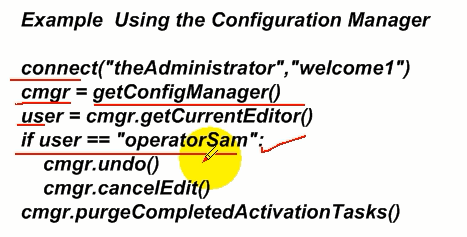
上一节中描述的标准change-management命令是用于调用configurationManagerMBean中操作的便捷命令。 除了这些操作之外,configurationManagerMBean还包含描述编辑会话的属性和操作。
有关详细信息,请参阅Oracle WebLogic Server MBean Reference中的"configurationManagerMBean"。
要访问此MBean,请使用WLST getConfigManager命令。
示例中的WLST联机脚本以管理员身份将WLST连接到服务器实例,检查进行更改的当前编辑器是否是特定的运算符,然后取消配置编辑。 该脚本还会清除所有已完成的激活任务。
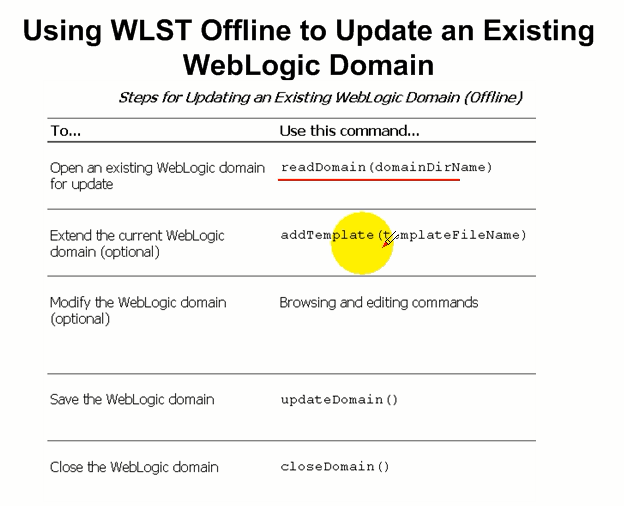
- WLST离线模式配置现有的domains(本文略,详见:03-07_创建域自定义模版)

03-14_WLST配置现有的Domain的更多相关文章
- 【CAS单点登录视频教程】 第03集 -- 配置 tomcat的 ssl
目录 ----------------------------------------- [CAS单点登录视频教程] 第06集[完] -- Cas认证 学习 票据认证FormsAuthenticati ...
- [原创]OpenEuler20.03安装配置PostgreSQL13.4详细图文版
OpenEuler安装配置PostgreSQL 编写时间:2021年9月18日 作者:liupp 邮箱:liupp@88.com 序号 更新内容 更新日期 更新人 1 完成第一至三章内容编辑: 202 ...
- hadoop生态搭建(3节点)-03.zookeeper配置
# https://www.oracle.com/technetwork/java/javase/downloads/java-archive-javase8-2177648.html # ===== ...
- jenkins学习 03 jenkins配置Maven项目
我们的产品使用Git作为版本管理工具,而jenkins需要git插件来支持git,所以我们需要为jenkins添加git插件. 在Available tab页中找到Git Plugin 点击下方的In ...
- Spring4学习回顾之路03—XML配置Bean ,依赖注入的方式
配置Bean的形式可以基于XML文件的方式,也可以基于注解的方式,而Bean的配置方式可以通过全类名(反射),通过工厂方式和FactoryBean. XML形式 <?xml version=&q ...
- win7系统保护配置现错误“文件名、目录名或卷标语法不正确。(0x8007007B)
windows7下系统保护功能很是鸡肋,有事会出现一下两个问题: 1.出现错误“文件名.目录名或卷标语法不正确.(0x8007007B) 2.保护设置列表中出现“Windows7_os(c:)(找不到 ...
- SpringBoot2.0 基础案例(03):配置系统全局异常映射处理
一.异常分类 这里的异常分类从系统处理异常的角度看,主要分类两类:业务异常和系统异常. 1.业务异常 业务异常主要是一些可预见性异常,处理业务异常,用来提示用户的操作,提高系统的可操作性. 常见的业务 ...
- Azure AD Domain Service(二)为域服务中的机器配置 Azure File Share 磁盘共享
一,引言 Azure File Share 是支持两种认证方式的! 1)Active Directory 2)Storage account key 记得上次分析的 "Azure File ...
- 【CAS单点登录视频教程】 第04集 -- tomcat下配置https环境
目录 ----------------------------------------- [CAS单点登录视频教程] 第06集[完] -- Cas认证 学习 票据认证FormsAuthenticati ...
随机推荐
- Fillder Script语法
官方的Fiddler Script使用文档 http://docs.telerik.com/fiddler/KnowledgeBase/FiddlerScript/ModifyRequestOrRes ...
- A Painless Q-learning Tutorial (一个 Q-learning 算法的简明教程)
本文是对 http://mnemstudio.org/path-finding-q-learning-tutorial.htm 的翻译,共分两部分,第一部分为中文翻译,第二部分为英文原文.翻译 ...
- xlwt set style making error: More than 4094 XFs (styles)
使用Xlwt,当内容过多时,会报错:More than 4094 XFs (styles) 解决方法: wb = xlwt.Workbook(style_compression=2) 使用style_ ...
- 杭州富阳场口科目四考试公交路线(西溪北苑->场口)
从西溪北苑出发,时间充裕,比较悠闲,打算坐公交前往,也打算做下科目四模拟题,顺便欣赏沿途的风景(去的时候需要看题目,回来的时候可以放松,哈哈哈),路线如下. 早上7点半出发,出去吃个早餐,步行到文一社 ...
- nginx介绍(三) - 虚拟主机
前言 前面提到过, 由nginx来分发请求到tomcat中, 那么怎么来区分这些tomcat呢? 我们一般访问网站的时候, 是不是可以使用 ip : port (127.0.0.1:8080)的方式来 ...
- lua脚本在游戏中的应用
为什么要在游戏中使用脚本语言? 要解释这个问题首先我们先来了解一下脚本语言的特性: 学习门槛低,快速上手 开发成本低,可维护性强 动态语言,灵活性高 相对于C/C++这类高复杂性.高风险的编译型语言来 ...
- log | logstash
log | logstash log logstash enter description here 1. 安装 1. 安装java java -version 检查java版本 没有安装则到or ...
- LINQ 【高级查询】
using (Data0216DataContext con = new Data0216DataContext()) { List<Users> ulist = con.Use ...
- Java的第6天,学习运算符
提到运算符我们就会想起 加 减 乘 除: Java中的一些运算符:关系运算符.逻辑运算符.赋值运算符.和条件运算符: 其中算术运算符有:+ , - , * , \, % ,++, -- ; + , - ...
- Apache SkyWalking的架构设计【译文】
Apache SkyWalking提供了一个功能强大并且很轻量级的后端.在此,将介绍为什么采用以下方式来设计它,以及它又是如何工作的. 架构图 对于APM而言,agent或SDKs仅是如何使用libs ...