
下载Android kernel
方法一:
https://source.android.com/setup/building-kernels
方法二:
在按照https://source.android.com/setup/downloading中说的方法建立mirror后,其实kernel也已经在其中了:

这样我们就可以直接使用下面的命令本地下载需要的kernel了,以goldfish为例:
git clone /home/pengdonglin/disk_ext/Android_Latest/aosp_mirror/kernel/goldfish
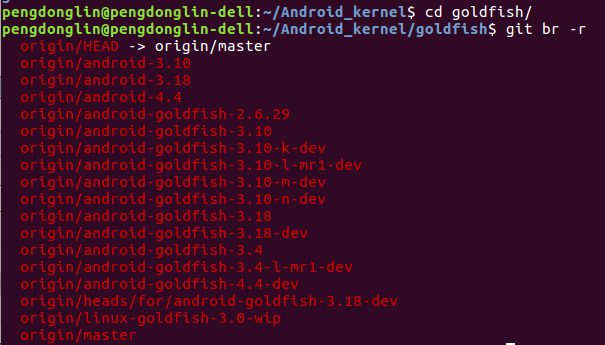
然后取出自己需要的分支即可:
pengdonglin@pengdonglin-dell:~/Android_kernel/goldfish$ git co origin/android-goldfish-2.6.

Checking out files: % (/), done.

Note: checking out 'origin/android-goldfish-2.6.29'.

You are in 'detached HEAD' state. You can look around, make experimental

changes and commit them, and you can discard any commits you make in this

state without impacting any branches by performing another checkout.

If you want to create a new branch to retain commits you create, you may

do so (now or later) by using -b with the checkout command again. Example:

  git checkout -b <new-branch-name>

HEAD is now at 4bb8fa0... goldfish: Add encrypted SD Card support.

pengdonglin@pengdonglin-dell:~/Android_kernel/goldfish$ ls

arch     CREDITS        drivers   include  Kbuild  MAINTAINERS  net             samples   sound

block    crypto         firmware  init     kernel  Makefile     README          scripts   usr

COPYING  Documentation  fs        ipc      lib     mm           REPORTING-BUGS  security  virt
方法三:
使用repo本地下载:
repo init -u /home/pengdonglin/disk_ext/Android_Latest/aosp_mirror/platform/manifest.git
然后修改.repo/manifest.xml为:
<?xml version="1.0" encoding="UTF-8"?>

<manifest>

  <remote  name="aosp"

           fetch=".."

           review="https://android-review.googlesource.com/" />

  <default revision="master"

           remote="aosp"

           sync-j="" />

  <project path="goldfish" name="kernel/goldfish" />

</manifest>
即只填写一个project,当然如果有其他需要的project,也可以接着追加。
最后执行repo sync即可。
完。
下载Android kernel的更多相关文章
- Mac OS X于Android Kernel下载方法
于上一篇日志中,我总结了大家提供的下载Android源代码的方法.这里再简单总结一下内核的下载方法. 參考这里的介绍:http://source.android.com/source/building ...
- 【Android 系统开发】下载 编译 Android源代码 和 Android kernel源代码
下载Android源码简要流程 : a. 获取repo文件: curl http://commondatastorage.googleapis.com/git-repo-downloads/repo ...
- 下载 编译 Android源代码 和 Android kernel源代码
下载Android源码简要流程 : a. 获取repo文件: curl http://commondatastorage.googleapis.com/git-repo-downloads/repo ...
- [原]Ubuntu 14.04编译Android Kernel
如何编译android kernel参考官方文档:https://source.android.com/source/building-kernels.html 在Ubuntu 14.04上编译a ...
- 如何下载android源码与android内核源码
首先,要分清楚,android的源代码和android的内核代码一般是分开的,要分别进行下载. 1.先下载android的源代码.(这里不包括android的内核代码) 下载最新的源代码,一 ...
- 同步、更新、下载Android Source & SDK from 国内镜像站(转载)
同步.更新.下载Android Source & SDK from 国内镜像站 转自: 同步.更新.下载Android Source & SDK from 国内镜像站 Download ...
- 同步、更新、下载Android Source & SDK from 国内镜像站
转自: 同步.更新.下载Android Source & SDK from 国内镜像站 Download the android source from china mirrors 以 ...
- Android开发——通过扫描二维码,打开或者下载Android应用
Android开发——通过扫描二维码,打开或者下载Android应用 在实现这个功能的时候,被不同的浏览器折磨的胃疼,最后实现了勉强能用,也查考了一下其他人的博客 android实现通过浏览器点击 ...
- 【Linux/Ubuntu学习6】unbuntu 下载android源码
在Windows下安装Cygwin,通过Cygwin也可在Windows里通过本文的下载步骤下载Android源码. 以下为在Ubuntu下下载Google Android4.4源码的步骤: 1. 安 ...
随机推荐
- win7自带截屏便签 打开命令
win7自带截屏 1.win+r 2.SnippingTool.exe 打开 便签 1.win+r 2.StikyNot.exe 打开 查本机ip 1.win+r 2.cmd 3.ipco ...
- vs code 前端如何以服务器模式打开 [安装服务器] server insteall
首先要安装 vs code 和 node.js(既然是前端就必须回,不会的面壁思过)然后在命令符中输入 npm install -g live-server 进行安装,(简单的NPM安装)安装成功后在 ...
- skyline添加wfs服务时,弹出错误“no layers were found”!
1.问题描述: 使用TerraExplorer Pro添加ArcGIS Server 10.2发布的WFS服务图层时,弹出如下错误: 2.错误原因: 发布wfs服务前,图层数据源的空间参考未设置,不能 ...
- flink的集群的HA高可用
对于一个企业级的应用,稳定性是首要要考虑的问题,然后才是性能,因此 HA 机制是必不可少的: 和 Hadoop 一代一样,从架构中我们可以很明显的发现 JobManager 有明显的单点问题(SPOF ...
- PHP远程下载图片,微信头像存到本地,本地图片转base64
方法一(推荐): function download_remote_pic($url){ $header = [ 'User-Agent: Mozilla/5.0 (Windows NT 6.1; W ...
- 洛谷3825 [NOI2017]游戏 2-sat
原文链接http://www.cnblogs.com/zhouzhendong/p/8146041.html 题目传送门 - 洛谷3825 题解 我们考虑到地图中x的个数很少,最多只有8个. 所以我们 ...
- 如何删除github里面的项目
第一步 :首先登陆github 第二步:如下图选择 第三步:选择如下图 第四步:点击你要删除的项目,点击settings 第五步:把页面向下拉,找到如图按钮并点击 第六步:需要确认输入你要删除的项目名 ...
- Jenkins的介绍
在公司看见有的部门在使用这个工具,好奇一下,今天就开始学习一番. 1.官网 https://jenkins.io/ 2.介绍 Jenkins是一个功能强大的应用程序,允许持续集成和持续交付项目,无论用 ...
- sublime text3 中 python3编译出现中文乱码解决方法
转 https://blog.csdn.net/Bin_bin_bingo/article/details/80531582 一.乱码现象 利用sublime自带编译快捷方式ctrl+B会出现中文乱码 ...
- 附006.harbor.cfg配置文件详解
一 必须参数 需要在配置文件中设置这些参数.如果用户更新它们harbor.cfg并运行install.sh脚本以重新安装Harbor,它们将生效. hostname:目标主机的主机名,用于访问UI和注 ...