
postgreSQL数据库的初探
kali是黑客的强大武器,还有一个也是哦——Metasploit
postgreSQL数据库是Metasploit的默认数据库哦!
启动postgresql:
service postgresql start
既然postgresql是配合Metasploit框架的,那么也要启动Metasploit:
kali > msfconsole
root@kali:~# service postgresql start

root@kali:~# msfconsole

[-] ***rting the Metasploit Framework console...|

[-] * WARNING: No database support: No database YAML file

[-] ***

Unable to handle kernel NULL pointer dereference at virtual address 0xd34db33f

EFLAGS:

eax:  ebx: f77c8c00 ecx:  edx: f77f0001

esi: 803bf014 edi: 8023c755 ebp: 80237f84 esp: 80237f60

ds:    es:   ss:

Process Swapper (Pid: , process nr: , stackpage=)

Stack:

       90909090.90909090.

       90909090.90909090.

       90909090.90909090.

       90909090.90909090.

       ..........................

       cccccccccccccccccccccccccc

       cccccccccccccccccccccccccc

       ccccccccc.................

       cccccccccccccccccccccccccc

       cccccccccccccccccccccccccc

       .................ccccccccc

       cccccccccccccccccccccccccc

       cccccccccccccccccccccccccc

       ..........................

       ffffffffffffffffffffffffff

       ffffffff..................

       ffffffffffffffffffffffffff

       ffffffff..................

       ffffffff..................

       ffffffff..................

Code:     M3 T4 SP L0 1T FR 4M 3W OR K! V3 R5 I0 N4

Aiee, Killing Interrupt handler

Kernel panic: Attempted to kill the idle task!

In swapper task - not syncing

       =[ metasploit v5.0.2-dev                           ]

+ -- --=[  exploits -  auxiliary -  post       ]

+ -- --=[  payloads -  encoders -  nops            ]

+ -- --=[  evasion                                       ]

+ -- --=[ ** This is Metasploit  development branch **   ]

msf5 >
启动完成
启动metasploit成功后则会进入:
msf >
命令行环境下
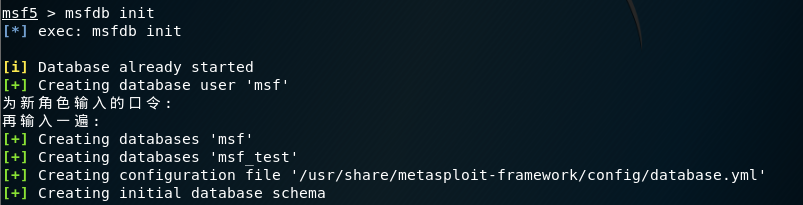
下一步,将建立metasploit将其信息存储在其中的数据库中:
需要以root权限身份登录postgres :(su:“switch user”命令)

提示:postgres@kali:/root$ 【表示程序 - 主机名 - 用户】
下一步,创建用户和密码:

使用 createuser 命令的-P选项创建用户名msf_user,并提示输入密码。
下一步,授予用户一定的权限并创建一个数据库:

使用 createdb 命令的-O为msf_user用户创建了 hack_db 数据库。
初步配置结束,exit退出!
接下来,则是连接msf和数据库了!参考数据库连接的博文

检查数据库是否连接?结果显示未连接!
使用 db_connect 命令连接数据库:
msf5 > db_connect

[-] A URL or saved data service name is required.

   USAGE:

      * Postgres Data Service:

          db_connect <user:[pass]>@<host:[port]>/<database>

        Examples:

          db_connect user@metasploit3

          db_connect user:pass@192.168.0.2/metasploit3

          db_connect user:pass@192.168.0.2:/metasploit3

          db_connect -y [path/to/database.yml]

      * HTTP Data Service:

          db_connect [options] <http|https>://<host:[port]>

        Examples:

          db_connect http://localhost:

          db_connect http://my-super-msf-data.service.com

          db_connect -c ~/cert.pem -t 6a7a74c1a5003802c955ead1bbddd4ab1b05a7f2940b4732d34bfc555bc6e1c5d7611a497b29e8f0 https://localhost:

        NOTE: You must be connected to a Postgres data service in order to successfully connect to a HTTP data service.

      Persisting Connections:

        db_connect --name <name to save connection as> [options] <address>

      Examples:

        Saving:     db_connect --name LA-server http://123.123.123.45:

        Connecting: db_connect LA-server

   OPTIONS:

       -l,--list-services List the available data services that have been previously saved.

       -y,--yaml          Connect to the data service specified in the provided database.yml file.

       -n,--name          Name used to store the connection. Providing an existing name will overwrite the settings for that connection.

       -c,--cert          Certificate file matching the remote data server's certificate. Needed when using self-signed SSL cert.

       -t,--token         The API token used to authenticate to the remote data service.

       --skip-verify      Skip validating authenticity of server's certificate (NOT RECOMMENDED).
db_connect --help

如上图显示: Connected to Postgres data service: 127.0.0.1/hack_db 【连接到hack_db数据库】
检查是否连接:

------------------------------------
至此,msf和postgreSQL数据库已经连接并可以使用,使用Metasploit进行的工作,结果将存到PostgreSQL数据库中。
更多了解,待它日研究后更新!!!
postgreSQL数据库的初探的更多相关文章
- ASP.NET MVC 使用 Petapoco 微型ORM框架+NpgSql驱动连接 PostgreSQL数据库
前段时间在园子里看到了小蝶惊鸿 发布的有关绿色版的Linux.NET——“Jws.Mono”.由于我对.Net程序跑在Linux上非常感兴趣,自己也看了一些有关mono的资料,但是一直没有时间抽出时间 ...
- PostgreSQL介绍以及如何开发框架中使用PostgreSQL数据库
最近准备下PostgreSQL数据库开发的相关知识,本文把总结的PPT内容通过博客记录分享,本随笔的主要内容是介绍PostgreSQL数据库的基础信息,以及如何在我们的开发框架中使用PostgreSQ ...
- TPC-H生成.tbl文件导入postgresql数据库的坑
数据库project好好的不用主流的MySQL和Microsoft server而要求用听都没听过的postgresql (当然,可能你三个都没听过) 这里的坑主要是把生成的那八张.tbl的表导入pg ...
- PowerDesigner反向工程PostgreSQL数据库
1. 环境准备: a) 安装PowerDesigner,以PowerDesigner15.1为例 b) 安装java jdk,以jdk-7-windows-i586为例 ...
- 视频教程--ASP.NET MVC 使用 Petapoco 微型ORM框架+NpgSql驱动连接 PostgreSQL数据库
说好的给园子里的朋友们录制与<ASP.NET MVC 使用 Petapoco 微型ORM框架+NpgSql驱动连接 PostgreSQL数据库> 这篇博客相对应的视频,由于一个月一来没有时 ...
- Enterprise Architect的共享Respository设置,postgresql数据库
Enterprise Architect有一个很实用的共享,在设计UML图的时候,可以连接到一个数据库服务器,将所有的画图数据共享在上面,所有连到这个server的人,都可以看到 别人的图,图中的元素 ...
- PostgreSQL数据库基本配置
一.安装 首先安装PostgreSQL客户端: sudo apt-get install postgresql-client 然后,安装PostgreSQL服务器: sudo apt-get inst ...
- C#访问PostGreSQL数据库的方法 http://www.jb51.net/article/35643.htm
这次的项目中的一个环节要求我把PostGreSQL数据取出来,然后放到SqlServer里,再去处理分析. http://www.jb51.net/article/35643.htm - 我对Post ...
- C#访问postgresql数据库
最近开始做C#的DotNet的工作,因为对PostgreSQL数据库比较有兴趣,所以自己研究了一下如何访问PostgreSQL的 数据库的问题. 1.为了访问PostgreSQL数据库,需要从pgfo ...
随机推荐
- Grafana+Prometheus 监控 MySQL
转自:Grafana+Prometheus 监控 MySQL 架构图 环境 IP 环境 需装软件 192.168.0.237 mysql-5.7.20 node_exporter-0.15.2.lin ...
- JMeter内存溢出:java.lang.OutOfMemoryError: Java heap space解决方法
一.问题原因 用JMeter压测,有时候当模拟并发请求较大或者脚本运行时间较长时,JMeter会停止,报OOM(内存溢出)错误. 原因是JMeter是一个纯Java开发的工具,内存由java虚拟机JV ...
- Android Studio 3.0 及以上版本使用技巧总结
1.更新Android Studio后下载Gradle文件的技巧 更新到3.0版本后,可能会出现创建新项目一直停留在如下图的界面: 选择等待?不知道要等到什么时候,这时候怎么办呢?显然,不能一直等待下 ...
- iOS---------查看界面的流畅度
iOS查看屏幕帧数工具--YYFPSLabel iOS 保持界面流畅的技巧 iOS 优化界面流畅度的探讨 先研究一下 改天自己出一篇文章
- .net实现一个简单的通用查询数据、导出Excel的网页
背景:临时提供一个简单的网页,供其他人浏览数据库(Oracel.MSSQL)的某些数据,并导出Excel.支持在配置文件中随时添加或修改sql. 实现:把sql语句等信息保存一个xml文件中,前端页面 ...
- Under what conditions should the 'start_udev' command be run?
环境 Red Hat Enterprise Linux 问题 We run start_udev as part of the storage allocation procedure that we ...
- Linux-3.14.12内存管理笔记【构建内存管理框架(3)】
此处接前文,分析free_area_init_nodes()函数最后部分,分析其末尾的循环: for_each_online_node(nid) { pg_data_t *pgdat = NODE_D ...
- 201871010123-吴丽丽《面向对象程序设计(Java)》第十三周学习总结
201871010123-吴丽丽<面向对象程序设计(Java)>第十三周学习总结 项目 内容 这个作业属于哪个课程 https://www.cnblogs.com/nwnu-daizh/ ...
- nginx学习(二):nginx显示默认首页解析过程
本篇文章分析下nginx 显示默认首页的过程 如下图所示 查看config文件: # 如果忘记nginx 安装目录.使用下面命令查看 [root@XXX]# whereis nginx nginx: ...
- for循环创建的a标签,当点击时如何确定点击的是哪一个标签?
创建 代码: js: 效果: 原因: html代码:这种获取选中标签的方式,是通过监听body来实现的,所以body上要增加这个onclick(this)