
Grafana+Prometheus 监控 MySQL
转自:Grafana+Prometheus 监控 MySQL
架构图
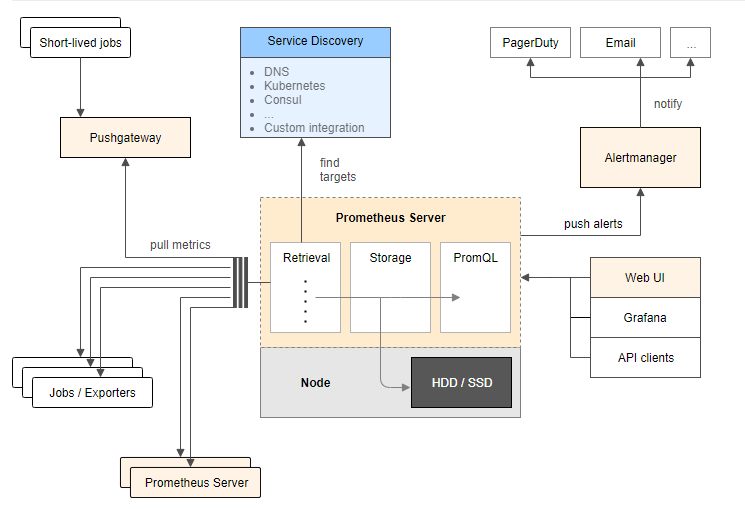
环境
| IP | 环境 | 需装软件 |
|---|---|---|
| 192.168.0.237 | mysql-5.7.20 | node_exporter-0.15.2.linux-amd64.tar.gz mysqld_exporter-0.10.0.linux-amd64.tar.gz |
| 192.168.0.248 | grafana+prometheus | prometheus-2.1.0.linux-amd64.tar.gz node_exporter-0.15.2.linux-amd64.tar.gz grafana-4.6.3.linux-x64.tar.gz |
在 192.168.0.248 上安装 grafana prometheus
安装 prometheus
# 创建保存软件的目录

mkdir /data/software/ -p

cd /data/software/

# 解压 prometheus

tar xvf prometheus-2.1.0.linux-amd64.tar.gz -C /iba/

cd /iba/

mv prometheus-2.1.0.linux-amd64 prometheus

cd prometheus/

cp prometheus.yml /tmp/prometheus.yml.20181203

# 配置 prometheus.yml

cat prometheus.yml

# my global config

global:

  scrape_interval:    15s # Set the scrape interval to every 15 seconds. Default is every 1 minute.

  evaluation_interval: 15s # Evaluate rules every 15 seconds. The default is every 1 minute.

  # scrape_timeout is set to the global default (10s).

# A scrape configuration containing exactly one endpoint to scrape:

# Here it's Prometheus itself.

scrape_configs:

- job_name: 'Host'

  file_sd_configs:

  - files:

    - host.yml

  metrics_path: /metrics

  relabel_configs:

  - source_labels: [__address__]

    regex: (.*)

    target_label: instance

    replacement: $1

  - source_labels: [__address__]

    regex: (.*)

    target_label: __address__

    replacement: $1:9100

- job_name: 'MySQL'

  file_sd_configs:

  - files:

    - mysql.yml

  metrics_path: /metrics

  relabel_configs:

  - source_labels: [__address__]

    regex: (.*)

    target_label: instance

    replacement: $1

  - source_labels: [__address__]

    regex: (.*)

    target_label: __address__

    replacement: $1:9104

- job_name: 'prometheus'

  static_configs:

  - targets:

    - localhost:9090

cat host.yml

- labels:

    service: test

  targets:

  - 192.168.0.248

  - 192.168.0.237

cat mysql.yml

- labels:

    service: test

  targets:

  - 192.168.0.237

# 测试 prometheus 是否可以正常启动

/iba/prometheus/prometheus --storage.tsdb.retention=30d &

ps -ef|grep prometh

kill -9 14650

# 配置 prometheus.service 文件

vi /usr/lib/systemd/system/prometheus.service

# 内容为

[Unit]

Description=Prometheus instance

Wants=network-online.target

After=network-online.target

[Service]

User=root

Group=root

Type=simple

Restart=on-failure

WorkingDirectory=/iba/prometheus/

RuntimeDirectory=prometheus

RuntimeDirectoryMode=0750

ExecStart=/iba/prometheus/prometheus  --storage.tsdb.retention=30d --config.file=/iba/prometheus/prometheus.yml

LimitNOFILE=10000

TimeoutStopSec=20

[Install]

WantedBy=multi-user.target

# 启动 prometheus

systemctl start prometheus

systemctl status prometheus -l

# 开放防火墙

firewall-cmd --permanent --add-rich-rule="rule family="ipv4" source address="192.168.0.0/16" accept"

firewall-cmd --reload
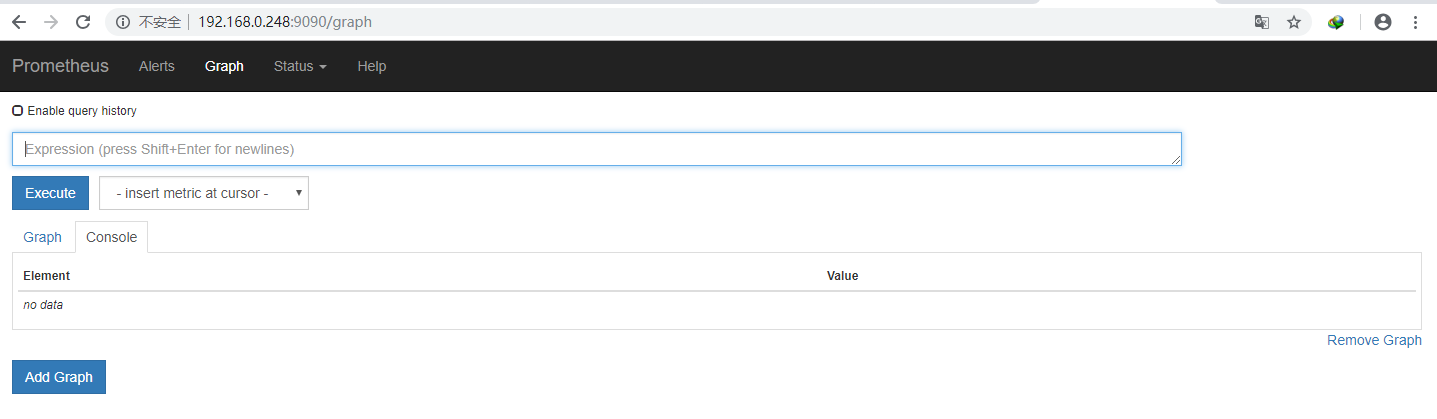
浏览器输入 http://192.168.0.248:9090 访问
prometheus.yml 文件参考:
https://prometheus.io/docs/prometheus/latest/configuration/configuration/
https://prometheus.io/docs/prometheus/latest/configuration/configuration/#%3Crelabel_config%3E
https://prometheus.io/docs/prometheus/latest/configuration/configuration/#%3Cfile_sd_config%3E
安装 node_exporter 获取主机信息
# 解压 node_exporter

cd /data/software/

tar xf node_exporter-0.15.2.linux-amd64.tar.gz -C /usr/local

mv node_exporter-0.15.2.linux-amd64 node_exporter

nohup ./node_exporter &
安装 grafana
cd /iba/software

# 解压

tar xf grafana-4.6.3.linux-x64.tar.gz -C /iba/prometheus/

cd /iba/prometheus/

mv grafana-4.6.3 grafana

cd grafana/

# 测试

./bin/grafana-server

# 停止

ctrl+c

cat /usr/lib/systemd/system/grafana-server.service

[Unit]

Description=Grafana instance

Documentation=http://docs.grafana.org

Wants=network-online.target

After=network-online.target

[Service]

User=root

Group=root

Type=simple

Restart=on-failure

WorkingDirectory=/iba/prometheus/grafana

RuntimeDirectory=grafana

RuntimeDirectoryMode=0750

ExecStart=/iba/prometheus/grafana/bin/grafana-server

LimitNOFILE=10000

TimeoutStopSec=20

[Install]

WantedBy=multi-user.target

# 启动

systemctl start grafana-server

systemctl status grafana-server -l
访问 http://192.168.0.248:3000,默认用户和密码是 admin/admin

配置数据源


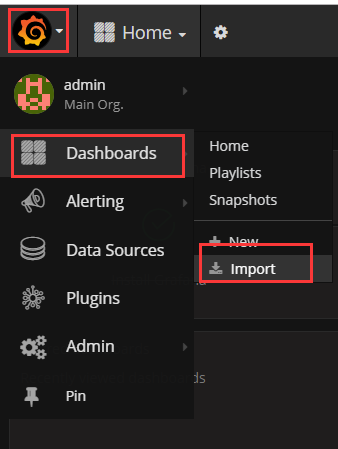
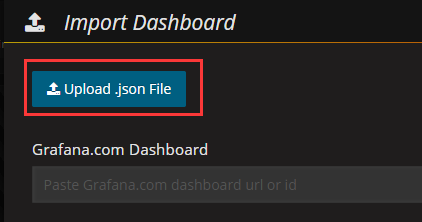
下载 grafana-dashboards-1.6.1.tar.gz,解压,使用浏览器导入 dashboard, 下载地址:https://github.com/percona/grafana-dashboards/archive/v1.6.1.tar.gz

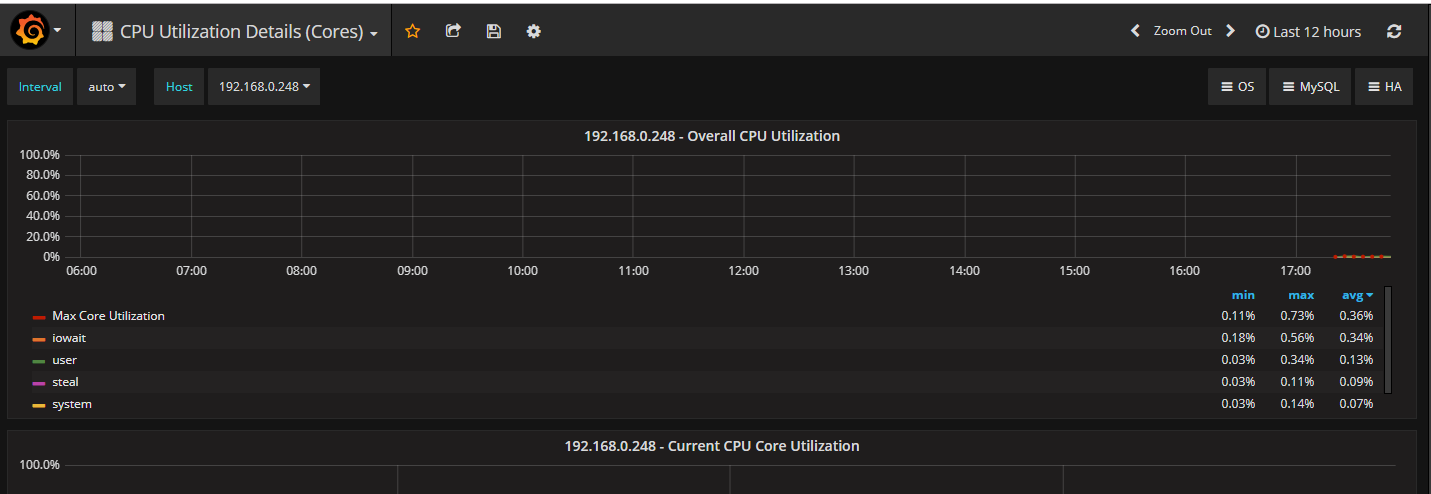
在 192.168.0.237 安装 node_exporter 和 mysqld_exporter
cd /iba/software/

tar zxf node_exporter-0.15.2.linux-amd64.tar.gz -C /usr/local/

cd /usr/local/

mv node_exporter-0.15.2.linux-amd64 node_exporter

# 启动

cd node_exporter/

nohup ./node_exporter &
几分钟后 grafana 出现了新服务器的信息

在mysql上配置监控使用的用户
GRANT REPLICATION CLIENT, PROCESS, SELECT ON *.* TO 'mysql_monitor'@'%' IDENTIFIED BY 'mysql_monitor';

FLUSH PRIVILEGES;
cd /iba/software/
tar zxf mysqld_exporter-0.10.0.linux-amd64.tar.gz -C /usr/local/
cd /usr/local/
mv mysqld_exporter-0.10.0.linux-amd64/ mysqld_exporter
cd mysqld_exporter/
# 在 mysql 上创建一个专门用于监控的用户,
cat .my.cnf
[client]
user=mysql_monitor
password=mysql_monitor
# 启动
nohup /usr/local/mysqld_exporter/mysqld_exporter -config.my-cnf="/usr/local/mysqld_exporter/.my.cnf" &导入 dashboard: MySQL_Overview.json

Grafana+Prometheus 监控 MySQL的更多相关文章
- 使用 Docker 部署 Grafana + Prometheus 监控 MySQL 数据库
一.背景 在平时开发过程当中需要针对 MySQL 数据库进行监控,这里我们可以使用 Grafana 和 Prometheus 来实现监控功能.Grafana 是一款功能强大的仪表盘面板,支持多种数据源 ...
- Grafana+Prometheus监控mysql性能
#cmd /usr/local 今天讲一下如何监控服务器中的mysql数据库的性能 一.数据库操作 1.mysql启动 #service mysqld start #启动数据库 #service my ...
- Prometheus 监控Mysql服务器及Grafana可视化
Prometheus 监控Mysql服务器及Grafana可视化. mysql_exporter:用于收集MySQL性能信息. 使用版本 mysqld_exporter 0.11.0 官方地址 使用文 ...
- Grafan+Prometheus 监控 MySQL
架构图 环境 IP 环境 需装软件 192.168.0.237 mysql-5.7.20 node_exporter-0.15.2.linux-amd64.tar.gz mysqld_exporter ...
- 采用prometheus 监控mysql
1. prometheus 是什么 开源的系统监控和报警工具,监控项目的流量.内存量.负载量等实时数据. 它通过直接或短时jobs中介收集监控数据,在本地存储所有收集到的数据,并且通过定义好的rule ...
- Prometheus 监控MySQL
目录 0.简介 1.mysql_exporter部署 2.mysql报警规则 0.简介 文中主要监控MySQL/MySQL主从信息 版本:mysql-5.7,mysql_exporter-0.12.1 ...
- 手把手教你使用 Prometheus 监控 MySQL 与 MariaDB.md
概述 MySQL 是常用的关系型数据库,MariaDB 作为 MySQL 的分支版本,兼容 MySQL 协议,也越来越流行.在 Kubernetes 环境中如何使用 Prometheus 来对它们进行 ...
- Grafana + Prometheus 监控PostgreSQL
效果图 部署环境 服务器名称 IP地址 部署业务 备注 部署agent sht-sgmhadoopcm-01 172.16.101.54 PostgreSQL 监控服务器.被监控服务器 node_ex ...
- Grafana+Prometheus监控
添加模板一定要看说明以及依赖 监控redis https://blog.52itstyle.com/archives/2049/ http://www.cnblogs.com/sfnz/p/65669 ...
随机推荐
- 安装完PyCharm,启动时弹出Failed to load JVM DLLbinserverjvm
安装完PyCharm,启动时弹出"Failed to load JVM DLL\bin\server\jvm.dll"解决方案 问题描述:打开PyCharm时,弹出"Fa ...
- Caffe源码-SGDSolver类
SGDSolver类简介 Solver类用于网络参数的更新,而SGDSolver类实现了优化方法中的随机梯度下降法(stochastic gradient descent),此外还具备缩放.正则化梯度 ...
- QT使用mysql
1.首先要下载qt create 官网链接:https://wiki.qt.io/Main 2.下载mysql驱动mysql-connector-c,注意是c或c++版本的驱动 官网下载地址:http ...
- Java生鲜电商平台-生鲜系统中商品订单系统售后系统设计
Java生鲜电商平台-生鲜系统中商品订单系统售后系统设计(服务订单履约系统) 说明: 电商之下,我们几乎能从电商平台上买到任何我们日常需要的商品,但是对于很多商品来说,用户购买发货后,只是整个交易流程 ...
- Nginx配置实例-负载均衡实例:平均访问多台服务器
场景 Nginx配置实例-反向代理实例:根据访问的路径跳转到不同端口的服务中: https://blog.csdn.net/BADAO_LIUMANG_QIZHI/article/details/10 ...
- java8新特性,你有用起来了吗?(精编)
2019年9月19日java13已正式发布,感叹java社区强大,经久不衰.由于国内偏保守,新东西总要放一放,让其他人踩踩坑,等稳定了才会去用.并且企业目的还是赚钱,更不会因为一个新特性去重构代码 ...
- 如何向小姐姐解释SQL和NoSQL之间的区别
最近,在Medium上出现了一个采访问题:如何向奶奶解释SQL和NoSQL之间的区别.我认为作者使用自己的结构化家谱来比较sql和nosql之间的差异.写作非常好,但是有点尴尬.面试官没有时间听你的话 ...
- 精通awk系列(14):细说awk中的变量和变量赋值
回到: Linux系列文章 Shell系列文章 Awk系列文章 awk变量 awk的变量是动态变量,在使用时声明. 所以awk变量有3种状态: 未声明状态:称为untyped类型 引用过但未赋值状态: ...
- ASP.NET Core on K8S深入学习(8)数据管理
本篇已加入<.NET Core on K8S学习实践系列文章索引>,可以点击查看更多容器化技术相关系列文章. 在Docker中我们知道,要想实现数据的持久化(所谓Docker的数据持久化即 ...
- SpringCloud 脚手架
疯狂创客圈 Java 高并发[ 亿级流量聊天室实战]实战系列 [博客园总入口 ] 架构师成长+面试必备之 高并发基础书籍 [Netty Zookeeper Redis 高并发实战 ] 前言 Crazy ...