
CentOS7自动化安装PXE方案
目的
无人值守批量安装CentOS7
安装条件
一台带有PXE协议支持NIC的待安装主机
一台存放安装文件的服务器,如NFS,HTTP或FTP服务器
Kickstart 生成的配置文件(ks.cfg)
DHCP服务器
TFTP服务器
HTTP服务器(Apache)
系统环境
服务器:CentOS Linux Release 7.3.1611
IP Address: 192.168.1.110/24
详细步骤
1、关闭SELinux和Firewalld
a)修改/etc/selinux/config,SELINUX的值改为disabled
# cat /etc/selinux/config
# This file controls the state of SELinux on the system.
# SELINUX= can take one of these three values:
# enforcing - SELinux security policy is enforced.
# permissive - SELinux prints warnings instead of enforcing.
# disabled - No SELinux policy is loaded.
#SELINUX=enforcing
SELINUX=disabled
# SELINUXTYPE= can take one of three two values:
# targeted - Targeted processes are protected,
# minimum - Modification of targeted policy. Only selected processes are protected.
# mls - Multi Level Security protection.
SELINUXTYPE=targeted
b)# systemctl stop firewalld
#systemctl disable firewalld
2、安装dhcp,tftp,http服务器,xinetd和system-config-kickstart
#yum -y install dhcp tftp-server http xinetd syslinux system-config-kickstart
3、下载CentOS7 光盘ISO文件到/usr/local/src下,并挂载到/mnt/cdrom目录下
# cd /usr/local/src
# wget http://mirrors.163.com/centos/7/isos/x86_64/CentOS-7-x86_64-DVD-1611.iso
# mkdir -p /mnt/cdrom
# mount -o loop CentOS-7-x86_64-DVD-1611.iso /mnt/cdrom
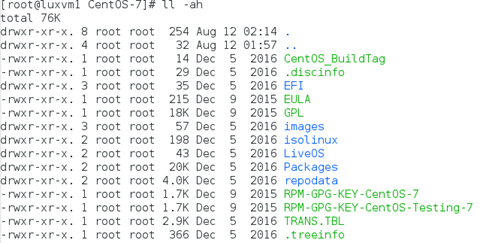
4、复制DVD ISO文件下所有内容到/var/www/html (Apache默认DocuementRoot目录)
#mkdir /var/www/html/CentOS-7
# cp -rf /mnt/cdrom/* /var/www/CentOS-7/
5、a)修改tftp服务的配置文件/etc/xinetd.d/tftp,将disable的值由yes改为no
service tftp
{
socket_type = dgram
protocol = udp
wait = yes
user = root
server = /usr/sbin/in.tftpd
server_args = -s /var/lib/tftpboot
disable = no
per_source = 11
cps = 100 2
flags = IPv4
}
b)
# systemctl start xinetd
# systemctl enable xinetd
6、配置支持PXE的启动程序syslinux。syslinux是一个功能强大的引导加载程序,而且兼容各种介质。它的目的是简化首次安装Linux的时间,并建立修护或其它特殊用途的启动盘。pxlinux是syslinux的一个派生品,用于支持从网络启动,pxlinux.0 是pxelinux的引导程序。
a)拷贝PXE启动需要的文件给tftp服务器
# cd /var/lib/tftp
# cp /usr/share/syslinux/pxelinux.0 .
# cp /var/www/html/CentOS-7/images/pxeboot/{initrd.img, vmlinuz} .
# cp /var/www/html/isolinux/{vesamenu.c32, *.msg} .
# mkdir pxelinux.cfg
# cp /var/www/html/CentOS-7/isolinux/isolinux.cfg pxelinux.cfg/default

b)修改sysconfig配置文件default
第1行default vesamenu.c32 修改为default linux, 系统将不会显示启动菜单的选择界面,而是直接进入lable linux 的安装项进行安装
第2行修改为timeout 1, 不需等待用户选择菜单,直接进入引导
第64行修改为
append initrd=initrd.img inst.stage2=http://192.168.1/110/CentOS-7 inst.ks=http://192.168.1.110/ks/ks.cfg
/var/lib/tftpboot/pxelinux.cfg/default 文件内容实例:
[root@luxvm1 tftpboot]# cat pxelinux.cfg/default
#default vesamenu.c32
#default menu.c32
default linux
timeout 1
#display boot.msg
# Clear the screen when exiting the menu, instead of leaving the menu displayed.
# For vesamenu, this means the graphical background is still displayed without
# the menu itself for as long as the screen remains in graphics mode.
menu clear
menu background splash.png
menu title CentOS Linux 7
menu vshift 8
menu rows 18
menu margin 8
#menu hidden
menu helpmsgrow 15
menu tabmsgrow 13
# Border Area
menu color border * #00000000 #00000000 none
# Selected item
menu color sel 0 #ffffffff #00000000 none
# Title bar
menu color title 0 #ff7ba3d0 #00000000 none
# Press [Tab] message
menu color tabmsg 0 #ff3a6496 #00000000 none
# Unselected menu item
menu color unsel 0 #84b8ffff #00000000 none
# Selected hotkey
menu color hotsel 0 #84b8ffff #00000000 none
# Unselected hotkey
menu color hotkey 0 #ffffffff #00000000 none
# Help text
menu color help 0 #ffffffff #00000000 none
# A scrollbar of some type? Not sure.
menu color scrollbar 0 #ffffffff #ff355594 none
# Timeout msg
menu color timeout 0 #ffffffff #00000000 none
menu color timeout_msg 0 #ffffffff #00000000 none
# Command prompt text
menu color cmdmark 0 #84b8ffff #00000000 none
menu color cmdline 0 #ffffffff #00000000 none
# Do not display the actual menu unless the user presses a key. All that is displayed is a timeout message.
menu tabmsg Press Tab for full configuration options on menu items.
menu separator # insert an empty line
menu separator # insert an empty line
label linux
menu label ^Install CentOS Linux 7
kernel vmlinuz
append initrd=initrd.img inst.stage2=http://192.168.1.110/CentOS-7 inst.ks=http://192.168.1.110/ks/ks.cfg quiet
label check
menu label Test this ^media & install CentOS Linux 7
kernel vmlinuz
menu default
append initrd=initrd.img inst.stage2=http://192.168.1.110/CentOS-7 rd.live.check inst.ks=http://192.168.1.110/ks/ks.cfg quiet
menu separator # insert an empty line
# utilities submenu
menu begin ^Troubleshooting
menu title Troubleshooting
label vesa
menu indent count 5
menu label Install CentOS Linux 7 in ^basic graphics mode
text help
Try this option out if you're having trouble installing
CentOS Linux 7.
endtext
kernel vmlinuz
append initrd=initrd.img inst.stage2=http://192.168.1.110/CentOS-7 xdriver=vesa nomodeset inst.ks=http://192.168.1.110/ks/ks.cfg quiet
label rescue
menu indent count 5
menu label ^Rescue a CentOS Linux system
text help
If the system will not boot, this lets you access files
and edit config files to try to get it booting again.
endtext
kernel vmlinuz
append initrd=initrd.img inst.stage2=http://192.168.1.110/CentOS-7 rescue quiet
label memtest
menu label Run a ^memory test
text help
If your system is having issues, a problem with your
system's memory may be the cause. Use this utility to
see if the memory is working correctly.
endtext
kernel memtest
menu separator # insert an empty line
label local
menu label Boot from ^local drive
localboot 0xffff
menu separator # insert an empty line
menu separator # insert an empty line
label returntomain
menu label Return to ^main menu
menu exit
menu end
7、修改dhcp配置文件/etc/dhcp/dhcpd.conf
allow booting;
allow bootp;
ddns-update-style interim;
ignore client-updates;
next-server 192.168.1.110;
filename "/pxelinux.0";
subnet 192.168.1.0 netmask 255.255.255.0 {
option subnet-mask 255.255.255.0;
option routers 192.168.1.1;
option domain-name "gw.local";
range dynamic-bootp 192.168.1.131 192.168.1.199;
default-lease-time 21600;
max-lease-time 43200;
}
8、创建Kickstart 配置文件ks.cfg
安装system-config-kickstart, 运行它即Kickstart Configurator来生成kickstart 配置文件ks.cfg.
# yum -y install system-config-kickstart
# system-config-kickstart
保存ks.cfg文件到/var/www/html/ks目录下

/var/www/html/ks/ks.cfg 文件内容如下:
(整个实验过程的重点和难点,请关注)
[root@luxvm1 ~]# cat /var/www/html/ks/ks.cfg
#platform=x86, AMD64, or Intel EM64T
#version=DEVEL
# Install OS instead of upgrade
install
# Keyboard layouts
keyboard 'us'
# Root password
rootpw --iscrypted $1$P2aQRXER$vJ1vvyd38QyNaOYQKOv19/
# Use network installation
url --url="http://192.168.1.110/CentOS-7"
# System language
lang en_US
# Firewall configuration
firewall --disabled
# System authorization information
auth --useshadow --passalgo=sha512
# Use graphical install
graphical
firstboot --disable
# SELinux configuration
selinux --disabled
# Network information
network --bootproto=dhcp --device=eth0
# Reboot after installation
reboot
# System timezone
timezone Asia/Shanghai
# System bootloader configuration
bootloader --location=mbr --driveorder=sda
autopart --type=lvm
# Clear the Master Boot Record
zerombr
# Partition clearing information
clearpart --all --initlabel
# Disk partitioning information
#
%packages
@^minimal
@core
chrony
kexec-tools
openscap
openscap-scanner
scap-security-guide
%end
%addon org_fedora_oscap
content-type = scap-security-guide
profile = standard
%end
%addon com_redhat_kdump --enable --reserve-mb='auto'
%end
%anaconda
pwpolicy root --minlen=6 --minquality=50 --notstrict --nochanges --notempty
pwpolicy user --minlen=6 --minquality=50 --notstrict --nochanges --notempty
pwpolicy luks --minlen=6 --minquality=50 --notstrict --nochanges --notempty
%end
附加:
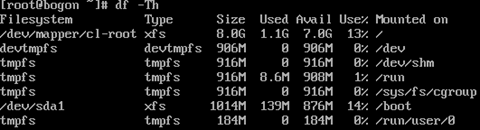
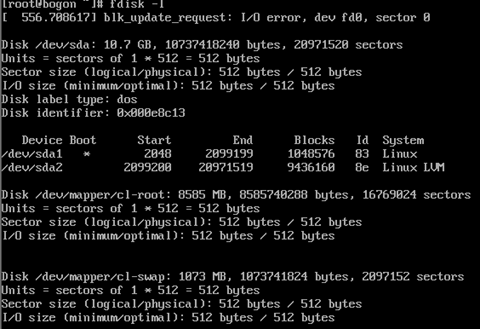
PXE CentOS7 information

CentOS7自动化安装PXE方案的更多相关文章
- Linux PXE自动化安装centos6,centos7系统
1.PXE是什么? pxe是Preboot Excution Environment的缩写,是intel公司研发,基于client/server的网络模式,支持远程主机通过网络从远端服务器下载镜,并由 ...
- 自动化安装操作系统(Centos7+PXE+Cobbler+kickstart)
一.简介 PXE称作是一种引导方式而不是安装方式似乎更加准确,PXE(Pre-boot Execution Environment)是由Intel设计的协议,它可以使计算机通过网络启动,但是有一个前提 ...
- 基于PXE网络启动的Linux系统自动化安装
在实际工作中,传统纯手动安装操作系统的方式是有一定的局限性的,例如:现在大多数的服务器都不自带光驱,若要安装系统需要外接光驱插入光盘,整个安装过程中需要人工交互确认,手动设置每一个安装设置项,人必 ...
- 搭建PXE实现自动化安装系统
一.PXE工作原理 Ø Client向PXE Server上的DHCP发送IP地址请求消息,DHCP检测Client是否合法(主要是检测Client的网卡MAC地址),如果合法则返回Client的I ...
- 配置pxe 自动化安装centos6.7
dhcp服务器是pxe自动化安装的必要条件,因此先搞定dhcp服务器,yum -y install dhcp, rpm -ql dhcp查看安装了哪些包,less /etc/dhcp/dhcpd.c ...
- CentOS 6.5自动化运维之基于DHCP和TFTP服务的PXE自动化安装centos操作系统详解
前言 如果要给很多台客户端主机安装操作系统,要是每一台都拿张安装光盘一台一台主机的去装系统那就太浪费时间和精力了.在生产环境中也不实际,要实现为多台主机自动安装操作系统,那我们怎么实现自动化安装 ...
- kickstart+pxe+tftp+ntp(http)自动化安装平台的搭建
听说过"克隆"吗,对于这个科技术语20年前可能还很陌生,羊可以克隆,通过基因dna序列:机器同样可以克隆通过网络IP! 如下为自动化安装平台: PXE(preboot execut ...
- 使用Kickstart+pxe自动化安装部署无人值守的linux服务器
Kickstart+pxe Kickstart无人职守安装RHEL5过程分享(详细图解版) 启动应用有:httpd.dhcpd.named.xinetd 无人职守自动批量安装linux系统超详细 参考 ...
- centos7.6自动化安装mysql5.5
一.目的 简化安装mysql的安装过程,局限很大,仅支持centos7.6上安装mysql5.5.60,如果想在其他版本的操作系统安装mysql,请自行修改有关变量. 如果想了解mysql安装的具体过 ...
随机推荐
- Python-Re正则表达式库
来源:中国MOOC北京理工大学Python教学团队 链接:https://www.icourse163.org/learn/BIT-1001870001#/learn/content?type=det ...
- 痞子衡嵌入式:恩智浦机器视觉模块OpenMV-RT那些事(1)- 初体验
大家好,我是痞子衡,是正经搞技术的痞子.本系列痞子衡给大家介绍的是机器视觉模块OpenMV-RT初体验. 近些年机器视觉应用一直是个很火的方向,想象一下机器如果能长上"眼睛",是不 ...
- linux basic
一:date 语法: 打印日期:date [OPTION]..... [+FORMAT] 设定日期:date [MMDDhhmm] [[cc][YY][.ss] 创建带实时日期的文件 touch $ ...
- java学习引言
Java学习之路:不走弯路,就是捷径 0.引言 软件开发之路是充满荆棘与挑战之路,也是充满希望之路.Java学习也是如此,没有捷径可走.梦想像<天龙八部>中虚竹一样被无崖子醍醐灌顶而轻松获 ...
- 【Android - IPC】之Serializable和Parcelable序列化
1.序列化的目的 (1)永久的保存对象数据(将对象数据保存到文件或磁盘中): (2)通过序列化操作将对象数据在网络上进行传输(由于网络传输是以字节流的方式对数据进行传输的,因此序列化的目的是将对象数据 ...
- Find命令、文件名后缀、Linux和Windows互传文件 使用介绍
第2周第5次课(3月30日) 课程内容: 2.23/2.24/2.25 find命令2.26 文件名后缀 2.27 Linux和Windows互传文件 find命令 文件查找: 1.which(一般用 ...
- 2019-2020-1 20199304《Linux内核原理与分析》第二周作业
计算机工作原理 存储程序计算机模型 冯·诺依曼体系结构 冯·诺依曼体系结构如图所示: 冯·诺依曼体系结构包含五大部分 运算器:在控制器的统一控制下,负责对数据进行加工.完成各种运算,如算术运算.逻辑运 ...
- ruby2.2 DevKit 安装后无法使用解决方案
windows 系统下,Ruby 的某些 gem 包需要 DevKit 才能正常安装,2.4 以后的版本可以一键安装 DevKit,之前的版本只能手动安装. 2.4 以后的可以到官网下载:https: ...
- 二分查找-Java版
/** * * 二分查找算法 * * * * @param srcArray 有序数组 * * @param target 查找元素 * * @return srcArray数组下标,没找到返回-1 ...
- 初始CSS3 实例
<!DOCTYPE html><html><head lang="en"> <meta charset="UTF-8" ...