
Salesforce LWC学习(三十二)实现上传 Excel解析其内容
本篇参考:salesforce lightning零基础学习(十七) 实现上传 Excel解析其内容
上一篇我们写了aura方式上传excel解析其内容。lwc作为salesforce的新宠儿,逐渐的在去aura化,这种功能怎么能lwc不搞一份,所以本篇来了,直接上代码。
excelImportForLwc.html
<template>

    <lightning-input type="file" label="上传" onchange={excelFileToJson} disabled={disableButton} accept="xlsx" multiple="false"></lightning-input>

    <lightning-button label="打印结果" onclick={printResult} disabled={disableButton}></lightning-button>

</template>
excelImportForLwc.js:因为 loadScript是一个 Promise操作,不是瞬间同步的操作,所以初始化先给按钮disable掉,加载完js资源以后启用。
import { LightningElement,track } from 'lwc';

import sheetJS from '@salesforce/resourceUrl/sheetJS';

import {loadScript } from 'lightning/platformResourceLoader';

import { ShowToastEvent } from 'lightning/platformShowToastEvent';

export default class ExcelImportForLwc extends LightningElement {

    @track dataList = [];

    @track disableButton = true;

    connectedCallback() {

        loadScript(this, sheetJS).then(() => {

             console.log('加载 sheet JS完成');

             this.disableButton = false;

        });

    }

    excelFileToJson(event) {

        event.preventDefault();

        let files = event.target.files;

        const analysisExcel = (file) =>

        new Promise((resolve, reject) => {

            const reader = new FileReader();

            reader.readAsBinaryString(file);

            reader.onload = () => resolve(reader.result);

            reader.onerror = (error) => reject(error);

        });

        analysisExcel(files[0])

        .then((result) => {

            let datas = []; // 存储获取到的数据

            let XLSX = window.XLSX;

            let workbook = XLSX.read(result, {

                type: 'binary'

            });

            for (let sheet in workbook.Sheets) {

                if (workbook.Sheets.hasOwnProperty(sheet)) {

                    datas = datas.concat(XLSX.utils.sheet_to_json(workbook.Sheets[sheet]));

                }

            }

            this.dataList = datas;

            const toastEvent = new ShowToastEvent({

                variant: "success",

                message: '文件已经上传解析成功',

            });

            this.dispatchEvent(toastEvent);

        });

    }

    printResult() {

        console.log(JSON.stringify(this.dataList));

    }

}
效果展示:
1. 上传按钮点击上传成功以后展示 toast

2. 点击打印结果按钮console出来excel内容
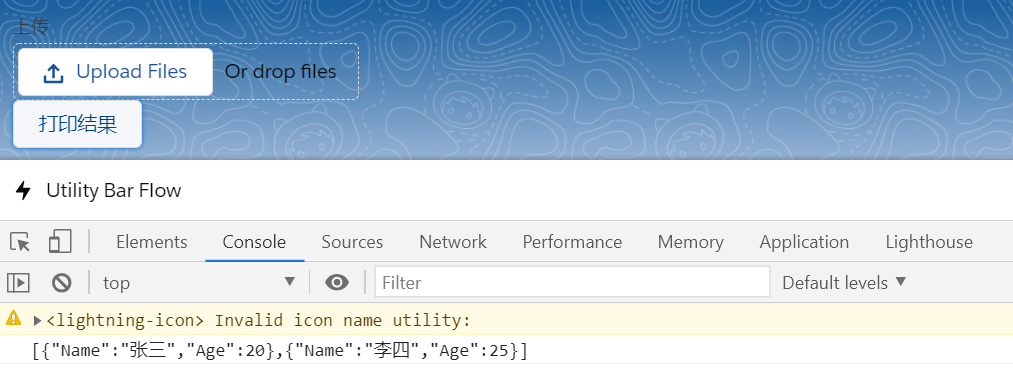
总结:lwc调用区别就是声明一个 Promise,在Promise里面通过 FileReader的onload去进行处理。处理方式和aura相同,只是部分写法区别。篇中仍然有很多没有优化,包括文件大小限制,error场景处理等等。感兴趣的自行完善。篇中有错误地方欢迎指出,有不懂欢迎留言。
Salesforce LWC学习(三十二)实现上传 Excel解析其内容的更多相关文章
- Salesforce LWC学习(三十九) lwc下quick action的recordId的问题和解决方案
本篇参考: https://developer.salesforce.com/docs/component-library/bundle/force:hasRecordId/documentation ...
- Salesforce LWC学习(三十) lwc superbadge项目实现
本篇参考:https://trailhead.salesforce.com/content/learn/superbadges/superbadge_lwc_specialist 我们做lwc的学习时 ...
- salesforce lightning零基础学习(十七) 实现上传 Excel解析其内容
本篇参考: https://developer.mozilla.org/zh-CN/docs/Web/API/FileReader https://github.com/SheetJS/sheetjs ...
- Salesforce LWC学习(三十四) 如何更改标准组件的相关属性信息
本篇参考: https://www.cnblogs.com/zero-zyq/p/14548676.html https://www.lightningdesignsystem.com/platfor ...
- Salesforce LWC学习(三十六) Quick Action 支持选择 LWC了
本篇参考: https://developer.salesforce.com/docs/component-library/documentation/en/lwc/lwc.use_quick_act ...
- Salesforce LWC学习(三十五) 使用 REST API实现不写Apex的批量创建/更新数据
本篇参考: https://developer.salesforce.com/docs/atlas.en-us.224.0.api_rest.meta/api_rest/resources_compo ...
- Salesforce LWC学习(三十八) lwc下如何更新超过1万的数据
背景: 今天项目组小伙伴问了一个问题,如果更新数据超过1万条的情况下,有什么好的方式来实现呢?我们都知道一个transaction只能做10000条DML数据操作,那客户的操作的数据就是超过10000 ...
- Salesforce LWC学习(四十) dynamic interaction 浅入浅出
本篇参考: Configure a Component for Dynamic Interactions in the Lightning App Builder - Salesforce Light ...
- springMVC3学习(十二)--文件上传优化CommonsMultipartResolver
基于上一篇文件上传发现效率很慢,我们应该对它进行优化 使用springMVC对文件上传的解析器 来处理文件上传的时候需要在spring的applicationContext里面加上springMVC ...
随机推荐
- C++的继承权限
原文来自于:https://www.cnblogs.com/2018shawn/p/10648408.html 公式: 继承成员对外的访问属性 = Max{继承方式,父类成员访问级别}: ps;以下成 ...
- 渗透技巧——如何逃逸Linux的受限制shell执行任意命令
导语:本文介绍了如何在受限制的shell中执行任意命令,实现交互.其相应的利用场景是说当我们通过一些手段拿到当前Linux机器的shell时,由于当前shell的限制,很多命令不能执行,导致后续的渗透 ...
- PostgreSQL All In One
PostgreSQL All In One SQL macOS https://www.postgresql.org/download/macosx/ EDB installer PostgreSQL ...
- CSS Architecture & CSS Design Patterns
CSS Architecture & CSS Design Patterns BEM Block, Element, Modifier https://en.bem.info/methodol ...
- how to write string to file in bash
how to write string to file in bash https://stackoverflow.com/questions/22713667/shell-script-how-to ...
- Open API collection
Open API collection online API https://developer.github.com/v3/ https://developer.github.com/v4 http ...
- xcode upgrade & git bug
xcode upgrade & git bug ➜ op-static git checkout feature/select-seat-system Agreeing to the Xcod ...
- 比特币跌破3.5万美元,巨鲸们将目光瞄向SPC算力币
比特币最近又迎来了大幅下跌,截至周三(1月20日),比特币跌幅超过5%,跌破3.5万美元.很显然,比特币没有预期那样顺顺利利地登顶4万美元,反而又出现了回调迹象.有些巨鲸们在大肆囤币,然而也有些巨鲸们 ...
- 详解支付体系颠覆者NGK公链:如何通过呼叫河马智能合约加速转账?
纵观全球加密货币市场,至今为止,全球已经发行的加密货币以及数字代币的数量已经超过了7000种,且未来还将会有更多的加密货币或数字代币出现.在众多加密货币项目中,投资者很难在众多的项目里甄别项目的好坏以 ...
- InnoDB 的记录结构和页结构
本文转载自InnoDB 的记录结构和页结构 概述 InnoDB将数据划分为若干个页,以页作为磁盘和内存之间交互的基本单位,中页的大小一般为16KB.也就是在一般情况下,一次最少从磁盘中读取16KB的内 ...