
Zabbix监控TCP status
监控原理
ss -ant | awk 'NR>1 {++s[$1]} END {for(k in s) print k,s[k]}'
LAST-ACK 5
ESTAB 348
FIN-WAIT-1 11
CLOSING 1
FIN-WAIT-2 41
TIME-WAIT 2447
LISTEN 8
状态值的解释
ESTABLISHED: The socket has an established connection.
SYN_SENT: The socket is actively attempting to establish a connection.
SYN_RECV: A connection request has been received from the network.
FIN_WAIT1: The socket is closed, and the connection is shutting down.
FIN_WAIT2: Connection is closed, and the socket is waiting for a shutdown from the remote end.
TIME_WAIT: The socket is waiting after close to handle packets still in the network.
CLOSED: The socket is not being used.
CLOSE_WAIT: The remote end has shut down, waiting for the socket to close.
LAST_ACK: The remote end has shut down, and the socket is closed. Waiting for acknowledgement.
LISTEN: The socket is listening for incoming connections.
CLOSING: Both sockets are shut down but we still don’t have all our data sent.
监控脚本
#!/bin/bash

# // pdd

# 未出现的状态值取0

status() {

    ss -ant | awk 'NR>1 {++s[$1]} END {for(k in s) print k,s[k]}'

}

case $ in

    LISTEN)

        listen=`status | grep "$1" | awk '{print $2}'`

        [ -z "$listen" ] && echo  || echo "$listen"

        ;;

    SYN-SENT)

        syn_sent=`status | grep "$1" | awk '{print $2}'`

        [ -z "$syn_sent" ] && echo  || echo "$syn_sent"

        ;;

    SYN-RCVD)

        syn_rcvd=`status | grep "$1" | awk '{print $2}'`

        [ -z "$syn_rcvd" ] && echo  || echo "$syn_rcvd"

        ;;

    ESTAB)

        estab=`status | grep "$1" | awk '{print $2}'`

        [ -z "$estab" ] && echo  || echo "$estab"

        ;;

    FIN-WAIT-)

        fin_wait_1=`status | grep "$1" | awk '{print $2}'`

        [ -z "$fin_wait_1" ] && echo  || echo "$fin_wait_1"

        ;;

    CLOSE-WAIT)

        close_wait=`status | grep "$1" | awk '{print $2}'`

        [ -z "$close_wait" ] && echo  || echo "$close_wait"

        ;;

    FIN-WAIT-)

        fin_wait_2=`status | grep "$1" | awk '{print $2}'`

        [ -z "$fin_wait_2" ] && echo  || echo "$fin_wait_2"

        ;;

    LAST-ACK)

        last_ack=`status | grep "$1" | awk '{print $2}'`

        [ -z "$last_ack" ] && echo  || echo "$last_ack"

        ;;

    TIME-WAIT)

        time_wait=`status | grep "$1" | awk '{print $2}'`

        [ -z "$time_wait" ] && echo  || echo "$time_wait"

        ;;

    CLOSED)

        closed=`status | grep "$1" | awk '{print $2}'`

        [ -z "$closed" ] && echo  || echo "$closed"

        ;;

    *)

        echo "Usage: LISTEN SYN-SENT SYN-RCVD ESTAB FIN-WAIT-1 CLOSE-WAIT FIN-WAIT-2 LAST-ACK TIME-WAIT CLOSED"

        ;;

esac
添加配置文件
userparameter_tcp.conf # 需要reload zabbix_agentd
# TCP

UserParameter=tcp.status[*],/usr/local/zabbix/scripts/tcp-status.sh $
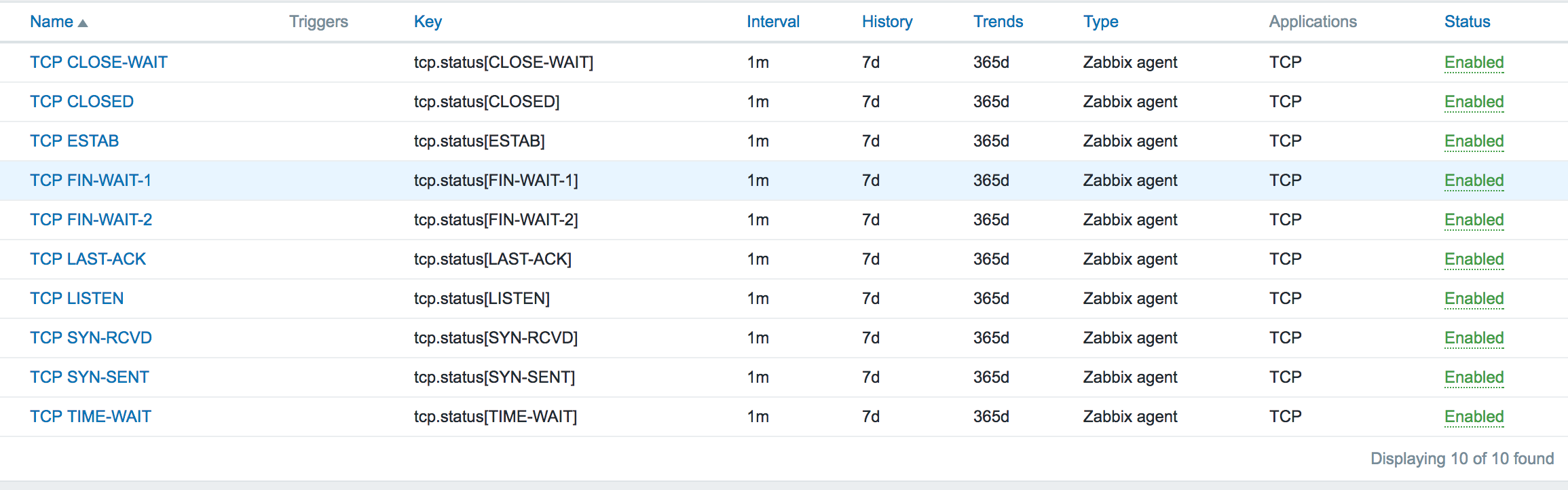
添加监控模板
Zabbix监控TCP status的更多相关文章
- Zabbix监控nginx-rtmp status(json版)
与前面的文章 zabbix监控nginx-rtmp status(html版)区别只在于取值的页面不一样 http://127.0.0.1:81/control/get/all_streams sta ...
- zabbix监控tcp状态
Tcp的连接状态对于我们web服务器来说是至关重要的,从TCP的连接状态中可以看出网络的连接情况,服务器的压力情况,对服务器的并发有很好的直观反映:尤其是并发量ESTAB:或者是syn_recv值,假 ...
- zabbix监控tcp连接数的脚本!!
#!/bin/bash #this script is used to get tcp and udp connetion status #tcp status metric=$ tmp_file=/ ...
- zabbix监控tcp连接并发数
第一步,想在zabbix的web监控tcp连接数,那么要看zabbix-server的版本和zabbix-agent版本是否一致,不然TCP-status图没有数据 也会报错.下图就是版本不符合报错的 ...
- ZABBIX监控TCP连接状态
一.获取监控数据 # /bin/netstat -an|awk '/^tcp/{++S[$NF]}END{for(a in S) print a,S[a]}' LISTEN ESTABLISHED T ...
- zabbix 监控TCP状态连接数
1.zabbix客户端,监控TCP状态脚本,并保存到的定路径.(/usr/local/zabbix-agent/shells) # cat zabbix_linux_plugin.sh #!/bin/ ...
- Zabbix监控redis status
概述 zabbix采用Trapper方式监控redis status 原理 redis-cli info命令得到redis服务器的统计信息,脚本对信息分两部分处理: (1)# Keyspace部分为Z ...
- Zabbix监控php-fpm status
开启php-fpm status php-fpm.conf pm.status_path = /statusx45 nginx.conf location ~ /(statusx45)$ { incl ...
- Zabbix监控nginx status
nginx开启status ./configure --with-http_stub_status_module nginx.conflocation /statusx35 { stub_status ...
随机推荐
- chrome 调试 ios的 H5 页面
原文地址http://www.cnblogs.com/kelsen/p/6402477.html 本文重点讨论如何在 Windows 系统中通过chrome 浏览器调试运行在 iPhone Safar ...
- 3.9 Templates -- Input Helpers
一.Input Helpers Ember中{{input}}和{{textarea}}是创建常规表单控件最简单的方法. {{input}}包裹内建的Ember.TextField和Ember.Che ...
- Java文件IO流的操作总结
Java中的IO操作涉及到的概念及相关类很多,很容易弄混,今天特来整理总结一下,并附上一份完整的文件操作的代码. 概念解析 读和写 流就是管道,向管道里面写数据用输出流:write 从管道里面读数据, ...
- python中format函数
python中format函数用于字符串的格式化 通过关键字 1 print('{名字}今天{动作}'.format(名字='陈某某',动作='拍视频'))#通过关键字 2 grade = {'nam ...
- oracle中 start with .. connect by prior.. 用法简介
我们经常会将一个比较复杂的目录树存储到一个表中.或者将一些部门存储到一个表中,而这些部门互相有隶属关系.这个时候你就会用到connect by prior start with.oracle 提供了s ...
- JS在if中的强制类型转换
JS在if中的强制类型转换 众所周知,JS在很多情况下会进行强制类型转换,其中,最常见两种是: 1.使用非严格相等进行比较,对==左边的值进行类型转换 2.在if判断时,括号内的值进行类型转换,转化为 ...
- Python笔记 #17# Pandas: Merge
10 Minutes to pandas Concat df = pd.DataFrame(np.random.randn(10, 4)) print(df) # break it into piec ...
- 20145301赵嘉鑫《网络对抗》逆向及Bof基础
20145301赵嘉鑫<网络对抗>逆向及Bof基础 实践目标 本次实践的对象是一个名为pwn1的linux可执行文件. 该程序正常执行流程是:main调用foo函数,foo函数会简单回 ...
- git基本配置及使用
目录 设置git git remote git-flow git merge 与 git rebase 参考 Git是分布式的代码管理工具,远程的代码管理是基于SSH的,所以要使用远程的Git则需要S ...
- install ros-indigo-ecl-build
-- ==> add_subdirectory(bp_smart_charging/bp_dock_drive) CMake Warning at /opt/ros/indigo/share/c ...