
给iOS开发新手送点福利,简述UIAlertView的属性和用法
UIAlertView
1.Title
获取或设置UIAlertView上的标题。
2.Message
获取或设置UIAlertView上的消息
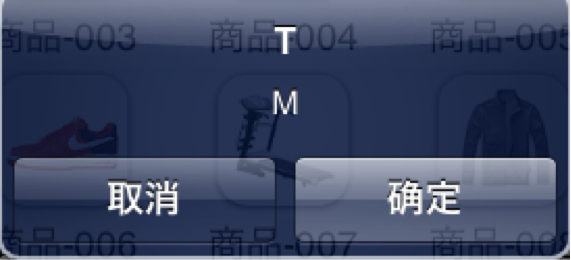
UIAlertView *alertView = [[UIAlertView alloc] initWithTitle:@"Title" message:@"message" delegate:self cancelButtonTitle:@"取消" otherButtonTitles:@"确定", nil];
alertView.title = @"T";
alertView.message = @"M";
[alertView show];
3.numberOfButtons (只读)
返回UIAlertView上有多少按钮.
UIAlertView *alertView = [[UIAlertView alloc] initWithTitle:@"Title" message:@"message" delegate:self cancelButtonTitle:@"取消" otherButtonTitles:@"确定", nil];
NSLog(@"%d",alertView.numberOfButtons);
[alertView show];

4.cancelButtonIndex
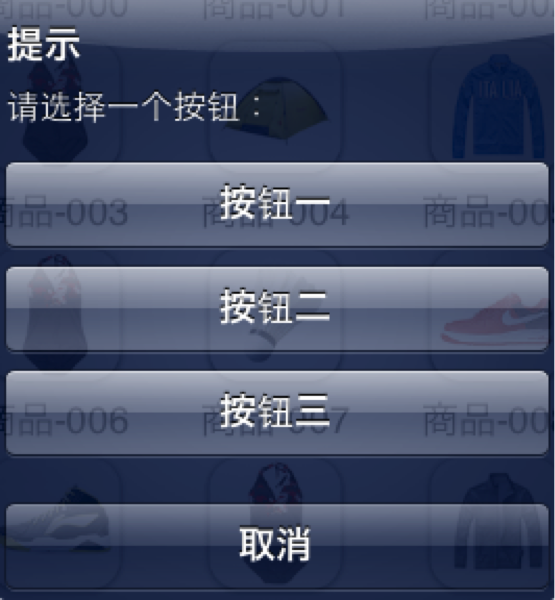
UIAlertView *alert = [[UIAlertView alloc]initWithTitle:@"提示" message:@"请选择一个按钮:" delegate:nil cancelButtonTitle:@"取消" otherButtonTitles:@"按钮一", @"按钮二", @"按钮三",nil];
[alert show];
NSLog(@"UIAlertView中取消按钮的角标是%d",alert.cancelButtonIndex);
效果:
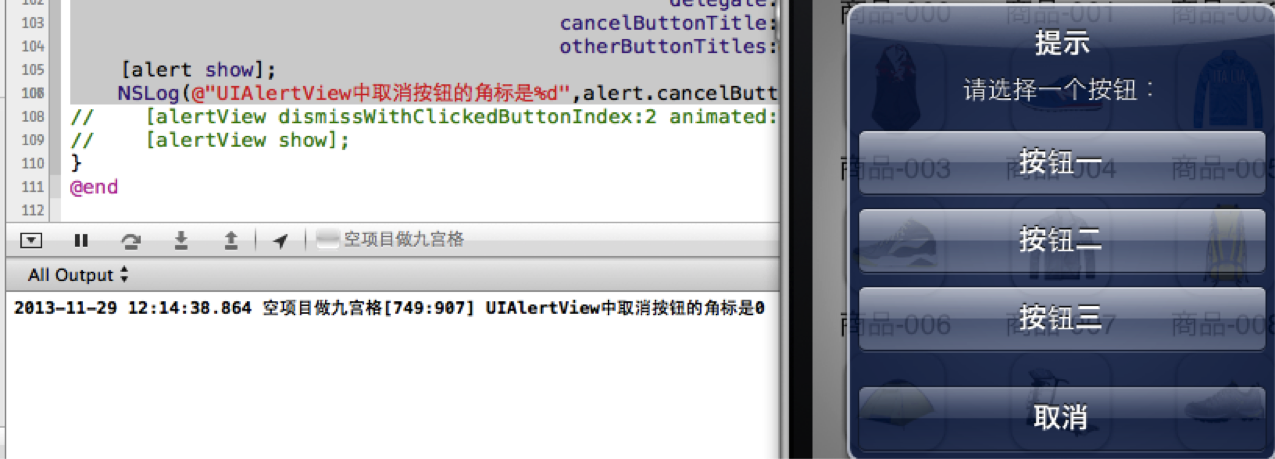
注意不要认为取消按钮的角标是4,“取消”,“按钮一”,“按钮二”,“按钮三”的索引buttonIndex分别是0,1,2,3
5. alertViewStyle
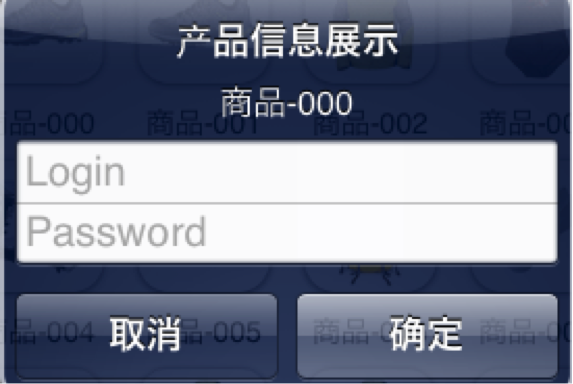
5.1 UIAlertViewStyleLoginAndPasswordInput
UIAlertView *alert = [[UIAlertView alloc] initWithTitle:@"产品信息展示" message:p.name delegate:nil cancelButtonTitle:@"取消" otherButtonTitles:@"确定", nil];
alert.alertViewStyle = UIAlertViewStyleLoginAndPasswordInput;
// 弹出UIAlertView
[alert show];
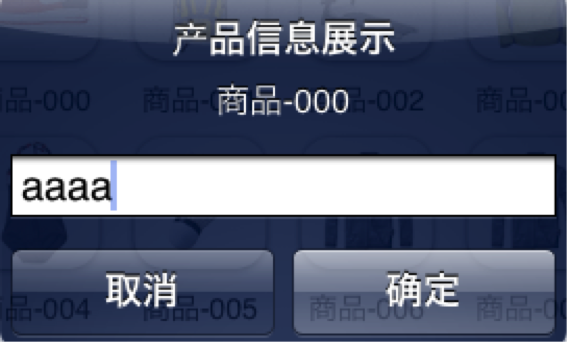
5.2 UIAlertViewStylePlainTextInput
UIAlertView *alert = [[UIAlertView alloc] initWithTitle:@"产品信息展示" message:p.name delegate:nil cancelButtonTitle:@"取消" otherButtonTitles:@"确定", nil];
alert.alertViewStyle = UIAlertViewStylePlainTextInput;
// 弹出UIAlertView
[alert show];
5.3 UIAlertViewStyleSecureTextInput
UIAlertView *alert = [[UIAlertView alloc] initWithTitle:@"产品信息展示" message:p.name delegate:nil cancelButtonTitle:@"取消" otherButtonTitles:@"确定", nil];
alert.alertViewStyle = UIAlertViewStyleSecureTextInput;
// 弹出UIAlertView
[alert show];
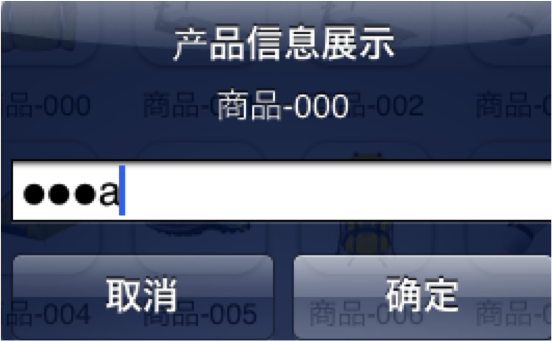
6. - (UITextField *)textFieldAtIndex:(NSInteger)textFieldIndex
返回textFieldIndex角标对应的文本框。
取出文本框文字
7.手动的取消对话框
[alert dismissWithClickedButtonIndex:0 animated:YES];
8. delegate
作为UIAlertView的代理,必须遵守UIAlertViewDelegate。
1.当点击UIAlertView上的按钮时,就会调用,并且当方法调完后,UIAlertView会自动消失。
- (void)alertView:(UIAlertView *)alertView clickedButtonAtIndex:(NSInteger)buttonIndex;
2.当UIAlertView即将出现的时候调用
- (void)willPresentAlertView:(UIAlertView *)alertView;
3. 当UIAlertView完全出现的时候调用
- (void)didPresentAlertView:(UIAlertView *)alertView;
4. 当UIAlertView即将消失的时候调用
- (void)alertView:(UIAlertView *)alertView willDismissWithButtonIndex:(NSInteger)buttonIndex;
5. 当UIAlertView完全消失的时候调用
- (void)alertView:(UIAlertView *)alertView didDismissWithButtonIndex:(NSInteger)buttonIndex;
9.注意UIAlertView调用show显示出来的时候,系统会自动强引用它,不会被释放。
10. 为UIAlertView添加子视图
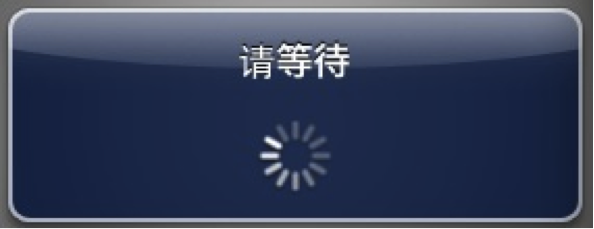
在为UIAlertView对象太添加子视图的过程中,有点是需要注意的地方,如果删除按钮,也就是取消UIAlerView视图中所有的按钮的时候,可能会导致整个显示结构失衡。按钮占用的空间不会消失,我们也可以理解为这些按钮没有真正的删除,仅仅是他不可见了而已。如果在UIAlertview对象中仅仅用来显示文本,那么,可以在消息的开头添加换行符(@"\n)有助于平衡按钮底部和顶部的空间。
下面的代码用来演示如何为UIAlertview对象添加子视图的方法。
UIAlertView*alert =
[[UIAlertView alloc]initWithTitle:@"请等待" message:nil delegate:nil cancelButtonTitle:nil otherButtonTitles:nil];
[alert show];
UIActivityIndicatorView*activeView =
[[UIActivityIndicatorView alloc]initWithActivityIndicatorStyle:UIActivityIndicatorViewStyleWhiteLarge];
activeView.center = CGPointMake(alert.bounds.size.width
/ 2.0f, alert.bounds.size.height - 40.0f);
[activeView startAnimating];
[alert addSubview:activeView];
11. UIAlertView小例子
UIAlertView默认情况下所有的text是居中对齐的。 那如果需要将文本向左对齐或者添加其他控件比如输入框时该怎么办呢?
不用担心, iPhone SDK还是很灵活的,
有很多delegate消息供调用程序使用。
所要做的就是在
- (void)willPresentAlertView:(UIAlertView *)alertView
中按照自己的需要修改或添加即可,
比如需要将消息文本左对齐,下面的代码即可实现:
-(void) willPresentAlertView:(UIAlertView *)alertView
{
for( UIView * view in alertView.subviews )
{
if(
[view isKindOfClass:[UILabel class]] )
{
UILabel*
label = (UILabel*) view;
label.textAlignment=UITextAlignmentLeft;
}
}
}
给iOS开发新手送点福利,简述UIAlertView的属性和用法的更多相关文章
- 给iOS开发新手送点福利,简述UIImagePickerController的属性和用法
1.+(BOOL)isSourceTypeAvailable:(UIImagePickerControllerSourceType)sourceType; // 检查指定源是否在设备上 ...
- 给iOS开发新手送点福利,简述UITableView的属性和用法
UITableView UITableView内置了两种样式:UITableViewStylePlain,UITableViewStyleGrouped <UITableViewDataSo ...
- 给iOS开发新手送点福利,简述UIView的属性和用法
UIView 1.alpha 设置视图的透明度.默认为1. // 完全透明 view.alpha = 0; // 不透明 view.alpha = 1; 2.clipsToBounds // 默认是N ...
- 给iOS开发新手送点福利,简述UITextField的属性和用法
UITextField属性 0. enablesReturnKeyAutomatically 默认为No,如果设置为Yes,文本框中没有输入任何字符的话,右下角的返回按钮是disabled的. ...
- 给iOS开发新手送点福利,简述UILabel的属性和用法
UILabel属性 1.text:设置标签显示文本. label.text = @"我是Label"; 2.attributedText:设置标签属性文本. NSString *t ...
- 给iOS开发新手送点福利,简述UIPikerView的属性和用法
1. numberOfComponents:返回UIPickerView当前的列数 NSInteger num = _pickerView.numberOfComponents; NSLog( @ ...
- 给iOS开发新手送点福利,简述UIScrollView的属性和用法
UIScrollView 1. contentOffset 默认CGPointZero,用来设置scrollView的滚动偏移量. // 设置scrollView的滚动偏移量 scrollView ...
- 给iOS开发新手送点福利,简述UIPageControl的属性和用法
UIPageControl 1. numberOfPages // 设置有多少页 默认为0 [pageControl setNumberOfPages:kImageCount]; 2. cur ...
- 给iOS开发新手送点福利,简述UISegment的属性和用法
UISegment属性 1.segmentedControlStyle 设置segment的显示样式. typedef NS_ENUM(NSInteger, UISegmentedControlSty ...
随机推荐
- c++ 判断容器是否为空
#include <iostream> #include <vector> #include <string> using namespace std; int m ...
- 更改CentOS7登录画面的分辨率
设置成用VNC Viewer去连接虚拟机的CentOS7 , 可是分辨率都得等登录了才能生效. 登录画面显示时,分辨率老大了. 找到了下面的文章 , 把 home/<user>/.conf ...
- 简单的spring mvc实例
简单的springmvc实例 pom.xml <project xmlns="http://maven.apache.org/POM/4.0.0" xmlns:xsi=&qu ...
- Rails 5 Test Prescriptions 第14章 Testing Exteranl Services(中断。)
external testing strategy ✅ the service integration test✅ introduce VCR✅ Client Unit Tests ❌ Why an ...
- 远程使用tomcat8的首页的管理工具
1.在%Tomcat_Home%/conf/Catalina/localhost中新建manager.xml,内容如下 <Context privileged="true" ...
- Xcode8出现问题总结
上点干货,目前得知的一些bug解决汇总:iOS10相册相机闪退bughttp://www.jianshu.com/p/5085430b029fiOS 10 因苹果健康导致闪退 crashhttp:// ...
- 理解Javascript的Event Loop
一.单线程 js作为浏览器脚本语言,他的主要用途是与用户交互,以及操作DOM,这决定了它只能是单线程,为什么呢?因为假如js同时有两个线程,一个线程是在DOM上增加内容,另一个线程是删除这个节点,那么 ...
- openfalcon源码分析之graph
openfalcon源码分析之graph 本节内容 graph功能 graph源码分析 2.1 graph中重要的数据结构 2.2 graph的简要流程图 2.3 graph处理数据过程 2.4 gr ...
- input type="file"在各个浏览器下的默认样式,以及修改自定义样式
一.<input type="file"/>在各个浏览器中的默认样式: 系统 浏览器 样式效果 点击效果 mac google 点击按钮和输入框都可以打开文件夹 mac ...
- 在Google Maps中导出KML文件
教你一招:在Google Maps中导出KML文件 2011-07-11 15:24:49 4819 人阅读 作者:上方文Q 编辑:上方文Q [复制链接] [爆料] Google Earth的一大乐趣 ...