
给iOS开发新手送点福利,简述UIPikerView的属性和用法
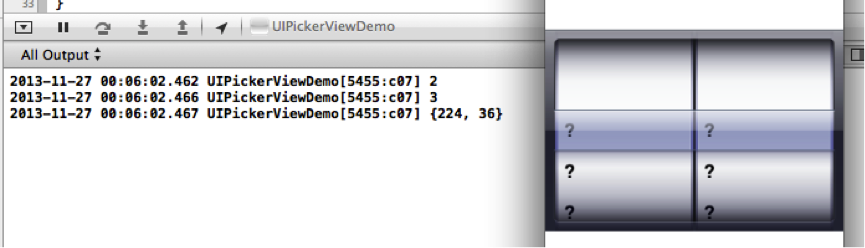
1. numberOfComponents:返回UIPickerView当前的列数
NSInteger num = _pickerView.numberOfComponents;
NSLog( @"%d", num);
2. - (NSInteger)numberOfRowsInComponent:(NSInteger)component; 返回component列中有多少行。
NSInteger numInCp = [_pickerView numberOfRowsInComponent:0];
NSLog(@"%d",numInCp);
3. - (CGSize)rowSizeForComponent:(NSInteger)component; 返回component中一行的尺寸。
CGSize size = [_pickerView rowSizeForComponent:0];
NSLog(@"%@", NSStringFromCGSize(size));
2. delegate:
2.0 设置UIPickerView代理
_pickerView.delegate = self;
// 设置UIPickView每行显示的内容
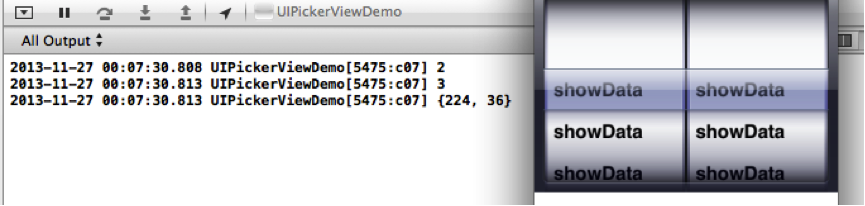
2.1 - (NSString *)pickerView:(UIPickerView *)pickerView titleForRow:(NSInteger)row forComponent:(NSInteger)component
{
return @"showData";
}
2.2 - (UIView *)pickerView:(UIPickerView *)pickerView viewForRow:(NSInteger)row forComponent:(NSInteger)component reusingView:(UIView *)view;
// 返回一个视图,用来设置pickerView的每行显示的内容。
-(UIView *)pickerView:(UIPickerView *)pickerView viewForRow:(NSInteger)row forComponent:(NSInteger)component reusingView:(UIView *)view
{
UIView *myView=[[UIView alloc]init];
myView.backgroundColor = [UIColor redColor];
return myView;
}
效果:

3. dataSource:数据源
#pragma mark - dataSource method
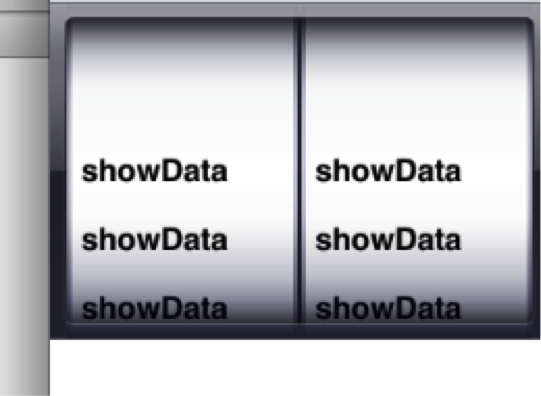
// 设置每列显示3行
- (NSInteger)pickerView:(UIPickerView *)pickerView numberOfRowsInComponent:(NSInteger)component
{
return 3;
}
// 设置显示2列
-(NSInteger)numberOfComponentsInPickerView:(UIPickerView *)pickerView
{
return 2;
}
4. showsSelectionIndicator:是否显示指示器,默认为NO
_pickerView.showsSelectionIndicator = NO;
注意:设置UIPickerView的行数与列数需要设置数据源,遵守UIPickerViewDataSource,设置UIPickerView的内容需要设置代理,并且遵守代理方法UIPickerViewDelegate。
5.-(void)pickerView:(UIPickerView*)pickerView didSelectRow:(NSInteger)row inComponent:(NSInteger)component;
当点击UIPickerView的某一列中某一行的时候,就会调用这个方法。
6. 返回第component列每一行的高度
- (CGFloat)pickerView:(UIPickerView *)pickerView
rowHeightForComponent:(NSInteger)component;
7.刷新某一列的数据
一旦调用了这个方法,就会重新给数据源发送消息计算这列的行数、重新给代理发送消息获得这列的内容
[pickerView reloadComponent:1];
8. 刷新所有列的数据
- (void)reloadAllComponents;
9. 返回选中的是第component列的第几行。
- (NSInteger)selectedRowInComponent:(NSInteger)component;
给iOS开发新手送点福利,简述UIPikerView的属性和用法的更多相关文章
- 给iOS开发新手送点福利,简述UIImagePickerController的属性和用法
1.+(BOOL)isSourceTypeAvailable:(UIImagePickerControllerSourceType)sourceType; // 检查指定源是否在设备上 ...
- 给iOS开发新手送点福利,简述UITableView的属性和用法
UITableView UITableView内置了两种样式:UITableViewStylePlain,UITableViewStyleGrouped <UITableViewDataSo ...
- 给iOS开发新手送点福利,简述UIView的属性和用法
UIView 1.alpha 设置视图的透明度.默认为1. // 完全透明 view.alpha = 0; // 不透明 view.alpha = 1; 2.clipsToBounds // 默认是N ...
- 给iOS开发新手送点福利,简述UITextField的属性和用法
UITextField属性 0. enablesReturnKeyAutomatically 默认为No,如果设置为Yes,文本框中没有输入任何字符的话,右下角的返回按钮是disabled的. ...
- 给iOS开发新手送点福利,简述UILabel的属性和用法
UILabel属性 1.text:设置标签显示文本. label.text = @"我是Label"; 2.attributedText:设置标签属性文本. NSString *t ...
- 给iOS开发新手送点福利,简述UIScrollView的属性和用法
UIScrollView 1. contentOffset 默认CGPointZero,用来设置scrollView的滚动偏移量. // 设置scrollView的滚动偏移量 scrollView ...
- 给iOS开发新手送点福利,简述UIPageControl的属性和用法
UIPageControl 1. numberOfPages // 设置有多少页 默认为0 [pageControl setNumberOfPages:kImageCount]; 2. cur ...
- 给iOS开发新手送点福利,简述UISegment的属性和用法
UISegment属性 1.segmentedControlStyle 设置segment的显示样式. typedef NS_ENUM(NSInteger, UISegmentedControlSty ...
- 给iOS开发新手送点福利,简述UIAlertView的属性和用法
UIAlertView 1.Title 获取或设置UIAlertView上的标题. 2.Message 获取或设置UIAlertView上的消息 UIAlertView *alertView = [[ ...
随机推荐
- PHP中redis的使用
redis是一个key-value存储系统.和Memcached类似,它支持存储的value类型相对更多,包括string(字符串).list(链表).set(集合)和zset(有序集合).这些数据类 ...
- 【c++基础】ifstream的构造函数
公共成员函数: ) ifstream(); initialization () explicit ifstream (const char* filename, ios_base::openmode ...
- Android中对文件的读写进行操作
1. 在文件的地方生成一个read.txt文件,并且写入一个read数据.IO流用完之后一定要记得关闭. 对于try和catch是对于错误的抓取. 2. 首先先new file来找到那个文件,然后在通 ...
- CodeForces - 778C: Peterson Polyglot (启发式合并trie树)
Peterson loves to learn new languages, but his favorite hobby is making new ones. Language is a set ...
- OJ链接
BNU..好难找..http://www.bnuoj.com
- idea快捷键 好的网址收藏
http://blog.csdn.net/u010800804/article/details/48491395http://blog.csdn.net/wei83523408/article/det ...
- 南阳oj-ASCII码排序-用了一个晚上
#include <iostream> #include <sstream> #include <stdio.h> #include <string> ...
- C# 使用oledb 方式连接本地或者远程oracel 数据库的方式
对于C# 进行oracle 数据库的开发来说使用oracle 提供的odp.net 方式是比较方便的,同时在性能以及兼容性也是比较好的 但是,对于不打算使用的,那么该如何使用oledb 进行连接 连接 ...
- ActiveMQ生产者和消费者优化策略
一.生产者优化策略 默认情况下,ActiveMQ服务端认为生产者端发送的是PERSISTENT Message.所以如果要发送NON_PERSISTENT Message,那么生产者端就要明确指定. ...
- ORA-25205: the QUEUE SYS.KUPC$S_1_20180123193821 does not exist
[oracle@hbjfdba:/oratmp]#expdp \'XXX as sysdba\' DIRECTORY=TMP_DUMP_DIR DUMPFILE=NEW_LOCAL_HB_DMN_%U ...