
iOS开发UI篇—无限轮播(循环展示)
iOS开发UI篇—无限轮播(循环展示)
一、简单说明
之前的程序还存在一个问题,那就是不能循环展示,因为plist文件中只有五个数组,因此第一个和最后一个之后就没有了,下面介绍处理这种循环展示问题的小技巧。

方法一:使用一个for循环,循环200次,创建200*=1000个模型,且默认程序启动后处在第100组的位置,向前有500个模型,向后也有500个模型,产生一种循环展示的假象。
代码如下:
 //

 //  YYViewController.m

 //  07-无限滚动(循环利用)

 //

 //  Created by apple on 14-8-3.

 //  Copyright (c) 2014年 yangyong. All rights reserved.

 //

 #import "YYViewController.h"

 #import "MJExtension.h"

 #import "YYnews.h"

 #import "YYcell.h"

 #define YYIDCell @"cell"

 @interface YYViewController ()<UICollectionViewDataSource,UICollectionViewDelegate>

 @property (weak, nonatomic) IBOutlet UICollectionView *collectinView;

 @property(nonatomic,strong)NSMutableArray *news;

 @end

 @implementation YYViewController

 #pragma mark-懒加载

 //-(NSArray *)news

 //{

 //    if (_news==nil) {

 //        _news=[YYnews objectArrayWithFilename:@"newses.plist"];

 //    }

 //    return _news;

 //}

 -(NSMutableArray *)news

 {

     if (_news==nil) {

         _news=[NSMutableArray array];

         for (int i=; i<; i++) {

             NSArray *array=[YYnews objectArrayWithFilename:@"newses.plist"];

             [_news addObjectsFromArray:array];

         }

     }

     return _news;

 }

 - (void)viewDidLoad

 {

     [super viewDidLoad];

     //注册cell

 //    [self.collectinView registerClass:[YYimageCell class] forCellWithReuseIdentifier:YYCell];

     [self.collectinView registerNib:[UINib nibWithNibName:@"YYcell" bundle:nil] forCellWithReuseIdentifier:YYIDCell];

     //默认处于第0组的第500个模型的左边

     [self.collectinView scrollToItemAtIndexPath:[NSIndexPath indexPathForItem: inSection:] atScrollPosition:UICollectionViewScrollPositionLeft animated:YES];

 }

 #pragma mark- UICollectionViewDataSource

 //一共多少组,默认为1组

 -(NSInteger)numberOfSectionsInCollectionView:(UICollectionView *)collectionView

 {

     return ;

 }

 -(NSInteger)collectionView:(UICollectionView *)collectionView numberOfItemsInSection:(NSInteger)section

 {

     return self.news.count;

 }

 -(UICollectionViewCell *)collectionView:(UICollectionView *)collectionView cellForItemAtIndexPath:(NSIndexPath *)indexPath

 {

     YYcell *cell=[collectionView dequeueReusableCellWithReuseIdentifier:YYIDCell forIndexPath:indexPath];

     cell.news=self.news[indexPath.item];

     NSLog(@"%p,%d",cell,indexPath.item);

     return cell;

 }

 #pragma mark-UICollectionViewDelegate

 @end
打印查看所处的索引(全程依然只创建了两个cell):
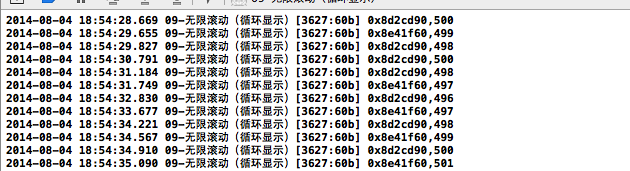
说明:
[self.collectinView scrollToItemAtIndexPath:<#(NSIndexPath *)#> atScrollPosition:<#(UICollectionViewScrollPosition)#> animated:<#(BOOL)#>]
//默认处于第0组的第500个模型的左边
方法二:设置其有100组,那么一共有100*5=500个模型。且设置默认处于第50组的索引为0处。
代码如下:
 //

 //  YYViewController.m

 //  07-无限滚动(循环利用)

 //

 //  Created by apple on 14-8-3.

 //  Copyright (c) 2014年 yangyong. All rights reserved.

 //

 #import "YYViewController.h"

 #import "MJExtension.h"

 #import "YYnews.h"

 #import "YYcell.h"

 #define YYIDCell @"cell"

 @interface YYViewController ()<UICollectionViewDataSource,UICollectionViewDelegate>

 @property (weak, nonatomic) IBOutlet UICollectionView *collectinView;

 @property(nonatomic,strong)NSArray *news;

 @end

 @implementation YYViewController

 #pragma mark-懒加载

 -(NSArray *)news

 {

     if (_news==nil) {

         _news=[YYnews objectArrayWithFilename:@"newses.plist"];

     }

     return _news;

 }

 //-(NSMutableArray *)news

 //{

 //    if (_news==nil) {

 //        _news=[NSMutableArray array];

 //        for (int i=0; i<200; i++) {

 //            NSArray *array=[YYnews objectArrayWithFilename:@"newses.plist"];

 //            [_news addObjectsFromArray:array];

 //        }

 //    }

 //    return _news;

 //}

 - (void)viewDidLoad

 {

     [super viewDidLoad];

     //注册cell

 //    [self.collectinView registerClass:[YYimageCell class] forCellWithReuseIdentifier:YYCell];

     [self.collectinView registerNib:[UINib nibWithNibName:@"YYcell" bundle:nil] forCellWithReuseIdentifier:YYIDCell];

     //默认处于第0组的第500个模型的左边

 //    [self.collectinView scrollToItemAtIndexPath:[NSIndexPath indexPathForItem:500 inSection:0] atScrollPosition:UICollectionViewScrollPositionLeft animated:YES];

      [self.collectinView scrollToItemAtIndexPath:[NSIndexPath indexPathForItem: inSection:] atScrollPosition:UICollectionViewScrollPositionLeft animated:YES];

 }

 #pragma mark- UICollectionViewDataSource

 //一共多少组,默认为1组

 -(NSInteger)numberOfSectionsInCollectionView:(UICollectionView *)collectionView

 {

     return ;

 }

 -(NSInteger)collectionView:(UICollectionView *)collectionView numberOfItemsInSection:(NSInteger)section

 {

     return self.news.count;

 }

 -(UICollectionViewCell *)collectionView:(UICollectionView *)collectionView cellForItemAtIndexPath:(NSIndexPath *)indexPath

 {

     YYcell *cell=[collectionView dequeueReusableCellWithReuseIdentifier:YYIDCell forIndexPath:indexPath];

     cell.news=self.news[indexPath.item];

     NSLog(@"%p,%d",cell,indexPath.item);

     return cell;

 }

 #pragma mark-UICollectionViewDelegate

 @end
注意:上面的两种方法都创建了大量的无用的模型,不太可取。且在实际开发中,建议模型的总数不要太大,因为在其内部需要遍历计算所有控件的frame。
如果模型数量太大,会占用资源。
改进建议:可以监听手指在上面的滚动,当停止滚动的时候,又重新设置初始的中间位置。
iOS开发UI篇—无限轮播(循环展示)的更多相关文章
- iOS开发UI篇—无限轮播(循环利用)
iOS开发UI篇—无限轮播(循环利用) 一.无限轮播 1.简单说明 在开发中常需要对广告或者是一些图片进行自动的轮播,也就是所谓的无限滚动. 在开发的时候,我们通常的做法是使用一个UIScrollV ...
- iOS开发UI篇—无限轮播(功能完善)
iOS开发UI篇—无限轮播(功能完善) 一.自动滚动 添加并设置一个定时器,每个2.0秒,就跳转到下一条. 获取当前正在展示的位置. [self addNSTimer]; } -(void)addNS ...
- iOS开发UI篇—无限轮播(新闻数据展示)
iOS开发UI篇—无限轮播(新闻数据展示) 一.实现效果 二.实现步骤 1.前期准备 (1)导入数据转模型的第三方框架MJExtension (2)向项目中添加保存有“新闻”数据的pli ...
- iOS开发UI篇—UIScrollView控件实现图片轮播
iOS开发UI篇—UIScrollView控件实现图片轮播 一.实现效果 实现图片的自动轮播 二.实现代码 storyboard中布局 代码: #import "YYV ...
- 【转】 iOS开发UI篇—UIScrollView控件实现图片轮播
原文:http://www.cnblogs.com/wendingding/p/3763527.html iOS开发UI篇—UIScrollView控件实现图片轮播 一.实现效果 实现图片的自动轮播 ...
- iOS开发UI篇—核心动画(UIView封装动画)
iOS开发UI篇—核心动画(UIView封装动画) 一.UIView动画(首尾) 1.简单说明 UIKit直接将动画集成到UIView类中,当内部的一些属性发生改变时,UIView将为这些改变提供动画 ...
- iOS开发UI篇—iOS开发中三种简单的动画设置
iOS开发UI篇—iOS开发中三种简单的动画设置 [在ios开发中,动画是廉价的] 一.首尾式动画 代码示例: // beginAnimations表示此后的代码要“参与到”动画中 [UIView b ...
- iOS开发UI篇—九宫格坐标计算
iOS开发UI篇—九宫格坐标计算 一.要求 完成下面的布局 二.分析 寻找左边的规律,每一个uiview的x坐标和y坐标. 三.实现思路 (1)明确每一块用得是什么view (2)明确每个view之间 ...
- iOS开发UI篇—从代码的逐步优化看MVC
iOS开发UI篇—从代码的逐步优化看MVC 一.要求 要求完成下面一个小的应用程序. 二.一步步对代码进行优化 注意:在开发过程中,优化的过程是一步一步进行的.(如果一个人要吃五个包子才能吃饱,那么他 ...
随机推荐
- C# 实现 微软WebRequestMethods.Ftp类中的FTP操作功能
先奉献一个测试地址,ftp内的文件请勿删除,谢谢 FtpEntity fe = "); 由于代码量较多,只抽出一部分,详细代码请移步 ftp://wjshan0808.3vhost.net ...
- generated clock
内部时钟的定义: create_generated_clock,通过-source,-edges,-divide_by,-multiply_by来执行clock沿. create_generated_ ...
- How to locate a path? - Unix & Linux Stack Exchange
How to locate a path? - Unix & Linux Stack Exchange http://unix.stackexchange.com/questions/2955 ...
- C# 中的"yield"使用
yield是C#为了简化遍历操作实现的语法糖,我们知道如果要要某个类型支持遍历就必须要实现系统接口IEnumerable,这个接口后续实现比较繁琐要写一大堆代码才能支持真正的遍历功能.举例说明 usi ...
- mysql 允许远程登陆
参考:http://blog.chinaunix.net/uid-23215128-id-2951624.html 1.以root账户登录 2.grant all PRIVILEGES on disc ...
- android中ContentProvider获取联系人 总结
35.内容提供者:ContentResolver 用内容提供者来获取联系人信息 35-1:权限 <!-- 对联系人的读.写权限 --> <uses-permission androi ...
- ubuntu常用命令记录集
1.查找当前目录下包含某字符串的文件 #find ./ -type f |xargs grep "string" 2.查找文件 #find ./ -name filename 3. ...
- HBase Mac OSX 安装笔记
本次测试安装的机器为Mac Book Pro, 系统为 OS X 10.9.4.hbase版本0.98.6.1. 使用Java版本为Oracle的JDK 1.6.0_65. 1. 下载安装 hbase ...
- Less 使用指南
简而言之 Less是为了简化css http://less.bootcss.com/features/ 以上链接是Less中文网站,里面有对Less的详细介绍. 一下写在使用中遇到的问题: 1.下载L ...
- 从零开始学iPhone开发(4)——使用WebView
转自 总结关于iPhone中UIWEBVIEW读取本地GBK编码格式html 关于webView读取本地GBK编码的html,尝试了两天,终于成功. 欢喜之余,把感想记下来.一般来说,不成都是人犯错, ...