
iOS开发UI篇—无限轮播(循环展示)
iOS开发UI篇—无限轮播(循环展示)
一、简单说明
之前的程序还存在一个问题,那就是不能循环展示,因为plist文件中只有五个数组,因此第一个和最后一个之后就没有了,下面介绍处理这种循环展示问题的小技巧。

方法一:使用一个for循环,循环200次,创建200*=1000个模型,且默认程序启动后处在第100组的位置,向前有500个模型,向后也有500个模型,产生一种循环展示的假象。
代码如下:
 //

 //  YYViewController.m

 //  07-无限滚动(循环利用)

 //

 //  Created by apple on 14-8-3.

 //  Copyright (c) 2014年 yangyong. All rights reserved.

 //

 #import "YYViewController.h"

 #import "MJExtension.h"

 #import "YYnews.h"

 #import "YYcell.h"

 #define YYIDCell @"cell"

 @interface YYViewController ()<UICollectionViewDataSource,UICollectionViewDelegate>

 @property (weak, nonatomic) IBOutlet UICollectionView *collectinView;

 @property(nonatomic,strong)NSMutableArray *news;

 @end

 @implementation YYViewController

 #pragma mark-懒加载

 //-(NSArray *)news

 //{

 //    if (_news==nil) {

 //        _news=[YYnews objectArrayWithFilename:@"newses.plist"];

 //    }

 //    return _news;

 //}

 -(NSMutableArray *)news

 {

     if (_news==nil) {

         _news=[NSMutableArray array];

         for (int i=; i<; i++) {

             NSArray *array=[YYnews objectArrayWithFilename:@"newses.plist"];

             [_news addObjectsFromArray:array];

         }

     }

     return _news;

 }

 - (void)viewDidLoad

 {

     [super viewDidLoad];

     //注册cell

 //    [self.collectinView registerClass:[YYimageCell class] forCellWithReuseIdentifier:YYCell];

     [self.collectinView registerNib:[UINib nibWithNibName:@"YYcell" bundle:nil] forCellWithReuseIdentifier:YYIDCell];

     //默认处于第0组的第500个模型的左边

     [self.collectinView scrollToItemAtIndexPath:[NSIndexPath indexPathForItem: inSection:] atScrollPosition:UICollectionViewScrollPositionLeft animated:YES];

 }

 #pragma mark- UICollectionViewDataSource

 //一共多少组,默认为1组

 -(NSInteger)numberOfSectionsInCollectionView:(UICollectionView *)collectionView

 {

     return ;

 }

 -(NSInteger)collectionView:(UICollectionView *)collectionView numberOfItemsInSection:(NSInteger)section

 {

     return self.news.count;

 }

 -(UICollectionViewCell *)collectionView:(UICollectionView *)collectionView cellForItemAtIndexPath:(NSIndexPath *)indexPath

 {

     YYcell *cell=[collectionView dequeueReusableCellWithReuseIdentifier:YYIDCell forIndexPath:indexPath];

     cell.news=self.news[indexPath.item];

     NSLog(@"%p,%d",cell,indexPath.item);

     return cell;

 }

 #pragma mark-UICollectionViewDelegate

 @end
打印查看所处的索引(全程依然只创建了两个cell):
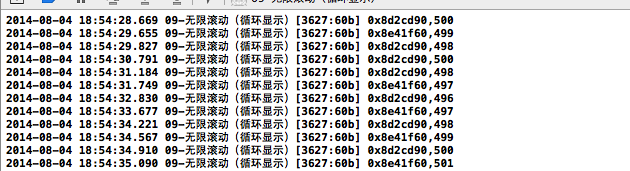
说明:
[self.collectinView scrollToItemAtIndexPath:<#(NSIndexPath *)#> atScrollPosition:<#(UICollectionViewScrollPosition)#> animated:<#(BOOL)#>]
//默认处于第0组的第500个模型的左边
方法二:设置其有100组,那么一共有100*5=500个模型。且设置默认处于第50组的索引为0处。
代码如下:
 //

 //  YYViewController.m

 //  07-无限滚动(循环利用)

 //

 //  Created by apple on 14-8-3.

 //  Copyright (c) 2014年 yangyong. All rights reserved.

 //

 #import "YYViewController.h"

 #import "MJExtension.h"

 #import "YYnews.h"

 #import "YYcell.h"

 #define YYIDCell @"cell"

 @interface YYViewController ()<UICollectionViewDataSource,UICollectionViewDelegate>

 @property (weak, nonatomic) IBOutlet UICollectionView *collectinView;

 @property(nonatomic,strong)NSArray *news;

 @end

 @implementation YYViewController

 #pragma mark-懒加载

 -(NSArray *)news

 {

     if (_news==nil) {

         _news=[YYnews objectArrayWithFilename:@"newses.plist"];

     }

     return _news;

 }

 //-(NSMutableArray *)news

 //{

 //    if (_news==nil) {

 //        _news=[NSMutableArray array];

 //        for (int i=0; i<200; i++) {

 //            NSArray *array=[YYnews objectArrayWithFilename:@"newses.plist"];

 //            [_news addObjectsFromArray:array];

 //        }

 //    }

 //    return _news;

 //}

 - (void)viewDidLoad

 {

     [super viewDidLoad];

     //注册cell

 //    [self.collectinView registerClass:[YYimageCell class] forCellWithReuseIdentifier:YYCell];

     [self.collectinView registerNib:[UINib nibWithNibName:@"YYcell" bundle:nil] forCellWithReuseIdentifier:YYIDCell];

     //默认处于第0组的第500个模型的左边

 //    [self.collectinView scrollToItemAtIndexPath:[NSIndexPath indexPathForItem:500 inSection:0] atScrollPosition:UICollectionViewScrollPositionLeft animated:YES];

      [self.collectinView scrollToItemAtIndexPath:[NSIndexPath indexPathForItem: inSection:] atScrollPosition:UICollectionViewScrollPositionLeft animated:YES];

 }

 #pragma mark- UICollectionViewDataSource

 //一共多少组,默认为1组

 -(NSInteger)numberOfSectionsInCollectionView:(UICollectionView *)collectionView

 {

     return ;

 }

 -(NSInteger)collectionView:(UICollectionView *)collectionView numberOfItemsInSection:(NSInteger)section

 {

     return self.news.count;

 }

 -(UICollectionViewCell *)collectionView:(UICollectionView *)collectionView cellForItemAtIndexPath:(NSIndexPath *)indexPath

 {

     YYcell *cell=[collectionView dequeueReusableCellWithReuseIdentifier:YYIDCell forIndexPath:indexPath];

     cell.news=self.news[indexPath.item];

     NSLog(@"%p,%d",cell,indexPath.item);

     return cell;

 }

 #pragma mark-UICollectionViewDelegate

 @end
注意:上面的两种方法都创建了大量的无用的模型,不太可取。且在实际开发中,建议模型的总数不要太大,因为在其内部需要遍历计算所有控件的frame。
如果模型数量太大,会占用资源。
改进建议:可以监听手指在上面的滚动,当停止滚动的时候,又重新设置初始的中间位置。
iOS开发UI篇—无限轮播(循环展示)的更多相关文章
- iOS开发UI篇—无限轮播(循环利用)
iOS开发UI篇—无限轮播(循环利用) 一.无限轮播 1.简单说明 在开发中常需要对广告或者是一些图片进行自动的轮播,也就是所谓的无限滚动. 在开发的时候,我们通常的做法是使用一个UIScrollV ...
- iOS开发UI篇—无限轮播(功能完善)
iOS开发UI篇—无限轮播(功能完善) 一.自动滚动 添加并设置一个定时器,每个2.0秒,就跳转到下一条. 获取当前正在展示的位置. [self addNSTimer]; } -(void)addNS ...
- iOS开发UI篇—无限轮播(新闻数据展示)
iOS开发UI篇—无限轮播(新闻数据展示) 一.实现效果 二.实现步骤 1.前期准备 (1)导入数据转模型的第三方框架MJExtension (2)向项目中添加保存有“新闻”数据的pli ...
- iOS开发UI篇—UIScrollView控件实现图片轮播
iOS开发UI篇—UIScrollView控件实现图片轮播 一.实现效果 实现图片的自动轮播 二.实现代码 storyboard中布局 代码: #import "YYV ...
- 【转】 iOS开发UI篇—UIScrollView控件实现图片轮播
原文:http://www.cnblogs.com/wendingding/p/3763527.html iOS开发UI篇—UIScrollView控件实现图片轮播 一.实现效果 实现图片的自动轮播 ...
- iOS开发UI篇—核心动画(UIView封装动画)
iOS开发UI篇—核心动画(UIView封装动画) 一.UIView动画(首尾) 1.简单说明 UIKit直接将动画集成到UIView类中,当内部的一些属性发生改变时,UIView将为这些改变提供动画 ...
- iOS开发UI篇—iOS开发中三种简单的动画设置
iOS开发UI篇—iOS开发中三种简单的动画设置 [在ios开发中,动画是廉价的] 一.首尾式动画 代码示例: // beginAnimations表示此后的代码要“参与到”动画中 [UIView b ...
- iOS开发UI篇—九宫格坐标计算
iOS开发UI篇—九宫格坐标计算 一.要求 完成下面的布局 二.分析 寻找左边的规律,每一个uiview的x坐标和y坐标. 三.实现思路 (1)明确每一块用得是什么view (2)明确每个view之间 ...
- iOS开发UI篇—从代码的逐步优化看MVC
iOS开发UI篇—从代码的逐步优化看MVC 一.要求 要求完成下面一个小的应用程序. 二.一步步对代码进行优化 注意:在开发过程中,优化的过程是一步一步进行的.(如果一个人要吃五个包子才能吃饱,那么他 ...
随机推荐
- Git 遇到了 early EOF index-pack failed 问题
Git 遇到了 early EOF index-pack failed 问题 今天想 clone 一下 boost 在 github 的 repo,结果在 clone 的过程中遇到了下面的错误.我原本 ...
- C++学习笔记(1)——数据类型占空间大小
boolean bool 1 byte character char 1 byte May be signed or unsigned wchar_t 1 byte char16_t ...
- 如何用css做一个细虚线边框表格
<style type="text/css"> <!-- .dashed_tbl { border-top: 1px dashed #333333; border ...
- [5] 智能指针boost::shared_ptr
[1]boost::shared_ptr简介 boost::shared_ptr属于boost库,定义在namespace boost中,包含头文件#include<boost/shared_p ...
- RecycleView可以策划的Item
public abstract class SwipeMenuViewHolder { /* 从左侧滑出菜单 */ public static final int EDGE_LEFT = 1; /* ...
- js遍历数组的错误方法
for (var index in myArray) { // don't actually do this console.log(myArray[index]); } 缺点: 数组的索引值inde ...
- Uva 10537 过路费
题目链接:http://vjudge.net/contest/143062#problem/C 题意: 给定一个无向图,大写字母是城市,小写字母是村庄,经过城市交过路费为当前货物的%5,路过村庄固定交 ...
- Python3基础 isinstance 判断一个变量是否为指定的类型
镇场诗:---大梦谁觉,水月中建博客.百千磨难,才知世事无常.---今持佛语,技术无量愿学.愿尽所学,铸一良心博客.------------------------------------------ ...
- 矩阵的QR分解
#include <cstdio> #include <cstdlib> #include <algorithm> #include <cmath> # ...
- HTML布局与框架
HTML块 HTML块元素 块元素在显示时,通常会以新行开始 如:<h1>.<p>.<ul> <!DOCTYPE html> <html> ...