
WPF中ControlTemplate和DataTemplate的区别
下面代码很好的解释了它们之间的区别:
<Window x:Class="WPFTestMe.Window12"

        xmlns="http://schemas.microsoft.com/winfx/2006/xaml/presentation"

        xmlns:x="http://schemas.microsoft.com/winfx/2006/xaml"

        Title="Window12" Height="300" Width="300">

    <Window.Resources>

        <DataTemplate x:Key="ButtonContentTemplate">

            <StackPanel Orientation="Horizontal" Background="Red">

                <Grid Height="8" Width="8" >

                    <Path HorizontalAlignment="Stretch"

           Margin="0,0,1.8,1.8"

           VerticalAlignment="Stretch" Stretch="Fill" Stroke="#FF000000"

           Data="M0.5,5.7 L0.5,0.5 L5.7,0.5"/>

                    <Path HorizontalAlignment="Stretch"

           Margin="2,3,0,0"

           VerticalAlignment="Stretch" Stretch="Fill" Stroke="#FFFFFFFF"

           Data="M3.2,7.5 L7.5,7.5 L7.5,3.5"/>

                    <Path HorizontalAlignment="Stretch"

           Margin="1.2,1.4,0.7,0.7"

           VerticalAlignment="Stretch" Fill="#FFFFFFFF" Stretch="Fill" Stroke="#FF000000"

           Data="M2.5,2.5 L7.5,7.5"/>

                    <Path HorizontalAlignment="Stretch"

           Margin="1.7,2.0,1,1"

           VerticalAlignment="Stretch" Stretch="Fill" Stroke="#FF000000"

           Data="M3,7.5 L7.5,7.5 L7.5,3.5"/>

                    <Path HorizontalAlignment="Stretch"

           Margin="1,1,1,1"

           VerticalAlignment="Stretch" Stretch="Fill" Stroke="#FFFFFFFF"

           Data="M1.5,6.5 L1.5,1 L6.5,1.5"/>

                </Grid>

                <ContentPresenter Content="{Binding}"/>

            </StackPanel>

        </DataTemplate>

        <ControlTemplate TargetType="Button" x:Key="ButtonControlTemplate">

            <Grid>

                <Ellipse Fill="{TemplateBinding Background}"/>

                <ContentPresenter HorizontalAlignment="Center"

              VerticalAlignment="Center"/>

            </Grid>

        </ControlTemplate>

    </Window.Resources>

    <StackPanel>

        <Button ContentTemplate="{StaticResource ButtonContentTemplate}" Content="1"/>

        <Button Template="{StaticResource ButtonControlTemplate}" ContentTemplate="{StaticResource ButtonContentTemplate}" Content="2"/>

        <Button Template="{StaticResource ButtonControlTemplate}" ContentTemplate="{StaticResource ButtonContentTemplate}" Content="3"/>

    </StackPanel>

</Window>
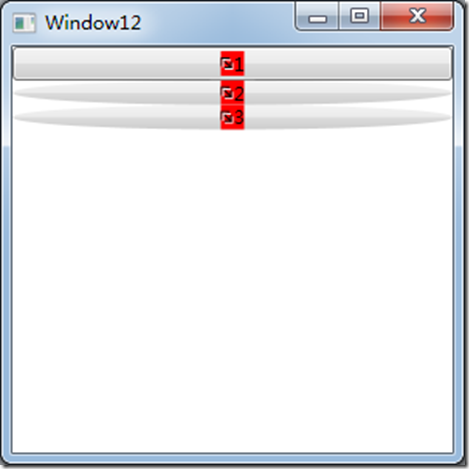
效果如下:
WPF中ControlTemplate和DataTemplate的区别的更多相关文章
- WPF中自定义的DataTemplate中的控件,在Window_Loaded事件中加载机制初探
原文:WPF中自定义的DataTemplate中的控件,在Window_Loaded事件中加载机制初探 最近因为项目需要,开始学习如何使用WPF开发桌面程序.使用WPF一段时间之后,感 ...
- WPF : ControlTemplate和DataTemplate的区别
ControlTemplate用于描述控件本身. 使用TemplateBinding来绑定控件自身的属性, 比如{TemplateBinding Background}DataTemplate用于描述 ...
- WPF中UserControl和DataTemplate
最新更新: http://denghejun.github.io 前言 前言总是留给我说一些无关主题的言论,WPF作为全新Microsoft桌面或web应用程序显示技术框架, 从08年开始,一直到现在 ...
- 从0 开始 WPF MVVM 企业级框架实现与说明 ---- 第四讲 WPF中 ControlTemplate
上讲我们介绍了DataTemplate,现在我们就介绍下ControlTemplate,可能后面大多在编码时候会出现一些英文,工作习惯,请见谅. ControlTemplate: 控件的外观,也就是控 ...
- WPF的ControlTemplate和DataTemplate简介
首先理清几个概念,Template.ControlTemplate.ContentTemplate.DataTemplate.ContentControl 这几个东西名字都差不多,意思感觉也接近,初次 ...
- wpf中在style的template寻找ControlTemplate和DataTemplate的控件
一.WPF中的两棵树 WPF中每个控件的Template都是由ControlTemplate构成,ControlTemplate包含了构成该控件的各种子控件,这些子控件就构成了VisualTree:而 ...
- ControlTemplate,ItemsPanelTemplate,DataTemplate(wpf)
在WPF中有三大模板ControlTemplate,ItemsPanelTemplate,DataTemplate.其中ControlTemplate和ItemsPanelTemplate是控件模板, ...
- [转]在WPF中区别TextBlock和Label
TextBlock和Label都是用来显示少量数据的.好多文章对Label存在的描述都是它允许使用"快速获取"."快速获取"就是允许你用Alt加上其它的按键快速 ...
- WPF Template模版之DataTemplate与ControlTemplate【一】
WPF Template模版之DataTemplate与ControlTemplate[一] 标签: Wpf模版 2015-04-19 11:52 510人阅读 评论(0) 收藏 举报 分类: -- ...
随机推荐
- Roadblocks(poj 3255)
题意:给出n个点,m条双向边,求严格次短路. /* 先spfa预处理出起点到每个点的和每个点到终点的最短距离,然后枚举每条边(这条边必须走),计算此时的最短路径,得出严格次短路. 正确性:因为对于一条 ...
- 在 Windows 和 Linux(Gnome) 环境下 从命令界面打开网页的方式
1.在 Windows 中 通过命令 可以打开网页是很简单的: start http://www.baidu.com 或 start iexplorer http://www.baidu.com 第二 ...
- Mac 下查看 Android Studio 的 SHA1的方法
cmd -> ->cd .android ->keytool -v -list -keystore debug.keystore 默认口令:android ************* ...
- LeetCode : 287. Find the Duplicate Number
aaarticlea/png;base64,iVBORw0KGgoAAAANSUhEUgAACRAAAAMMCAYAAAAhQhmZAAAMFGlDQ1BJQ0MgUHJvZmlsZQAASImVlw ...
- Linux(CentOS)系统下设置nginx开机自启动
Nginx 是一个很强大的高性能Web和反向代理服务器.下面介绍在linux下安装后,如何设置开机自启动.首先,在linux系统的/etc/init.d/目录下创建nginx文件,使用如下命令:vi ...
- 《Linux私房菜》笔记和问题记录
鸟哥的Linux私房菜简体首页 对Linux的学习侧重于基本命令和运维相关的部分,最后章节的测试问题不错. 1.VIM程序编辑器 1.所有的Linux都会内建VI:很多软件的编辑接口都会主动呼叫VI: ...
- python多线程之semaphore(信号量)
#!/usr/bin/env python # -*- coding: utf-8 -*- import threading import time import random semaphore = ...
- python类中的super,原理如何?MRO是什么东东?
下面这个URL解释得比较清楚. http://python.jobbole.com/86787/?utm_source=group.jobbole.com&utm_medium=related ...
- 浅谈config文件的使用
一.缘起 最近做项目开始使用C#,因为以前一直使用的是C++,因此面向对象思想方面的知识还是比较全面的,反而是因没有经过完整.系统的.Net方面知识的系统学习,经常被一些在C#老鸟眼里几乎是常识的小知 ...
- js判断当前的访问是手机/电脑
<script type="text/javascript"> var commonURL = 'http://www.xxx.com/'; function mobi ...