
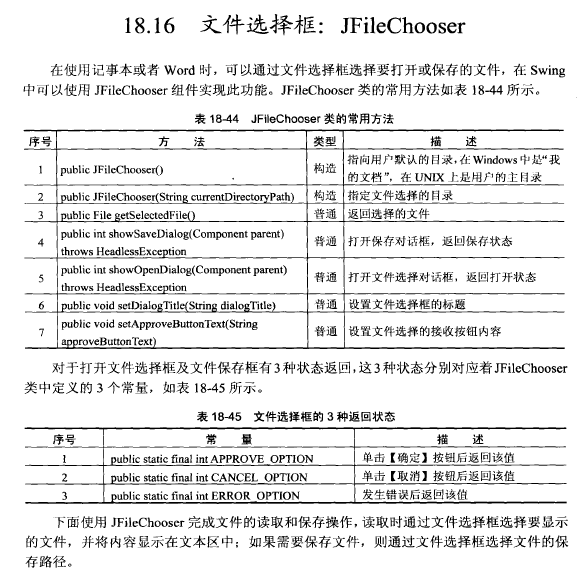
Java——文件选择框:JFileChooser
import java.awt.BorderLayout;

import java.awt.Container;

import java.awt.event.ActionEvent;

import java.awt.event.ActionListener;

import java.awt.event.WindowAdapter;

import java.awt.event.WindowEvent;

import java.io.File;

import java.io.FileInputStream;

import java.io.FileOutputStream;

import java.io.PrintStream;

import java.util.Scanner;

import javax.imageio.stream.FileImageInputStream;

import javax.swing.JButton;

import javax.swing.JFileChooser;

import javax.swing.JFrame;

import javax.swing.JLabel;

import javax.swing.JPanel;

import javax.swing.JScrollPane;

import javax.swing.JTextArea;

//=================================================

// File Name       :	JFileChooser_demo

//------------------------------------------------------------------------------

// Author          :	Common

//类名:myWindowEventHandle

//属性:

//方法:

class Note implements ActionListener{

	private JFrame frame = new JFrame("窗体");					//定义窗体

	private JTextArea area = new JTextArea("JTextArea");	//定义文本区

	private JButton open = new JButton("打开文件");			//打开文件

	private JButton save = new JButton("保存文件");			//保存文件

	private JLabel label = new JLabel("现在没有打开的文件");

	private JPanel butpan = new JPanel();

	public Note(){

		this.butpan.add(open);

		this.butpan.add(save);

		//设置窗体中的布局管理器为BorderLayout,所有的组件水平和垂直间距为3

		frame.setLayout(new BorderLayout(3,3));

		frame.add(this.label,BorderLayout.NORTH);

		frame.add(this.butpan,BorderLayout.SOUTH);

		frame.add(this.area, BorderLayout.CENTER);

		this.frame.setSize(330,180);

		this.frame.setVisible(true);

		this.frame.addWindowListener(new WindowAdapter(){	//加入事件监听

			public void windowClosing(WindowEvent arg0) {			//窗口关闭时触发,按下关闭按钮

			// TODO 自动生成的方法存根

			System.out.println("windowClosing-->窗口关闭");

			System.exit(1);

			}

		});

		this.open.addActionListener(this);

		this.save.addActionListener(this);

//		this.frame.setSize(330,180);

//		this.frame.setVisible(true);

	}

	@Override

	public void actionPerformed(ActionEvent e) {	//按键事件监听

		// TODO 自动生成的方法存根

		File file = null;

		int result = 0;

		JFileChooser fileChooser = new JFileChooser();

		if(e.getSource() == this.open){

			this.area.setText("");

			fileChooser.setApproveButtonText("确定");		//定义“确定“按钮”

			fileChooser.setDialogTitle("打开文件");				//定义文件选择框标题

			result = fileChooser.showOpenDialog(this.frame);		//显示打开对话框

			if(result == JFileChooser.APPROVE_OPTION){

				file = fileChooser.getSelectedFile();

				this.label.setText("打开的文件名称为:"+file.getName());

			}else if(result == JFileChooser.CANCEL_OPTION){

				this.label.setText("没有选择任何文件");

			}else{

				this.label.setText("操作出现错误");

			}

			if(file != null){

				try{

					Scanner scan = new Scanner(new FileInputStream(file));//设置输入流

					scan.useDelimiter("\n");						//设置换行为分隔符

					while(scan.hasNext()){							//循环读取

						this.area.append(scan.next());		//读取内容到文本区

						this.area.append("\n");					//设置换行

					}

					scan.close();												//关闭

				}catch(Exception ex){

					this.label.setText("文件读取出错");

				}

			}

		}

		if(e.getSource() == this.save){

			result = fileChooser.showSaveDialog(this.frame);		//显示保存文件框

			if(result == JFileChooser.APPROVE_OPTION){

				file = fileChooser.getSelectedFile();

				this.label.setText("存储的文件名称为:"+file.getName());

			}else if(result == JFileChooser.CANCEL_OPTION){

				this.label.setText("没有选择任何文件");

			}else{

				this.label.setText("操作出现错误");

			}

			if(file != null){

				try{

					PrintStream out = new PrintStream(new FileOutputStream(file));

					out.print(this.area.getText());

					out.close();

				}catch(Exception ex){

					this.label.setText("文件保存出错");

				}

			}

		}

	}

}

//主类

//Function        : 	JFileChooser_demo

public class JFileChooser_demo {

	public static void main(String[] args) {

		// TODO 自动生成的方法存根

		new Note();

	}

}
Java——文件选择框:JFileChooser的更多相关文章
- Java Swing提供的文件选择对话框 - JFileChooser
JFileChooser() 构造一个指向用户默认目录的 JFileChooser. JFileChooser(File currentDirectory) 使 ...
- 在Win7下要通过某个 线程 来调用SavaDialog文件选择框的问题
如果 在Win7下要通过某个 线程 来调用SavaDialog文件选择框的代码 选择窗口 有时会出不来 需要设置如下: ThreadthreadOfRec = new Thread(Reciv ...
- IE8 下更改input[file] file文件选择框样式
1/使用绝对定位,将文件选择框固定,并且隐藏该选择框(文件选择框可调整宽高),设置该文件选择框 z-index 调高 比如 999. 2/使用任意标签,调整为与上面选择框相同宽高,目的为使用该标签样式 ...
- layui文件上传中如何先判断后再弹出文件选择框
前言:layui中的上传,如何在点击上传按钮前阻止file的默认打开文件选择框呢?我想点击后先判断下,如果判断结果不符合,就直接弹出提示框,而不是文件选择框,判断符合才进行文件选择.但是在layui的 ...
- Java文件选择对话框(文件选择器JFileChooser)的使用:以一个文件加密器为例
文件加密器,操作过程肯定涉及到文件选择器的使用,所以这里以文件加密器为例.下例为我自己写的一个文件加密器,没什么特别的加密算法,只为演示文件选择器JFileChooser的使用. 加密器界面如图: 项 ...
- js点击某个图标或按钮弹出文件选择框
<HTML> <head> <script type="text/javascript" src="script/jquery-1.6.2. ...
- VBS 文件选择框,选择Excel文件
1 2 3 4 5 6 7 8 9 10 11 12 13 14 15 16 on error resume Next Set objDialog=CreateObject("UserAcc ...
- MFC打开文件选择框和多选框,保存文件夹的选择,保存文件路径的选择
CString defaultDir = "C:\\"; //默认打开的文件路径 CString fileName = ""; //默认打开的文件名 CStri ...
- ABAP文件选择框函数
因为WS_FILENAME_GET已经被废弃所以使用接口CL_GUI_FRONTEND_SERVICES来实现本地文件的选择. 用接口类CL_GUI_FRONTEND_SERVICES实现的方法 CA ...
随机推荐
- AngularJS 日期转换字符串
日期转换成字符串的办法有很多种,其中最简单的方法是 使用AngularJS的filter来实现. $filter('date')(date, 'yyyyMM'): $filter('date')(da ...
- div两栏等高布局
<!DOCTYPE html><html lang="en"><head> <meta charset="UTF-8" ...
- 编译php5.4的时候出现错误----configure: error: in `/usr/local/src/php540/php-5.4.0':
错误如下:checking for grep that handles long lines and -e... /bin/grep checking for egrep... /bin/grep - ...
- Jquery 获取 radio/select选中值
Radio <input type="radio" name="rd" id="rd1" checked="checked& ...
- 【深入Java虚拟机】之一:Java内存模型与内存溢出
[深入Java虚拟机]之:Java内存区域与内存溢出 高速缓存模型如下: ----------------------------------------------------分割线-------- ...
- Trinity min_kmer_cov
A high min_kmer value was used to reduce noise in the assembly and to identify only transcripts that ...
- BZOJ 3173: [Tjoi2013]最长上升子序列
3173: [Tjoi2013]最长上升子序列 Time Limit: 10 Sec Memory Limit: 128 MBSubmit: 1524 Solved: 797[Submit][St ...
- [日常训练]常州集训day5
T1 Description 小$W$和小$M$一起玩拼图游戏啦~ 小$M$给小$M$一张$N$个点的图,有$M$条可选无向边,每条边有一个甜蜜值,小$W$要选$K$条边,使得任意两点间最多有一条路径 ...
- javascript向上向下取整
alert(Math.ceil(25.9)); alert(Math.ceil(25.5)); alert(Math.ceil(25.1)); alert(Math.round(25.9)); ale ...
- CommonJS/AMD/CMD/UMD概念初探
1.CommonJS是一种规范,NodeJS是这种规范的实现. 1.1.CommonJS 加载模块是同步的,所以只有加载完成才能执行后面的操作. 参考: http://www.commonjs.org ...